
Introduction
Thank you for choosing the BOBLOV W3 WiFi Body Camera. This manual provides detailed instructions for the proper setup, operation, and maintenance of your device. Please read this manual thoroughly before using the camera to ensure optimal performance and to prevent damage.
Package Contents
Verify that all items listed below are included in your package:
- 1x BOBLOV W3 Body Camera
- 1x 64GB Micro SD Card (pre-installed in camera)
- 1x USB-C Charging Cable
- 1x Screw Driver
- 1x User Manual (this document)
- 1x Back Magnets Clip
- 1x Brooch
Product Overview
Familiarize yourself with the camera's components and controls:

Image: BOBLOV W3 Body Camera with labels indicating the Power/Video Button, Audio/WiFi Button, Microphone, Reset button, Brooch attachment point, Back Magnetic Clip, and USB-C Charging Interface. The image also shows the dimensions of the camera.
- Power/Video Button: Used to power on/off the device and start/stop video recording.
- Audio/WiFi Button: Used to start/stop audio recording and activate/deactivate WiFi function.
- Mic: Microphone for audio capture.
- Reset: Small button to reset the device (requires a pin).
- Brooch: Attachment point for the included brooch clip.
- Back Magnetic Clip: Removable clip for magnetic attachment.
- Charging Interface: USB-C port for charging and data transfer.
Setup
1. Charging the Camera
Before initial use, fully charge the camera. The built-in 1450mAh battery takes approximately 3 hours to fully charge.
- Connect the provided USB-C charging cable to the camera's charging interface.
- Connect the other end of the cable to a USB power adapter (not included) or a computer's USB port.
- The charging indicator light will illuminate during charging and turn off when fully charged.
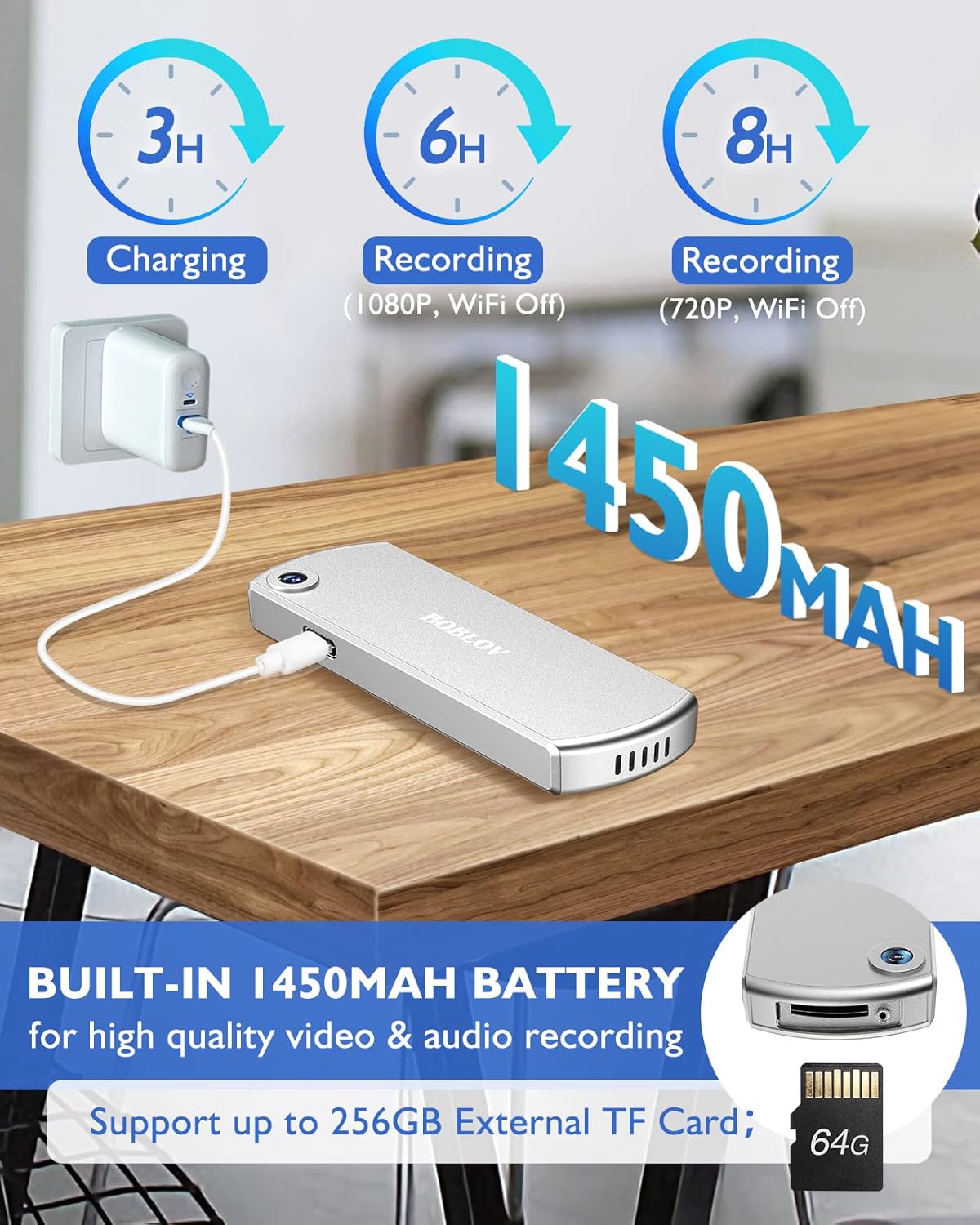
Image: The BOBLOV W3 Body Camera being charged via a USB-C cable, highlighting the 1450mAh battery and charging times: 3 hours for full charge, 6 hours recording (1080P, WiFi Off), and 8 hours recording (720P, WiFi Off).
2. Inserting/Expanding Memory Card
The W3 Body Camera uses an external Micro SD card. A 64GB card is included and pre-installed.
- Locate the memory card slot on the camera.
- Use the included screwdriver to carefully unscrew the cover of the card slot.
- Insert or replace the Micro SD card (up to 256GB) into the slot with the contacts facing down.
- Securely fasten the card slot cover with the screwdriver.
3. Attaching the Camera
The camera offers two attachment options: a back magnetic clip and a brooch.
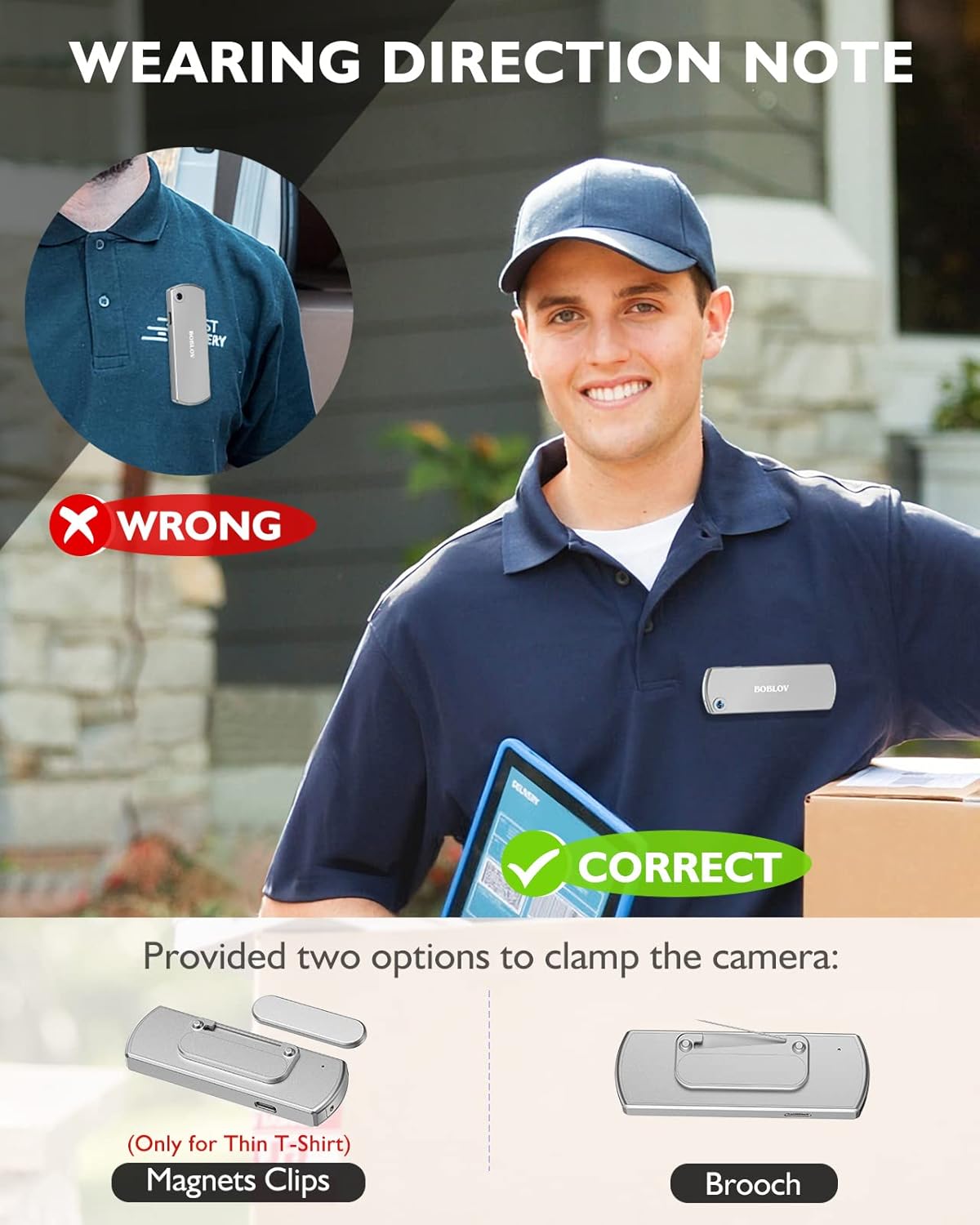
Image: Illustration demonstrating correct and incorrect ways to wear the BOBLOV W3 Body Camera. It shows that magnetic clips are suitable for thin T-shirts, while a brooch provides a more secure attachment for other clothing types.
- Magnetic Clip: Attach the magnetic clip to the back of the camera. This is suitable for thin fabrics like T-shirts. Ensure the camera is securely held.
- Brooch: For more secure attachment or thicker clothing, use the provided brooch. Attach it to the camera's designated brooch point and then pin it to your clothing.
Operating Instructions
1. Power On/Off
- Power On: Press and hold the Power/Video Button for a few seconds until the indicator light illuminates.
- Power Off: Press and hold the Power/Video Button again for a few seconds until the indicator light turns off.
2. Video Recording
- While the camera is powered on, press the Power/Video Button once to start video recording. The indicator light will flash to indicate recording is in progress.
- Press the Power/Video Button again to stop video recording. The indicator light will return to a steady state.
- The camera supports 1080P and 720P video recording. With WiFi off, it can record for approximately 6 hours at 1080P or 8 hours at 720P on a full charge.
- Videos are saved in 5-minute fragments by default. The camera supports loop recording, overwriting older files when the memory card is full.
3. Audio Recording
- While the camera is powered on, press the Audio/WiFi Button once to start audio recording.
- Press the Audio/WiFi Button again to stop audio recording.
4. WiFi Function and App Connectivity
The BOBLOV W3 features WiFi connectivity, allowing you to manage files and change settings via a smartphone app.
- Activate WiFi: Press and hold the Audio/WiFi Button for a few seconds to turn on the WiFi function. The WiFi indicator light will flash.
- Download App:
- For Android devices, download the DHiHZ app.
- For iOS devices, download the Mini-XRcam app.
- Connect to Camera: On your smartphone, go to WiFi settings and connect to the camera's WiFi network (usually named "BOBLOV_W3_XXXX"). The default password is typically "12345678".
- Use App: Open the downloaded app to view live footage, playback recordings, download files, and adjust camera settings.
- Deactivate WiFi: Press and hold the Audio/WiFi Button again to turn off WiFi.

Image: The BOBLOV W3 Body Camera wirelessly connected to a smartphone, illustrating the WiFi function for managing files, changing settings, and accessing features like video, audio, preview, playback, and download through the dedicated Android (DHiHZ) and iOS (Mini-XRcam) applications.
5. Connecting to a PC
You can connect the camera to a computer to manage recorded files and change settings.
- Ensure the camera is powered ON before connecting to the PC.
- Connect the camera to your computer using the provided USB-C cable.
- The camera will appear as a removable disk drive on your computer.
- You can then access, copy, delete, or upload recorded files. Some settings may also be configurable via a configuration file on the camera's storage.

Image: The BOBLOV W3 Body Camera connected to a laptop via a USB-C cable, demonstrating how to manage recorded files and change settings. Icons for Playback, Delete, Upload, and Settings are shown, with a note to ensure the camera is powered ON for connection.
Maintenance
- Cleaning: Use a soft, dry cloth to clean the camera body. Do not use liquid cleaners or solvents.
- Storage: Store the camera in a cool, dry place away from direct sunlight and extreme temperatures.
- Battery Care: To prolong battery life, avoid fully discharging the battery frequently. Charge the camera regularly, even if not in use for extended periods.
- Memory Card: Periodically back up important recordings from the Micro SD card to a computer. Format the Micro SD card regularly (e.g., once a month) to maintain optimal performance and prevent data corruption.
- Water Resistance: The camera has an IP65 waterproof rating, meaning it is protected against dust and low-pressure water jets. It is not designed for submersion.
Troubleshooting
| Problem | Possible Cause / Solution |
|---|---|
| Camera does not power on. | Battery may be depleted. Charge the camera for at least 3 hours. If the issue persists, try resetting the camera using a pin in the reset hole. |
| Camera gets hot when WiFi is on. | This is normal behavior for the camera when the WiFi function is active due to increased power consumption. |
| Cannot connect to WiFi via smartphone app. | Ensure WiFi is enabled on the camera. Check if you have downloaded the correct app (DHiHZ for Android, Mini-XRcam for iOS). Verify the WiFi password (default is "12345678"). Try restarting both the camera and your phone. |
| Camera stops recording unexpectedly. | The memory card may be full. The camera supports loop recording, but if the card is corrupted or too slow, it might cause issues. Try formatting the card or using a different high-speed Micro SD card. Battery may be low. |
| Cannot access files on PC. | Ensure the camera is powered ON before connecting to the PC. Try a different USB-C cable or USB port. |
Specifications
| Feature | Detail |
|---|---|
| Brand | BOBLOV |
| Model Name | W3 |
| Model Number | B-W3 |
| Connectivity Technology | Wi-Fi |
| Special Features | Lightweight |
| Compatible Devices | Android/iOS Phone |
| Power Source | Battery Powered |
| Video Capture Resolution | 1080p |
| Colour | Silver |
| Mounting Type | Surface Mount |
| Form Factor | Compact |
| Enclosure Material | Metal |
| Alert Type | Motion Only |
| Light Source | Infrared |
| Waterproof Rating | IP65 |
| Control Method | App |
| Wattage | 3.7 Watt-hours |
| Night Vision | Night Color |
| Item Dimensions | 9 x 3 x 1.5 centimetres |
| Battery Capacity | 1450mAh (Built-in) |
| Recording Time (1080P, WiFi Off) | Approx. 6 hours |
| Recording Time (720P, WiFi Off) | Approx. 8 hours |
| Charging Time | Approx. 3 hours |
| External Memory | Micro SD Card, up to 256GB (64GB included) |
| Net Weight | 60g / 2oz |
Warranty and Support
BOBLOV provides a two-year warranty for high-value products, including the W3 Body Camera. For any technical assistance, troubleshooting, or warranty claims, please contact BOBLOV customer service.
Please refer to the official BOBLOV website or your purchase documentation for the most up-to-date contact information and warranty details.


