
DJXFLI 2x100W Warm White Cold White 2in1
DJXFLI COB Par Lights User Manual
Model: 2x100W Warm White Cold White 2in1
1. Introduction
Thank you for choosing the DJXFLI COB Par Lights. This professional stage lighting fixture is designed to provide powerful and versatile illumination for various events, including church services, parties, weddings, and concerts. Featuring two 100W COB (Chip-on-Board) LEDs, this unit offers both cool and warm white light, allowing for a wide range of color temperatures from 3500K to 7500K. Its robust die-cast aluminum housing ensures durability, while multiple control modes provide flexibility for any lighting setup.
This manual provides essential information for the safe and effective operation of your COB Par Lights. Please read it thoroughly before installation and use, and retain it for future reference.

Figure 1.1: Front view of the DJXFLI COB Par Lights, showcasing the two powerful LED blinder fresnel flash strobe wash units.
2. Safety Information
To ensure safe operation and prolong the lifespan of your device, please adhere to the following safety precautions:
- Electrical Safety: Always connect the unit to a grounded power outlet with the correct voltage (110V AC). Disconnect power before cleaning or servicing.
- Ventilation: Ensure adequate ventilation around the unit. Do not block ventilation openings. The high-quality cooling system requires unobstructed airflow to prevent overheating.
- Indoor Use: This product is designed for indoor use only. Avoid exposure to rain, moisture, or extreme temperatures.
- Eye Protection: Do not look directly into the light source when the unit is operating, as intense light can cause eye damage.
- Handling: Handle the unit with care. Avoid dropping or subjecting it to strong impacts.
- Qualified Personnel: All installation, maintenance, and repair work should be performed by qualified personnel.
3. Package Contents
Verify that all items are present and in good condition upon opening the package:
- 1 x COB Par Lights Unit
- 1 x Power Cable
- 1 x DMX Cable
- 1 x Bow Mount Bracket
- 2 x Screws
- 1 x User Manual (this document)
4. Product Overview and Features
The DJXFLI COB Par Lights are engineered for professional performance and ease of use. Key features include:
- High CRI & Power COB Light Source: Two 100W COB LEDs provide pure light color without unsightly color separation shadows, creating a romantic and passionate atmosphere.
- Durable Housing: Constructed with a die-cast aluminum housing for enhanced durability and heat dissipation.
- Versatile Control Modes: Supports DMX512, Master/Slave, Auto, and Sound Activated modes.
- Digital Display: Features a 4-digit digital display for easy navigation and setting adjustments.
- Efficient Cooling System: Integrated cooling system prevents overheating and ensures stable operation.
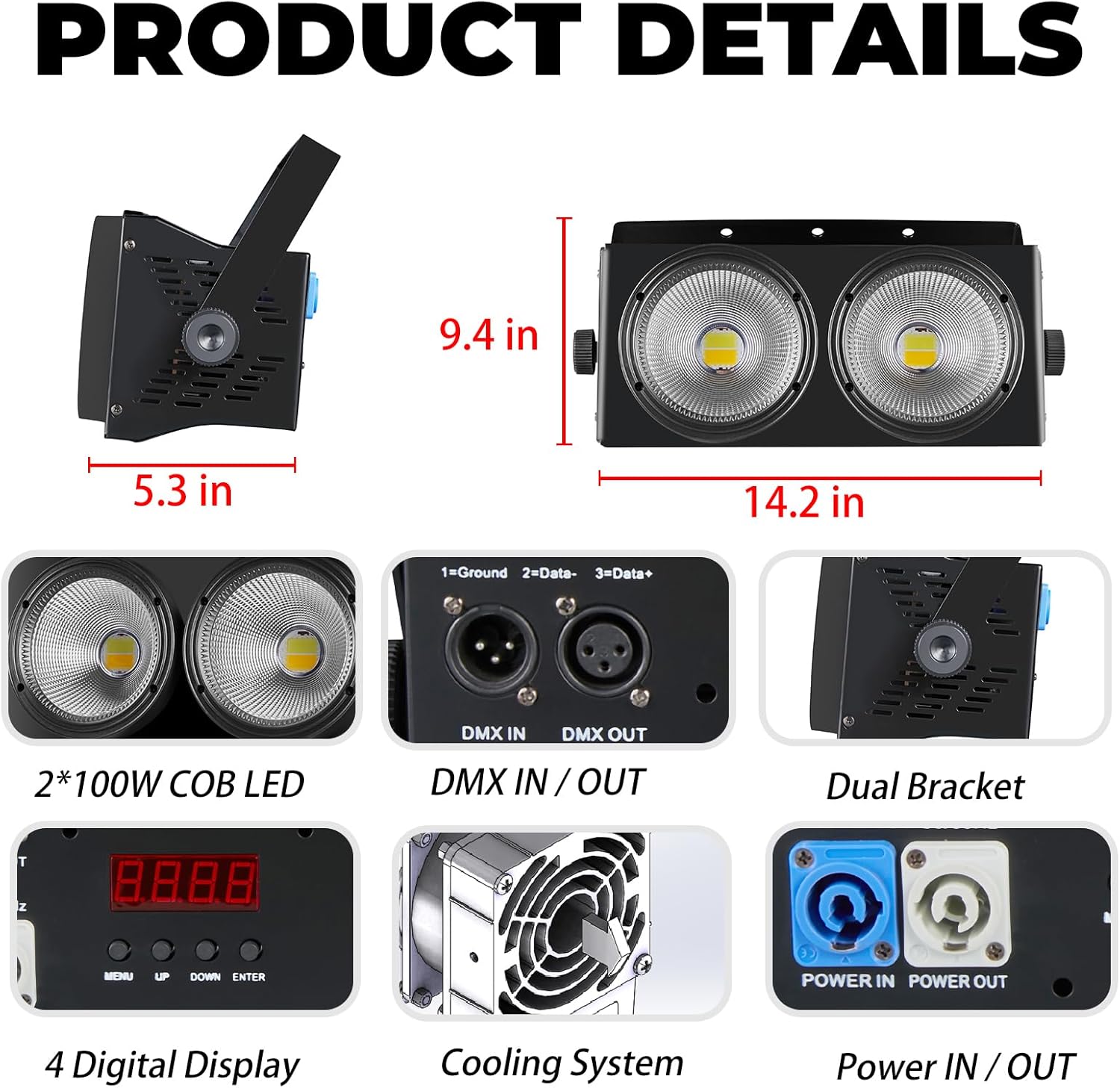
Figure 4.1: Detailed view of the product, highlighting dimensions, DMX IN/OUT ports, dual bracket, 4-digit digital display, cooling system, and Power IN/OUT connections.

Figure 4.2: Illustration of the 3500K-7500K lighting color change capabilities, including warm white, a blend of warm and cold white (2 in 1), and pure white light.

Figure 4.3: Examples of the white light effect, showing illumination with both LED eyes active and with a single LED eye active.

Figure 4.4: Examples of the warm light effect, showing illumination with both LED eyes active and with a single LED eye active.
5. Setup
5.1 Mounting
The COB Par Lights unit comes with a dual bracket for flexible mounting options. It can be securely mounted on a truss system or placed on the ground. Ensure the mounting surface or structure can safely support the weight of the fixture.

Figure 5.1: The COB Par Lights unit mounted on a truss, demonstrating its application in a stage lighting setup.
5.2 Connections
Connect the power cable to the 'Power IN' port on the unit and then to a suitable grounded power outlet. For DMX control, connect a DMX cable from your DMX controller to the 'DMX IN' port. If linking multiple units, connect from the 'DMX OUT' of the first unit to the 'DMX IN' of the next.

Figure 5.2: Included power and DMX cables, essential for connecting the COB Par Lights to power and control systems.
6. Operating Modes
The DJXFLI COB Par Lights offer several operating modes to suit various lighting needs:
- DMX512 Control: Connect to a DMX controller to precisely manage light intensity, color temperature, and strobe effects. The unit supports 2, 4, or 6 DMX channels. Refer to the DMX chart in the appendix for channel assignments.
- Master/Slave Mode: Link multiple units together. Set one unit as the 'Master' and others as 'Slave' to synchronize their operation. When the signal is disconnected, the light remains in its current state and automatically recognizes master/slave functions upon reconnection.
- Auto Mode: The unit cycles through pre-programmed light shows and effects automatically.
- Sound Activated Mode: The light reacts to ambient sound or music, changing effects and intensity in sync with the audio.

Figure 6.1: Icons illustrating the available control modes: DMX, Sound Activated, Auto, and Master/Slave.
Video 6.1: Demonstration of the LED COB par lights, showcasing cold white, warm white, and strobe effects in a DJ setup. This video illustrates the dynamic capabilities of the lighting unit.
7. Maintenance
Regular maintenance ensures optimal performance and longevity of your COB Par Lights.
- Cleaning: Periodically clean the lenses and exterior casing with a soft, lint-free cloth. Do not use abrasive cleaners or solvents.
- Cooling System: Ensure the cooling fan and vents are free from dust and debris. A high-quality cooling system is integrated to prevent damage from overheating.
- Inspection: Regularly inspect power and DMX cables for any signs of damage. Replace damaged cables immediately.
8. Troubleshooting
If you encounter issues with your COB Par Lights, refer to the following common problems and solutions:
| Problem | Possible Cause | Solution |
|---|---|---|
| No power | Power cable disconnected; No power from outlet; Unit fuse blown. | Check power cable connection; Test outlet with another device; Replace fuse (consult qualified technician). |
| No DMX control | Incorrect DMX address; Faulty DMX cable; Incorrect DMX mode setting. | Verify DMX address on unit and controller; Test/replace DMX cable; Ensure unit is set to DMX mode. |
| Light flickers or behaves erratically | Poor DMX signal; Overheating. | Check DMX connections and termination; Ensure proper ventilation and clear cooling vents. |
| Unit is hot to touch | Blocked ventilation; Prolonged high-intensity use. | Ensure vents are clear; Allow unit to cool down; Reduce intensity if operating in confined spaces. |
9. Specifications
Detailed technical specifications for the DJXFLI COB Par Lights:
| Specification | Value |
|---|---|
| Model Number | 2x100W Warm White Cold White 2in1 |
| Light Source Type | Light Emitting Diode (COB) |
| Wattage | 200 Watts (2x100W) |
| Color Temperature | 3500K-7500K (Warm & Cold White 2 in 1) |
| Voltage | 110 Volts (AC) |
| Material | Aluminum (Die-cast housing) |
| Product Dimensions | 16"L x 8.8"W x 8.8"H |
| Item Weight | 7.73 pounds |
| Control Modes | DMX512, Master/Slave, Auto, Sound Activated |
| DMX Channels | 2/4/6 CH |
| Finish Type | Polished |
| Mounting Type | Ceiling Mount (via bracket) |
| Bulb Features | Dimmable |
| UPC | 768477758359 |
10. Warranty and Support
DJXFLI is committed to providing high-quality products and excellent customer service. The strobe projection lamp features a high-quality cooling system designed to prevent damage due to overheating.
If you have any questions, concerns, or require technical assistance, please do not hesitate to contact DJXFLI after-sales support via email. We aim to reply within 24 hours and assist in resolving any issues you may encounter.
For the most up-to-date support information and contact details, please refer to the official DJXFLI brand store or the contact information provided at the point of purchase.
Related documents2x100W Warm White Cold White 2in1

Ask a question about this manual
Ask about setup, troubleshooting, compatibility, parts, safety, or missing instructions. Manuals+ will review the question and use this page’s manual context to help answer it.