
DEVAISE AHDG057HX
DEVAISE 3-Drawer Mobile File Cabinet AHDG057HX User Manual
Model: AHDG057HX | Brand: DEVAISE
1. Introduction
This manual provides detailed instructions for the assembly, operation, and maintenance of your DEVAISE 3-Drawer Mobile File Cabinet, model AHDG057HX. Designed for home office use, this cabinet offers versatile storage solutions, including file drawers, open shelves, and a surface suitable for a printer. Please read these instructions carefully before assembly and use to ensure proper function and longevity of your product.
2. Important Safety Information
- Load Capacity: The cabinet is designed to support a maximum weight of 150 lbs (68 kg). Do not exceed this weight limit to prevent damage or instability.
- Assembly: Follow all assembly instructions precisely. Improper assembly can lead to instability and potential hazards. While one person can perform most of the assembly, two people are recommended for certain steps, especially for handling larger components or the bottom file drawer.
- Stability: Ensure all casters are locked when the cabinet needs to remain stationary. The central caster is designed to prevent tipping when drawers are open, but avoid opening multiple heavy drawers simultaneously.
- Placement: Place the cabinet on a level surface. Avoid placing heavy items on the edges of shelves or drawers to maintain balance.
- Children and Pets: Keep children and pets away from the cabinet during assembly. Do not allow children to climb on or play with the cabinet, especially with open drawers, as this may cause tipping.
3. Package Contents
Before beginning assembly, verify that all parts and hardware are present and undamaged. All necessary components, including a screwdriver, are typically included in the package. If any parts are missing or damaged, please contact DEVAISE customer service for assistance.

Image 1: Overview of the DEVAISE 3-Drawer Mobile File Cabinet in Greige Modern finish.
4. Setup and Assembly Instructions
Assembly typically takes 2-3 hours for one person. While instructions are provided, some users have found visual aids helpful. Ensure you have adequate space and follow these steps carefully.
- Unpack and Identify Parts: Carefully unpack all components. Lay them out on a clean, soft surface to prevent scratches. Identify each part using the provided labels. Note that some pieces may not be labeled, requiring careful comparison with the instruction diagrams.
- Attach Casters: Secure the five rolling casters to the bottom panel of the cabinet. Ensure the two lockable casters are positioned at the front for easy access.
- Assemble the Main Frame: Connect the side panels, back panel, and internal dividers according to the diagrams. Pay close attention to the orientation of each piece, as incorrect placement can affect drawer alignment.
- Install Drawer Slides: Attach the drawer slides to the cabinet frame and to the drawer sides. Ensure they are level and securely fastened for smooth operation.
- Assemble Drawers: Construct the three drawers. The two top drawers are for office supplies, and the bottom drawer is designed for files.
- Install File Rails (Bottom Drawer): For the bottom drawer, install the adjustable rails to accommodate A4 or Letter-sized files. These rails allow for flexible organization of hanging files.
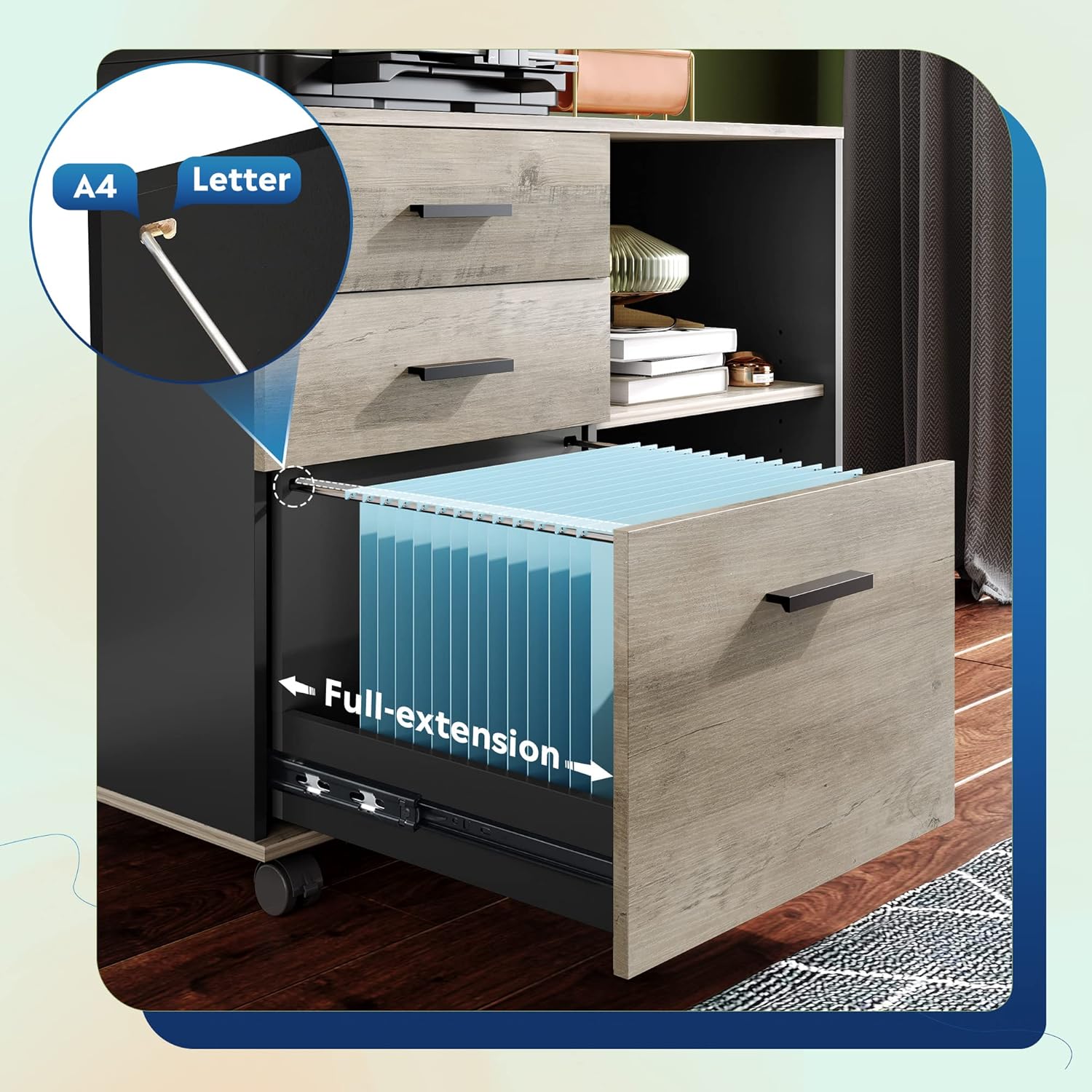
Image 2: The bottom drawer features full-extension slides and adjustable rails for A4 or Letter-sized hanging files.
- Insert Drawers into Frame: Carefully slide the assembled drawers onto their respective slides within the cabinet frame.
- Install Adjustable Shelf: Place the adjustable shelf in the open compartment. You can choose the desired height based on your storage needs.

Image 3: The open shelf can be adjusted to different heights.
- Attach Handles: Secure the easy-pull handles to the front of each drawer.
- Final Checks: Ensure all screws are tightened, and the cabinet is stable. Test the drawers for smooth operation.
5. Operating Instructions
- Using Drawers: The two top drawers are suitable for small office supplies. The bottom drawer is designed for A4/Letter-sized hanging files and features full-extension slides for easy access.
- Adjusting File Rails: The file rails in the bottom drawer can be adjusted to fit either A4 or Letter-sized documents. Simply reposition the rails as needed.
- Locking Casters: The front two casters are lockable. Press down on the lever to lock the wheels and prevent the cabinet from moving. Lift the lever to unlock. The central caster provides additional stability, preventing tipping when drawers are open.
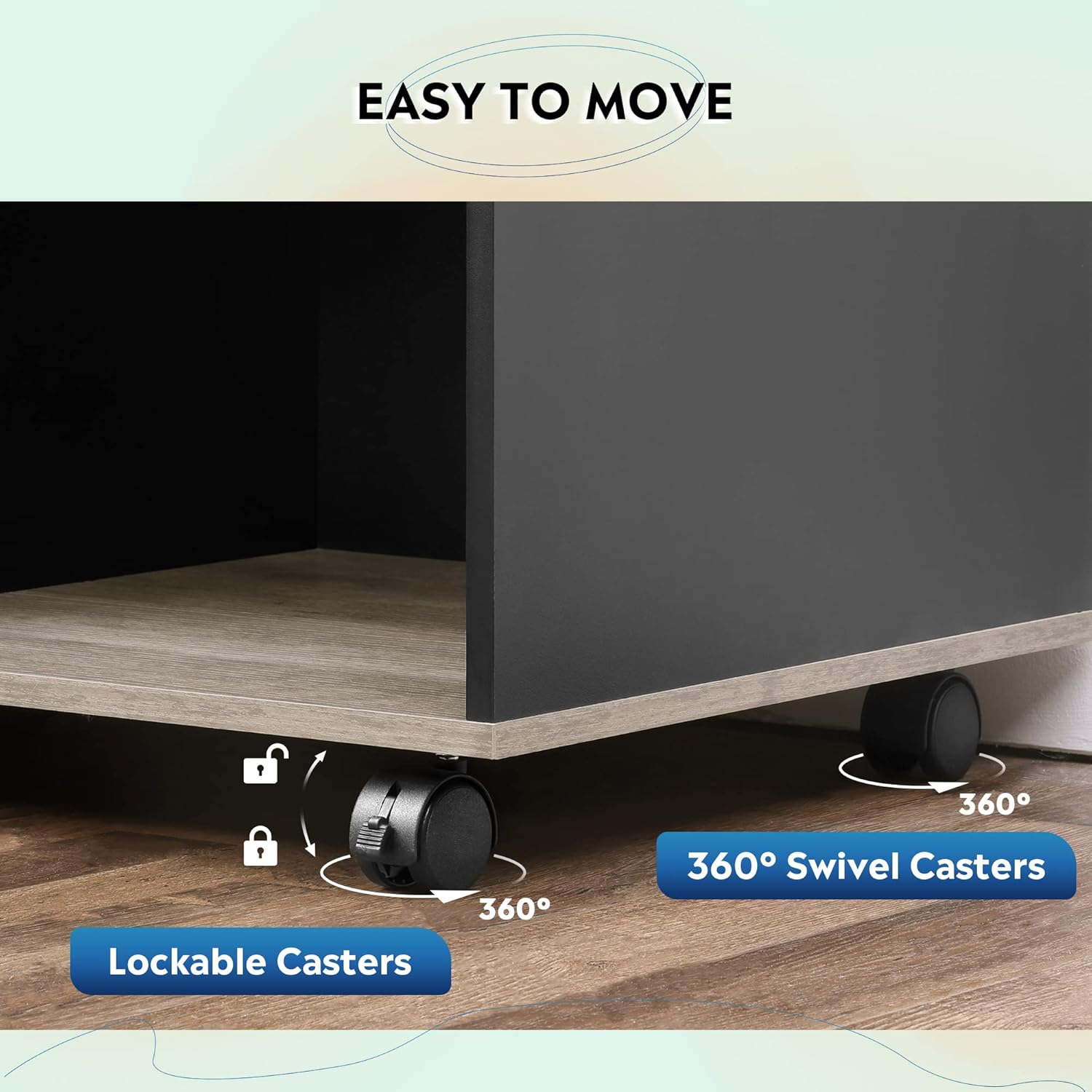
Image 4: The cabinet features 360° swivel casters, with two front casters being lockable for stability.
- Open Shelves: The open shelves provide additional storage for books, decor, or other office items. The top surface can accommodate a printer or other devices.
- Cable Management: Utilize the integrated dual cable management hole for organizing power cords and cables from devices placed on the cabinet top.

Image 5: A dual cable management hole helps organize wires for devices placed on the cabinet.
6. Maintenance and Care
- Cleaning: The cabinet is crafted from eco-friendly wood board, which is scratch and stain resistant. To clean, simply wipe the surfaces with a damp cloth. Avoid harsh chemicals or abrasive cleaners that could damage the finish.
- Regular Checks: Periodically check all screws and fasteners to ensure they remain tight. Retighten if necessary to maintain stability.
- Avoid Overloading: Do not exceed the stated weight capacity of 150 lbs (68 kg) for the entire cabinet or place excessively heavy items in drawers, as this can stress the drawer bottoms and slides.
7. Troubleshooting
- Issue: Drawers do not align or slide smoothly.
- Solution: This is often due to incorrect assembly of the drawer slides or the main cabinet frame.
- Review the assembly instructions carefully, paying close attention to the orientation of the side panels and drawer slides.
- Ensure all screws securing the slides to both the cabinet and the drawers are fully tightened and level.
- Verify that the drawer components themselves are assembled correctly and squarely.
- Issue: Cabinet feels unstable or wobbly.
- Solution:
- Ensure all assembly hardware is securely tightened.
- Verify the cabinet is placed on a flat, level surface.
- Confirm that the casters are properly installed and, if stationary, the front two lockable casters are engaged.
- Avoid exceeding the 150 lbs (68 kg) weight limit.
- Issue: Missing or damaged parts during assembly.
- Solution: If you discover any missing or damaged components upon unpacking, please contact DEVAISE customer service immediately for replacement parts.
8. Product Specifications
| Brand | DEVAISE |
| Model Name | AHDG057HX |
| Color | Greige |
| Material | Engineered Wood |
| Product Dimensions (D x W x H) | 15.7"D x 31.3"W x 24.7"H |
| Item Weight | 46 Pounds (20.8 kg) |
| Weight Limit | 150 Pounds (68 kg) |
| Mounting Type | Floor Mount |
| Base Type | Casters |
| Assembly Required | Yes |

Image 6: Detailed product dimensions for planning placement.
9. Warranty and Customer Support
DEVAISE is committed to providing quality products and customer satisfaction. For any questions regarding assembly, missing parts, product defects, or general inquiries, please contact DEVAISE customer service. We offer 24/7 support to assist you.
Please refer to your purchase documentation or the DEVAISE official website for specific warranty details and contact information.
Related documentsAHDG057HX


Ask a question about this manual
Ask about setup, troubleshooting, compatibility, parts, safety, or missing instructions. Manuals+ will review the question and use this page’s manual context to help answer it.