Introduction
This manual provides detailed instructions for the safe operation, installation, and maintenance of your DJXFLI 2x100W RGBWAuv 6-in-1 COB Par Light. Please read this manual thoroughly before use to ensure proper functionality and to prevent damage to the unit or injury to personnel.
The DJXFLI COB Par Light is a versatile stage lighting fixture designed for various applications including church events, parties, discos, and other entertainment venues. It features two 100W COB LED sources with RGBWAuv (Red, Green, Blue, White, Amber, UV) color mixing capabilities.
Safety Instructions
WARNING: Failure to follow these safety instructions may result in fire, electric shock, injury, or damage to the product or property.
- Always connect the unit to a grounded power outlet.
- Ensure the voltage of the power source matches the unit's requirements.
- Do not operate the unit if the power cord is damaged.
- Avoid direct eye exposure to the light source.
- Ensure adequate ventilation around the unit to prevent overheating.
- Do not open the housing; there are no user-serviceable parts inside. Refer all servicing to qualified personnel.
- Keep the unit away from moisture and extreme temperatures.
- Mount the unit securely using the provided bracket and appropriate hardware.
Package Contents
Verify that all items are present and in good condition upon opening the package:
- 1 x COB Par Light
- 1 x User Manual
- 1 x Power Cord (1.2m)
- 1 x Mounting Bracket
- 2 x Screws

Image: The COB Par Light, power cord, mounting bracket, and user manual as included in the package.
Product Overview
The DJXFLI COB Par Light is engineered with advanced features for professional lighting applications:
- High CRI & Power COB Light Source: Features two 100W COB (Chip-on-Board) LEDs, providing pure color without separation shadows.
- RGBWAuv 6-in-1 Color Mixing: Offers a wide spectrum of colors including Red, Green, Blue, White, Amber, and Ultraviolet for diverse lighting effects.
- Durable Housing: Constructed with a die-cast aluminum housing for enhanced durability and heat dissipation.
- Multiple Control Modes: Supports DMX512, Master/Slave, Auto, and Sound Activated modes for flexible operation.
- Integrated Cooling System: Equipped with a high-quality cooling system to prevent overheating and ensure longevity of the LED lamps.

Image: Front view of the COB Par Light, illustrating its dual COB LED design and examples of red and blue light output.

Image: A visual representation of the various colors achievable with the RGBWAuv 6-in-1 COB LEDs, including UV, Green, Red, Orange, White, and Blue.
Setup
Mounting the Fixture
The COB Par Light can be mounted on a truss, stand, or placed on the ground using the adjustable mounting bracket.
- Attach the mounting bracket to the fixture using the provided screws.
- Securely fasten the fixture to your desired mounting surface (truss, stand, etc.) ensuring it is stable and cannot fall.
- Adjust the angle of the light as needed using the bracket's adjustment knobs.

Image: The COB Par Light mounted on a truss, demonstrating its use in a stage setup with green and orange light projections.
Power Connection
Connect the included power cord to the "POWER IN" port on the back of the fixture and then to a grounded power outlet. Multiple units can be daisy-chained using the "POWER OUT" port for convenience, ensuring the total current draw does not exceed the circuit's capacity.
DMX Connection (Optional)
For DMX control, connect a DMX controller to the "DMX IN" port using a 3-pin DMX cable. For multiple fixtures, daisy-chain them by connecting the "DMX OUT" of the first fixture to the "DMX IN" of the next, and so on. Terminate the last fixture in the chain with a DMX terminator.
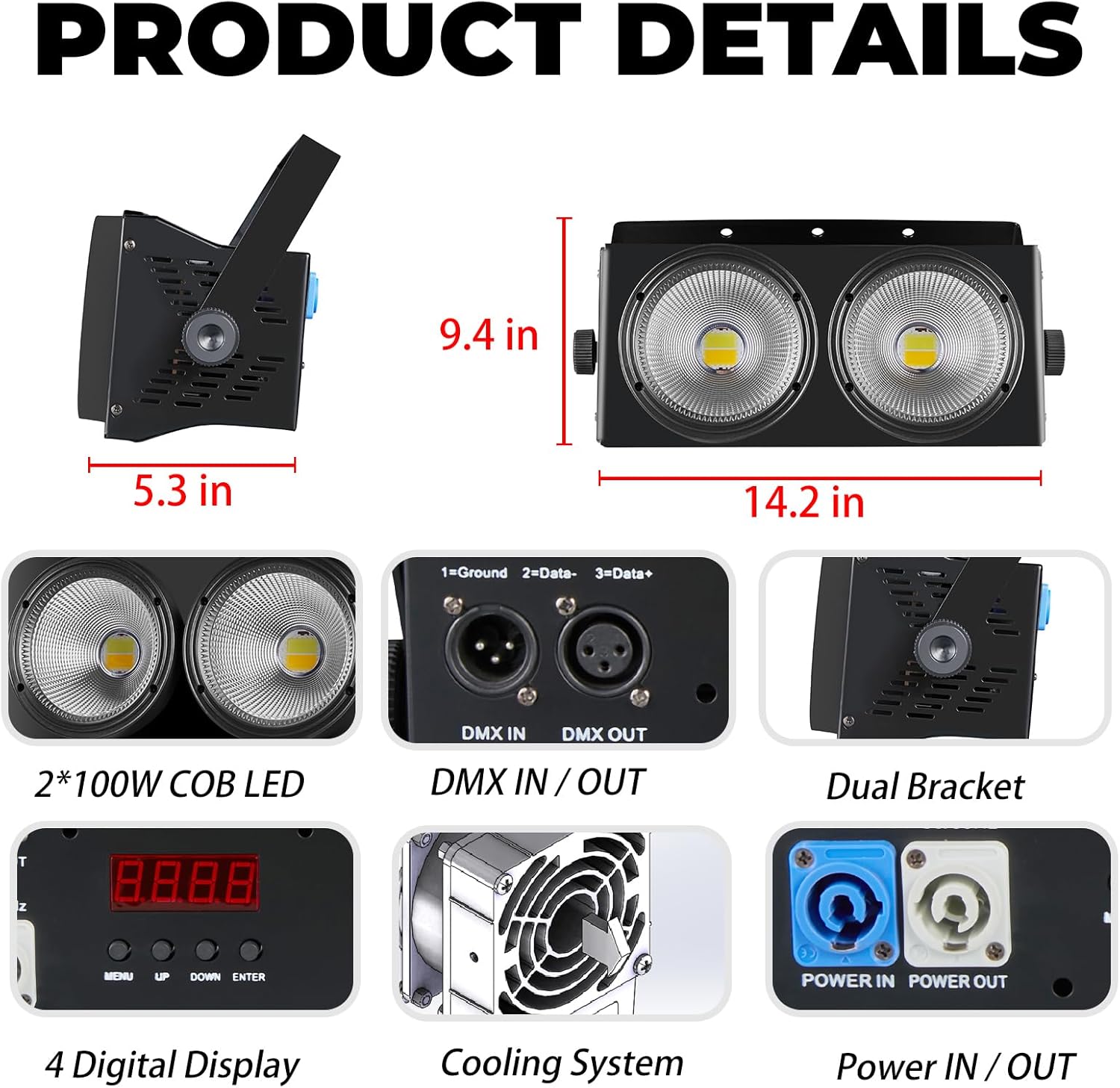
Image: A close-up of the product's rear panel, highlighting the DMX input/output ports, power input/output, digital display, and the cooling fan.
Operating Modes
The DJXFLI COB Par Light offers several operating modes, selectable via the digital display on the rear panel.

Image: Icons representing the DMX, Sound Activated, Auto, and Master/Slave control modes, accompanied by examples of the light's output in various colors.
1. DMX512 Control Mode
This mode allows professional control over the fixture's functions using a DMX controller. Refer to the DMX channel chart (usually provided in a separate DMX manual or appendix) for specific channel assignments and values. The fixture can independently control individual light beads or set signal retention.
2. Master/Slave Mode
Connect multiple fixtures using DMX cables. Set one fixture as the "Master" and the others as "Slave." The slave units will mimic the master unit's operations, allowing synchronized lighting effects without a DMX controller. The unit automatically recognizes master and slave functions.
3. Auto Mode
The fixture will cycle through pre-programmed internal lighting shows and color changes automatically. Use the digital display to select different auto programs or adjust speed.
4. Sound Activated Mode
In this mode, the light reacts to ambient sound or music, changing patterns and colors in sync with the audio input. Sensitivity can often be adjusted via the digital display.
Maintenance
Regular maintenance ensures optimal performance and extends the lifespan of your COB Par Light:
- Cleaning: Periodically clean the lenses and exterior housing with a soft, lint-free cloth. Do not use abrasive cleaners or solvents.
- Ventilation: Ensure that the cooling vents are free from dust and obstructions. Use compressed air to clear dust if necessary.
- Inspection: Regularly check power cables, DMX cables, and mounting hardware for any signs of wear or damage. Replace damaged components immediately.
- Storage: When not in use for extended periods, store the fixture in a dry, dust-free environment.
Troubleshooting
| Problem | Possible Cause | Solution |
|---|---|---|
| No power | Power cord disconnected; no power from outlet; faulty power cord. | Check power connections; test outlet; replace power cord. |
| No DMX control | Incorrect DMX address; faulty DMX cable; DMX controller issue; no DMX terminator. | Verify DMX address settings; check DMX cable integrity; ensure DMX terminator is used on the last fixture. |
| Light flickers or behaves erratically | Loose connection; DMX signal interference; overheating. | Check all connections; ensure DMX cables are properly shielded; ensure adequate ventilation. |
| Fan noise is loud | Dust accumulation in fan; fan malfunction. | Clean fan and vents; if noise persists, contact customer support. |
If you encounter issues not listed here or if the problem persists after attempting the solutions, please contact DJXFLI customer support.
Specifications
| Feature | Detail |
|---|---|
| Model Number | 2x100W RGBWAuv 6in1 |
| Light Source | 2 x 100W COB LED (RGBWAuv 6-in-1) |
| Power Consumption | 200 Watts (Max 250 Watts) |
| Voltage | AC 240 Volts |
| Amperage | 1.04 Amps |
| Color Temperature | 3200 Kelvin (Warm White component) |
| Control Modes | DMX512, Master/Slave, Auto, Sound Activated |
| Housing Material | Die-cast Aluminum |
| Product Dimensions | 16"L x 8.8"W x 8.8"H |
| Item Weight | 7.88 pounds |
| Mounting Type | Pole Mount, Bracket Mount |
| UPC | 768477758533 |
Warranty and Support
DJXFLI is committed to providing quality products and customer satisfaction. The strobe projection lamp has a high-quality cooling system to avoid damage to the LED lamp due to overheating.
If you have any questions or require assistance, please contact DJXFLI after-sales support via email. We aim to respond within 24 hours and assist in resolving any issues.
For further information or to explore other products, please visit the official DJXFLI store: DJXFLI Store


