
FLEXTAILGEAR MAX PUMP 2 PLUS
FLEXTAILGEAR MAX PUMP 2 PLUS Electric Air Pump
User Manual
1. Product Overview
The FLEXTAILGEAR MAX PUMP 2 PLUS is a compact and versatile electric air pump designed for outdoor enthusiasts. It features a powerful inflation and deflation capability, an integrated camping lantern, and an emergency power bank function. Its lightweight and portable design makes it an ideal companion for camping, hiking, and various inflatable activities.

Image: The FLEXTAILGEAR MAX PUMP 2 PLUS, a compact orange and white device, held in a user's hand, demonstrating its small size and portability.
- Portable Design: Weighing only 6.7 oz (189.94 grams) with dimensions of 2.2 x 1.9 x 3.5 inches (5.6 x 4.88 x 8.9 cm).
- Dual Pressure Modes: High pressure (4.5 kPa) and low pressure (2.5 kPa) for efficient inflation and deflation.
- Integrated Camping Lantern: Stepless dimming LED light from 20 to 200 lumens.
- Emergency Power Bank: Built-in 4800 mAh rechargeable battery can charge electronic devices.
- Multi-functional Nozzles: Equipped with 5 different nozzles to fit various inflatable products.
- Water Resistance: IP44 rated for splash resistance.
2. Components and Parts
Familiarize yourself with the different parts of your MAX PUMP 2 PLUS and its accessories.

Image: A detailed diagram of the FLEXTAILGEAR MAX PUMP 2 PLUS, highlighting its key components: Concealable Hanging Structure, Deflation Port, Inflation Port, Pump Switch, Light Switch, Stepless Dimming LED Light, Type-A Output Port, and Type-C Charging Port.
Included Accessories:
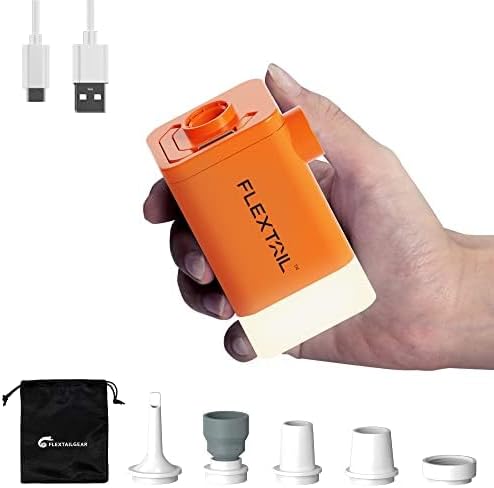
Image: The FLEXTAILGEAR MAX PUMP 2 PLUS shown alongside its black storage bag, USB-C charging cable, and five different nozzle adapters for various inflation needs.
The pump comes with 5 multi-functional nozzles to ensure compatibility with a wide range of inflatable items, from small toys to large air mattresses.

Image: A visual guide demonstrating the five different types of nozzles included with the pump, showing their application for swimming rings, inflatable toys, outdoor air cushions, inflatable boats, air beds, floating beds, and an exclusive nozzle for vacuum bags.
3. Setup
3.1 Charging the Device
Before first use, fully charge your MAX PUMP 2 PLUS. Connect the provided USB-C cable to the Type-C Charging Port on the device and plug the other end into a USB power adapter (not included).
- The charging indicator light will be red when charging (0%-95%).
- The indicator light will turn green when fully charged.
- A full charge provides up to 1.5 hours of operation in low pressure mode or 45 minutes in high pressure mode.

Image: A visual representation of the charging indicator lights: red for 0%-95% charge and green for fully charged.
4. Operating Instructions
4.1 Inflation and Deflation
The MAX PUMP 2 PLUS offers two air pressure levels for optimal performance.
- To turn on the pump: Double-click the Pump Switch.
- To switch between modes: Long press the Pump Switch to toggle between Low (2.5 kPa) and High (4.5 kPa) pressure modes.
- Inflation: Attach the appropriate nozzle to the Inflation Port and insert it into the inflatable item's valve. Double-click the pump switch to start.
- Deflation: Attach the appropriate nozzle to the Deflation Port and insert it into the inflatable item's valve. Double-click the pump switch to start. This helps to quickly remove air for compact storage.

Image: The pump demonstrating its two air pressure levels: Low mode at 2.5 kPa and High mode at 4.5 kPa, suitable for various inflation tasks.
Note: This pump is designed for inflatable items such as air mattresses, pool floats, and inflatable toys. It is not suitable for inflating items requiring very high pressure like footballs, basketballs, balloons, or vehicle tires.
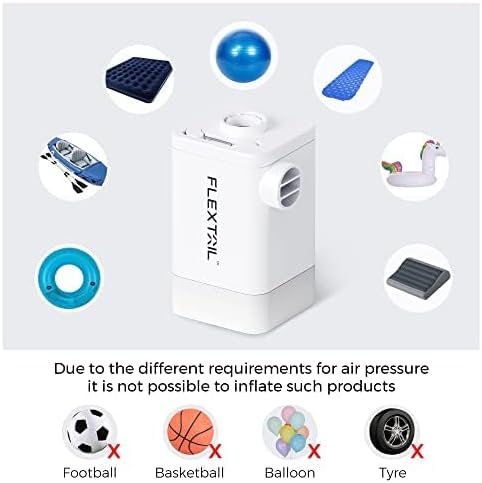
Image: A visual guide showing examples of items that can be inflated (air mattress, yoga ball, sleeping pad, kayak, swimming ring, unicorn float) and items that cannot be inflated (football, basketball, balloons, car tire) due to different air pressure requirements.
4.2 Using the Camping Light
The integrated LED light provides adjustable illumination for various camping and outdoor needs.
- To turn on/off the light: Double-click the Light Switch.
- To adjust brightness: Long press the Light Switch for stepless dimming, adjusting brightness from 20 lm to 200 lm.
- The light can be hung using the concealable hanging structure for overhead illumination in tents or other areas.

Image: The pump's stepless dimming LED light feature, showing brightness adjustable from 50 lm to 500 lm (note: product description states 20-200lm, image might be for a different model or general feature illustration) and battery endurance at different brightness levels.

Image: The FLEXTAILGEAR MAX PUMP 2 PLUS hanging inside a tent, providing illumination, demonstrating its utility as a camping lantern.
4.3 Emergency Power Bank Function
The built-in 4800 mAh battery can serve as an emergency power source for your electronic devices.
- Connect your device's charging cable to the Type-A Output Port on the pump.
- The pump can provide a charge to your phone once or twice, depending on your phone's battery capacity.

Image: The FLEXTAILGEAR MAX PUMP 2 PLUS connected via a cable to a smartphone, illustrating its emergency power bank capability.
5. Maintenance
5.1 Cleaning
To ensure longevity and optimal performance, keep your MAX PUMP 2 PLUS clean.
- Wipe the exterior with a soft, damp cloth. Do not use harsh chemicals or abrasive cleaners.
- Ensure the inflation and deflation ports are free from dust and debris.
5.2 Storage
Store the pump in a cool, dry place away from direct sunlight and extreme temperatures. It is recommended to store it with a partial charge (around 50%) if not used for extended periods to preserve battery health.
The device is IP44 water-resistant, meaning it is protected against splashing water from any direction. However, it should not be submerged in water.

Image: The FLEXTAILGEAR MAX PUMP 2 PLUS with water splashing around it, illustrating its IP44 water resistance rating.
6. Troubleshooting
| Problem | Possible Cause | Solution |
|---|---|---|
| Pump does not turn on. | Low battery; Incorrect operation. | Charge the pump fully; Double-click the pump switch to turn on. |
| Weak airflow. | Low battery; Incorrect pressure mode; Nozzle obstruction. | Recharge the pump; Long press the pump switch to switch to high pressure mode; Clear any obstructions from the nozzle or ports. |
| Light does not turn on. | Low battery; Incorrect operation. | Charge the pump; Double-click the light switch to turn on. |
| Device not charging from pump (power bank function). | Pump battery too low; Incorrect cable/connection. | Ensure pump is sufficiently charged; Check cable and connection. |
7. Specifications
| Feature | Detail |
|---|---|
| Model Number | MAX PUMP 2 PLUS |
| Dimensions (L x W x H) | 5.6 x 4.88 x 8.9 cm (2.2 x 1.9 x 3.5 inches) |
| Weight | 189.94 grams (6.7 ounces) |
| Material | Plastic |
| Battery Capacity | 4800 mAh Lithium-polymer |
| Airflow Capacity | 5 L/second |
| High Pressure Mode | 4.5 kPa |
| Low Pressure Mode | 2.5 kPa |
| Light Brightness | 20 - 200 lm (stepless dimming) |
| Water Resistance | IP44 |
| Power Source | Rechargeable battery |

Image: A visual summary of the pump's key features: Extra Lightweight (6.7 oz), Two Pressure Levels, Large Battery Capacity (4800mAh), Emergency Power Bank, and IP44 Water Resistance.
8. Warranty and Support
FLEXTAILGEAR products are manufactured to high quality standards. For information regarding warranty coverage, technical support, or service, please refer to the warranty card included with your product or visit the official FLEXTAILGEAR website. Please retain your proof of purchase for any warranty claims.
Related documentsMAX PUMP 2 PLUS

Ask a question about this manual
Ask about setup, troubleshooting, compatibility, parts, safety, or missing instructions. Manuals+ will review the question and use this page’s manual context to help answer it.