
Donerton I09
Donerton Wireless Earbud 5.3 Headphones User Manual
Model: I09
Introduction
Thank you for choosing Donerton Wireless Earbud 5.3 Headphones. This manual provides detailed instructions on how to set up, operate, and maintain your new earbuds to ensure optimal performance and longevity. Please read this manual thoroughly before using the product.

Image: Donerton Wireless Earbuds (Model I09) in their charging case, showcasing the sleek design and digital display.
What's in the Box
- 2 x Wireless Earbuds (Left and Right)
- 1 x Fast Charging Case
- 1 x Type-C Charging Cable
- 3 x Pairs of Silicone Earplugs (S / M / L)
- 1 x User Manual (This Document)
Product Overview
The Donerton I09 earbuds feature a stylish design with advanced functionality for an enhanced audio experience.

Image: Overview of Donerton True Wireless Earbud key features including Hi-Fi Stereo Sound, Bluetooth 5.3, IP7 Waterproof, Ergonomic Design, One-Step Pairing, 80H Playing Time, Dual-Mic, and Auto Power On/Off.
Key Features:
- Hi-Fi Stereo Sound: Enjoy immersive audio with powerful bass and clear highs.
- Bluetooth 5.3: Ensures a stable and efficient wireless connection.
- Long Playtime: Up to 80 hours of total playtime with the charging case.
- IP7 Waterproof: Protects earbuds from sweat and rain, ideal for sports.
- LCD Digital Display: Shows battery levels of the case and individual earbuds.
- Touch Controls: Intuitive touch-sensitive areas for managing music and calls.

Image: Visual representation of Hi-Fi stereo sound waves emanating from an earbud, indicating superior audio quality.

Image: A person using Donerton earbuds while taking a selfie, demonstrating their practical use in daily activities.
Setup
1. Charging the Earbuds and Case
Before first use, fully charge the charging case and earbuds. The charging case extends the playtime significantly.
- Place the earbuds into the charging case. Ensure they are correctly seated; the earbuds' LED indicators will light up to confirm charging.
- Connect the Type-C charging cable to the charging port on the case and the other end to a USB power adapter (not included) or a computer's USB port.
- The LCD digital display on the charging case will show the battery percentage of the case and the charging status of each earbud.
- A full charge for the case provides up to 80 hours of additional playtime for the earbuds.

Image: The Donerton charging case connected via USB-C, illustrating its compact design and the digital display showing battery levels.
2. Initial Pairing (One-Step Pairing)
The earbuds are designed for easy, one-step pairing with your device.
- Open the charging case. The earbuds will automatically power on and enter pairing mode.
- On your smartphone or Bluetooth-enabled device, go to the Bluetooth settings.
- Search for "I09" in the list of available devices and select it to connect.
- Once connected, you will hear a confirmation tone, and the earbuds' LED indicators will turn off or flash slowly.

Image: A smartphone screen showing "I09" in the Bluetooth device list, demonstrating the one-step pairing process with the earbuds in their open charging case.
Note: After the initial pairing, the earbuds will automatically connect to the last paired device when taken out of the charging case, provided Bluetooth is enabled on your device.
3. Wearing the Earbuds
For optimal sound quality and comfort, choose the correct size of silicone earplugs (S/M/L) and adjust the earbuds to fit snugly in your ears.

Image: A person wearing the Donerton Wireless Earbuds, illustrating the in-ear fit and discreet design.
Operating Instructions
Power On/Off
- Power On: Open the charging case, and the earbuds will automatically power on. Alternatively, long-press the touch area on both earbuds for 3 seconds.
- Power Off: Place the earbuds back into the charging case and close the lid. They will automatically power off and begin charging. Alternatively, long-press the touch area on both earbuds for 5 seconds.
Touch Controls
The Donerton I09 earbuds feature intuitive touch controls for easy management of music and calls.

Image: Diagram illustrating the touch control functions: Previous Song, Next Song, Volume Up, Pause/Start, Answer/Hang Up, Volume Down.
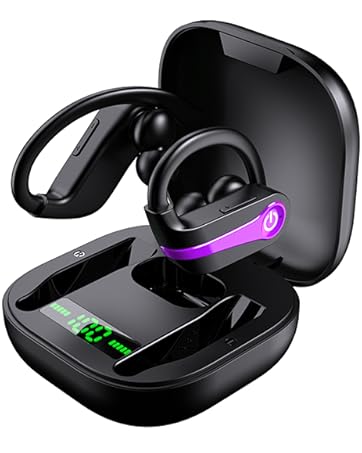
Image: A robotic hand interacting with an earbud's touch surface, symbolizing the advanced touch control functionality.
| Function | Action (Left Earbud) | Action (Right Earbud) |
|---|---|---|
| Play/Pause | Single tap | Single tap |
| Next Song | Double tap | Double tap |
| Previous Song | Triple tap | Triple tap |
| Volume Up | Long press | N/A |
| Volume Down | N/A | Long press |
| Answer/End Call | Single tap | Single tap |
| Reject Call | Long press for 2 seconds | Long press for 2 seconds |
| Activate Voice Assistant | Quadruple tap | Quadruple tap |
Single Earbud Mode
You can use either the left or right earbud independently. Simply take one earbud out of the charging case, and it will automatically connect to your device. The touch controls for single earbud use may vary slightly (e.g., volume control might not be available on both earbuds simultaneously).
Maintenance
Cleaning
- Regularly clean the earbuds and charging case with a soft, dry, lint-free cloth.
- Do not use abrasive cleaners, alcohol, or chemical solvents.
- Clean the charging contacts on both the earbuds and the case to ensure proper charging.
Storage
When not in use, store the earbuds in their charging case to protect them from dust and damage.
Water Resistance (IP7)
The Donerton I09 earbuds are IP7 waterproof, meaning they are protected against immersion in water up to 1 meter for up to 30 minutes. This makes them suitable for use during workouts and in rainy conditions.

Image: Donerton earbuds with water droplets, demonstrating their IP7 waterproof rating, suitable for protection against sweat and rain.
Important: The charging case is NOT waterproof. Do not expose the charging case to water or moisture.
Troubleshooting
| Problem | Possible Cause | Solution |
|---|---|---|
| Earbuds not charging | Poor contact with charging pins; charging cable/adapter issue; case battery low. | Ensure earbuds are correctly seated in the case. Clean charging contacts. Try a different charging cable or adapter. Charge the case fully. |
| Earbuds not pairing with device | Bluetooth off; earbuds not in pairing mode; interference; previously paired device. | Ensure Bluetooth is enabled on your device. Take earbuds out of case to enter pairing mode. Turn off Bluetooth on other nearby devices. Forget "I09" in your device's Bluetooth settings and re-pair. |
| Only one earbud working | One earbud not connected; low battery on one earbud. | Place both earbuds back in the case, close the lid, then open again. Ensure both are charged. If issue persists, reset earbuds (refer to manufacturer's website for specific reset instructions if not in manual). |
| Low volume or poor sound quality | Earbuds not properly seated; ear tips too small/large; earwax buildup; device volume low. | Adjust earbuds for a snug fit. Try different size ear tips. Clean earbud mesh. Increase volume on both earbuds and connected device. |
| Call quality issues (e.g., static, muffled sound) | Environmental noise; microphone obstruction; weak signal. | Move to a quieter environment. Ensure microphone area is clear. Stay within Bluetooth range of your device. |
Specifications
| Feature | Detail |
|---|---|
| Model Name | I09 |
| Connectivity Technology | Wireless (Bluetooth 5.3) |
| Bluetooth Range | 10 Meters |
| Battery Life (Earbuds) | 5-6 hours per single charge |
| Total Playtime with Charging Case | Up to 80 Hours |
| Charging Time (Quick Charge) | 10 minutes charge for 1 hour playtime |
| Water Resistance Level | IP7 Waterproof (Earbuds only) |
| Audio Driver Size | 6 mm Composite Diaphragm |
| Frequency Range | 20 Hz - 20 kHz |
| Control Method | Touch Control |
| Material (Case) | PC and ABS Construction |
| Color | White |
Warranty and Support
Donerton products come with a standard manufacturer's warranty. For specific warranty details, please refer to the warranty card included in your product packaging or visit the official Donerton website.
If you encounter any issues or have questions regarding your Donerton Wireless Earbud 5.3 Headphones, please contact our customer support team:
- Website: Visit the Donerton Store on Amazon
- Please have your model number (I09) and purchase details ready when contacting support.
Ask a question about this manual
Ask about setup, troubleshooting, compatibility, parts, safety, or missing instructions. Manuals+ will review the question and use this page’s manual context to help answer it.