
1. Introduction
The JOYO AVALLON R-19 is a compressor effect pedal designed for electric guitar and bass. It features a classic compressor circuit with independent input and output signal controls, offering precise dynamic feedback and tone shaping. This manual provides detailed instructions for setup, operation, and maintenance of your AVALLON R-19 pedal.
2. Product Overview
2.1 Key Features
- Precise compression circuit with dynamic feedback.
- Independent control knobs for INPUT signal and OUTPUT signal.
- Three main control knobs: RATIO, ATTACK, and RELEASE for detailed tone adjustment.
- Integrated GAIN REDUCTION indicators for visual monitoring of compression.
- Durable metal aluminum alloy casing.
- Innovative R-series ambience LED lights for visual feedback.
- True Bypass design to maintain signal integrity when the effect is disengaged.
2.2 Controls and Indicators
Familiarize yourself with the pedal's layout and controls:
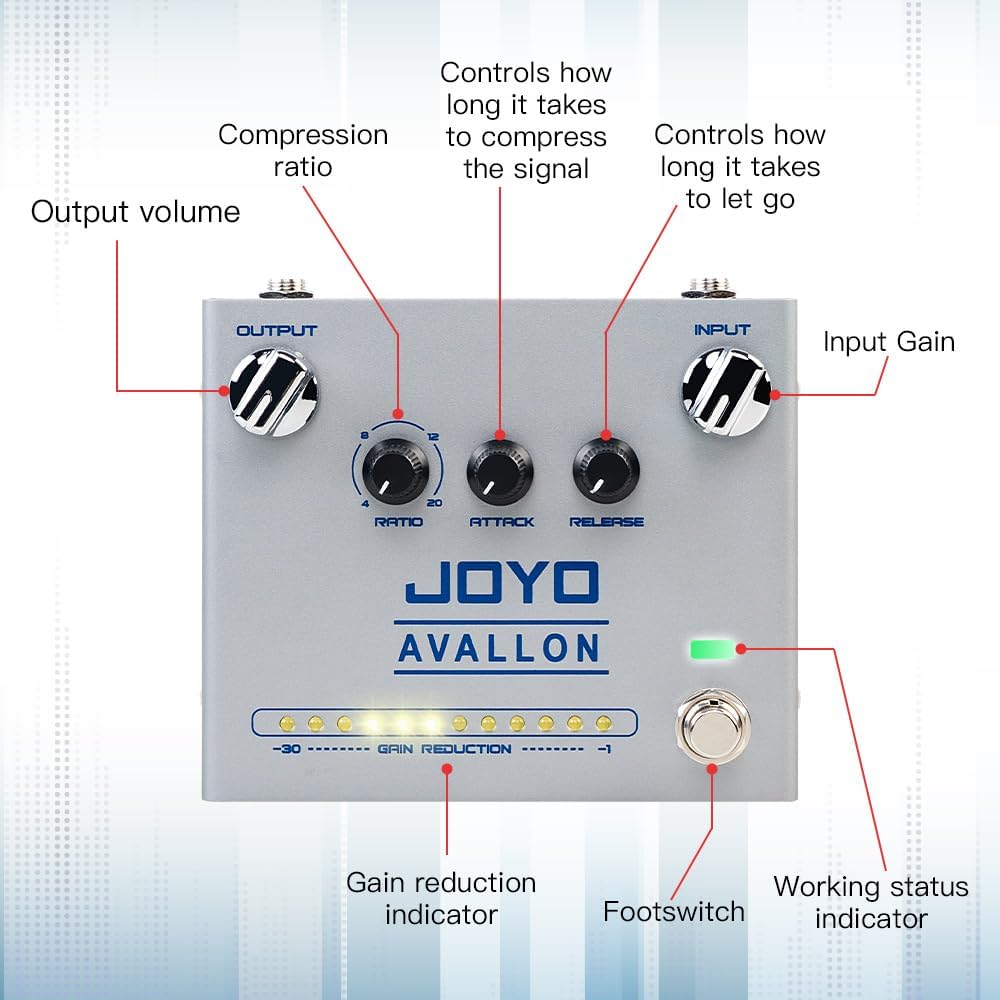
Image: Front view of the JOYO AVALLON R-19 pedal with labels for Input Gain, Output Volume, Compression Ratio, Attack, Release, Gain Reduction Indicator, Footswitch, and Working Status Indicator.
- INPUT Knob: Adjusts the input gain of the signal entering the compressor.
- OUTPUT Knob: Adjusts the overall output volume of the compressed signal.
- RATIO Knob: Controls the compression ratio, determining how much the signal is compressed once it exceeds the threshold. Settings range from subtle to heavy compression.
- ATTACK Knob: Sets how quickly the compressor reacts to the input signal exceeding the threshold. A faster attack (lower setting) will compress transients more quickly.
- RELEASE Knob: Determines how long it takes for the compressor to return to its uncompressed state after the signal falls below the threshold.
- GAIN REDUCTION Indicators: A series of LEDs that visually display the amount of gain reduction being applied by the compressor in real-time.
- Footswitch: Engages or disengages the effect. True Bypass ensures your signal remains unaffected when the pedal is off.
- Working Status Indicator: An LED that shows if the pedal is active or bypassed.
2.3 Rear Panel and LED Modes

Image: Rear panel of the JOYO AVALLON R-19 pedal, highlighting the Output Socket, DC Power Input, Input Socket, and the LED mode switch with SYNC, ALWAYS, and OFF settings.
- Input Socket: Connect your instrument (guitar/bass) here.
- Output Socket: Connect to your amplifier or the next pedal in your signal chain.
- DC Power Input: Connect a 9V DC power adapter (center negative).
- Rear Ambience LED Light: Provides additional visual feedback.
- LED Mode Switch:
- SYNC: All LEDs (including ambience lights) are controlled by the footswitch. They turn on when the effect is engaged and off when bypassed.
- ALWAYS: The ambience LEDs on both sides are always on. The top LED (working status indicator) is controlled by the footswitch.
- OFF: All LEDs, including the ambience lights, are off. The top LED (working status indicator) is controlled by the footswitch.
3. Setup
3.1 Power Supply
The AVALLON R-19 pedal requires a 9V DC power supply with a center-negative plug. The working current is above 120mA. Using a power supply that meets these specifications is crucial for proper and quiet operation. A dedicated pedal power supply with noise reduction technology is recommended.
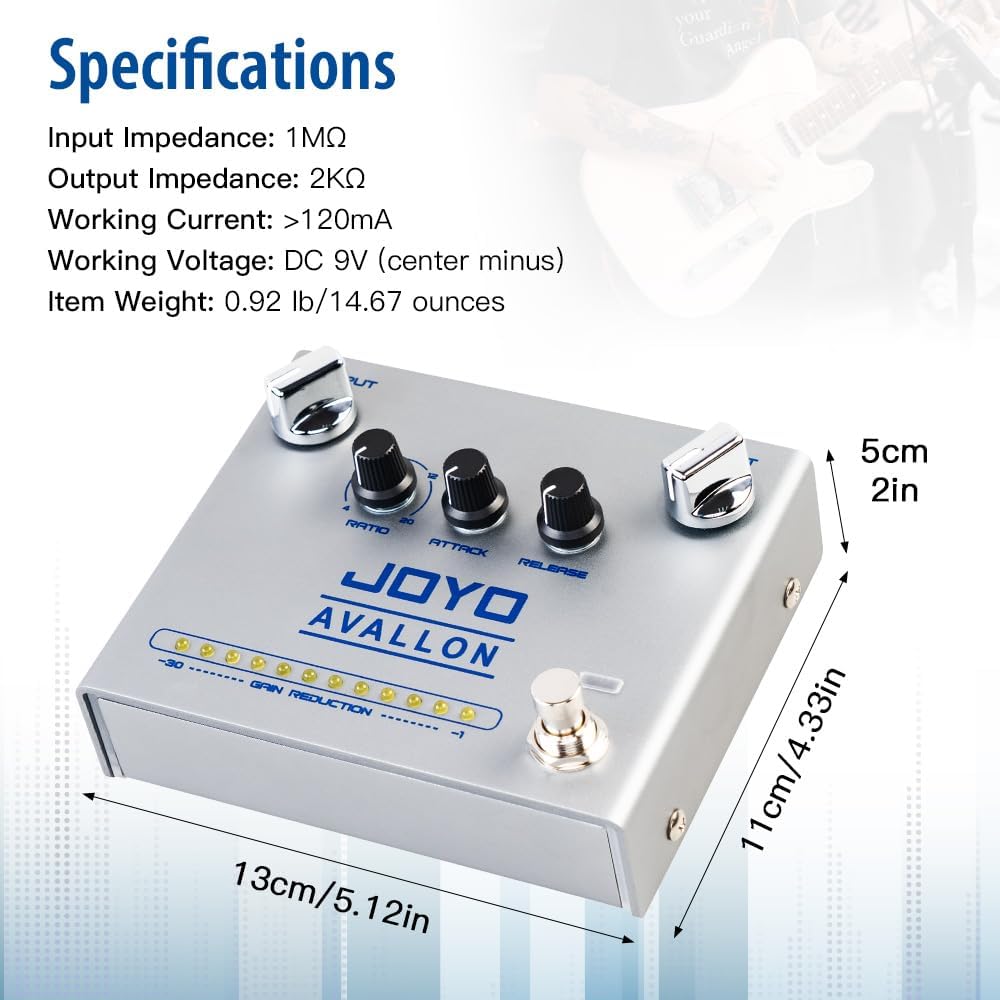
Image: Close-up of the DC 9V power input on the JOYO AVALLON R-19 pedal, showing the center-negative polarity symbol.
3.2 Connecting the Pedal
Follow these steps to connect your AVALLON R-19 pedal:
- Ensure your amplifier is turned off or its volume is set to minimum.
- Connect your electric guitar or bass to the INPUT socket of the AVALLON R-19 pedal using a standard 1/4-inch instrument cable.
- Connect the OUTPUT socket of the AVALLON R-19 pedal to your amplifier's input (or the input of the next pedal in your signal chain) using another 1/4-inch instrument cable.
- Connect the 9V DC center-negative power adapter to the pedal's DC Power Input.
- Once all connections are secure, you can power on your amplifier and adjust its volume.
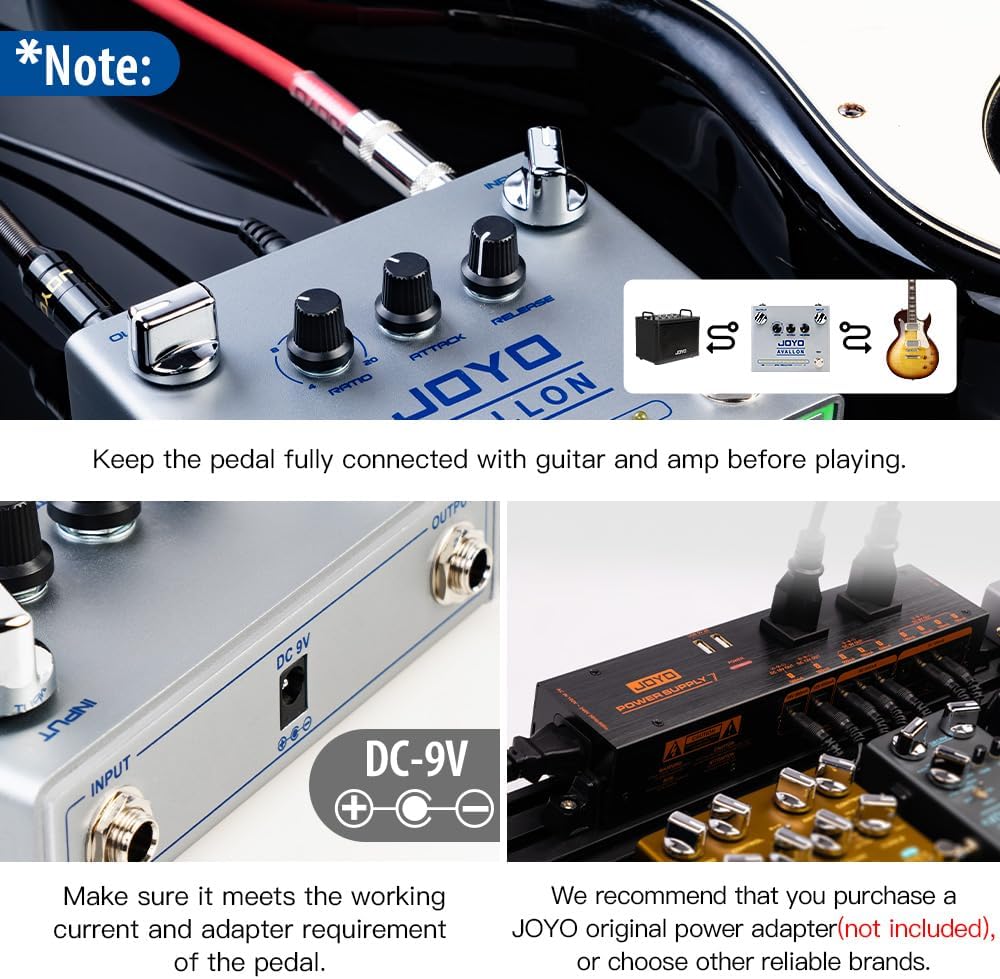
Image: Connection diagram illustrating the JOYO AVALLON R-19 pedal placed in the signal chain between a guitar and an amplifier.
4. Operating Instructions
4.1 Basic Operation
- Press the footswitch to engage the compressor effect. The Working Status Indicator LED will illuminate.
- Adjust the INPUT knob to set the sensitivity of the compressor to your instrument's signal. Higher settings will make the compressor react to quieter signals.
- Use the OUTPUT knob to control the overall volume of the pedal. This can be used to compensate for any perceived volume drop due to compression or to boost your signal.
- Observe the GAIN REDUCTION Indicators to see how much compression is being applied in real-time. More illuminated LEDs indicate greater gain reduction.
4.2 Shaping Your Tone with Compression
The three main compression knobs (RATIO, ATTACK, RELEASE) allow for detailed control over your sound:
- RATIO:
- A lower ratio (e.g., 4:1) provides subtle, transparent compression, ideal for evening out dynamics without drastically altering your tone.
- A higher ratio (e.g., 20:1) results in more aggressive compression, often used for sustain or to create a more uniform sound.
- ATTACK:
- A slower attack (higher setting) allows the initial transient (the "pick attack") of your notes to pass through uncompressed, resulting in a punchier sound.
- A faster attack (lower setting) compresses the initial transient, smoothing out the attack and increasing sustain.
- RELEASE:
- A faster release (lower setting) makes the compressor disengage quickly, which can be good for maintaining dynamic response but can also lead to "pumping" if too fast.
- A slower release (higher setting) keeps the compression engaged longer, providing smoother sustain but potentially reducing dynamic range.
Experiment with these controls to find the ideal compression settings for your playing style and desired sound.
5. Maintenance
To ensure the longevity and optimal performance of your JOYO AVALLON R-19 pedal, follow these maintenance guidelines:
- Cleaning: Use a soft, dry cloth to clean the pedal's exterior. Avoid using abrasive cleaners, solvents, or excessive moisture, as these can damage the finish or internal components.
- Storage: When not in use for extended periods, store the pedal in a cool, dry place away from direct sunlight and extreme temperatures.
- Power: Always use the specified 9V DC center-negative power supply. Incorrect power can damage the unit and void the warranty.
- Connections: Periodically check all cable connections for wear and tear. Ensure plugs are clean and securely seated in their respective jacks.
6. Troubleshooting
If you encounter issues with your AVALLON R-19 pedal, refer to the following common troubleshooting steps:
- No Sound:
- Check all cable connections between your instrument, pedal, and amplifier. Ensure they are fully inserted.
- Verify the power supply is correctly connected and providing the specified 9V DC (center-negative) power.
- Ensure the amplifier is on and its volume is up.
- Test with different cables and a different power supply if possible.
- Bypass the pedal to see if sound returns, indicating an issue with the pedal itself.
- Weak or Distorted Sound:
- Check the INPUT and OUTPUT knob settings. Adjust them to appropriate levels.
- Review the RATIO, ATTACK, and RELEASE settings. Extreme settings can sometimes lead to undesirable sound characteristics.
- Ensure your instrument's output is not too high or too low for the pedal's input.
- Excessive Noise/Hum:
- Ensure you are using a high-quality, regulated 9V DC center-negative power supply, preferably one designed for guitar pedals with noise reduction.
- Check for ground loops in your setup.
- Test the pedal in isolation (instrument directly into pedal, then pedal directly into amp) to rule out other noisy components in your signal chain.
- LEDs Not Working:
- Check the LED Mode Switch on the rear panel. Ensure it is not set to "OFF" if you expect the ambience LEDs to be on.
- Verify the pedal is receiving power.
If these steps do not resolve the issue, please contact JOYO customer support for further assistance.
7. Specifications
| Feature | Specification |
|---|---|
| Input Impedance | 1MΩ |
| Output Impedance | 2KΩ |
| Working Current | >120mA |
| Working Voltage | DC 9V (center minus) |
| Item Weight | 13.4 ounces (0.92 lb / 14.67 ounces) |
| Product Dimensions | 5.12"L x 2.17"W x 4.33"H (13cm x 5.5cm x 11cm) |
| Body Material | Metal aluminum alloy |
| Compatible Devices | Bass guitar, electric guitar |
| Connector Type | 1/4-Inch Straight |
| Signal Format | Digital (referring to internal processing, not analog signal path) |
8. What's in the Box
Upon opening your JOYO AVALLON R-19 package, you should find the following items:
- JOYO AVALLON R-19 Compressor Effect Pedal
- User Manual (this document)
9. Warranty and Support
JOYO is committed to providing quality products and excellent customer service. If you encounter any issues with your product, JOYO offers prompt service within 24 hours.
For support inquiries, please refer to the contact information provided with your purchase or visit the official JOYO website. Keep your purchase receipt as proof of purchase for warranty claims.
For more information about JOYO products, visit the JOYO Official Store on Amazon.
10. Official Product Videos
No official product videos from the seller were found in the provided data to embed. Please refer to the product page for any available video content.


