
KURAIDORI ZD1610R
Multifunction Digital Air Fryer with Rotisserie
Model: ZD1610R
Brand: KURAIDORI
Important Safeguards
When using electrical appliances, basic safety precautions should always be followed, including the following:
- Read all instructions before operating the appliance.
- Do not touch hot surfaces. Use handles or knobs.
- To protect against electrical shock, do not immerse cord, plugs, or the appliance in water or other liquid.
- Close supervision is necessary when any appliance is used by or near children.
- Unplug from outlet when not in use and before cleaning. Allow to cool before putting on or taking off parts.
- Do not operate any appliance with a damaged cord or plug or after the appliance malfunctions or has been damaged in any manner.
- The use of accessory attachments not recommended by the appliance manufacturer may cause injuries.
- Do not use outdoors.
- Do not let cord hang over edge of table or counter, or touch hot surfaces.
- Do not place on or near a hot gas or electric burner, or in a heated oven.
- Extreme caution must be used when moving an appliance containing hot oil or other hot liquids.
- Always attach plug to appliance first, then plug cord into the wall outlet. To disconnect, turn any control to “off”, then remove plug from wall outlet.
- Do not use appliance for other than intended use.
- Ensure adequate ventilation around the appliance during operation.
Product Overview
The KURAIDORI Multifunction Digital Air Fryer with Rotisserie (ZD1610R) is designed for versatile cooking, utilizing high-speed hot air circulation to prepare a variety of dishes with minimal to no oil. It features a transparent door panel for monitoring cooking progress.
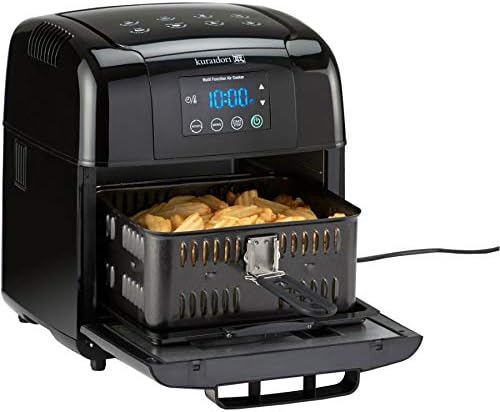
Figure 1: The KURAIDORI Air Fryer with its main cooking basket extended, containing food. This view highlights the digital display and the overall compact design of the appliance.
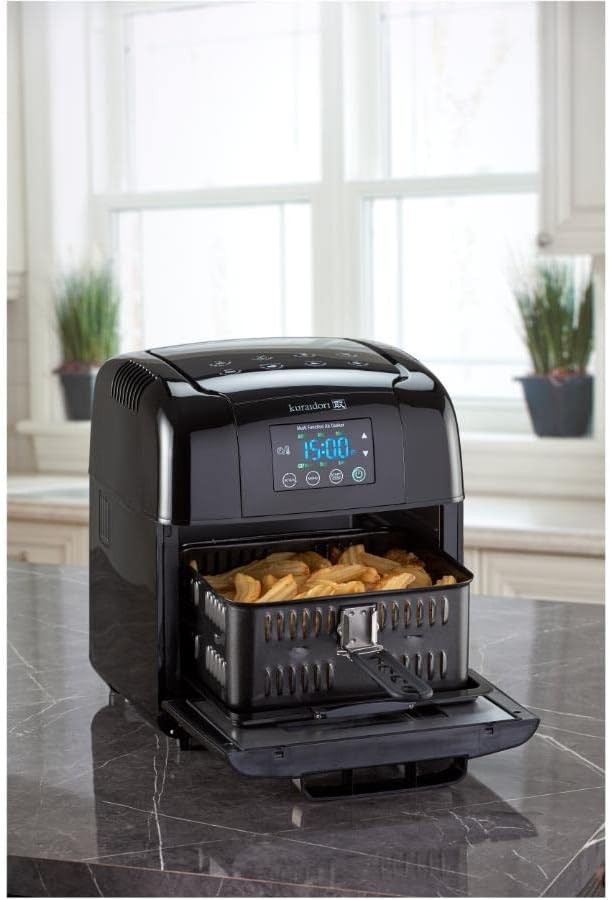
Figure 2: The KURAIDORI Air Fryer positioned on a kitchen counter, demonstrating its size and appearance in a typical home environment. The cooking basket is partially open, showing its contents.
Key Components:
- Main Unit: Houses the heating element, fan, and control panel.
- Digital LED Display: For setting and monitoring cooking parameters.
- Control Panel: Touch controls for temperature, timer, and presets.
- Transparent Door Panel: Allows visual monitoring of food during cooking.
- Fryer Basket: Primary cooking accessory for air frying.
- Grill Inserts (Two): For grilling various foods.
- Rotisserie Spindle: For rotisserie cooking.
- Non-stick Pizza Pan: For baking pizzas or other flat items.
Setup
Unpacking:
- Carefully remove the air fryer and all accessories from the packaging.
- Remove any packaging materials, stickers, or labels.
- Retain the packaging for future storage or transport.
Before First Use:
- Wipe the exterior of the appliance with a damp cloth.
- Wash the fryer basket, grill inserts, rotisserie spindle, and pizza pan with warm, soapy water. Rinse thoroughly and dry completely.
- Place the air fryer on a stable, heat-resistant surface, ensuring adequate space (at least 6 inches) around the appliance for proper air circulation.
- Plug the power cord into a grounded electrical outlet.
Operating Instructions
Basic Operation:
- Prepare Food: Place your desired food into the appropriate accessory (fryer basket, grill insert, or rotisserie spindle). Do not overfill.
- Insert Accessory: Carefully slide the accessory into the air fryer. Ensure it is securely in place.
- Power On: Plug the appliance into a power outlet. The digital LED display will illuminate.
- Set Temperature: Use the temperature controls to set the desired cooking temperature. The temperature range is 65°C to 200°C (149°F to 392°F).
- Set Timer: Use the timer controls to set the cooking time. The timer can be set from 0 to 60 minutes.
- Start Cooking: Press the Start button to begin the cooking cycle. The appliance will preheat briefly, then begin cooking.
- Monitor Progress: Use the transparent door panel to observe the cooking process.
- Shake/Turn Food (Optional): For even cooking, some foods may require shaking the basket or turning the food halfway through the cooking time.
- End of Cycle: The air fryer will automatically shut off when the timer reaches zero. A chime will sound.
- Remove Food: Carefully pull out the accessory using heat-resistant gloves or tongs. Place food on a serving plate.
Using Cooking Program Presets:
The air fryer comes with pre-programmed settings for common dishes. Refer to the icons on the control panel for specific presets. To use a preset:
- Place food in the air fryer.
- Press the Preset button repeatedly until the desired food icon is selected on the digital display.
- The appliance will automatically set the optimal temperature and time for that preset.
- Press the Start button to begin cooking.
Rotisserie Function:
For rotisserie cooking, secure the food onto the rotisserie spindle according to the instructions provided with the accessory. Insert the spindle into the designated slots inside the air fryer. Select the rotisserie function on the control panel, if available, or manually set the temperature and time. The rotisserie function will rotate the food for even cooking.
Maintenance and Cleaning
Proper cleaning and maintenance will ensure the longevity and optimal performance of your air fryer.
General Cleaning:
- Unplug and Cool: Always unplug the air fryer from the power outlet and allow it to cool completely before cleaning.
- Exterior: Wipe the exterior of the appliance with a soft, damp cloth. Do not use abrasive cleaners or scouring pads.
- Interior: Wipe the interior with a soft, damp cloth. For stubborn food residue, use a mild dish soap solution. Ensure the interior is dry before next use.
Cleaning Accessories:
- Fryer Basket, Grill Inserts, Rotisserie Spindle, Pizza Pan: These accessories are NOT dishwasher safe. Wash them by hand with warm, soapy water and a non-abrasive sponge. Rinse thoroughly and dry completely before storing or re-using.
- For baked-on food, soak the accessories in warm, soapy water for about 10-15 minutes before cleaning.
- Avoid using metal utensils or harsh abrasive cleaners on non-stick surfaces to prevent damage.
Storage:
Ensure the air fryer and all accessories are clean and dry before storing. Store the appliance in a cool, dry place.
Troubleshooting
If you encounter issues with your air fryer, please refer to the following common problems and solutions:
| Problem | Possible Cause | Solution |
|---|---|---|
| Air fryer does not turn on. | Appliance is not plugged in. Power outlet is not functioning. | Ensure the power cord is securely plugged into a working electrical outlet. Test the outlet with another appliance. |
| Food is not cooked evenly. | Basket is overloaded. Food was not shaken/turned. | Reduce the amount of food in the basket. Cook in smaller batches. Shake the basket or turn the food halfway through the cooking time. |
| White smoke coming from the appliance. | Grease residue from previous use. Excess oil on food. | Clean the interior of the air fryer and accessories thoroughly after each use. Pat food dry before cooking to remove excess oil. |
| Food is not crispy. | Too much moisture in food. Temperature too low or cooking time too short. | Ensure food is patted dry before cooking. Increase temperature or cooking time slightly. |
Specifications
| Model Name | ZD1610R |
| Brand | KURAIDORI |
| Capacity | 5.5 Liters |
| Output Wattage | 1500 Watts |
| Temperature Range | 65°C to 200°C (149°F to 392°F) |
| Timer Control | 0 to 60 minutes |
| Control Method | Touch |
| Inner Material | Stainless Steel |
| Has Nonstick Coating | Yes |
| Is Dishwasher Safe | No |
| Item Weight | 19.18 Pounds |
| Product Dimensions | 10.62 x 11.81 x 14.17 inches |
| UPC | 822733209969 |
Warranty and Support
This product is covered by a manufacturer's warranty. Please refer to the warranty card included in your product packaging for specific terms and conditions, including warranty period and coverage details.
For technical support, troubleshooting assistance, or to inquire about replacement parts, please contact KURAIDORI customer service. Contact information can typically be found on the manufacturer's official website or on the product packaging.
Ask a question about this manual
Ask about setup, troubleshooting, compatibility, parts, safety, or missing instructions. Manuals+ will review the question and use this page’s manual context to help answer it.