
LiNKFOR ULKVC613us-US
LiNKFOR UHF Handheld Rechargeable Microphone System User Manual
Model: ULKVC613us-US (S-105)
Brand: LiNKFOR
1. Introduction
This user manual provides detailed instructions for the LiNKFOR UHF Handheld Rechargeable Microphone System. This all-metal dual cordless microphone system is designed for various applications including karaoke, conferences, parties, and public speaking, offering clear sound and reliable wireless performance.

Figure 1: LiNKFOR UHF Handheld Rechargeable Microphone System
2. Package Contents
Please check the package carefully to ensure all items are present and in good condition:
- 1 x Receiver
- 2 x Wireless Microphones
- 1 x 6.35mm Audio Cable
- 2 x RCA Cables
- 1 x 6.35mm to 3.5mm Adapter
- 1 x 2-in-1 Charging Cable
- 1 x Power Adapter
- 1 x User Manual
- 2 x Microphone Sponges
- 2 x Microphones Anti-Rolling Rings
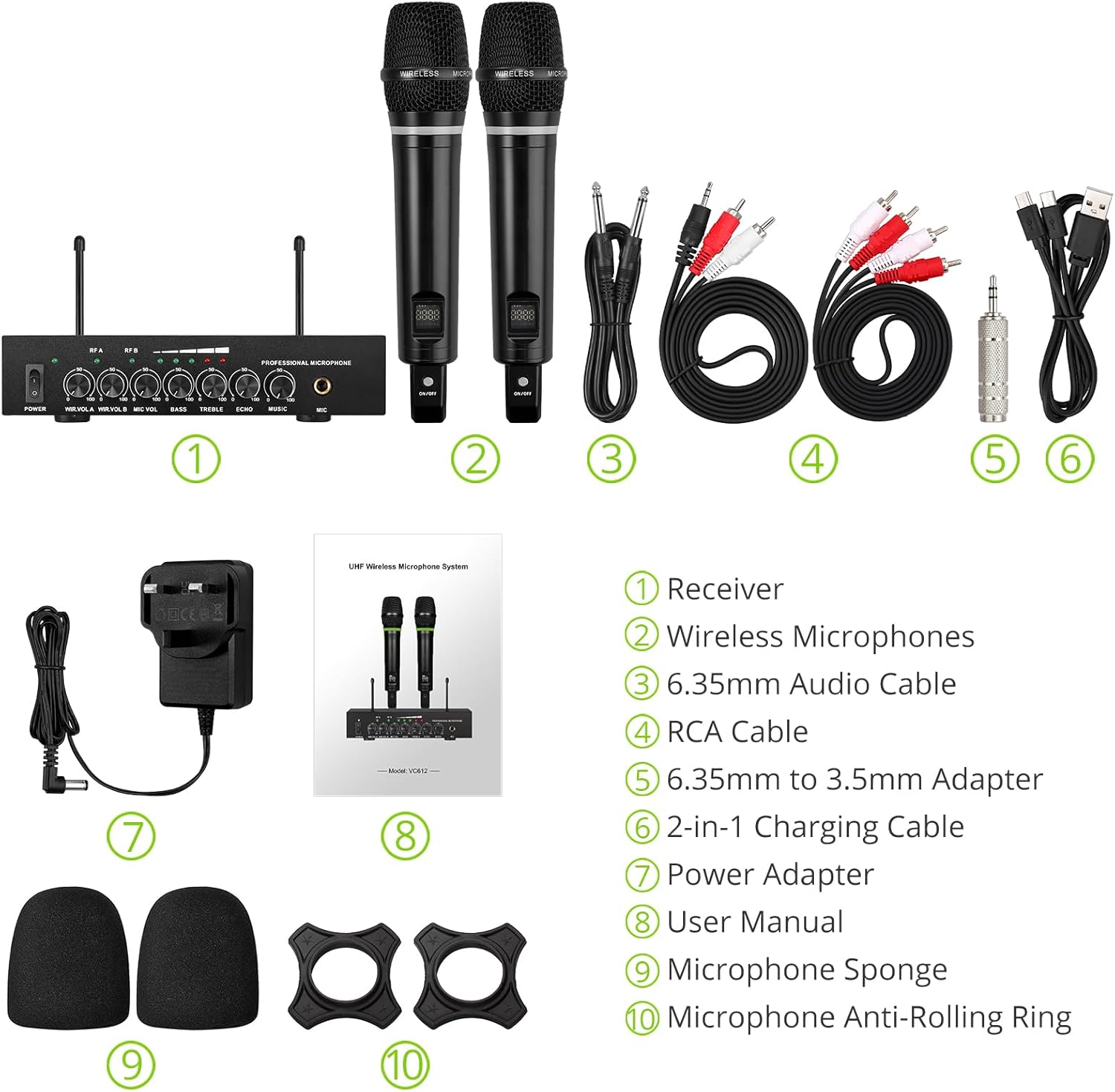
Figure 2: Complete Package Contents
3. Setup Instructions
3.1 Connecting the Receiver
- Power Connection: Connect the included power adapter to the DC 12V INPUT port on the receiver and plug it into a power outlet.
- Audio Output:
- For RCA connection: Use the provided RCA cables to connect the "OUTPUT" ports (L/R) on the receiver to the audio input (e.g., AUX, PC) of your sound system (soundbar, amplifier, mixer, or speakers).
- For 6.35mm connection: Use the 6.35mm audio cable to connect the "6.35mm MIC Output" on the receiver to a 6.35mm microphone input on your sound system.
- External Audio Input (Optional):
- For RCA input: Use RCA cables to connect external audio sources (e.g., DVD player, TV) to the "INPUT" ports (L/R) on the receiver.
- For Bluetooth input: Enable Bluetooth on your mobile device (smartphone, tablet) and search for "X168" to pair and connect.

Figure 3: Receiver Connections (RCA Input/Output, 6.35mm MIC Output)

Figure 4: Bluetooth Connection Setup
3.2 Preparing the Microphones
- Charging: The microphones are rechargeable. Use the provided 2-in-1 charging cable to charge both microphones simultaneously. The LED light ring on the microphone will turn red when charging and green when fully charged or in use. A full charge takes approximately 3-4 hours and provides up to 10 hours of play time.
- Power On/Off: Locate the ON/OFF switch on each microphone and slide it to the "ON" position to power on. The display screen on the microphone will light up.
- Anti-Rolling Rings & Sponges: Attach the anti-rolling rings to the base of the microphones and place the microphone sponges over the mesh heads for protection and improved sound quality.

Figure 5: Charging the Microphones
4. Operating Instructions
- Power On System: Ensure the receiver is powered on (POWER switch on the front panel). The indicator lights for RF A and RF B should illuminate when the corresponding microphone is turned on and connected.
- Adjusting Volume: Use the "WIR.VOL A" and "WIR.VOL B" knobs on the receiver to adjust the individual volume levels of Microphone A and Microphone B.
- Sound Control: The receiver features independent controls for BASS, TREBLE, and ECHO to customize the sound output. Adjust these knobs to achieve your desired audio effect.
- Music Volume: The "MUSIC" knob controls the volume of the external audio input (e.g., Bluetooth, RCA input).
- Wireless Range: The UHF wireless range for the microphones is approximately 165 feet (50 meters). The Bluetooth range for audio input is approximately 32 feet (10 meters).

Figure 6: Wireless Range Overview

Figure 7: Sound Control Features
4.1 Official Product Video
Video 1: LiNKFOR Rechargeable UHF Wireless Microphone System Overview. This video demonstrates the setup, features, and usage of the microphone system, including connections and sound adjustments.
5. Maintenance
- Keep the receiver and microphones clean by wiping them with a soft, dry cloth.
- Avoid exposing the devices to extreme temperatures, humidity, or direct sunlight.
- Store the system in a dry, cool place when not in use.
- Ensure microphones are fully charged before extended use to maximize battery life.
6. Troubleshooting
| Problem | Possible Cause | Solution |
|---|---|---|
| No sound output. |
|
|
| Microphone not charging. |
|
|
| Bluetooth connection issues. |
|
|

Figure 8: Compatibility and Common Questions
7. Specifications
| Feature | Detail |
|---|---|
| Brand | LiNKFOR |
| Model Name | S-105 |
| Item Model Number | ULKVC613us-US |
| Connectivity Technology | UHF Wireless, Bluetooth 5.0 |
| Microphone Form Factor | Handheld |
| Material | Metal |
| Power Source | Battery Powered (Rechargeable Lithium Ion) |
| Play Time | Up to 10 hours (after 3-4 hours charge) |
| UHF Wireless Range | Approx. 165 ft (50m) |
| Bluetooth Range | Approx. 32 ft (10m) |
| Signal-to-Noise Ratio | 95 dB |
| Impedance | 600 Ohm |
| Frequency Response | 1 KHz (Min/Max) |
| Number of Channels | 2 |
| Item Dimensions (L x W x H) | 16.54 x 12.99 x 3.31 inches |
| Item Weight | 4.84 pounds (2.2 Kilograms) |
| Compatible Devices | Amplifier, Audio Mixer, Karaoke Machine, TV, Laptop, Smartphones (not Bluetooth Speakers) |

Figure 9: Product Dimensions
8. Warranty and Support
For warranty information or technical support, please refer to the contact details provided in your product packaging or visit the official LiNKFOR website. Keep your purchase receipt for warranty claims.
LiNKFOR is committed to providing innovative products and reliable connectivity solutions. For further assistance, please contact customer service.
Ask a question about this manual
Ask about setup, troubleshooting, compatibility, parts, safety, or missing instructions. Manuals+ will review the question and use this page’s manual context to help answer it.