
1. Product Overview
The HOOBRO End Table with Charging Station (Model BG43UBZP201) is a versatile furniture piece designed for living rooms, bedrooms, and home offices. It features a compact design with integrated charging capabilities, including AC outlets, USB, and Type-C ports. The table provides convenient storage with two drawers and open shelves, supported by a sturdy metal frame and engineered wood construction.

Image: The HOOBRO End Table with Charging Station positioned next to a bed, showcasing its compact size and integrated charging functionality.

Image: A pair of HOOBRO End Tables with Charging Stations placed on either side of a sofa, demonstrating their utility in a living room environment.
2. Safety Information
Please read and understand all safety instructions before assembly and use. Failure to follow these instructions may result in injury or damage to the product.
- Do not expose the product to direct sunlight for extended periods.
- Avoid placing the product in damp environments to prevent material degradation.
- Ensure all screws and fasteners are securely tightened during assembly and periodically check for looseness.
- Do not overload the table or drawers beyond their weight capacity.
- Keep children away from small parts during assembly.
- Only use the charging station for compatible electronic devices.
3. Package Contents
Verify that all components are present before beginning assembly. If any parts are missing or damaged, please contact customer support.
- Tabletop Panel
- Middle Shelf Panel with Charging Station
- Bottom Panel
- Side Panels (for drawers)
- Drawer Fronts
- Metal Frame Components
- Adjustable Feet
- Drawer Knobs
- Accessory Kit (screws, dowels, Allen key)
- Instruction Manual
4. Assembly Instructions
Assembly typically requires two people and takes approximately 60-90 minutes. An Allen key is provided, but a power drill may expedite the process. Follow the numbered steps in the included diagrammatic instructions for best results.
- Unpack and Identify Parts: Carefully remove all components from the packaging. Lay them out on a clean, soft surface to prevent scratches. Refer to the parts list to identify each piece.
- Assemble the Metal Frame: Connect the metal frame components using the provided screws. Ensure all connections are secure but do not overtighten initially.
- Attach Adjustable Feet: Screw the adjustable feet into the bottom of the metal frame legs. These can be adjusted later to level the table on uneven surfaces.
- Install Drawer Housing: Attach the side and back panels to form the drawer housing, securing them to the metal frame.
- Assemble Drawers: Construct the two drawers by attaching the side, front, and back panels. Insert the bottom panel and attach the drawer knob to the front.
- Insert Charging Station: Place the middle shelf panel, which includes the pre-installed charging station, into the frame and secure it. Ensure the power cord is routed correctly.
- Attach Top Panel: Secure the tabletop panel to the top of the metal frame.
- Final Tightening and Leveling: Once all parts are assembled, go back and tighten all screws. Adjust the feet as needed to ensure the table is stable and level.

Image: A close-up view of the adjustable foot, illustrating its 360-degree rotation for leveling the table.
5. Operating Instructions (Charging Station)
The integrated charging station provides convenient power access for your electronic devices.
- Connect to Power: Plug the 150 cm (4.9-foot) power cord from the charging station into a standard wall outlet.
- Utilize AC Outlets: The charging station includes two 3-prong AC outlets (120V/12A). Plug in devices such as lamps, laptops, or other small appliances.
- Use USB Ports: One USB port (5V/2A) is available for charging smartphones, tablets, and other USB-powered devices.
- Use Type-C Port: One Type-C port (5V/2A) is available for charging compatible devices.
Important: Do not exceed the maximum power rating of the charging station. Disconnect the power cord from the wall outlet when not in use or during electrical storms.
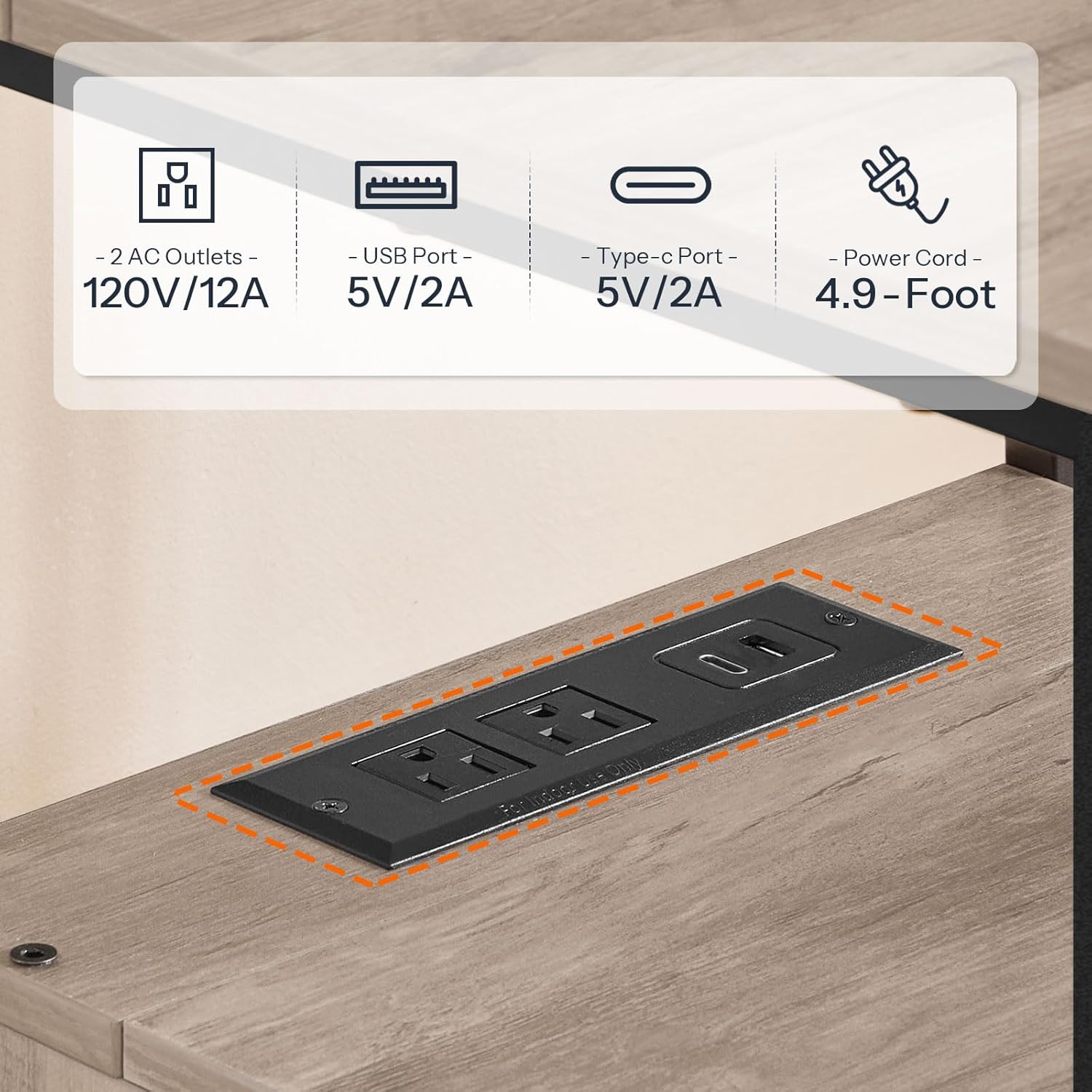
Image: A detailed view of the charging station, highlighting its two AC outlets, one USB port, and one Type-C port, along with their specifications.
6. Maintenance
Proper care will ensure the longevity of your HOOBRO End Table.
- Cleaning: Wipe the surface with a soft, damp cloth. Avoid harsh chemicals or abrasive cleaners that may damage the finish.
- Spills: Immediately wipe up any liquid spills to prevent water damage to the engineered wood.
- Environmental Conditions: Keep the table away from direct heat sources and areas of high humidity.
- Fastener Checks: Periodically check all screws and connections to ensure they remain tight. Retighten as necessary.
7. Troubleshooting
If you encounter any issues with your end table, refer to the following common solutions:
| Problem | Possible Cause | Solution |
|---|---|---|
| Table is wobbly | Uneven floor; loose fasteners | Adjust the leveling feet; tighten all assembly screws. |
| Drawers do not slide smoothly | Incorrect assembly; obstruction | Recheck drawer assembly steps; ensure no items are blocking the drawer path. |
| Charging station not working | Not plugged in; power outage; faulty device | Ensure the power cord is securely plugged into a live wall outlet; check household circuit breaker; test with a different device. |
8. Specifications
Key technical details and dimensions for the HOOBRO End Table with Charging Station.
- Model: BG43UBZP201
- Dimensions (L x W x H): 39 x 39 x 59 cm (15.3 x 15.3 x 23.2 inches)
- Material: Engineered Wood, Metal Frame
- Color: Greige + Black
- Charging Station:
- 2 x AC Outlets (120V/12A)
- 1 x USB Port (5V/2A)
- 1 x Type-C Port (5V/2A)
- Power Cord Length: 150 cm (4.9 feet)
- Number of Drawers: 2
- Number of Shelves: 2 (including the top surface and the shelf with charging station)
- Recommended Use: Indoor

Image: A diagram illustrating the precise dimensions of the end table, including length, width, height, and drawer measurements.
9. Warranty and Support
For warranty information, product support, or to report missing/damaged parts, please contact HOOBRO customer service through the retailer where the product was purchased or visit the official HOOBRO website. Please have your model number (BG43UBZP201) and purchase details ready when contacting support.


