
1. Introduction
This manual provides essential instructions for setting up, operating, and maintaining your ZTE Cymbal U Link II Z2335CA flip phone. Please read this guide thoroughly to ensure proper use and to maximize the performance of your device.
The ZTE Cymbal U Link II Z2335CA is an unlocked 4G flip phone designed for straightforward communication. It features a 2.8-inch main display, a 1.7-inch external display, a 2MP camera, and 8GB of internal storage, expandable via microSD.
2. Package Contents
Ensure all items are present in your product package:
- ZTE Cymbal U Link II Z2335CA Flip Phone
- USB Cable
- Battery (1 Lithium Ion battery)
3. Device Overview
Familiarize yourself with the physical features of your ZTE Cymbal U Link II Z2335CA.

Figure 3.1: Phone Open - Main Screen and Keypad
This image displays the ZTE Cymbal U Link II Z2335CA flip phone in its open position, revealing the main 2.8-inch color display at the top and the full alphanumeric keypad with navigation buttons below. The screen shows the time '5:03 PM' and 'Thu, Apr 1', with options for 'Contacts', 'Menu', and 'Messages' at the bottom. The keypad includes standard number keys, call/end buttons, a central navigation pad, and function keys.

Figure 3.2: Phone Closed - External Display
This image shows the ZTE Cymbal U Link II Z2335CA flip phone in its closed state. The external 1.7-inch TFT display is visible, showing '4:55 PM' and 'Thu, Apr 1', along with a 'No SIM card' indicator. The textured outer casing is also visible.
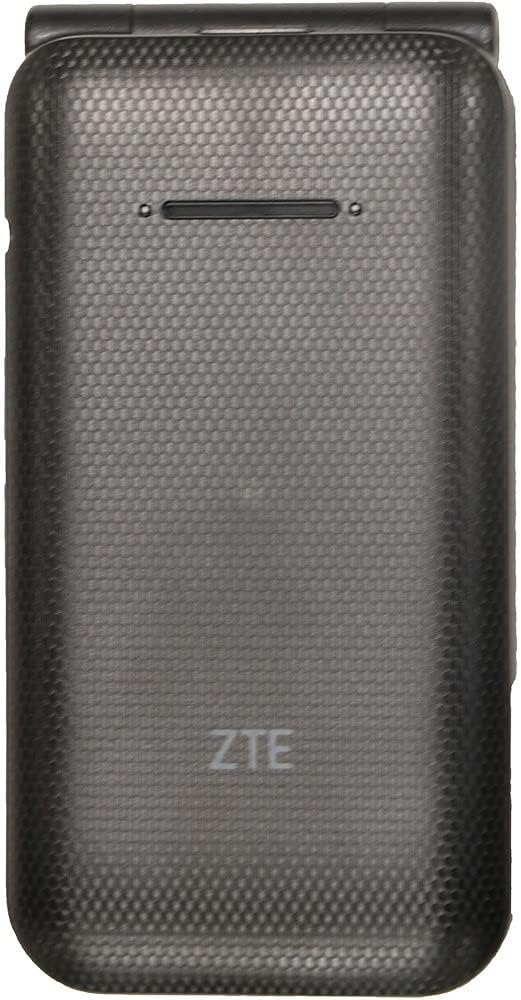
Figure 3.3: Phone Closed - Back View
This image presents the rear view of the ZTE Cymbal U Link II Z2335CA flip phone when closed. The textured black casing is prominent, featuring the ZTE logo embossed near the bottom. A speaker grille is visible at the top.

Figure 3.4: Phone Open - Top-Down View
This image provides a top-down perspective of the ZTE Cymbal U Link II Z2335CA flip phone in its open configuration. It highlights the hinge mechanism connecting the two halves of the phone. The internal 2MP camera lens is visible on the upper half, just above the hinge.

Figure 3.5: Phone Open - Left Side View
This image shows the left side of the ZTE Cymbal U Link II Z2335CA flip phone when open. It reveals the volume up and down buttons located on the side of the upper half of the phone. The phone's slim profile is also visible.

Figure 3.6: Phone Open - Right Side View
This image displays the right side of the ZTE Cymbal U Link II Z2335CA flip phone when open. It shows the power/lock button and the MicroUSB 2.0 charging port located on the side of the lower half of the phone.
4. Setup
4.1. Installing the SIM Card
- Power off the phone and remove the back cover.
- Locate the SIM card slot.
- Insert your Nano-SIM card into the designated slot with the gold contacts facing down, ensuring it clicks into place.
- Replace the back cover.
4.2. Installing the Battery
- With the back cover removed, align the battery's gold contacts with the terminals in the battery compartment.
- Gently press the battery into place.
- Replace the back cover.
4.3. Charging the Phone
- Connect the USB cable to the MicroUSB port on the right side of the phone.
- Connect the other end of the USB cable to a compatible USB power adapter or a computer's USB port.
- Allow the phone to charge until the battery indicator shows a full charge.
5. Operating Instructions
5.1. Powering On/Off
- To Power On: Press and hold the Power/End Call button until the screen lights up.
- To Power Off: Press and hold the Power/End Call button, then select 'Power Off' from the options on the screen.
5.2. Making and Receiving Calls
- To Make a Call: Open the phone, dial the number using the keypad, and press the Green Call button.
- To Answer a Call: When the phone rings, open the flip and press the Green Call button.
- To End a Call: Press the Red End Call button or close the flip.
5.3. Sending and Receiving Messages
- To Send a Message: From the main menu, navigate to 'Messages', select 'New Message', enter the recipient's number and your message, then send.
- To Read a Message: New messages will typically appear as a notification. Navigate to 'Messages' from the main menu to view your inbox.
5.4. Using the Camera
- From the main menu, select 'Camera'.
- Frame your shot using the main display.
- Press the designated camera button or the center navigation button to capture a photo.
6. Maintenance
- Cleaning: Use a soft, dry cloth to clean the phone's screen and body. Avoid liquid cleaners.
- Storage: Store the phone in a cool, dry place away from direct sunlight and extreme temperatures.
- Battery Care: Do not expose the battery to high temperatures or puncture it. Use only approved chargers.
- Water Resistance: This phone is not water-resistant. Avoid exposure to liquids.
7. Troubleshooting
| Problem | Possible Solution |
|---|---|
| Phone does not power on | Ensure the battery is correctly installed and charged. Connect the charger and try again. |
| No network signal | Check if the SIM card is properly inserted. Move to an area with better network coverage. Contact your service provider. |
| Cannot make or receive calls | Verify network signal. Check if your SIM card is active and has sufficient credit/plan. |
| Battery drains quickly | Reduce screen brightness. Close unused applications. Limit background data usage. |
| Phone is unresponsive | Remove and reinsert the battery to perform a soft reset. |
8. Specifications
- Model: Z2335CA
- Main Display: 2.8 inches, 240 x 320 pixels resolution
- External Display: 1.7 inches TFT
- Processor: Qualcomm QM 215, 1.1 GHz CPU Speed
- RAM: 1GB
- Internal Storage: 8GB ROM
- Expandable Storage: MicroSD up to 32GB
- Camera: 2MP (Rear)
- Battery: 1600mAh Removable Lithium Ion
- Connectivity: 4G LTE (B2, 4, 5, 12, 66, 71, 41), 3G UMTS (B2, 4, 5), 2G GSM (850, 1900), Bluetooth 4.2, MicroUSB 2.0
- Operating System: Proprietary (Linux 3.18.71)
- Audio Jack: 3.5 mm
- Dimensions: 6 x 4 x 2 inches
- Weight: 9.1 ounces
- Color: Black
9. Warranty and Support
For warranty information and customer support, please refer to the documentation provided at the time of purchase or contact your retailer. As this is a renewed product, warranty terms may vary. Please consult the specific warranty details provided by the seller.


