
1. Introduction
Thank you for choosing the iOCHOW Automatic Paper Shredder. This manual provides essential information for the safe and efficient operation, maintenance, and troubleshooting of your shredder. Please read it thoroughly before use and retain it for future reference.
This shredder is designed for micro-cutting paper documents, credit cards, and staples, offering a high level of security (P-4). It features both automatic and manual feed options, a large capacity waste bin, and multiple safety protections.
2. Safety Instructions
To ensure safe operation and prevent damage, observe the following safety guidelines:
- Keep Hands and Clothing Clear: Always keep hands, loose clothing, jewelry, and long hair away from the paper entry slot to prevent injury.
- Supervise Children and Pets: This appliance is not intended for use by children. Keep children and pets away from the shredder at all times.
- Power Source: Connect the shredder only to a properly grounded power outlet with the correct voltage. Do not overload the power outlet.
- Avoid Overloading: Do not exceed the maximum sheet capacity for either automatic (150 sheets) or manual (10 sheets) feeding. Overloading can cause jams and damage the motor.
- Paper Only: This shredder is designed for paper, credit cards, and small staples. Do not shred plastic, cardboard, adhesive labels, large paper clips, or other non-paper materials.
- Proper Alignment: Insert paper straight into the feed slot to prevent jams.
- Overheat Protection: The shredder is equipped with overheat protection. If it runs continuously for too long, it will automatically shut off to cool down. Allow sufficient cooling time before resuming operation.
- Empty Bin Regularly: Empty the waste bin frequently to prevent overflow and potential paper jams.
- Unplug When Not in Use: Always unplug the shredder before moving, cleaning, or performing any maintenance.
- Flammable Materials: Do not place the shredder near heat sources or in damp environments. Do not spray flammable liquids into the shredder.

Image: Essential Usage Guidelines for Shredder, illustrating key safety and usage tips such as 'Only for Paper Use', 'Avoid Overloading', 'Remove Clips', 'Proper Alignment', 'Cool Down', 'Empty Bin Regularly', and 'Safety First'.
3. Product Components
Familiarize yourself with the main components of your iOCHOW paper shredder:
- Automatic Feed Tray: For shredding up to 150 sheets automatically.
- Manual Feed Slot: For shredding up to 10 sheets, credit cards, or staples manually.
- Control Panel: Includes Power Switch, Forward, Reverse buttons, and indicator lights (Full, Overheating/Overloading, Power).
- Waste Bin: 25-liter capacity, designed to collect shredded materials. Features a transparent window to monitor fill level.
- Casters: Four wheels for easy mobility.
- Shredding Blades: High-strength nitrided steel blades for micro-cut shredding.

Image: Close-up view of the shredder's internal components, showing the metal spiral blade and the cylindrical motor component, labeled 'Lame en Acier' (Steel Blade) and 'Moteur Puissant' (Powerful Motor).
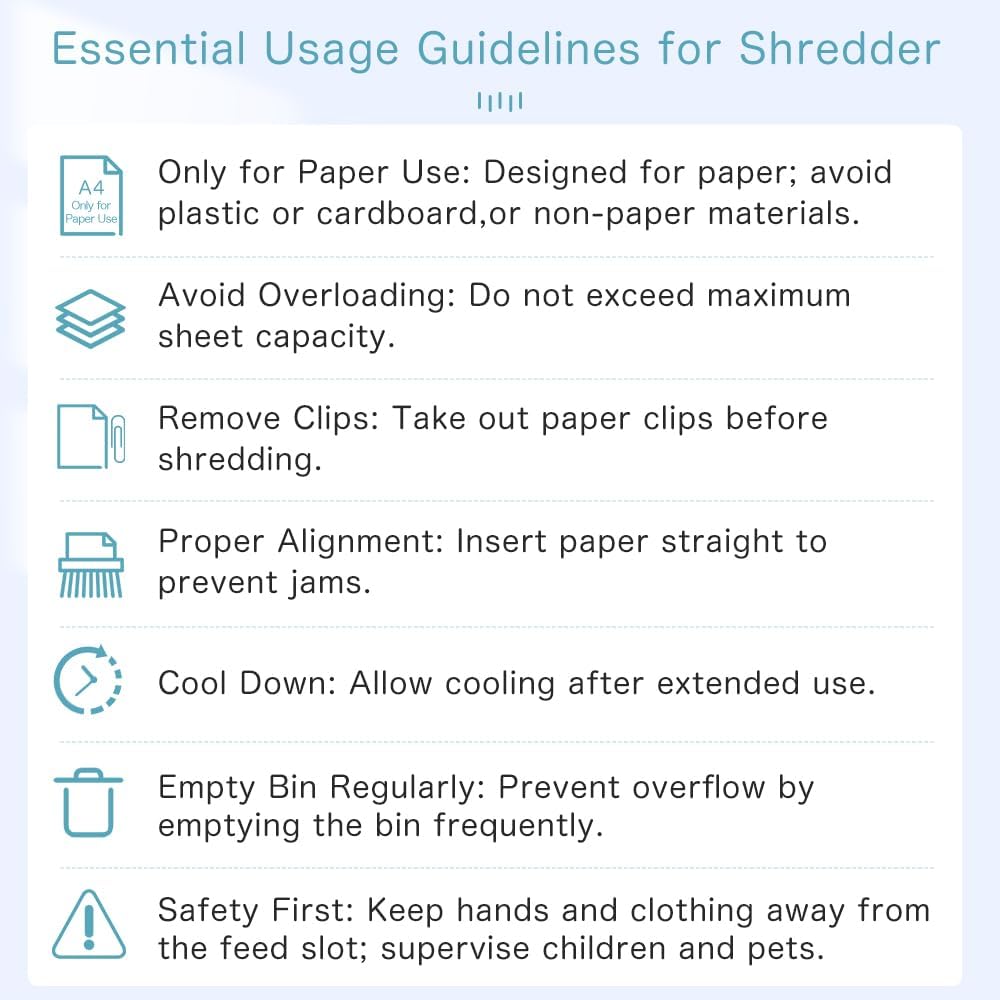
Image: Detailed view of the shredder's internal components, highlighting the high-strength nitrided steel blade, powerful motor, and universal casters for easy mobility. Also shows the transparent window of the 25L bin.
4. Setup
- Unpack: Carefully remove the shredder from its packaging.
- Position: Place the shredder on a flat, stable surface. Ensure there is adequate space around the unit for ventilation.
- Connect Power: Plug the power cord into a standard, grounded electrical outlet.
- Check Bin: Ensure the waste bin is correctly inserted into the shredder body. The shredder will not operate if the bin is not properly seated.
5. Operating Instructions
5.1 Powering On/Off
Press the 'Power Switch' button on the control panel to turn the shredder on. The 'Power' indicator light will illuminate. Press it again to turn off the shredder.
5.2 Automatic Feed Mode
For shredding large volumes of paper:
- Ensure the shredder is powered on.
- Stack up to 150 sheets of A4 paper neatly into the automatic feed tray.
- The shredder will automatically detect the paper and begin shredding.
- The maximum continuous run time in automatic mode is approximately 30 minutes. After this, the shredder may enter a cool-down period.
5.3 Manual Feed Mode
For shredding smaller quantities or specific items:
- Ensure the shredder is powered on.
- Insert up to 10 sheets of A4 paper into the manual feed slot.
- The shredder will detect the paper and start shredding.
- The maximum continuous run time in manual mode is approximately 5 minutes.
5.4 Shredding Credit Cards and Staples
The shredder can safely shred credit cards and small staples. Insert these items one at a time into the manual feed slot.

Image: Comparison of automatic and manual shredding modes. The manual feed slot is shown accepting 10 sheets, while the auto feed tray is shown with 150 sheets, demonstrating the shredder's dual functionality.

Image: Close-up of the shredder's control panel, featuring buttons for Reverse, Forward, and Power Switch, along with indicator lights for 'Full', 'Overheating/Overloading', and 'Power'. This section is labeled 'Protection de Sécurité' (Safety Protection).
6. Maintenance
6.1 Emptying the Waste Bin
The transparent window on the waste bin allows you to monitor the fill level. When the 'Full' indicator light illuminates or the bin appears full, slide out the bin and empty the shredded contents. The shredder will automatically stop operating when the bin is removed for safety.
6.2 Clearing Paper Jams
If a paper jam occurs, the shredder will stop. Follow these steps:
- Press the 'Reverse' button on the control panel to attempt to clear the jam by backing out the paper.
- If the paper does not clear, turn off and unplug the shredder.
- Carefully remove the jammed paper from the feed slot. Use caution as the blades are sharp.
- Plug in and power on the shredder. Test with a single sheet of paper.
6.3 Overheat Protection
If the shredder operates continuously for an extended period, the 'Overheating/Overloading' indicator light may illuminate, and the unit will automatically shut down to prevent damage. Allow the shredder to cool down for approximately 45 minutes before resuming operation.
6.4 General Care
Wipe the exterior of the shredder with a soft, dry cloth. Do not use abrasive cleaners or solvents. Regularly oil the shredder blades with shredder oil to maintain performance and extend blade life.

Image: Illustration of how to remove jammed paper by opening the cover and the upgraded automatic paper feeder designed to prevent jams.

Image: Depicts multiple safety features including overheat protection (automatic stop when overheated), automatic power off (stops when bin is pulled out), and flame retardant material to prevent fire risks.
7. Troubleshooting
| Problem | Possible Cause | Solution |
|---|---|---|
| Shredder does not turn on. | No power, waste bin not inserted correctly, overheat protection active. | Check power connection. Ensure bin is fully inserted. Allow shredder to cool down if overheated. |
| Paper jam. | Overloading, paper inserted incorrectly, staples/clips not removed. | Press 'Reverse' button. If unsuccessful, unplug and manually clear paper. Reduce paper quantity. |
| Shredder stops during operation. | Overheat protection, waste bin full or removed. | Allow shredder to cool. Empty and reinsert waste bin. |
| Shredder is noisy or slow. | Blades need lubrication, excessive paper dust. | Oil the shredder blades. Empty waste bin and clean any visible paper dust. |
8. Specifications
| Feature | Detail |
|---|---|
| Model | SZJ2-0417 |
| Shred Type | Micro-Cut |
| Shred Size | 3 x 10 mm |
| Security Level | P-4 |
| Automatic Feed Capacity | Up to 150 sheets (A4) |
| Manual Feed Capacity | Up to 10 sheets (A4) |
| Waste Bin Capacity | 25 Liters |
| Continuous Run Time (Auto) | Up to 30 minutes |
| Continuous Run Time (Manual) | Up to 5 minutes |
| Cool Down Time | Approx. 45 minutes |
| Noise Level | 60 Decibels |
| Compatible Materials | Paper, Credit Cards, Small Staples |
| Dimensions (L x W x H) | 36 x 25 x 49 cm |
| Weight | 9.7 Kilograms |
| Power Source | Electric Cable |
| Special Features | Automatic Start/Stop, Overheat Protection, Bin Full Sensor, Portable with Casters |
9. Warranty and Support
9.1 Warranty Information
This iOCHOW product comes with a 1-year warranty from the date of purchase. Additionally, a 1-month free return and exchange period is offered. The warranty covers manufacturing defects and malfunctions under normal use. It does not cover damage caused by misuse, neglect, unauthorized repairs, or natural disasters.
9.2 Customer Support
For technical assistance, warranty claims, or any questions regarding your iOCHOW paper shredder, please contact our customer support team. Refer to your purchase documentation or the iOCHOW official website for contact details.