
1. Introduction
This manual provides detailed instructions for the proper use and programming of your ARRAROWN Surpass Hobby ESC Programming Card. This device is designed to configure various parameters of compatible Surpass Hobby brushless Electronic Speed Controllers (ESCs) for RC cars, enhancing control and performance.
Important Compatibility Note: This programming card is exclusively compatible with Surpass Hobby brand ESCs, specifically models ranging from 25A to 150A. It is not designed to work with ESCs from other manufacturers.

Image 1.1: The Surpass Hobby ESC Programming Card with its BEC connection cable. This card is used for programming compatible brushless ESCs.
2. Setup
Before operating the programming card, ensure your Surpass Hobby ESC is properly connected to your RC vehicle's power source and receiver, as per your ESC's instruction manual.
2.1 Connecting the Programming Card
- Locate the BEC (Battery Eliminator Circuit) cable on your ESC.
- Connect the BEC wires from the ESC to the corresponding port on the programming card. Ensure the connection is secure and the cable's color direction matches the port's indication on the card.
- Turn on the ESC. For 80A and 120A ESCs, it may be necessary to press and hold specific keys on the ESC during power-on to enter programming mode. Refer to your ESC manual for specific instructions.

Image 2.1: The programming card shown alongside a compatible ESC and motor, illustrating its application in RC car setups. The card is compatible with 1/8, 1/10, 1/12, 1/14, 1/16, and 1/18 scale RC cars.
3. Operating Instructions
Follow these steps to program your ESC using the programming card:

Image 3.0: A close-up view of the programming card's buttons: Down (↓), Right (→), Programme, and Reset.
- After connecting the BEC wires and turning on the ESC, the green LED on the programming card will flash twice and then turn off. This indicates a successful connection. If the connection fails, the green LED will not flash as described. The white LED will illuminate to show the current value of the selected item.
- Press the "↓" (Down) key to navigate through the different programmable parameters.
- Once a parameter is selected, press the "→" (Right) key to cycle through and select the desired value for that parameter.
- To confirm your selections, press the "Program" key. The green LED will illuminate immediately and then turn off within 5 seconds, indicating successful programming. If the green LED does not behave this way, programming has failed.
- To restore the ESC to its factory default settings, press the "Reset" key. After resetting, it is recommended to reprogram the ESC after turning off and then turning on the power.
3.1 Programmable Parameters
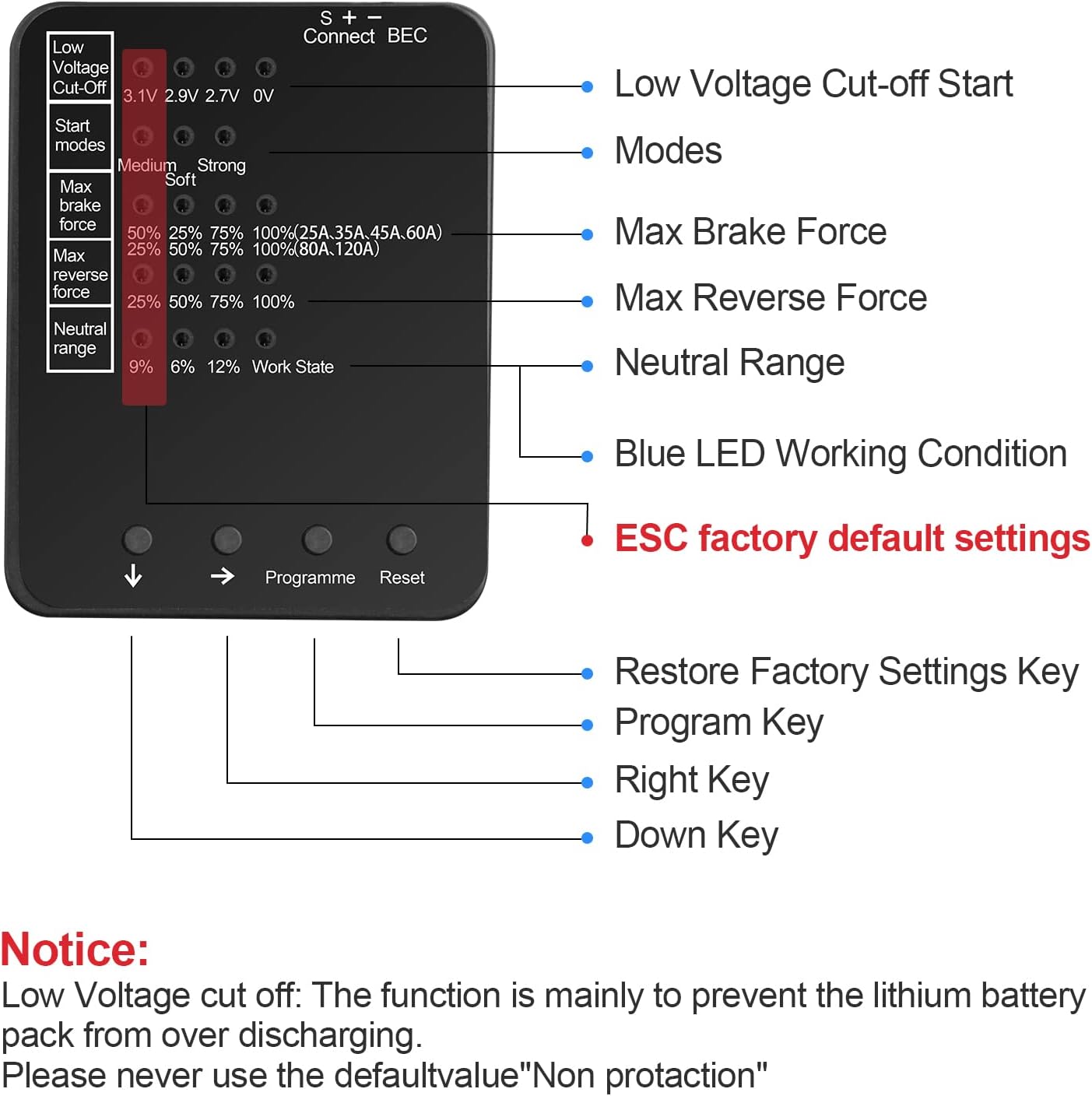
Image 3.1: Detailed diagram of the programming card's interface, showing various programmable parameters and their corresponding LED indicators.
- Low Voltage Cut-Off: Protects the battery from over-discharging. Options include 3.1V, 2.9V, 2.7V, or no detection. (Default: 3.1V)
- Start Mode: Controls the initial acceleration. Options are Normal, Soft, and Strengthened. (Default: Normal)
- Maximum Braking Force: Sets the intensity of the brake.
- For 25A, 35A, 45A, 60A ESCs: 50%, 25%, 75%, 100%. (Default: 50%)
- For 80A, 120A ESCs: 25%, 50%, 75%, 100%. (Default: 25%)
- Maximum Reversing Force: Sets the intensity of the reverse throttle. Options are 25%, 50%, 75%, 100%. (Default: 25%)
- Neutral Range: Defines the dead band around the neutral throttle position. Options are 9%, 6%, 12%. (Default: 9%)
4. Maintenance
The Surpass Hobby ESC Programming Card requires minimal maintenance. To ensure its longevity and proper function:
- Keep the card clean and free from dust, dirt, and moisture.
- Store the card in a dry, cool place away from direct sunlight and extreme temperatures.
- Avoid dropping the card or subjecting it to strong impacts.
- Regularly inspect the BEC connection cable for any signs of wear or damage. Replace if necessary.
5. Troubleshooting
If you encounter issues while using the programming card, refer to the following common problems and solutions:
| Problem | Possible Cause | Solution |
|---|---|---|
| Green LED does not flash twice or connection fails. | Incorrect BEC cable connection, ESC not powered on, or incompatible ESC. |
|
| Programming fails (Green LED does not turn off within 5 seconds after pressing "Program"). | Interruption during programming, unstable connection, or incorrect procedure. |
|
| "Work State" light blinks constantly. | Indicates an error or an uninitialized state. |
|
6. Specifications
- Product Dimensions: 2.36 x 1.88 x 0.2 inches (60 x 47 x 6 mm)
- Item Weight: 1.76 ounces (26g)
- Compatibility: Surpass Hobby Brushless ESCs (25A, 35A, 45A, 60A, 80A, 120A, 150A)
- RC Car Scale Compatibility: 1/8, 1/10, 1/12, 1/14, 1/16, 1/18 scale RC cars
- Functions: Low Voltage Cut-Off, Start Mode, Max Braking Force, Max Reversing Force, Neutral Range adjustment.

Image 6.1: The programming card displaying its physical dimensions for reference.
7. Warranty Information
Specific warranty details for the ARRAROWN Surpass Hobby ESC Programming Card may vary. Please refer to the product packaging or contact the manufacturer directly for the most accurate and up-to-date warranty information.
8. Customer Support
For technical assistance, troubleshooting beyond this manual, or inquiries regarding your product, please contact ARRAROWN customer support. Contact details can typically be found on the product packaging or the official ARRAROWN website.
You can also visit the ARRAROWN Store on Amazon for more information and product listings.