
Tapo Tapo C110P2
TP-Link Tapo C110P2 2K Security Camera User Manual
Model: Tapo C110P2
Brand: Tapo
Introduction
The Tapo C110 Home Security Wi-Fi Camera provides crystal-clear 2K HD video, allowing you to monitor your home, family, and pets with ease. Equipped with advanced features like motion detection, two-way audio, and night vision, this camera ensures you stay connected and informed. It supports both local storage via a microSD card and cloud storage options, offering flexible recording solutions. The Tapo C110P2 is designed for indoor use and integrates seamlessly with smart home ecosystems like Alexa and Google Home.

Image: Two Tapo C110P2 cameras, showcasing their compact design.
What's in the Box
Please check the package contents to ensure all items are present:
- 2 x Tapo C110 WiFi Camera
- 2 x Power Adapter
- User Guide
- Mounting Screws
- Mounting Plate
Setup
Follow these steps to set up your Tapo C110P2 camera:
- Download the Tapo App: Search for 'Tapo' in the Apple App Store or Google Play Store and download the official Tapo app.
- Power On Your Camera: Plug in your Tapo C110P2 camera using the provided power adapter. Wait for the LED indicator to blink green and orange, indicating it's ready for setup.
- Follow In-App Guide: Open the Tapo app, create a TP-Link ID if you don't have one, and follow the on-screen instructions to add your camera. Ensure your phone is connected to a 2.4GHz Wi-Fi network during setup.

Image: Quick setup guide for the Tapo camera.

Image: The Tapo app interface on a smartphone, indicating compatibility with Android and iOS.
Operating the Tapo C110P2 Camera
Live View and 2K HD Resolution
Access the live feed of your camera anytime through the Tapo app. The 2K HD resolution (2304x1296 pixels) provides clear and detailed video, allowing you to discern fine details.

Image: Visual comparison highlighting the superior clarity of 2K HD resolution.
Motion Detection and Instant Notifications
The camera features intelligent motion detection. When activity is detected, you will receive instant push notifications on your smartphone. The Tapo C110 also includes baby crying detection, making it suitable for use as a baby monitor.

Image: Example of a motion detection alert received on a smartphone.
Two-Way Audio and Built-in Siren
Communicate with individuals near the camera using the built-in two-way audio feature. This allows you to comfort pets, speak to family members, or deter intruders. For security, a built-in siren can be activated to ward off unwanted visitors.

Image: Demonstrating the two-way audio feature, allowing communication through the camera.
Night Vision
The integrated IR sensor provides clear night vision up to 30 feet, ensuring continuous monitoring even in low-light conditions or complete darkness.

Image: The camera's night vision capability, showing a clear view of a sleeping baby in the dark.
Secure Local and Cloud Storage
Record footage continuously onto a microSD card (up to 512 GB, not included) for local storage. Alternatively, subscribe to Tapo Care for cloud storage, which offers a 30-day video history and additional benefits like motion tracking.
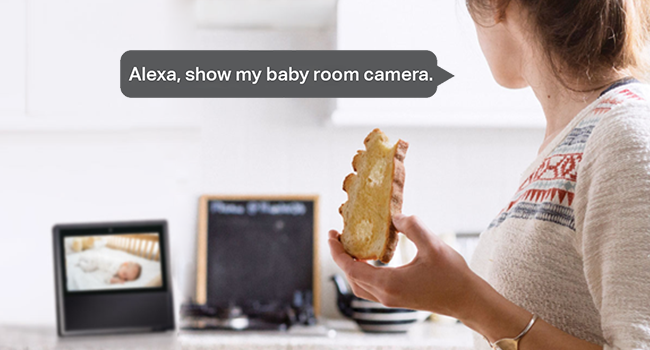
Image: Overview of storage options: encrypted cloud, local recording, and app playback.
Works with Alexa & Google Assistant
Integrate your Tapo C110P2 with Amazon Alexa or Google Assistant for convenient voice control. Use simple voice commands to view the live stream on compatible smart displays like Echo Show or Google Chrome Cast.

Image: Using voice commands with Alexa to view the camera feed.
Device Sharing
Share access to your camera feed with family members or trusted individuals through the Tapo app, allowing multiple users to monitor the same camera simultaneously.
NVR/NAS Compatibility
Tapo cameras are ONVIF and RTSP compatible, allowing them to be integrated into existing Network Video Recorder (NVR) or Network Attached Storage (NAS) monitoring systems for advanced surveillance setups.

Image: The Tapo camera's compatibility with NVR and NAS systems.
Maintenance
- Cleaning: Use a soft, dry cloth to clean the camera lens and body. Avoid using liquid cleaners or aerosols that may damage the device.
- Placement: Ensure the camera is placed in a stable location, away from direct sunlight, heat sources, and excessive moisture.
- Firmware Updates: Regularly check for and install firmware updates via the Tapo app to ensure optimal performance, security, and access to new features.
- MicroSD Card: If using a microSD card, ensure it is compatible with the device (refer to TP-Link's website for compatibility) and periodically check its status in the app.
Troubleshooting
Camera Not Connecting to Wi-Fi
- Ensure your Wi-Fi network is 2.4GHz. The Tapo C110P2 does not support 5GHz networks.
- Check your Wi-Fi password for accuracy.
- Move the camera closer to your Wi-Fi router to improve signal strength.
- Restart your router and the camera.
Poor Video Quality / Grainy Night Vision
- Ensure the camera lens is clean and free from dust or smudges.
- Check your internet connection speed. A stable and fast connection is crucial for 2K streaming.
- For night vision, ensure there are no reflective surfaces close to the camera that might cause glare.
MicroSD Card Not Detected or Recording
- Ensure the microSD card is inserted correctly.
- Verify the microSD card is compatible with the Tapo C110P2 (up to 512 GB). Refer to TP-Link's official website for a list of compatible cards.
- Format the microSD card through the Tapo app settings.
- If the issue persists, try a different microSD card.
Two-Way Audio Issues
- Ensure your phone's microphone is enabled for the Tapo app.
- Check your internet connection for stability, as audio streaming requires consistent bandwidth.
- Adjust the volume settings in the Tapo app.
Specifications
| Feature | Detail |
|---|---|
| Model | Tapo C110P2 |
| Video Capture Resolution | 2K (1296p) |
| Connectivity | Wi-Fi (2.4GHz) |
| Night Vision Range | Up to 30 Feet |
| Storage Options | MicroSD Card (up to 512 GB), Cloud Storage (Tapo Care subscription) |
| Audio | 2-Way Audio, Built-in Siren |
| Smart Home Compatibility | Amazon Alexa, Google Assistant |
| Indoor/Outdoor Usage | Indoor |
| Power Source | Corded Electric (6 watts) |
| Dimensions (L x W x H) | 2.66 x 2.15 x 3.89 inches |
| Weight | 1.1 pounds |
| Field of View | 110 Degrees |
Warranty and Support
For warranty information and technical support, please contact TP-Link directly. They are available to assist with any product-related inquiries or issues.
- Phone: (866) 225-8139
- Website: myproducts.tp-link.com/us
- Email: support.USA@tp-link.com
Note: This manual provides general instructions. For the most up-to-date information and detailed troubleshooting, please refer to the official Tapo app or TP-Link's support website.
Important Note on Videos
The provided product data indicates the presence of videos. However, specific video URLs, creator types, or filenames were not available to allow for direct embedding in this manual. Please refer to the product's official listing or the Tapo app for any available video tutorials or demonstrations.
Related documentsTapo C110P2


Ask a question about this manual
Ask about setup, troubleshooting, compatibility, parts, safety, or missing instructions. Manuals+ will review the question and use this page’s manual context to help answer it.