Introduction
Thank you for choosing the EverBrite Rechargeable Portable Magnetic LED Work Light. This manual provides essential information for the safe and effective use of your new work light. Please read it thoroughly before operation and retain it for future reference.
This versatile work light features a 1000 lumen output, a 2200mAh rechargeable lithium battery, and four distinct lighting modes. Its durable construction, magnetic base, and 180-degree rotatable stand make it suitable for various applications, from automotive repair to outdoor activities and emergency situations.

Image: The EverBrite Rechargeable Portable Magnetic LED Work Light, showcasing its compact design and included USB-C charging cable.
Product Features
- Rechargeable Battery: Equipped with a 2200mAh lithium battery for extended use. Includes a USB-Type-C charging cable.
- Four Lighting Modes: Offers Low Light (300 Lumen), High Light (1000 Lumen), High SOS, and Low SOS to suit different needs.
- Durable Construction: Made from ABS hard rubber for compression, impact, and abrasion resistance.
- Magnetic Base: Strong magnet allows secure attachment to metal surfaces.
- Flexible Positioning: 180-degree rotatable angle for directing light precisely.
- Tripod Compatibility: Features an M6 thread mount for use with most tripods.
- Portable Design: Compact size (4.2" x 3.7" x 1.6") and lightweight (7.4 ounces) for easy handling and transport.
Setup
Initial Charging
- Locate the USB-Type-C charging port on the work light.
- Connect the provided USB-Type-C cable to the work light and a compatible USB power source (e.g., power bank, computer USB socket, car USB socket, wall adapter).
- The power indicator lights will illuminate to show the charging status. A full charge is indicated when all lights are solid.
- Note: Do not turn on the light while the work light is charging.

Image: Close-up view of the work light's rear, showing the USB-Type-C charging port and the power indicator lights.
Operating Instructions
Power On/Off and Mode Selection
- To turn on the light, press the power button located on the back of the unit.
- Each subsequent press of the power button will cycle through the four lighting modes:
- Low Light: 300 lumens, suitable for general illumination and extended battery life.
- High Light: 1000 lumens, for maximum brightness.
- High SOS: A bright SOS signal for emergency situations.
- Low SOS: A lower intensity SOS signal.
- To turn off the light, continue pressing the power button until the light switches off, or press and hold the power button for approximately 2 seconds.

Image: Visual representation of the four lighting modes: Low Light, High Light, High SOS, and Low SOS.
Mounting and Positioning
- Magnetic Attachment: The strong magnetic base allows the work light to be securely attached to any ferrous metal surface. Ensure the surface is clean and stable before attachment.
- Tripod Mounting: For non-metallic surfaces or specific positioning needs, utilize the M6 thread mount located at the bottom of the unit. This is compatible with most standard tripods.
- Adjustable Angle: The integrated stand allows for a 180-degree rotation, enabling you to direct the light beam precisely where needed.

Image: The work light attached magnetically to a car hood, demonstrating its powerful magnetic base.

Image: Diagram illustrating the 180-degree rotation capability of the work light's stand.
Maintenance
Cleaning
To clean the work light, wipe it with a soft, damp cloth. Do not use abrasive cleaners or solvents, as these may damage the surface or internal components. Ensure the charging port cover is closed to prevent dust and moisture ingress.
Battery Care and Storage
- For optimal battery life, avoid fully discharging the battery frequently.
- Charge the device regularly, even if not in use, to maintain battery health.
- Store the work light in a cool, dry place away from direct sunlight and extreme temperatures.
- If storing for an extended period, charge the battery to approximately 50% every 3-6 months.
Troubleshooting
| Problem | Possible Cause | Solution |
|---|---|---|
| Light does not turn on. | Battery is depleted. | Charge the work light using the provided USB-Type-C cable. |
| Light is dim or flickers. | Low battery level. | Recharge the battery. |
| Work light does not charge. | Faulty cable or power source. | Try a different USB-Type-C cable or power adapter. Ensure connections are secure. |
| Magnetic base does not hold securely. | Surface is not metallic or is uneven. | Ensure attachment to a clean, flat, ferrous metal surface. Consider using the M6 thread mount with a tripod if a suitable magnetic surface is unavailable. |
Specifications
| Model: | B09YKLG56C |
| Brand: | EverBrite |
| Brightness: | 1000 Lumens (High Light), 300 Lumens (Low Light) |
| Battery: | 2200mAh Lithium-Ion (included) |
| Charging Port: | USB-Type-C |
| Voltage: | 3.7 Volts |
| Wattage: | 10 Watts |
| Product Dimensions: | 4.2"L x 3.7"W x 1.6"H |
| Item Weight: | 7.4 ounces |
| Material: | ABS Hard Rubber, Metal |
| Mounting Type: | Magnetic Mount, M6 Thread Mount |
| Impact Resistance: | 1 Meter Drop Test (approximate) |
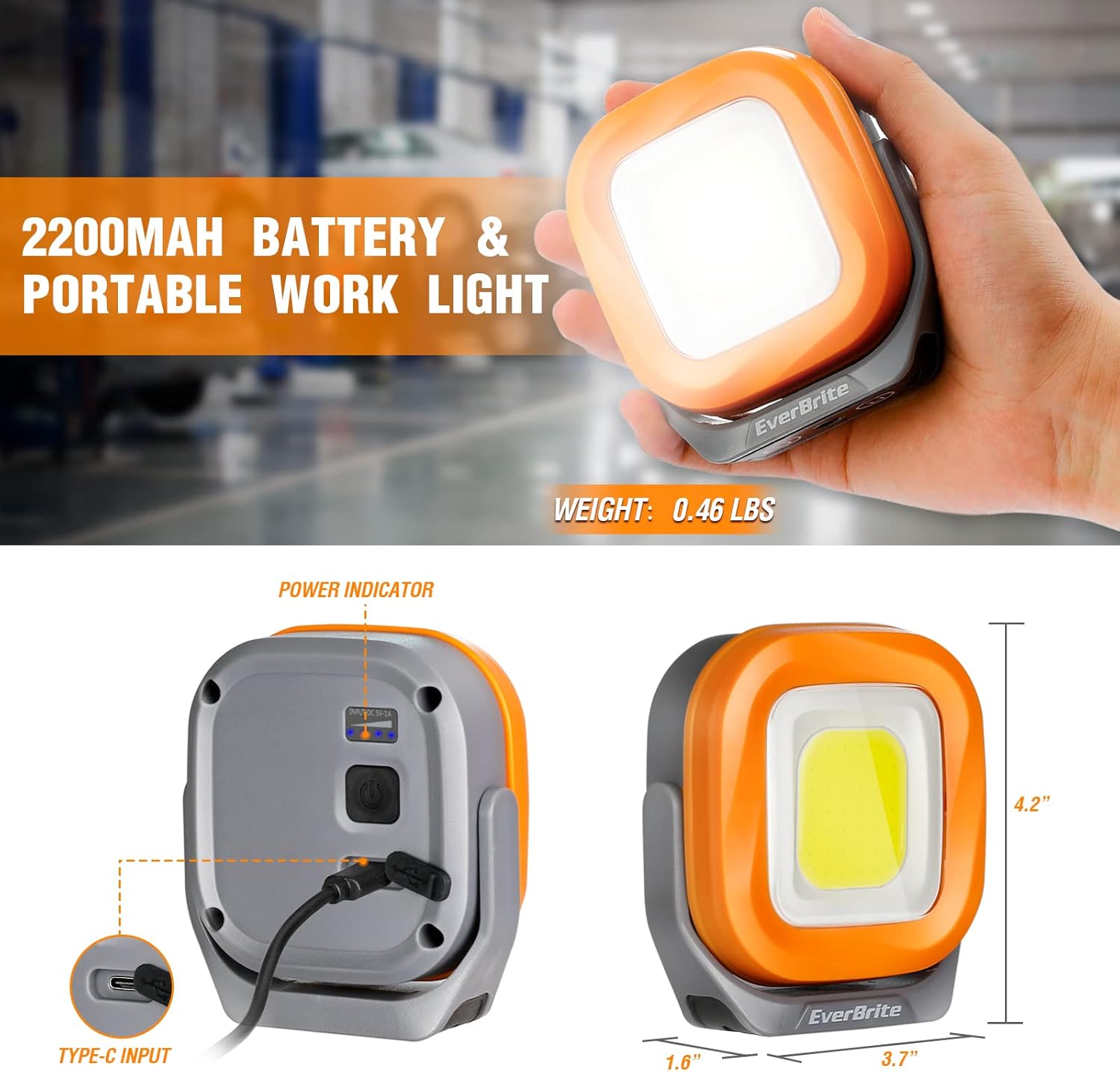
Image: The work light with its dimensions (4.2" x 3.7" x 1.6") and 2200mAh battery capacity highlighted.
Warranty and Support
For warranty information or technical support, please contact EverBrite customer service. You may also visit the official EverBrite store for additional product information and support resources.


