
Introduction
This manual provides essential information for the safe and effective use of the Velleman WMPC124 1A Power Supply Module. This module is designed to convert an AC or DC input voltage into a stable, adjustable DC output voltage, suitable for various electronic projects and experiments. Please read these instructions carefully before installation and operation.
Safety Instructions
- Always disconnect power before making any connections or adjustments to the module.
- Ensure that the input voltage and current ratings do not exceed the module's specifications.
- Observe correct polarity for DC input and output connections.
- Avoid short circuits on the output terminals.
- This module is intended for use by individuals with basic knowledge of electronics. If unsure, seek professional assistance.
- Do not expose the module to moisture, extreme temperatures, or corrosive environments.
Product Overview
The Velleman WMPC124 is a compact, assembled, and tested power supply module. It features input and output screw terminals for secure wiring and a potentiometer for adjusting the output voltage.
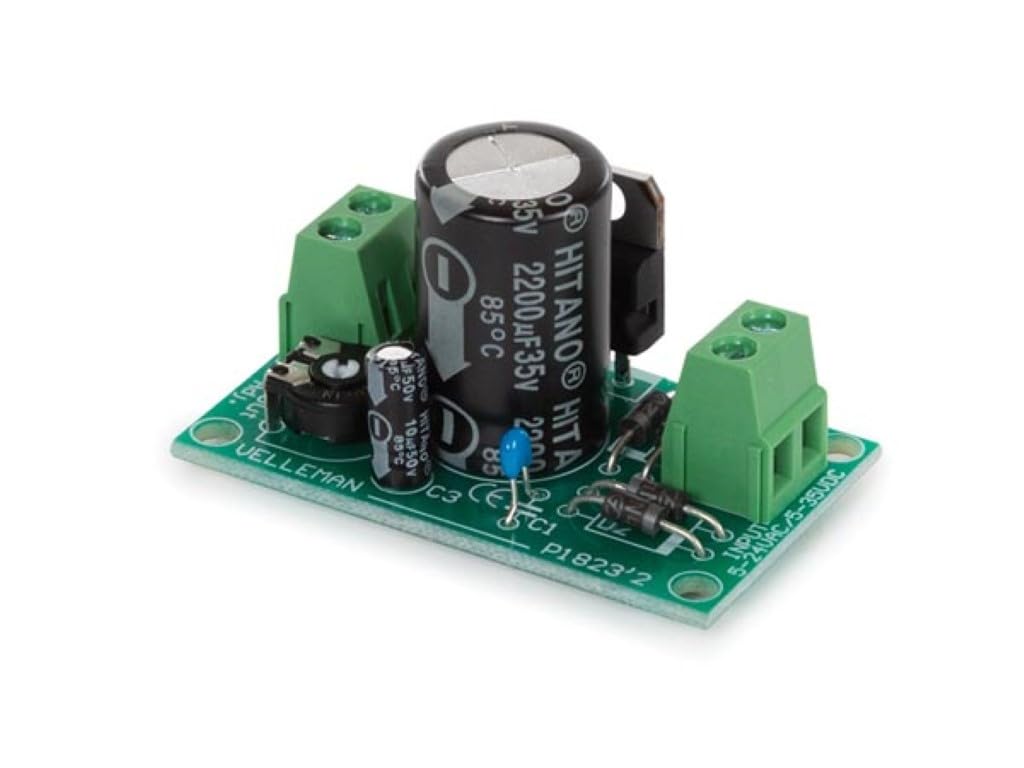
Figure 1: Top view of the WMPC124 module. Note the input terminals on the right, output terminals on the left, and the voltage adjustment potentiometer at the bottom-left.

Figure 2: Angled view of the WMPC124 module, showing component layout.
Specifications
| Feature | Value |
|---|---|
| Minimum Output Voltage | 1.2 V |
| Maximum Output Current | 1 A |
| Maximum Output Voltage | 30 VDC |
| Maximum Input Voltage | 24 VAC or 35 VDC |
| Skill Level | Assembled and Tested |
| Wattage | 15 watts |
| Input Voltage (AC) | Up to 24 Volts (AC) |
| Amperage | 1 Amps (Output) |
| Output Voltage (DC) | Adjustable from 1.2V to 30V |
| Dimensions | 3.5 x 7.5 x 15.5 cm |
| Weight | 60 g |
Setup
1. Transformer Selection
The WMPC124 module requires an external AC transformer or a DC power source. The choice of transformer depends on the desired DC output voltage. Refer to the table below for guidance:

Figure 3: Transformer rating guide.
Recommended Transformers:
- For 3-6VDC output: 9Vac transformer (e.g., 109010C: OPEN-FRAME TRANSFORMER 10.8 VA 1 x 9 V~ 1200 mA max.)
- For 6-9VDC output: 12Vac transformer (e.g., 112012C: OPEN-FRAME TRANSFORMER 12 VA 1 x 12 V~ 1000 mA max.)
- For 9-12VDC output: 15Vac transformer
- For 12-15VDC output: 18Vac transformer
- For 15-21VDC output: 24Vac transformer (e.g., 212024C: OPEN-FRAME TRANSFORMER 24 VA 2 x 12 V~ 1000 mA max.)
2. Wiring Connections
- Input Connection: Connect your chosen AC transformer (or DC power source) to the INPUT screw terminals on the right side of the module. Ensure the input voltage does not exceed 24 VAC or 35 VDC. For AC input, polarity is not critical. For DC input, observe the '+' and '-' markings if present, though the module's rectifier bridge allows for some tolerance.
- Output Connection: Connect your load (e.g., DC motor, low-voltage light bulb, project circuit) to the OUTPUT screw terminals on the left side of the module. Observe the '+' and '-' polarity markings carefully.
3. Initial Adjustment
Before applying power to your load, it is recommended to set the output voltage to its minimum. Use a small screwdriver to turn the potentiometer (labeled 'Vout Adj.') fully counter-clockwise. This will set the output to approximately 1.2V.
Operating the Module
- Power On: Once all connections are secure and verified, apply power to the input terminals.
- Adjusting Output Voltage: Connect a multimeter to the output terminals to monitor the voltage. Slowly turn the potentiometer clockwise to increase the output voltage to your desired level (between 1.2V and 30V).
- Current Limitation: The module is rated for a maximum output current of 1A. Do not exceed this limit to prevent damage to the module or connected devices.
- Power Off: Disconnect the input power when the module is no longer needed.
Maintenance
- Keep the module clean and free from dust and debris. Use a soft, dry cloth for cleaning.
- Regularly inspect all wiring connections to ensure they are tight and secure.
- Store the module in a dry, cool environment when not in use.
- Avoid physical shock or excessive vibration.
Troubleshooting
- No Output Voltage:
- Check if input power is correctly applied and within specifications.
- Verify input and output wiring for correct connections and polarity.
- Ensure the potentiometer is not set to its absolute minimum (though it should still provide ~1.2V).
- Inspect for any visible damage to components (e.g., burnt resistors, bulging capacitors).
- Incorrect Output Voltage:
- Recalibrate the output voltage using a multimeter and the potentiometer.
- Ensure the input voltage is stable and sufficient for the desired output.
- Module Overheating:
- Reduce the load current to stay within the 1A maximum.
- Ensure adequate ventilation around the module.
- Verify that the input voltage is not excessively high for the desired output, leading to higher power dissipation.
Warranty and Support
For warranty information or technical support, please refer to the documentation provided with your purchase or contact your retailer or the manufacturer, Velleman, directly. Keep your proof of purchase for any warranty claims.
Velleman Contact Information: Please visit the official Velleman website for the most up-to-date support and contact details.


