
Squire YG-LL40COMBI
Squire Combination Small Padlock (Locker Lock Combi 40) - User Manual
Model: YG-LL40COMBI
1. Introduction
This manual provides comprehensive instructions for the safe and effective use of your Squire Combination Small Padlock (Locker Lock Combi 40). Please read this manual thoroughly before using the product to ensure proper operation and longevity.
Product Overview
The Squire Combination Small Padlock is a robust, keyless security solution designed for various applications, from securing luggage to gym lockers and sheds. It features a 4-wheel combination mechanism, offering 10,000 possible codes for enhanced security. Constructed with a durable zinc die-cast body and a tough steel shackle, it is built to resist brute force attacks and withstand various weather conditions.

Figure 1: Squire Combination Small Padlock (Locker Lock Combi 40)
This image displays the overall appearance of the Squire Combination Small Padlock, showcasing its black body and chrome-plated steel shackle, along with the four combination wheels set to '0000'.
Key Features
- Keyless Security: Eliminates the need for keys with a 4-digit combination.
- High Combinations: Offers 10,000 unique, re-codable combinations.
- Durable Construction: Features a zinc die-cast body and hardened steel shackle for enhanced resistance.
- Weather Resistant: Anti-corrosive properties make it suitable for both indoor and outdoor use.
- Versatile Application: Ideal for luggage, gym lockers, sheds, toolboxes, cabinets, and gates.

Figure 2: Key Features of the LL 40Combi Padlock
This diagram highlights the main components and features of the padlock, including the hardened steel shackle, lock with brass body cover, and the easy recoding facility.
2. Setup: Setting Your Combination
Your Squire Combination Padlock is factory pre-set to the combination 0-0-0-0. You must open the lock to change the combination. Follow these steps carefully to set your personal code:
- Open the Lock: Ensure the dials are set to the factory default 0-0-0-0. Press the button located on the bottom of the lock to release the shackle and open the padlock.
- Locate Recoding Tool/Mechanism: With the shackle open, rotate it 180 degrees from its locked position. You may need to press it down slightly into the body of the lock to engage the recoding mechanism.
- Set Your New Combination: While the shackle is in the recoding position, rotate the four combination wheels to your desired personal code. Choose a memorable but secure combination.
- Lock the Shackle: Once your new combination is set, return the shackle to its normal closed position and press it down firmly until it clicks into place.
- Test the New Combination: Scramble the dials to a random number. Then, enter your newly set combination and press the button to ensure the lock opens correctly. If it does not open, repeat the steps from the beginning.

Figure 3: Steps for Setting and Using the Padlock
This image illustrates the three primary steps: lining up the initial combination, pulling the shackle to open, and pressing the shackle down to lock and spin the dials.
Important: Always remember your combination. There is no master key or override to reset the lock if the combination is forgotten and the lock is closed.
3. Operating Your Padlock
Opening the Padlock
- Align the four combination wheels to your set personal code.
- Press the release button located at the bottom of the padlock.
- The shackle will spring open, allowing you to remove the padlock.
Closing and Securing the Padlock
- Place the shackle through the item you wish to secure.
- Push the shackle firmly back into the padlock body until it clicks into place.
- Scramble the combination dials to a random set of numbers. This will lock the padlock and prevent unauthorized opening.

Figure 4: Versatile Applications of the Padlock
This collage demonstrates various uses for the Squire padlock, including securing gym lockers, storage units, gates, and luggage.
4. Maintenance
The Squire Combination Padlock is designed for durability and minimal maintenance. To ensure its long-term performance and smooth operation, consider the following:
- Cleaning: Periodically wipe the padlock body and shackle with a soft, damp cloth to remove dirt and grime. Avoid using harsh chemicals or abrasive cleaners, as these can damage the finish.
- Lubrication: For outdoor use or in dusty environments, a light application of a silicone-based lubricant to the shackle mechanism and combination wheels can help maintain smooth operation. Do not use oil-based lubricants as they can attract dirt.
- Storage: When not in use for extended periods, store the padlock in a clean, dry environment to prevent dust accumulation and potential corrosion, especially if used outdoors.
- Inspection: Regularly inspect the shackle and body for any signs of damage or wear. If the shackle becomes bent or the combination wheels become stiff, consider replacing the padlock.
5. Troubleshooting
If you encounter issues with your Squire Combination Padlock, refer to the following common problems and solutions:
| Problem | Possible Cause | Solution |
|---|---|---|
| Padlock will not open with the correct combination. | Dials are not perfectly aligned; internal mechanism is stiff; combination was changed incorrectly. |
|
| Shackle is difficult to close or does not click into place. | Obstruction in the shackle hole; shackle is bent; internal mechanism is dirty. |
|
| Combination dials are stiff or hard to turn. | Dirt or grime accumulation; lack of lubrication. |
|
| Forgotten combination. | Combination was not recorded or remembered. | Unfortunately, if the padlock is closed and the combination is forgotten, there is no way to open it without knowing the code. The lock is designed for high security and does not have a master key or backdoor. You may need to replace the padlock. |
6. Specifications
Below are the technical specifications for the Squire Combination Small Padlock (Locker Lock Combi 40):
| Attribute | Detail |
|---|---|
| Brand | Squire |
| Model Number | YG-LL40COMBI |
| Lock Type | Combination Lock |
| Material | Alloy Steel (Zinc Die-cast body, Steel Shackle) |
| Number of Dials | 4 |
| Combinations | 10,000 (re-codable) |
| Item Weight | 0.16 Kilograms (approx. 5.6 ounces) |
| Control Method | Push Button |
| Special Feature | Portable, Weather Resistant, Anti-corrosive |
| Recommended Uses | Luggage, Gym Lockers, Sheds, Toolboxes, Cabinets, Gates, Home Security |
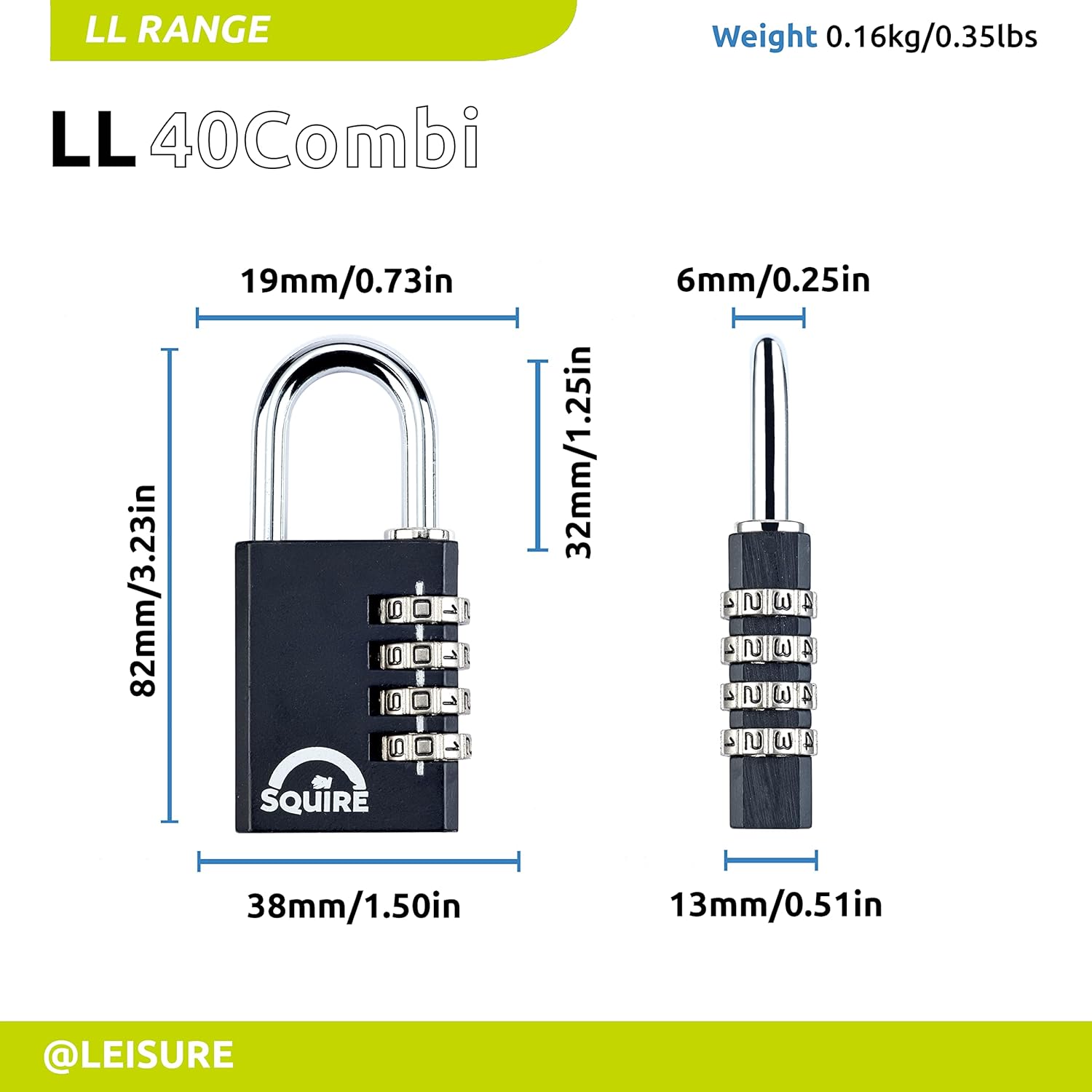
Figure 5: Dimensions of the LL 40Combi Padlock
This image provides detailed measurements of the padlock, including its height (82mm/3.23in), width (38mm/1.50in), shackle clearance (32mm/1.25in), and shackle diameter (6mm/0.25in).
7. Warranty Information
Squire stands behind the quality and durability of its products. The Squire Combination Small Padlock (Locker Lock Combi 40) comes with a 10-year warranty. This warranty covers defects in materials and workmanship under normal use. Please retain your proof of purchase for any warranty claims.
For detailed warranty terms and conditions, please refer to the official Squire website or contact customer support.
8. Customer Support
If you have any questions, require assistance, or need to report an issue with your Squire Combination Small Padlock, please contact Squire customer support through the following channels:
- Official Website: Visit the official Squire website for FAQs, product information, and contact forms.
- Amazon Store: You can also visit the Squire Store on Amazon for additional product details and seller information.
- Contact Information: Refer to the packaging or official Squire website for direct contact details such as phone numbers or email addresses.
When contacting support, please have your product model number (YG-LL40COMBI) and purchase details ready.
Ask a question about this manual
Ask about setup, troubleshooting, compatibility, parts, safety, or missing instructions. Manuals+ will review the question and use this page’s manual context to help answer it.