
O-CONN DW-168-08
O-CONN Mini Chainsaw Battery Charger User Manual
Model: DW-168-08
Introduction
Thank you for choosing the O-CONN Mini Chainsaw Battery Charger. This universal charger is designed to provide efficient and reliable power to most mini chainsaw lithium batteries on the market. Please read this manual thoroughly before use to ensure safe and optimal performance of your charger.
Safety Information
Always observe the following safety precautions to prevent electric shock, fire, or injury.
- Dry Location Use Only: This charger is designed for indoor use in dry conditions. Do not expose to rain, moisture, or damp environments.
- Voltage Compatibility: Ensure the input voltage of the charger (AC100-240V) matches your power supply.
- Proper Battery Type: Only charge lithium batteries compatible with the specified output voltage range (21V-98V). Attempting to charge incompatible battery types may result in damage or injury.
- Ventilation: Ensure adequate ventilation around the charger during operation. Do not cover the charger.
- Unplug When Not in Use: Disconnect the charger from the power outlet when not in use or before cleaning.
- Inspect Before Use: Before each use, inspect the charger and its cord for any signs of damage. Do not use a damaged charger.
- Children and Pets: Keep the charger out of reach of children and pets.
- Protection Features: The charger is equipped with Over Voltage Protection, Over Current Protection, Overheat Protection, and Overcharge Protection to ensure safe charging.

Image: Charger highlighting its built-in protection features.
Product Overview
The O-CONN Mini Chainsaw Battery Charger is a compact and efficient power adapter designed for various mini chainsaw lithium batteries. It features a standard American plug and a 5.5*2.5mm DC interface for universal compatibility.

Image: Front view of the charger, showing its compact design.

Image: Back view of the charger, displaying model number (DW-168-08), input/output specifications, and safety certifications.
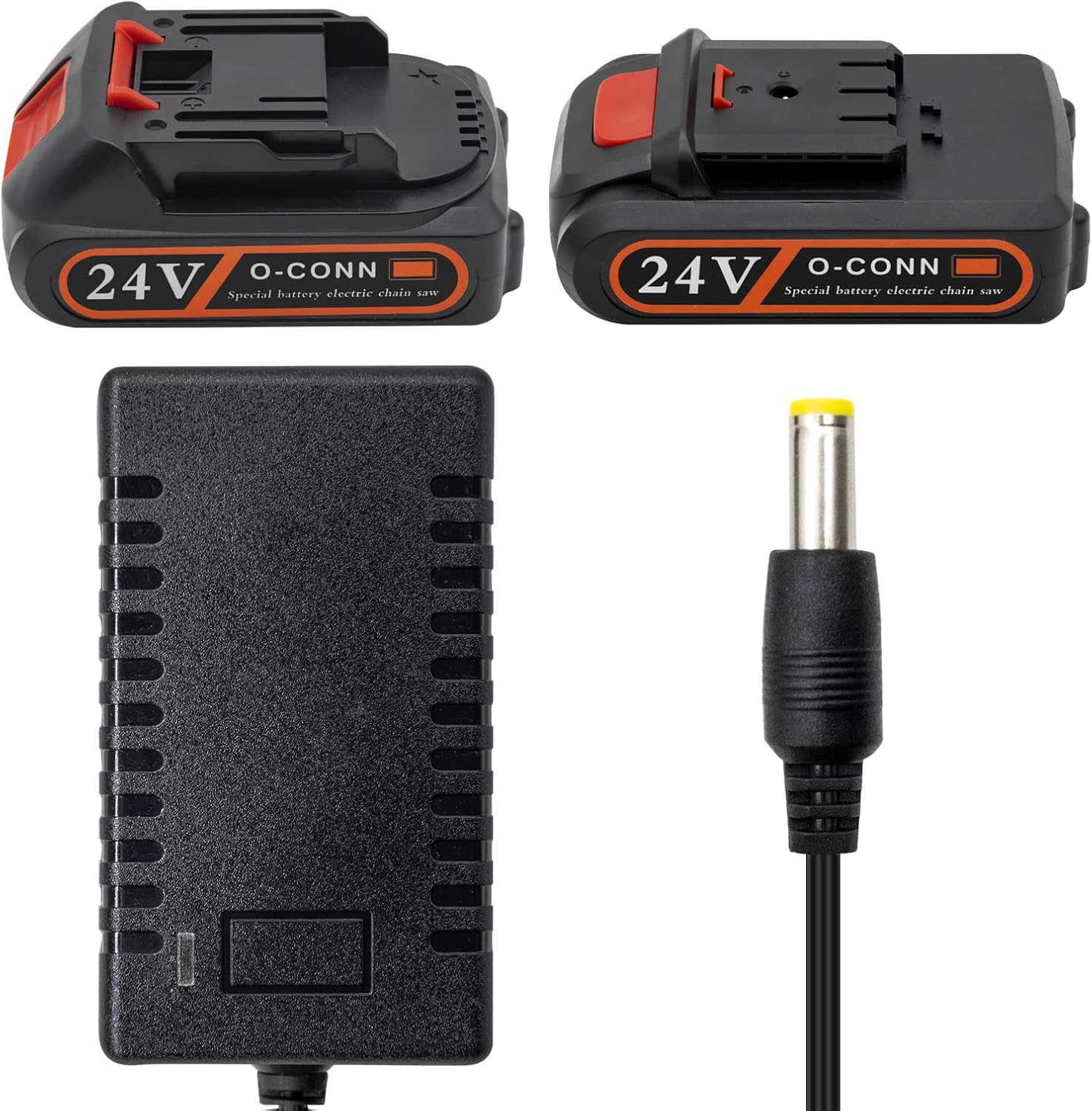
Image: The charger alongside two O-CONN 24V batteries, demonstrating its intended use.
Setup
Follow these steps for initial setup and connection:
- Unpack: Carefully remove the charger from its packaging.
- Inspect: Check the charger and its cable for any visible damage. Do not proceed if damage is found.
- Power Connection: Plug the charger's AC plug into a standard AC100-240V wall outlet.
- Battery Connection: Insert the DC plug (5.5*2.5mm) of the charger into the charging port of your mini chainsaw lithium battery. Ensure a secure connection.
Operating Instructions
Charging your mini chainsaw battery is a straightforward process:
- Connect Battery: As described in the Setup section, connect the charger's DC plug to the battery's charging port.
- Plug into Power: Plug the charger into a suitable wall outlet.
- Charging Indicator: The LED indicator on the charger will illuminate to show the charging status. Typically, a red light indicates charging is in progress, and a green light indicates the battery is fully charged. Refer to your battery's specific instructions for its charging indicator behavior if different.
- Charging Time: Charging time will vary depending on the battery's capacity and its current charge level. A fully depleted battery may take approximately 3 hours to fully recharge.
- Disconnect: Once the battery is fully charged (indicated by a green light), disconnect the charger from the battery first, then unplug the charger from the wall outlet.
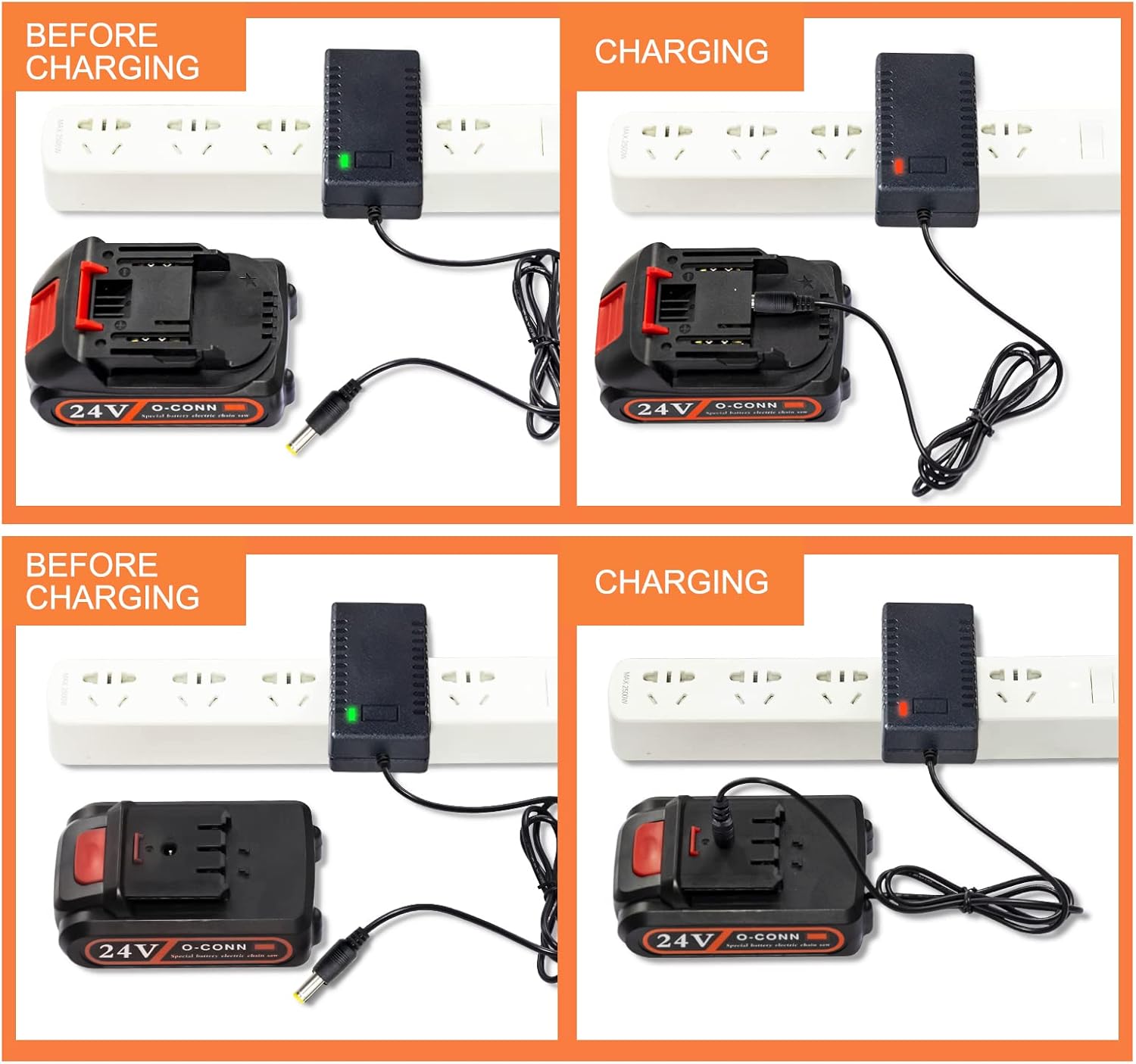
Image: Visual guide demonstrating the charging process, showing the LED indicator changing from green (before charging) to red (charging).
Maintenance
Proper maintenance ensures the longevity of your charger:
- Cleaning: Disconnect the charger from power before cleaning. Use a soft, dry cloth to wipe the exterior. Do not use liquid cleaners or solvents.
- Storage: Store the charger in a cool, dry place away from direct sunlight and extreme temperatures.
- Cable Care: Avoid bending or crimping the power cord excessively. Do not pull the cord to unplug the charger from the outlet.
Troubleshooting
If you encounter issues with your charger, refer to the following common problems and solutions:
| Problem | Possible Cause | Solution |
|---|---|---|
| Charger LED does not light up. | No power from outlet; loose connection; faulty charger. | Check the power outlet with another device. Ensure all connections are secure. If the issue persists, contact customer support. |
| Battery not charging. | Incorrect battery type; faulty battery; charger not fully connected. | Verify battery compatibility with charger specifications. Ensure the DC plug is fully inserted into the battery. Test with a different compatible battery if available. |
| Charger gets excessively hot. | Poor ventilation; internal fault. | Ensure the charger is in a well-ventilated area. Discontinue use immediately and contact customer support if overheating occurs. |
Specifications
| Feature | Detail |
|---|---|
| Model | DW-168-08 |
| Input | AC100-240V 50-60Hz |
| Output | 21V-98V 1A |
| DC Interface | 5.5*2.5mm |
| Compatibility | Most mini chainsaw lithium batteries (20V, 21V, 24V, 26V, 28V) |
| Protection | Over Voltage, Over Current, Overheat, Overcharge |
| Product Dimensions | 0.39 x 0.39 x 0.39 inches |
| Item Weight | 1.76 ounces (0.05 Kilograms) |
Warranty and Support
O-CONN is committed to providing quality products and excellent customer service. For any questions, concerns, or issues regarding your Mini Chainsaw Battery Charger, please contact our customer support team.
Customer Service: We provide 24x7 after-sales support service to solve any of your worries. Please feel free to contact us through the platform where you purchased the product or visit the official O-CONN website for contact information.
For more information, please visit the O-CONN brand store on Amazon.
Related documentsDW-168-08


Ask a question about this manual
Ask about setup, troubleshooting, compatibility, parts, safety, or missing instructions. Manuals+ will review the question and use this page’s manual context to help answer it.