
Introduction
This manual provides essential instructions for the safe and effective use of your FANTTIK T8 APEX 2000 Amp Jump Starter. Please read this guide thoroughly before operation and retain it for future reference.

The FANTTIK T8 APEX 2000 Amp Jump Starter, shown with its heavy-duty battery clamps and 65W fast charger.
What's in the Box
Verify that all items are present upon unboxing:
- T8 APEX Portable Car Battery Jump Starter Pack
- Heavy-Duty Battery Clamps
- USB-C to C Charging Cable
- 65W Fast Charger
- Microfiber Storage Bag
- User Guide (this document)

An illustration of the FANTTIK T8 APEX Jump Starter and its included accessories: the jump starter unit, upgraded shark clamps, 65W PD fast charger, USB-C to USB-C cable, storage bag, and user guide.
Safety Information
The FANTTIK T8 APEX incorporates TenSafe technology for enhanced safety. Adhere to the following guidelines to prevent injury or damage:
- Spark-Proof Technology: Designed to prevent sparks during connection. Always ensure proper connection.
- Reverse Polarity Protection: Protects against incorrect connections to battery terminals.
- IP65 Water Resistant: Provides protection against dust and low-pressure water jets. Avoid submerging the device.
- Thermal Efficiency & Power Management: Ensures stable performance and extended battery life.
- Do not attempt to jump start a frozen battery.
- Do not connect the positive and negative clamps together.
- Keep out of reach of children.
- Store in a cool, dry place away from direct sunlight and high temperatures.
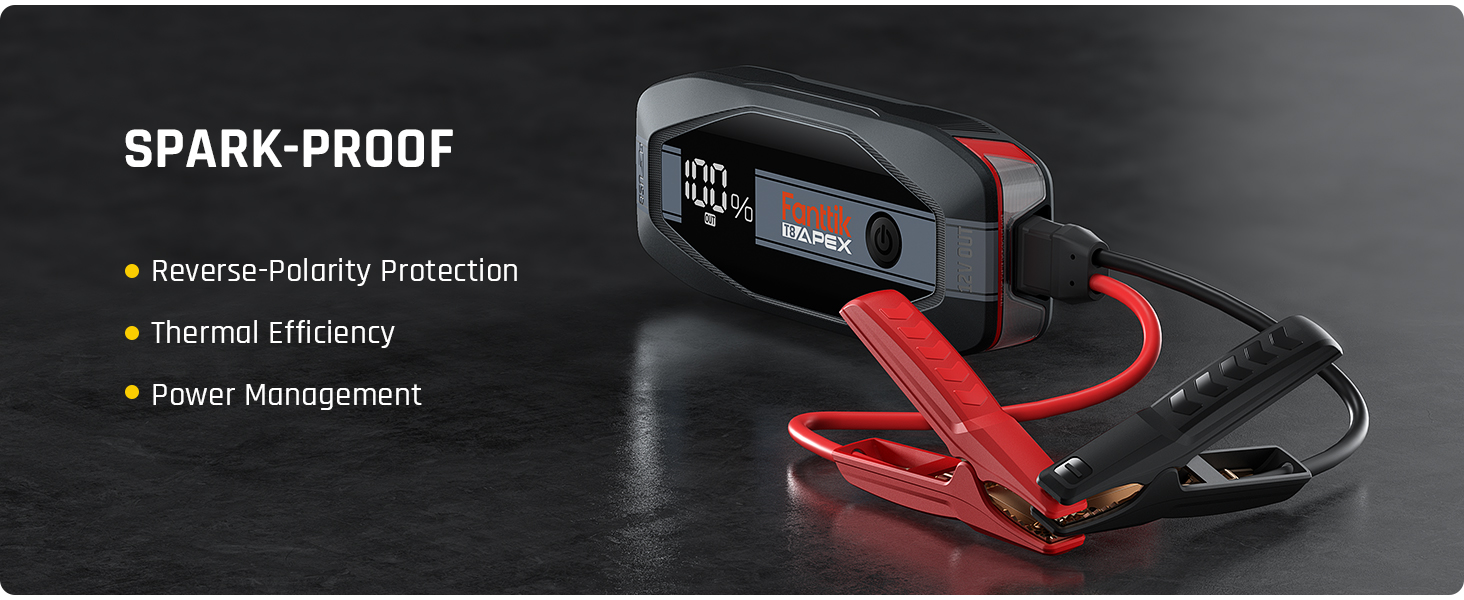
The FANTTIK T8 APEX features multiple protection mechanisms including Spark-Proof, Reverse Polarity Protection, Over Voltage Protection, Short Circuit Protection, Over Charge Protection, and High Temperature Protection.
The FANTTIK T8 APEX is IP65 water-resistant, offering protection against dust and water splashes.
Setup and Initial Charging
Before first use, fully charge the FANTTIK T8 APEX unit.
- Charge the Unit: Connect the included USB-C to C Charging Cable to the T8 APEX and the 65W Fast Charger. Plug the charger into a wall outlet. The digital screen will display the charging progress. A full charge takes approximately 1.5 hours with the 65W charger.
- Check Battery Level: The 3.0-inch smart screen displays the remaining battery level. Ensure the unit is sufficiently charged before attempting to jump start a vehicle.

The FANTTIK T8 APEX supports rapid charging, reaching a full charge in 1.5 hours with the 65W PD fast charger. It can also charge from 0% to a single jump start capacity in just 5 minutes.
Operating Instructions
Jump Starting a Vehicle
The FANTTIK T8 APEX is designed to jump start vehicles with up to 8.5L gasoline engines and 6.0L diesel engines.
Standard Jump Start (Battery Voltage > 9V)
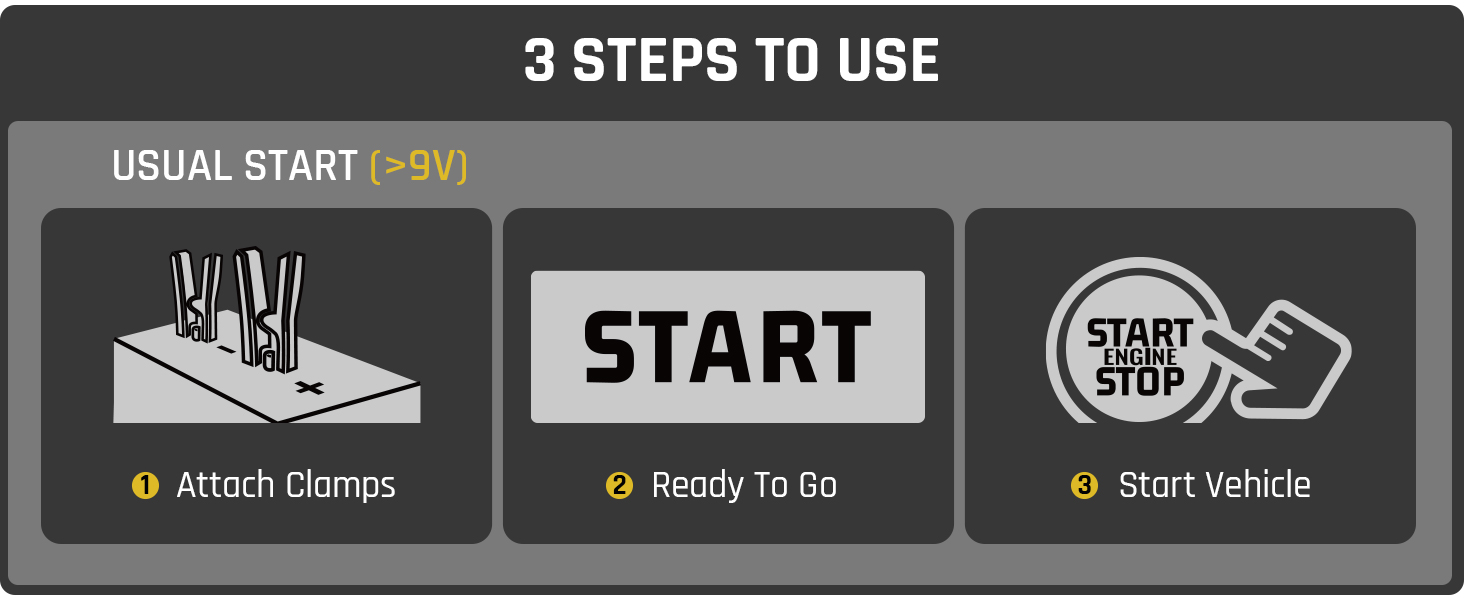
- Attach Clamps: Connect the red (+) clamp to the positive terminal of the vehicle battery and the black (-) clamp to the negative terminal. Ensure a secure connection.
- Ready to Go: The smart screen will display "START" when the unit is ready to proceed.
- Start Vehicle: Turn the vehicle ignition to start. Once the vehicle starts, immediately disconnect the clamps from the battery, then disconnect the clamps from the jump starter.
Visual guide for a standard jump start: 1. Attach clamps, 2. Wait for "START" on screen, 3. Start vehicle.

The FANTTIK T8 APEX connected to a car battery, ready to provide 2000 Amps for an instantaneous engine start.
Manual Override Start (Battery Voltage < 9V or Completely Dead)
Use this mode only when the vehicle battery is extremely low or completely dead and the unit does not automatically detect it.
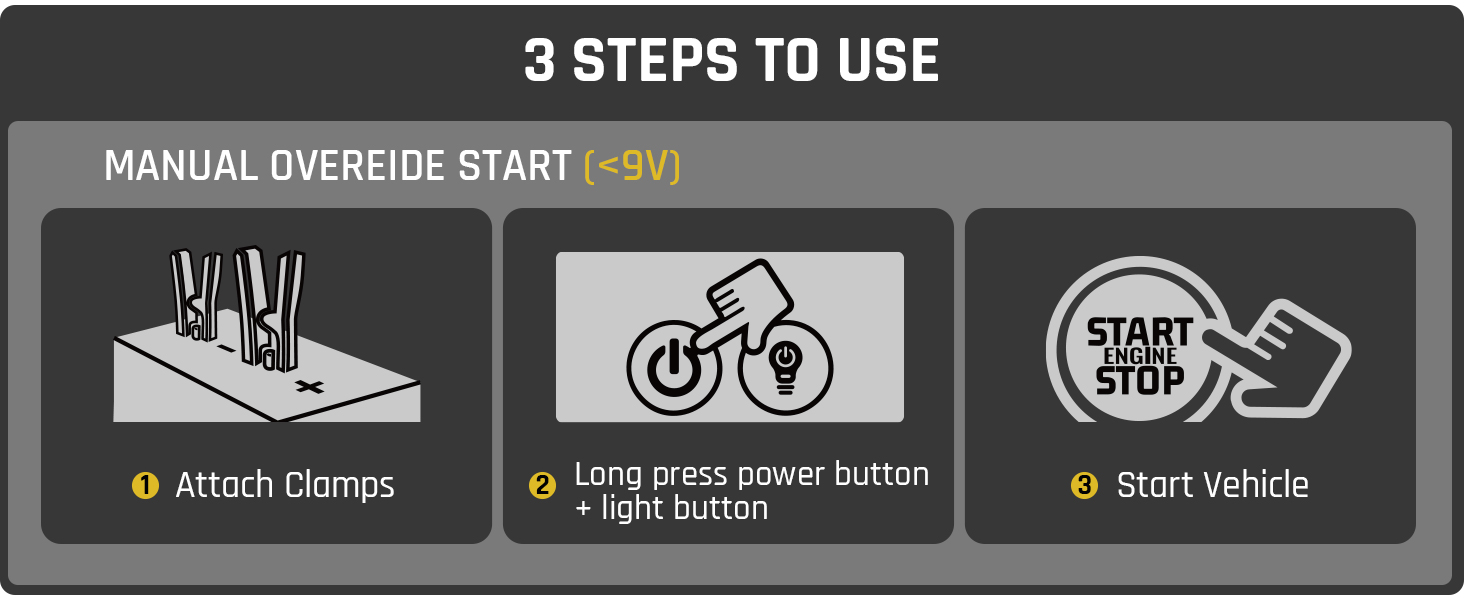
- Attach Clamps: Connect the red (+) clamp to the positive terminal of the vehicle battery and the black (-) clamp to the negative terminal.
- Activate Override: Simultaneously long-press the power button and the LED light button on the T8 APEX until the screen indicates override mode.
- Start Vehicle: Turn the vehicle ignition to start. Once the vehicle starts, immediately disconnect the clamps from the battery, then disconnect the clamps from the jump starter.

Visual guide for a manual override jump start: 1. Attach clamps, 2. Long press power and light buttons, 3. Start vehicle.
Charging External Devices
The FANTTIK T8 APEX can also function as a power bank for your electronic devices.
- USB-C Power Delivery (PD 65W): Use the USB-C port for fast charging compatible laptops (e.g., MacBook Pro 13''), phones, and other USB-C devices.
- USB-A Quick Charge (QC 18W): Use the USB-A port for charging other USB-compatible devices.

The FANTTIK T8 APEX can charge multiple devices simultaneously, including a laptop via PD 65W and a smartphone via QC 18W.
Using the LED Light
The integrated LED light offers multiple modes for convenience and emergencies:
- Flashlight: For general illumination.
- Strobe Light: For signaling or attracting attention.
- SOS Rescue Light: Emits an SOS signal in emergencies.

A user utilizing the super-bright 400 lumens LED light of the FANTTIK T8 APEX to illuminate a car engine bay, highlighting its flashlight, strobe, and SOS rescue light functions.
Maintenance
- Recharge Regularly: To maintain optimal battery health, recharge the unit every 3-6 months, even if not in use.
- Cleaning: Wipe the unit with a dry, soft cloth. Do not use harsh chemicals or abrasive cleaners.
- Storage: Store the jump starter in its microfiber storage bag in a cool, dry place. Avoid extreme temperatures.
- Clamp Inspection: Periodically inspect the battery clamps and cables for any signs of damage or corrosion.
Troubleshooting
| Problem | Possible Cause | Solution |
|---|---|---|
| Unit does not turn on. | Battery is completely discharged. | Charge the unit using the provided 65W fast charger. |
| Vehicle does not start after connecting. | Incorrect clamp connection; vehicle battery too low; unit not sufficiently charged. | Ensure clamps are securely connected to the correct terminals. Check unit's battery level. If vehicle battery is extremely low, try Manual Override Start. |
| "START" not displayed on screen. | Vehicle battery voltage is below 9V; clamps not connected properly. | Check clamp connections. If battery is very low, use Manual Override Start. |
| Unit gets warm during use. | Normal operation during high power output. | This is normal. If it becomes excessively hot, disconnect and allow to cool. |
| External devices not charging. | Unit battery low; incorrect cable/port used; device not compatible. | Ensure unit is charged. Use appropriate USB-C PD or USB-A QC port and compatible cable. |

The FANTTIK T8 APEX's smart detection display shows real-time battery voltage and remaining charge, aiding in troubleshooting.
Specifications
| Feature | Detail |
|---|---|
| Brand | Fanttik |
| Model | T8 APEX |
| Peak Output Current | 2000 Amps |
| Engine Compatibility | Up to 8.5L Gas, 6.0L Diesel |
| Charging Input | USB-C PD 65W (Two-Way Fast Charging) |
| Charging Output | USB-C PD 65W, USB-A QC 18W |
| Display | 3.0-inch Smart Screen (Voltage, Battery Level) |
| Safety Features | TenSafe Technology (Spark-Proof, Reverse Polarity, Over Voltage, Short Circuit, Over Charge, High Temperature Protection) |
| Water Resistance | IP65 |
| LED Light | 400 Lumens (Flashlight, Strobe, SOS) |
| Product Dimensions | 9.21"W x 3.74"D x 1.77"H |
| Item Weight | 4.4 pounds |
Warranty and Support
FANTTIK provides reliable customer service and lifetime expert technical support for the T8 APEX Jump Starter. For assistance, troubleshooting, or warranty claims, please contact FANTTIK customer support through their official website or the retailer where the product was purchased.
For more information, visit the official Fanttik store: Fanttik Store on Amazon


