
1. Introduction
This manual provides essential information for the proper setup, operation, and maintenance of your Motast P32 Smart Watch. Please read it thoroughly to ensure optimal performance and longevity of your device.

Figure 1: Motast P32 Smart Watch promotional banner.

Figure 2: Front view of the Motast P32 Smart Watch displaying various fitness metrics.
2. Setup
2.1 What's in the Box
- 1 x Motast P32 Smart Watch
- 1 x Magnetic Charging Cable
2.2 Charging the Device
Before first use, fully charge your smart watch. Connect the magnetic charging cable to the charging pins on the back of the watch. Ensure the pins align correctly. Connect the USB end of the cable to a standard USB power adapter (not included).

Figure 3: Magnetic charging cable attached to the smart watch.
2.3 App Installation and Pairing
The Motast P32 Smart Watch uses the GloryFit app for full functionality. Download the app by scanning the QR code provided in the watch's manual or searching for 'GloryFit' in your smartphone's app store (compatible with Bluetooth 4.0, iOS 9.0+ or Android 5.0+).
Once installed, open the GloryFit app and follow the on-screen instructions to pair your smart watch via Bluetooth. The app will automatically detect the watch for pairing. Confirm the pairing on both your phone and the watch.

Figure 4: The GloryFit app interface on a smartphone, showing various data and settings.
3. Operating the Smart Watch
3.1 Basic Navigation
- Touch Screen: Swipe up, down, left, or right to navigate through menus and features. Tap to select.
- Side Button: Press the side button to wake the screen, return to the previous menu, or turn the watch on/off (long press).
3.2 Display and Brightness
The Motast P32 features a 1.69-inch TFT color display with a resolution of 240 x 280 pixels. The brightness can be adjusted through 4 levels to suit various lighting conditions, ensuring clear visibility indoors and outdoors.

Figure 5: The 1.69-inch full touch screen display of the smart watch.
3.3 Watch Faces
Customize your watch's appearance by choosing from multiple pre-installed watch faces or downloading additional options via the GloryFit app. You can also personalize the dial with your own photos.
4. Features
4.1 Fitness Tracking
The smart watch tracks various fitness metrics including steps, calories burned, and distance. It supports 24 sports modes such as walking, running, cycling, swimming, skipping, yoga, basketball, and football. GPS tracking is available through connection with your smartphone.

Figure 6: Fitness tracking with GPS connectivity via the GloryFit App.

Figure 7: The smart watch supports 24 different sport modes.
4.2 Health Monitoring
The Motast P32 includes a Heart Rate Monitor, Blood Pressure Monitor, Blood Oxygen Monitor (SpO2), and Sleep Monitor. These features help you understand your health trends. Note: The data provided by this device is for reference only and cannot be used for medical diagnosis or treatment.

Figure 8: 24/7 Heart Rate Monitor and Sleep Monitor in action.
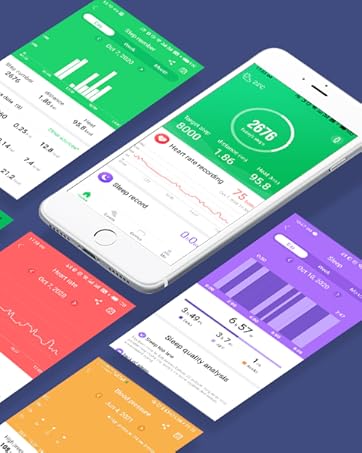
Figure 9: Overview of health monitoring features including Heart Rate, Blood Pressure, SpO2, Step Counter, and Calories Counter.
4.3 Smart Functions
- Notifications: Receive call, SMS, and app messages (WhatsApp, Facebook, Messenger, Instagram, etc.) directly on your wrist.
- Music Control: Control music playback on your smartphone (play, pause, skip tracks).
- Camera Control: Use your watch as a remote shutter for your smartphone camera.
- Weather Display: Get real-time weather updates when connected to your phone.
- Sedentary Reminder: Receive alerts to move after periods of inactivity.
- Alarm Clock & Stopwatch: Essential time management tools.
- Find Phone/Watch: Locate your paired smartphone or watch.

Figure 10: Call and SMS alerts displayed on the smart watch.

Figure 11: Remote camera control feature.

Figure 12: Music control functionality.

Figure 13: Weather display on the smart watch.

Figure 14: Sedentary reminder feature.
4.4 Water Resistance
The Motast P32 Smart Watch has an IP68 waterproof rating, making it suitable for daily activities like washing hands, exercising, and playing in the rain. It can also be worn during swimming. Note: Do not use in water hotter than 38°C, such as showers, saunas, or hot springs.

Figure 15: The IP68 waterproof rating allows for use during various water activities.

Figure 16: The smart watch is designed to withstand water exposure.
5. Maintenance
5.1 Cleaning
Regularly clean your smart watch and strap with a soft, dry cloth. If necessary, use a slightly damp cloth with mild soap, then dry thoroughly. Avoid harsh chemicals or abrasive materials.
5.2 Strap Replacement
The Motast P32 uses a standard 22mm strap with quick-release pins, allowing for easy replacement. To remove a strap, locate the small pin on the underside where the strap connects to the watch body. Pull the pin inwards and gently detach the strap. To attach a new strap, align the pins with the holes on the watch body, pull the pin inwards, and slide the strap into place until the pin locks securely.
6. Troubleshooting
- Watch not turning on: Ensure the watch is fully charged. Connect it to the magnetic charging cable and a power source.
- Unable to pair with smartphone: Make sure Bluetooth is enabled on your phone and the watch is within range. Restart both devices and try pairing again through the GloryFit app.
- Inaccurate health readings: Ensure the watch is worn snugly on your wrist, about one finger's width from your wrist bone. Avoid excessive movement during measurements. Remember, data is for reference only.
- Notifications not appearing: Check the notification settings in the GloryFit app to ensure all desired app notifications are enabled. Also, verify your phone's notification settings.
- Short battery life: Reduce screen brightness, disable unnecessary features, and ensure the watch is not constantly searching for a Bluetooth connection if not paired.
7. Specifications
| Model Name | P32 |
| Brand | Motast |
| Screen Size | 1.69 Inches |
| Shape | Rectangular |
| Battery Cell Composition | Lithium Polymer |
| Wireless Communication Standard | Bluetooth |
| Connectivity Technology | GPS (via smartphone) |
| Special Features | Fitness Tracker (Pedometer, Calories, Distance), GPS tracking, Heart Rate Monitor, Blood Pressure Monitor, 24 Sports Modes, IP68 Waterproof, Sleep Monitor, Blood Oxygen Monitor, Call Notifications, SMS and APP Messages, Music & Camera Control, Brightness Adjustment, Weather Display, Sedentary Reminder, Gmail, Alarm Clock, Stopwatch, Find Phone, Find watch. |
| Operating System | GloryFit (compatible with Bluetooth 4.0, iOS 9.0+ or Android 5.0+ smart phones) |
| Product Dimensions | 1.57 x 1.18 x 0.39 inches |
| Item Weight | 0.282 ounces |
| Phone Standby Time (with data) | 15 days |
| What's in the box | 1 x Smartwatch |
8. Official Product Video
Video 1: Overview of the Motast P32 Smart Watch features, including its 1.69-inch touch screen, fitness tracking, and health monitoring capabilities.
9. Warranty and Support
For warranty information and customer support, please refer to the documentation included with your product or visit the official Motast website. Keep your purchase receipt for warranty claims.


