
Introduction
This manual provides detailed instructions for the installation, operation, and maintenance of your ASVEGEN 12.1 Inch Touch Screen Android 12.0 Car Stereo GPS Navigation system. Please read this manual thoroughly before using the product to ensure proper functionality and to avoid damage.
What's in the Box
Verify that all components are present in the package:
- 1x Car Stereo Unit
- 1x Backup Camera
- 1x Cable Pack (includes necessary wiring harnesses)
- 1x User Manual (this document)
Specifications
| Feature | Description |
|---|---|
| Operation System | Android 12.0 |
| CPU | OCTA-Core |
| RAM | 4GB |
| ROM | 64GB |
| Screen Type | T-style IPS Touch Screen |
| Screen Size | 12.1 Inch |
| Screen Resolution | 1024*768 |
| Bluetooth Version | 5.0 |
| Connectivity | Wi-Fi, Bluetooth |
| Audio Output Mode | AUX, Stereo |
| Included Components | Car stereo, backup camera, cable pack, user manual |
Setup and Installation
This car stereo is designed for a factory-fitted installation in Bentley Continental GT and Flying Spur models from 2005-2012. It supports both left-hand drive and right-hand drive vehicles. Professional installation is recommended.
Compatibility Notes:
- Supports original steering wheel control.
- Supports original sound system.
- Includes a backup camera; it is not compatible with the original reversing camera.
- Does not support factory headrest monitors.
- Does not support factory parking assist.
- The original fiber optical cable does not need to be plugged in, as the unit uses an AUX cable for audio integration.
Installation Overview:
The unit replaces the existing car stereo system, integrating seamlessly into the dashboard. The image below illustrates the visual transformation after installation.

Image: Comparison of the car's center console before and after the installation of the new 12.1-inch Android stereo. The new unit provides a larger screen and updated interface.
Ensure all cables from the included pack are correctly connected to their respective ports on the car stereo and the vehicle's wiring harness. Refer to the detailed wiring diagram provided in the separate installation guide (if applicable) or consult a professional installer.

Image: The ASVEGEN 12.1 Inch Android Car Stereo unit, showcasing its large display and wood grain finish, alongside the included backup camera.
Operating Instructions
System Overview and Performance
The unit runs on Android 12.0 with an Octa-Core CPU, 4GB RAM, and 64GB ROM, providing a responsive and powerful user experience. The 12.1-inch IPS capacitive touch screen offers a clear display with 1024*768 resolution.
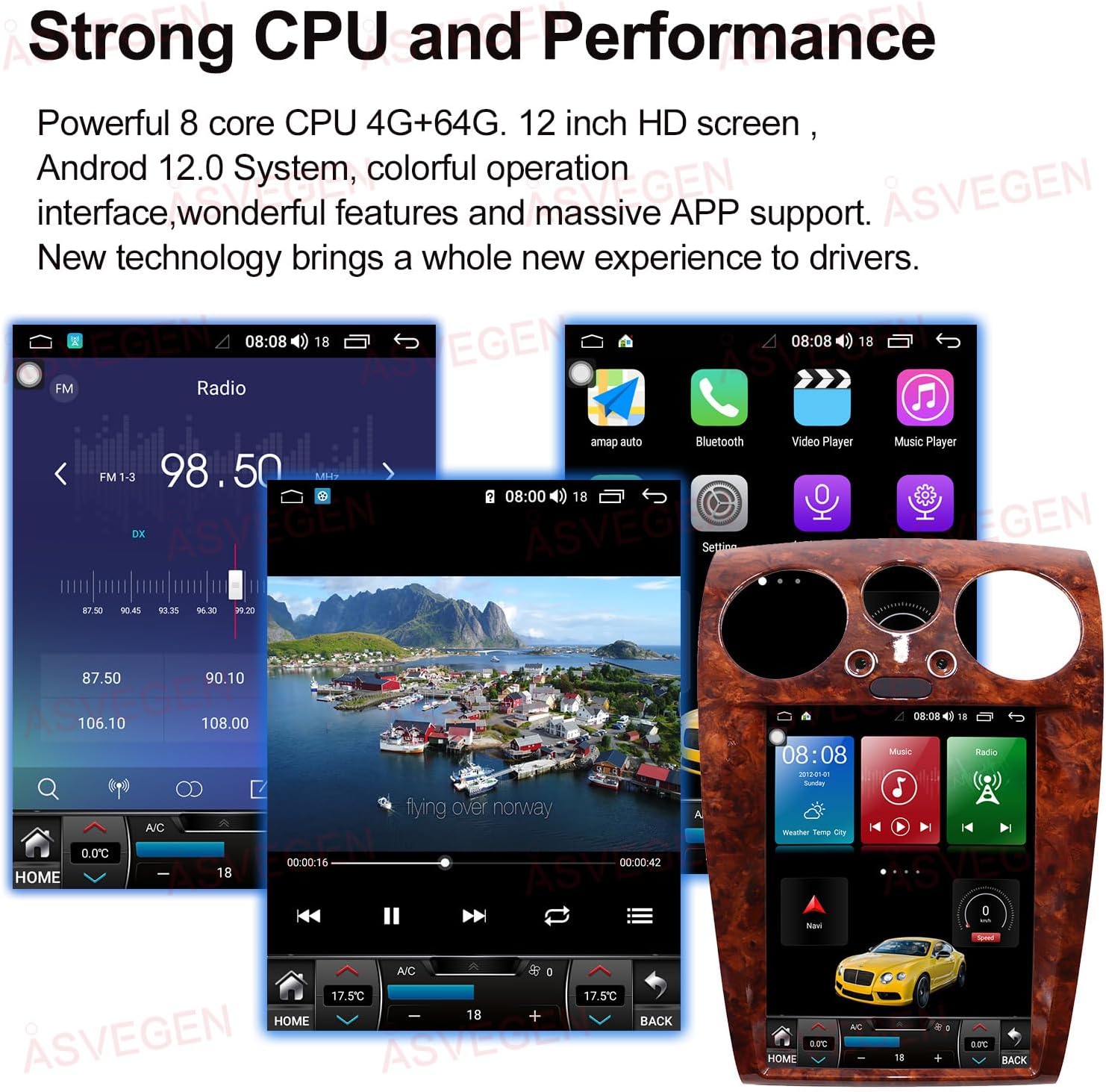
Image: The ASVEGEN car stereo's interface showing the main screen with app icons, a radio tuner, and a navigation view, highlighting its strong CPU and performance.
GPS Navigation
The system supports both online and offline GPS navigation with voice guidance and 2D/3D map views. You can use pre-installed maps or download your preferred navigation applications via Wi-Fi.

Image: The car stereo screen showing a detailed map with navigation routes and common map application icons like Google Maps, Waze, and iGO Maps.
Bluetooth 5.0 Connectivity
Connect your mobile phone via Bluetooth 5.0 for hands-free calls, automatic phonebook loading, and Bluetooth music playback. This ensures a stable and high-quality audio connection.

Image: The car stereo's display showing the Bluetooth interface for making calls and playing music, demonstrating hands-free operation.
Apple CarPlay & Android Auto
Seamlessly integrate your smartphone with the car stereo using Apple CarPlay and Android Auto. This allows you to access your phone's features, such as navigation, music, messages, and calls, directly on the stereo screen. The unit supports both wireless and wired connections.

Image: The car stereo displaying the Apple CarPlay and Android Auto interfaces, showing how smartphone apps are mirrored and controlled on the large screen.
Steering Wheel Controls
Maintain the convenience of your original steering wheel controls. The unit is designed to integrate with your vehicle's existing steering wheel buttons, allowing you to control audio, calls, and other functions without taking your hands off the wheel.

Image: A visual representation of how the ASVEGEN car stereo integrates with the vehicle's steering wheel controls, allowing for easy access to various functions.
Built-in DSP for Sound Quality
Experience excellent sound quality with the built-in Digital Signal Processor (DSP). The DSP features EQ balanced audio processing technology, allowing you to customize sound settings for an optimal listening experience.
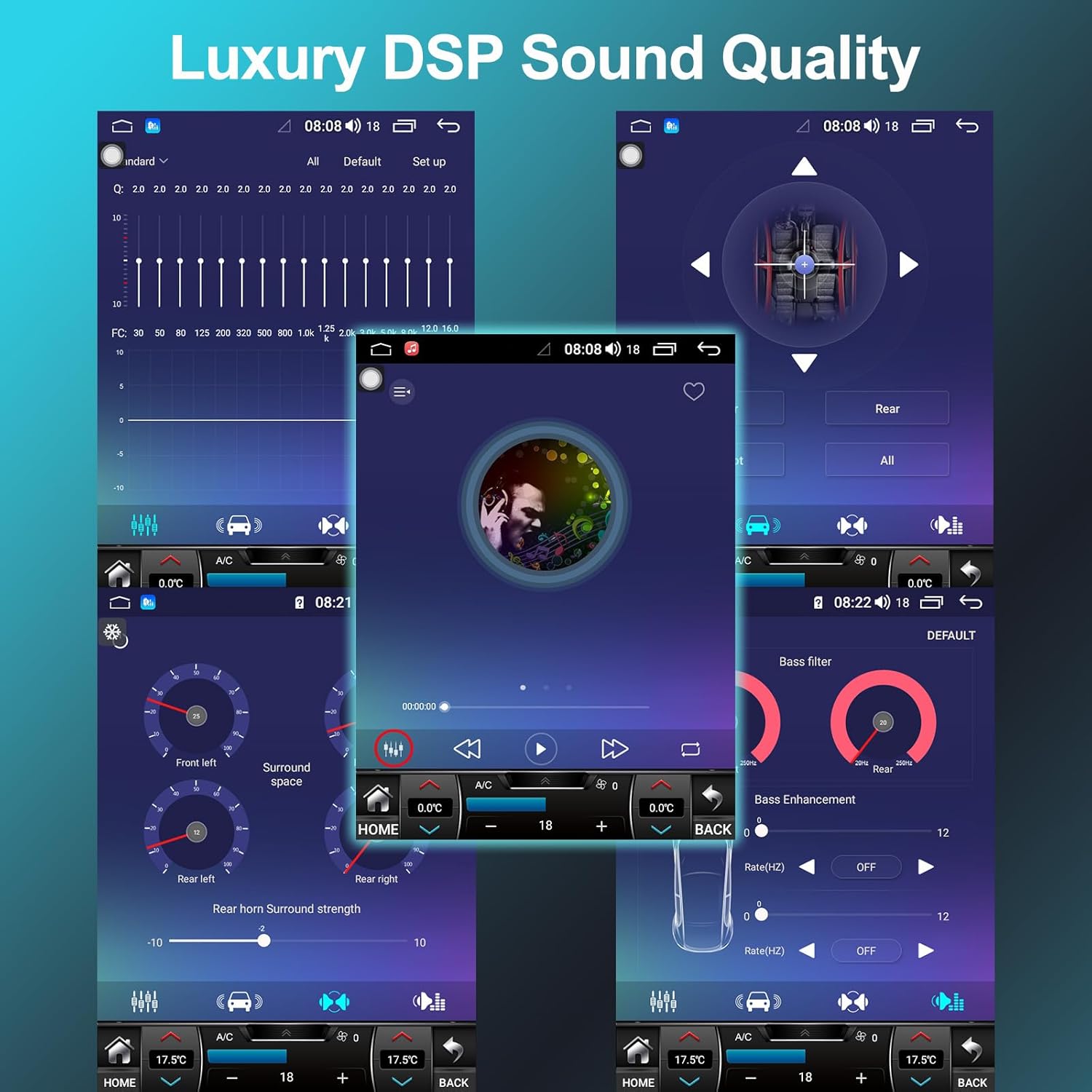
Image: The car stereo's screen showing the DSP settings interface, including equalizer adjustments and sound field controls for enhanced audio quality.
Wi-Fi Connectivity and App Downloads
Utilize the built-in Wi-Fi module to connect to the internet via Wi-Fi hotspots or your mobile phone's hotspot. This enables you to surf the internet, download applications from the Google Play Store, and access online content directly on your car stereo.
Split Screen Function
The split screen function allows you to display two applications simultaneously on the 12.1-inch screen. For example, you can have navigation running on one side while controlling music or another app on the other.
Intelligent Voice Control
Access applications and control various functions using intelligent voice commands, enhancing convenience and safety while driving.
FM/AM Radio Receiver
The unit includes an FM/AM radio tuner that supports worldwide analog radio channel frequencies. You can store up to 30 of your favorite stations for quick access.
Mirror Link Function
Project your smartphone screen (both iOS and Android) onto the car stereo screen, allowing you to view and interact with your phone's content on a larger display.
Support for Driving Recorder/OBD2
The system supports external driving recorders and OBD2 devices (if your car is equipped), providing additional functionality and diagnostic capabilities.
Maintenance
To ensure the longevity and optimal performance of your ASVEGEN car stereo, follow these maintenance guidelines:
- Cleaning: Use a soft, dry cloth to clean the screen and exterior. For stubborn smudges, slightly dampen the cloth with water or a screen-safe cleaner. Avoid abrasive materials or harsh chemicals.
- Temperature: Avoid exposing the unit to extreme temperatures, both hot and cold, for extended periods.
- Liquid Contact: Prevent any liquids from entering the unit. In case of accidental spills, immediately power off the unit and allow it to dry completely before use.
- Software Updates: Periodically check for software updates from the manufacturer to ensure the system runs efficiently and has the latest features and security patches.
Troubleshooting
If you encounter issues with your car stereo, refer to the following common problems and solutions:
- No Power:
Solution: Check all power connections and fuses. Ensure the car's ignition is on. If professionally installed, contact your installer. - No Sound:
Solution: Verify speaker connections. Check volume levels on the unit and ensure the AUX cable is properly connected if using the original sound system. Check DSP settings. - GPS Not Working/Inaccurate:
Solution: Ensure the GPS antenna is properly installed and has a clear view of the sky. Check internet connection for online maps. Restart the navigation application. - Bluetooth Connection Issues:
Solution: Ensure Bluetooth is enabled on both the stereo and your phone. Delete previous pairings and try reconnecting. Move your phone closer to the unit. - Touch Screen Unresponsive:
Solution: Restart the unit. If the issue persists, a factory reset might be necessary (note: this will erase all user data). - Apps Crashing/Slow Performance:
Solution: Close background applications. Clear app caches. Ensure sufficient storage space. Consider a factory reset if performance issues are severe.
For issues not covered here, please contact ASVEGEN customer support.
Warranty and Support
Your ASVEGEN 12.1 Inch Android Car Stereo comes with a 12-month warranty from the date of purchase. This warranty covers manufacturing defects and malfunctions under normal use.
For warranty claims, technical support, or any inquiries regarding your product, please contact ASVEGEN customer service through the retailer where you purchased the product or visit the official ASVEGEN website for contact information.
Please retain your proof of purchase for warranty validation.