
1. Introduction
This manual provides detailed instructions for the assembly, operation, and maintenance of your SHW Vista L-Shaped Desk with Monitor Stand and Drawer. Designed to maximize workspace efficiency, this desk features a versatile L-shaped layout, an integrated monitor stand, and a convenient storage drawer. Please read this manual thoroughly before assembly and use to ensure proper setup and safe operation.

Image: The SHW Vista L-Shaped Desk in Walnut, showcasing its design with a monitor, books, and a backpack hanging from a hook.
2. Safety Information
Adhere to the following safety guidelines to prevent injury or damage to the product:
- Always assemble the desk according to the provided instructions.
- Do not use the desk if it is not fully assembled or if any parts are missing or damaged.
- Do not place heavy objects on the desk, as this could cause it to tip over. The maximum weight recommendation is 50 pounds.
- Always use the desk on a flat, stable surface.
- Keep the desk away from heat sources and do not expose it to direct sunlight for extended periods.
- Supervise children when they are using the desk to prevent injuries.
3. Package Contents
Before beginning assembly, verify that all components listed in the included packing list are present and undamaged. All necessary assembly tools are typically provided with the product. If any parts are missing or damaged, please contact customer support.
4. Assembly Instructions
Detailed assembly instructions are included in your product packaging. It is recommended that two people assemble this desk for ease and safety. Follow the step-by-step guide to ensure correct and stable construction.
Key Assembly Notes:
- The monitor shelf can be installed on either the left or right side of the desk to suit your preference.
- The integrated storage drawer slides into place and can be organized using the provided dividers.
- Ensure all screws and fasteners are tightened securely for stability.
- Adjust the leg glides on the bottom of the desk feet to ensure the desk is level on uneven surfaces.
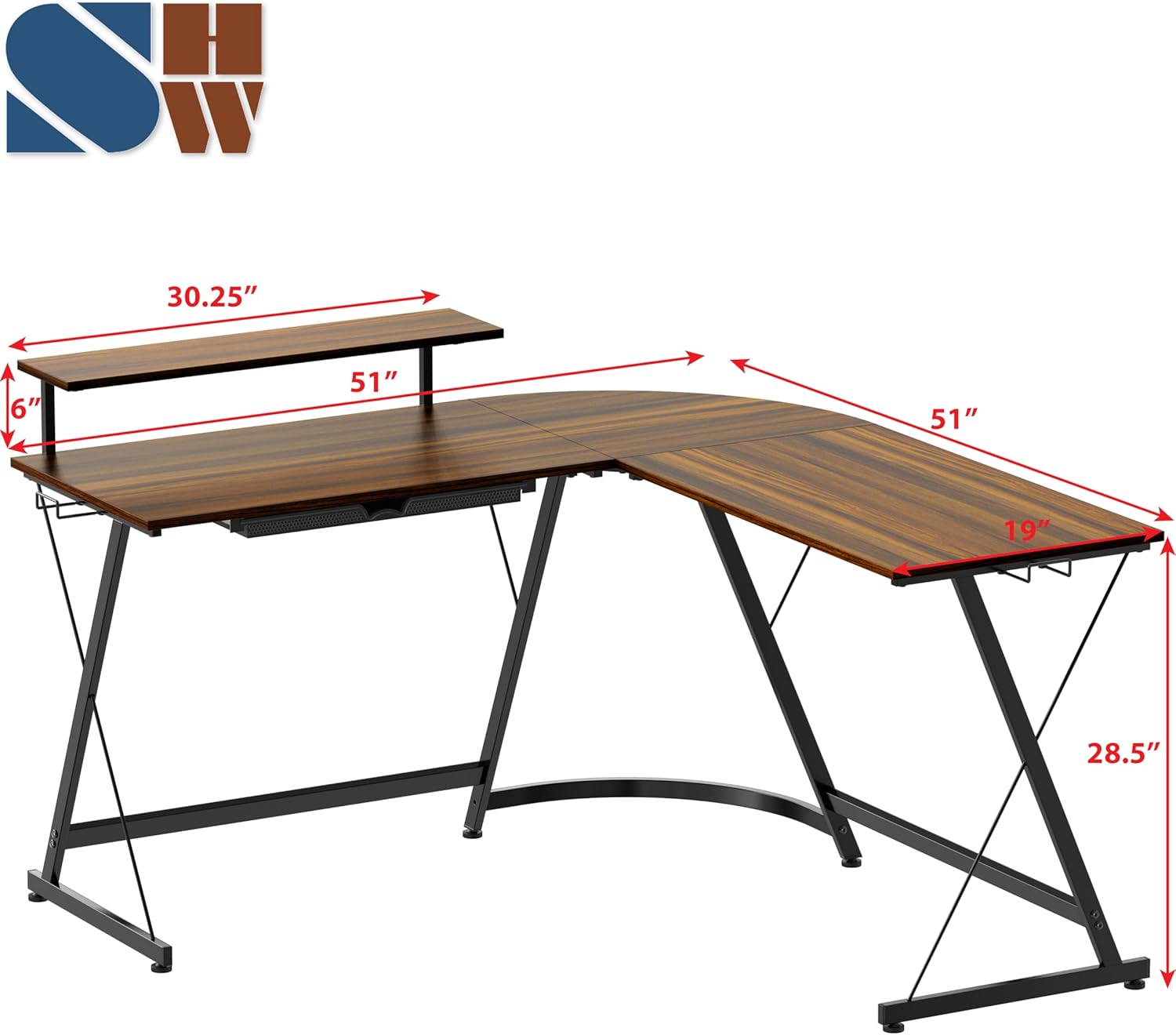
Image: A diagram illustrating the dimensions of the L-shaped desk, including the monitor stand height and overall desk measurements.

Image: A detailed view of the desk's monitor stand and the pull-out storage drawer, highlighting its organizational compartments.
5. Usage
L-Shaped Design:
The L-shaped configuration of this desk is designed to maximize your workspace, fitting efficiently into corners and providing ample surface area for multiple tasks or equipment. The rounded corner ensures comfortable movement around the desk.
Monitor Stand:
Utilize the elevated monitor stand to position your screen at an ergonomic eye level, which can help improve posture and reduce neck strain. This also frees up additional space on the main desktop surface. The monitor stand is removable and can be placed on either the left or right side of the desk.
Integrated Storage Drawer:
The pull-out drawer provides convenient storage for office supplies, small gadgets, or personal items, helping to keep your workspace organized and clutter-free. The drawer includes adjustable dividers for customized organization.
Headphone Hooks:
The desk includes hooks on both sides, ideal for hanging headphones, backpacks, or other accessories, keeping them easily accessible and off the desktop.

Image: The L-shaped desk in a home office setting, showing a backpack hanging from one of the integrated hooks.
6. Maintenance
- Cleaning: Wipe the laminated engineered wood desktop with a soft, damp cloth. Avoid abrasive cleaners or harsh chemicals that could damage the finish.
- Frame Care: The steel frame with a powder-coated finish can be cleaned with a damp cloth.
- Regular Checks: Periodically check all screws and fasteners to ensure they remain tight. Re-tighten if necessary to maintain stability.
- Avoid Extreme Conditions: Do not expose the desk to excessive moisture, direct sunlight for prolonged periods, or extreme temperature changes, as this may affect the material integrity.
7. Troubleshooting
Desk is Wobbly:
Check that all assembly screws are securely tightened. Adjust the leg glides located at the bottom of each desk leg to compensate for uneven flooring. Rotate the glides until the desk is stable and level.
Drawer Not Sliding Smoothly:
Ensure the drawer is correctly aligned within its tracks. Check for any obstructions or debris in the drawer glides. If the drawer is plastic, verify it is not overloaded.
Missing or Damaged Parts:
If you discover any missing or damaged parts during assembly or use, please contact SHW customer support for assistance.
8. Specifications
| Feature | Detail |
|---|---|
| Brand | SHW |
| Model Number | OD-41M-N |
| Shape | L-Shape |
| Product Dimensions (D x W x H) | 51"D x 51"W x 28.5"H |
| Color | Walnut |
| Top Material Type | Engineered Wood |
| Frame Material Type | Steel |
| Finish Type | Powder Coated |
| Special Feature | Monitor Riser, Integrated Storage Drawer, Headphone Hooks |
| Number of Drawers | 1 |
| Item Weight | 16.62 Kilograms |
| Maximum Weight Recommendation | 50 Pounds |
| Recommended Number of People for Assembly | 2 |
| Required Assembly | Yes |
| UPC | 811244038342 |
| Patent No | US D891,820 S1 |
9. Warranty and Support
Warranty:
This SHW product comes with a Limited Warranty. Please refer to the warranty documentation included with your purchase for specific terms and conditions.
Customer Support:
For any questions, assistance with assembly, or to report missing/damaged parts, please contact SHW customer support. Contact information can typically be found on the product packaging or the manufacturer's official website.