
1. Product Overview
The Weeylite Ninja 20-200W LED Video Light is a continuous output photography lighting solution designed for various applications including vlogging, on-location shooting, weddings, stage productions, portrait photography, and product photography. It features a stable 5600K color temperature, adjustable brightness, and high color accuracy.

Image: Weeylite Ninja 20-200W LED Video Light with a standard reflector attached, showcasing its compact design and powerful output.
Key Features:
- Strong Output & Stable Lighting: Provides 200W bright and continuous illumination with a stable 5600K color temperature and 79000lux/1m output. CRI 95+ and TLCI 97+ ensure natural and pristine color reproduction.
- Solid & Compact Design: Features a built-in LCD display for real-time parameter adjustments. A specialized lamp protect cover safeguards the LED bead. Constructed from aviation aluminum alloy for durability, weighing only 2.39kg for portability.
- Ultra Silent Fan: Integrated ultra-silent fan and strong heat dissipation system prevent overheating and extend LED bead service life. A one-button silent mode provides a quiet environment for video productions (max power up to 20% in silent mode).
- Smart App Control: Utilizes a 2.4GHz Bluetooth wireless system with the WeeylitePro App for simultaneous control of multiple lights across 6 groups and 19 channels (iOS & Android compatible). Also supports DMX Input/Output and an optional RC-11 wireless remote.
- Standard Bowens Mount: Compatible with various lighting accessories such as reflectors, softboxes, beauty dishes, and snoots. The U-shape mounting bracket offers 330° rotation for flexible lighting angles.
2. Setup
2.1. Unpacking and Component Identification
Carefully unpack all components from the packaging. Verify that all items listed in the packing list are present.

Image: Detailed view of the Weeylite Ninja 20-200W, illustrating its components and the included accessories in the product packing list.
Packing List:
- Weeylite Ninja 20 COB Light
- Round Lampshade (Reflector)
- COB Beads Protect Cover
- Power Adapter
- User Manual
2.2. Assembly
- Attach the COB Beads Protect Cover: Ensure the protective cover is securely placed over the LED COB beads when not using a reflector or softbox to prevent damage.
- Mounting the Reflector/Softbox:
- Align the Bowens mount of the reflector or softbox with the light's mount.
- Twist clockwise until it locks into place. To remove, press the lampshade connection button and twist counter-clockwise.
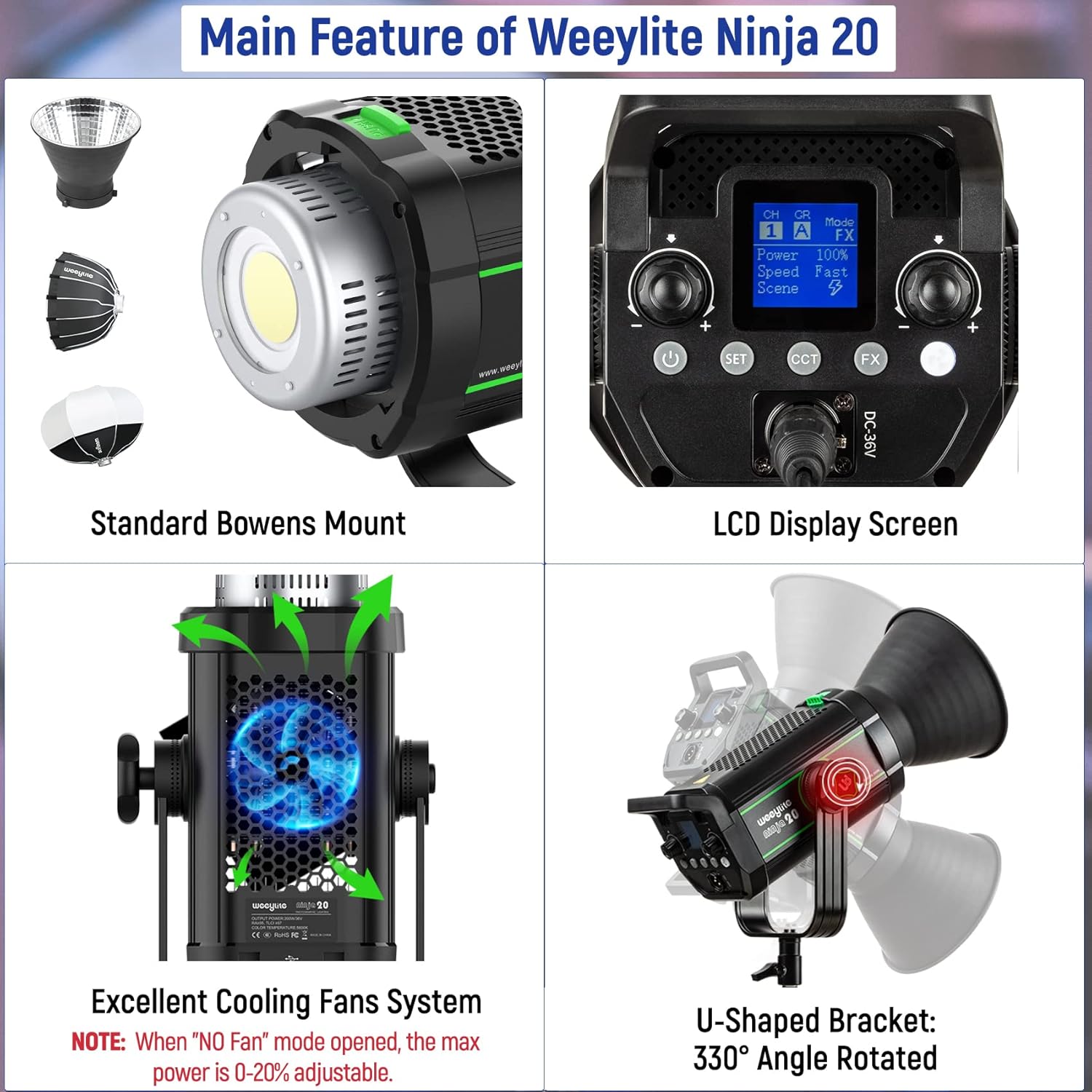
Image: Close-up of the Weeylite Ninja 20-200W, illustrating the standard Bowens mount for accessories and the U-shaped bracket for angle adjustment.
- Mounting the Light: Attach the light to a compatible light stand using the U-shaped mounting bracket. Adjust the angle by loosening the bracket lock knob, setting the desired position, and tightening the knob.
- Power Connection: Connect the power adapter to the power socket on the light. Plug the adapter into a suitable power outlet.
3. Operating Instructions
3.1. On-Board Control
The light features an intuitive LCD display and rotary knobs for direct control.
Image: The LCD display and control interface of the Weeylite Ninja 20-200W, showing options for brightness, channel, and light temperature.
- Power On/Off: Use the Power Key to turn the light on or off.
- Brightness Adjustment: Rotate the Left Rotary Knob to adjust brightness from 0% to 100%.
- Color Temperature: The light operates at a stable 5600K color temperature. The CCT button on the LCD allows for fine-tuning around this value.
- Lighting Effects (FX): Press the FX key to cycle through 6 built-in lighting effects. Use the rotary knobs to adjust parameters for each effect.
- Fan Control: Press the Fan Switch Key to toggle the ultra-silent fan on or off. Note that when the fan is off, the maximum power output is limited to 20% to prevent overheating.
- Channel/Group Selection: Use the Set Key and rotary knobs to select the desired channel and group for multi-light setups.
3.2. WeeylitePro App Control
The WeeylitePro App allows for convenient wireless control of the light via Bluetooth.

Image: A smartphone displaying the WeeylitePro App interface, demonstrating wireless control capabilities for the LED video light.
- Download the App: Search for "WeeylitePro" on the App Store (iOS) or Google Play Store (Android) and install it on your smartphone.
- Connect to the Light:
- Ensure Bluetooth is enabled on your smartphone and the light is powered on.
- Open the WeeylitePro App and follow the on-screen instructions to search for and connect to your Ninja 20-200W light.
- Control Functions: The app provides comprehensive control over brightness, lighting effects, and channel/group settings.
3.3. DMX Control
The Ninja 20-200W supports DMX512 protocol for professional lighting setups.
- Connect a DMX512 controller to the DMX IN port of the light.
- For daisy-chaining multiple lights, connect the DMX OUT port of the first light to the DMX IN port of the next.
- Refer to your DMX controller's manual for specific DMX address settings and control protocols.
4. Maintenance
- Cleaning: Regularly clean the light's exterior with a soft, dry cloth. For the LED COB beads, use a soft, lint-free cloth. Avoid using harsh chemicals or abrasive materials.
- Storage: Store the light in a dry, dust-free environment when not in use. Use the provided protective cover for the LED beads.
- Heat Dissipation: Ensure the fan vents are clear of obstructions to maintain optimal heat dissipation and prolong the life of the LED beads.
- Cable Care: Inspect power cables and connectors regularly for any signs of wear or damage. Replace damaged cables immediately.
5. Troubleshooting
- Light Not Turning On:
- Check if the power adapter is securely connected to both the light and the power outlet.
- Verify that the power outlet is functional.
- If using battery power (with optional battery plate), ensure batteries are charged and correctly inserted.
- Fan Noise is Loud:
- The fan may run louder at higher power settings. Consider reducing brightness if noise is an issue.
- Activate the one-button silent mode (power limited to 20%) for reduced fan noise.
- Ensure fan vents are not obstructed.
- App Control Issues:
- Ensure Bluetooth is enabled on your smartphone and the light.
- Restart the WeeylitePro App and try reconnecting.
- Check if the light's firmware is up to date (if applicable, via USB-C port).
- Inconsistent Brightness/Color:
- Ensure the light is receiving stable power.
- Check for any physical damage to the LED beads or internal components.
6. Specifications
| Model Number | 6953400302547 |
| Power Output | 200W |
| Color Temperature | 5600K (Daylight) |
| CRI | ≥95 |
| TLCI | ≥97 |
| Illumination | 79000 Lux@1M (with lampshade) |
| Brightness Adjustment | 0% - 100% Stepless |
| Control Methods | On-board, WeeylitePro App (Bluetooth 2.4GHz), DMX512, RC-11 Remote (optional) |
| Mount Type | Standard Bowens Mount |
| Rotation Angle | 330° (U-shaped bracket) |
| Item Weight | 2.39 kg (5.27 lbs) |
| Package Dimensions | 19.5 x 10.25 x 10.25 inches |
| Manufacturer | Weiying |
7. Warranty and Support
Weeylite is committed to providing high-quality products and excellent customer service. For any inquiries, technical support, or warranty claims, please contact the seller or visit the official Weeylite website for assistance.
Please retain your proof of purchase for warranty purposes. Specific warranty terms and conditions may vary by region and retailer.
