Introduction
This manual provides detailed instructions for the operation and maintenance of your Casio A100WE-7B Digital Watch. Please read this manual carefully to ensure proper use and to fully utilize all features of your timepiece.
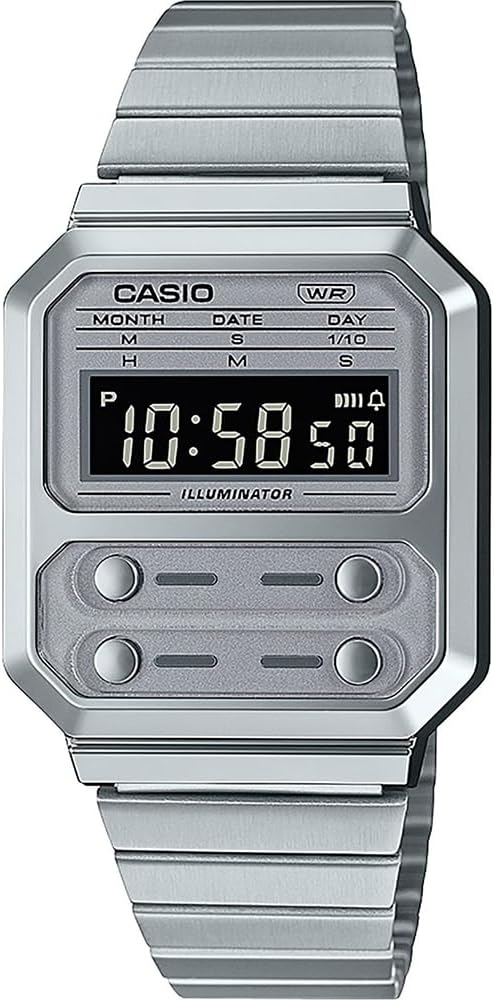
Figure 1: Front view of the Casio A100WE-7B Digital Watch. The watch features a silver-tone case and band, a clear digital display, and four distinct buttons for various functions located below the main display area.
Setup
Adjusting the Band Length
The watch band features a side clasp for easy adjustment. To adjust the length:
- Open the clasp by lifting the small lever.
- Slide the clasp along the band to the desired position.
- Press the lever down firmly to secure the clasp. Ensure it clicks into place to prevent accidental opening.
Initial Time and Date Setting
Refer to the "Operating Instructions" section for detailed instructions on setting the time and date using the watch's buttons.
Operating Instructions
Your Casio A100WE-7B watch features four buttons for operation. While the exact button functions may vary by mode, generally:
- Button A (Top Left): Mode selection, adjustment.
- Button B (Top Right): Start/Stop, increment.
- Button C (Bottom Left): Light, decrement.
- Button D (Bottom Right): Reset, confirmation.
Timekeeping Mode
This is the default mode, displaying the current time (hours, minutes, seconds), day of the week, month, and date.
- To enter time setting mode, press and hold Button A until the seconds begin to flash.
- Press Button A repeatedly to cycle through the setting options: seconds, hour, minute, year, month, day.
- Use Button B to increase the flashing value or Button C to decrease it.
- Press Button A again to exit the setting mode.
Alarm Function
The watch features a daily alarm.
- From Timekeeping Mode, press Button A to cycle through modes until "AL" (Alarm) appears.
- Press and hold Button A until the alarm hour flashes.
- Use Button B to adjust the hour and Button A to switch to minutes.
- Use Button B to adjust the minutes.
- Press Button A to exit alarm setting.
- To turn the alarm ON/OFF, press Button B while in Alarm Mode. An alarm indicator will appear/disappear.
Stopwatch Function
The 1/100 second digital stopwatch measures elapsed time, split time, and two finishes.
- From Timekeeping Mode, press Button A to cycle through modes until "ST" (Stopwatch) appears.
- Press Button B to start the stopwatch.
- Press Button B again to stop it.
- Press Button D to reset the stopwatch to zero.
- For split times, press Button D while the stopwatch is running to display the split. Press Button D again to return to elapsed time measurement.
Backlight Operation (EL Backlight)
Press Button C (bottom left) to illuminate the display for easy reading in low light conditions. The backlight will remain on for a few seconds.
Hourly Time Signal
To activate or deactivate the hourly time signal (which beeps every hour on the hour), navigate to the Alarm Mode. While in Alarm Mode, press Button D to toggle the hourly time signal ON/OFF. An indicator will show if it's active.
Auto Calendar
The watch includes an auto calendar feature, which automatically adjusts for different month lengths and leap years once the date is correctly set.
Maintenance
Water Resistance
Your watch is water resistant for daily use. This means it can withstand splashes or brief immersion in water, such as during hand washing or rain. It is not suitable for swimming, diving, or showering with hot water, as steam can penetrate the seals.
- Do not operate buttons while the watch is wet.
- Avoid exposing the watch to extreme temperatures or sudden temperature changes.
Battery Life
The approximate battery life is 7 years with a CR2016 battery. When the display becomes dim or functions become erratic, it is time to replace the battery. Battery replacement should be performed by a qualified technician to ensure water resistance is maintained.
Cleaning
Wipe the watch case and band with a soft, dry cloth. For stubborn dirt, a slightly damp cloth can be used, followed by a dry cloth. Avoid using chemical cleaners, as they may damage the watch's finish.
Troubleshooting
- Display is blank or dim: The battery may be low or depleted. Replace the battery.
- Time is incorrect: Re-set the time according to the "Timekeeping Mode" instructions. Ensure the correct AM/PM setting is selected if using 12-hour format.
- Buttons are unresponsive: Ensure the watch is not wet. If the issue persists, a reset may be required (consult a service center) or the battery may be extremely low.
- Water inside the watch: Immediately take the watch to a qualified service center. Do not attempt to dry it yourself, as this can cause further damage.
Specifications
| Model Number | A100WE-7BDF |
| Case Dimensions | 37.5 x 33.5 x 9.5 mm |
| Total Weight | 58 g |
| Water Resistance | Daily Use (Splashes, Rain) |
| Backlight | EL Backlight |
| Alarm | Daily Alarm |
| Stopwatch | 1/100 second digital stopwatch |
| Time Signal | Hourly Time Signal |
| Calendar | Auto Calendar |
| Accuracy | +/-30 seconds per month |
| Battery Type | CR2016 (1 Lithium Metal battery included) |
| Approx. Battery Life | 7 years |
| Module | 1275 |
| Clasp Type | Double Locking Foldover Clasp |
Warranty and Support
Your Casio watch is covered by a manufacturer's warranty against defects in materials and workmanship. For specific warranty terms and conditions, please refer to the warranty card included with your purchase or visit the official Casio website.
For technical support, service, or replacement parts, please contact your local authorized Casio service center. Contact information can typically be found on the official Casio website or in the documentation provided with your watch.
Note: Unauthorized repairs or modifications may void your warranty.


