
EverBrite E021047AU
EverBrite Rechargeable LED Headlamp with Motion Sensor - User Manual
Model: E021047AU
1. Product Overview
The EverBrite Rechargeable LED Headlamp is a versatile lighting device designed for various activities such as hiking, running, camping, and general tasks. It features multiple lighting modes, a motion sensor for hands-free operation, and a rechargeable battery.

Image 1.1: The EverBrite headlamp, illustrating its main features including the light, headband, USB charging cable, and motion sensor functionality.
2. Package Contents
- 1 x EverBrite Rechargeable LED Headlamp
- 1 x Micro-USB Charging Cable
- 1 x Lithium Ion Battery (pre-installed)
3. Key Features
- Rechargeable Battery: Equipped with a 1200mAh lithium battery and Micro-USB charging.
- 9 Lighting Modes: Includes XPE, COB, XPE+COB, Red Beam, and SOS Red Strobe in key light mode, plus XPE, COB, XPE+COB, and Red Beam in motion sensor mode.
- Motion Sensor: Allows hands-free operation to turn the light on/off with a wave of the hand.
- Lightweight and Durable: Constructed from ABS hard rubber, weighing approximately 0.17 lbs (80g).
- Adjustable Headband: Elastic headband fits head circumferences from 15.7" (40cm) to 31.5" (80cm).
- Adjustable Angle: Headlamp can be tilted up to 45 degrees.
- Temperature Resistant: Operates effectively in temperatures from -4℉ (-20℃) to 140℉ (60℃).
4. Setup
4.1 Charging the Headlamp
- Locate the Micro-USB charging port on the headlamp.
- Connect the provided Micro-USB cable to the headlamp and the other end to a 5V 1A USB charger (not included), power bank, or computer USB socket.
- The power indicator lights will show the charging status. One light flashing indicates charging, and four solid lights indicate a full charge.
- Unplug the headlamp promptly after charging is complete to preserve battery life.
Important: Do not turn on the light while the headlamp is charging.

Image 4.1: Illustration of the headlamp's Micro-USB charging port and battery indicator lights, demonstrating connection to a power source.
4.2 Adjusting the Headband
- Place the headlamp on your head.
- Adjust the elastic headband to a comfortable fit. The band is designed to adapt to various head sizes (15.7"-31.5" / 40-80cm).
- Ensure the headlamp is secure but not too tight to avoid discomfort during prolonged use.

Image 4.2: The adjustable and breathable headband of the EverBrite headlamp, shown being worn by individuals.
5. Operating Instructions
5.1 Power On/Off and Mode Selection (Key Light Mode)
- Press the power button once to turn on the headlamp.
- Within 5 seconds of turning on, press the power button repeatedly to cycle through the following modes: XPE Mode (300 Lm) > COB Mode (300 Lm) > XPE+COB Mode (500 Lm) > Red Beam > SOS Red Strobe.
- If the light has been on for more than 5 seconds in any mode, a single press of the power button will turn the light off directly, without cycling through all modes.

Image 5.1: Visual representation of the headlamp's various lighting modes and their respective lumen outputs.
5.2 Motion Sensor Mode
- To activate motion sensor mode, press the dedicated motion sensor button (usually indicated by a wave icon or distinct from the main power button). A red indicator light will illuminate.
- Once activated, wave your hand within approximately 15 cm (6 inches) of the sensor to turn the light ON or OFF.
- In motion sensor mode, you can cycle through XPE, COB, XPE+COB, and Red Beam by pressing the main power button.
- To exit motion sensor mode, press the motion sensor button again.
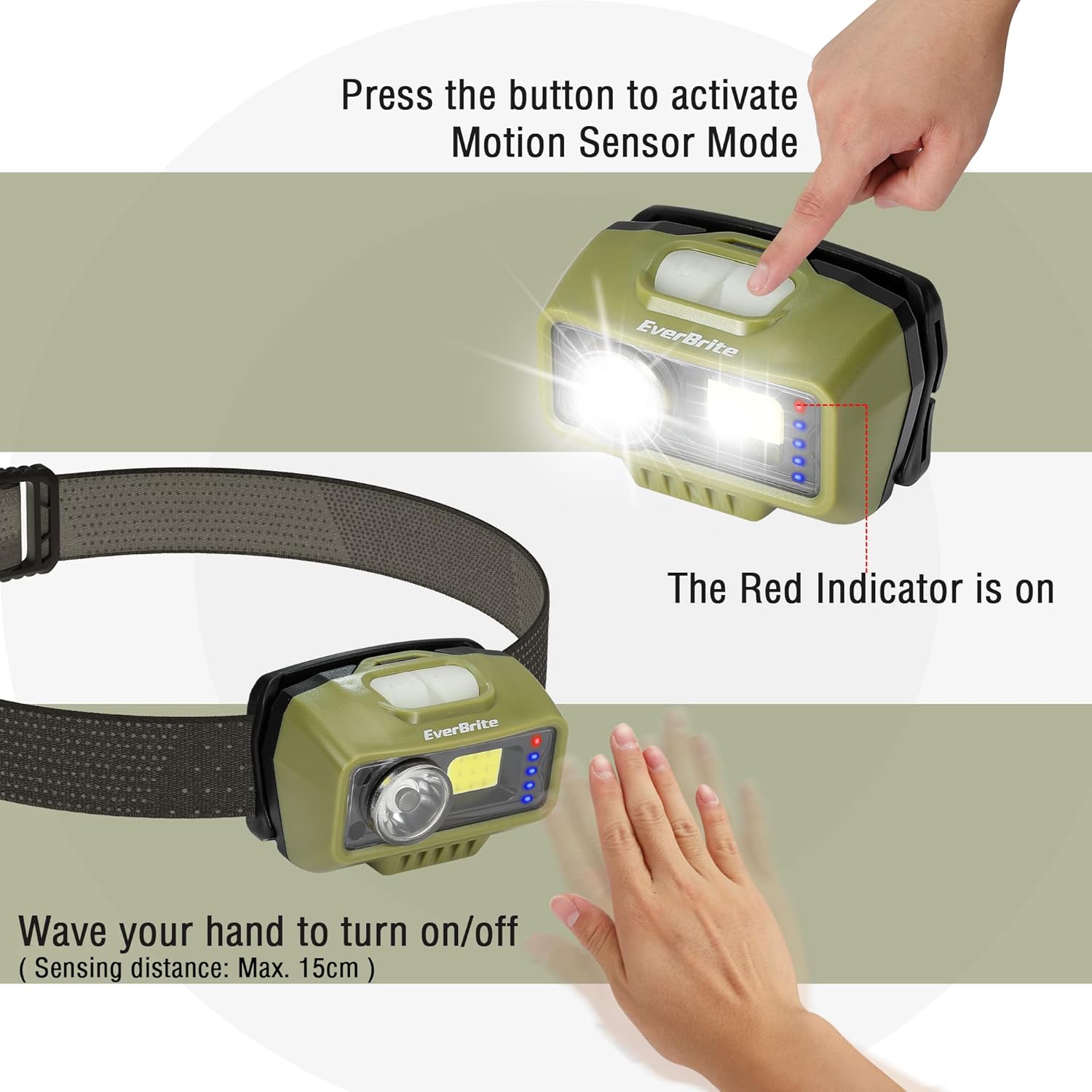
Image 5.2: Demonstration of the motion sensor feature, showing how to activate it and use hand gestures to control the light.
5.3 Angle Adjustment
The headlamp unit can be tilted up to 45 degrees to direct the light precisely where needed. Gently push or pull the light housing to adjust its angle.
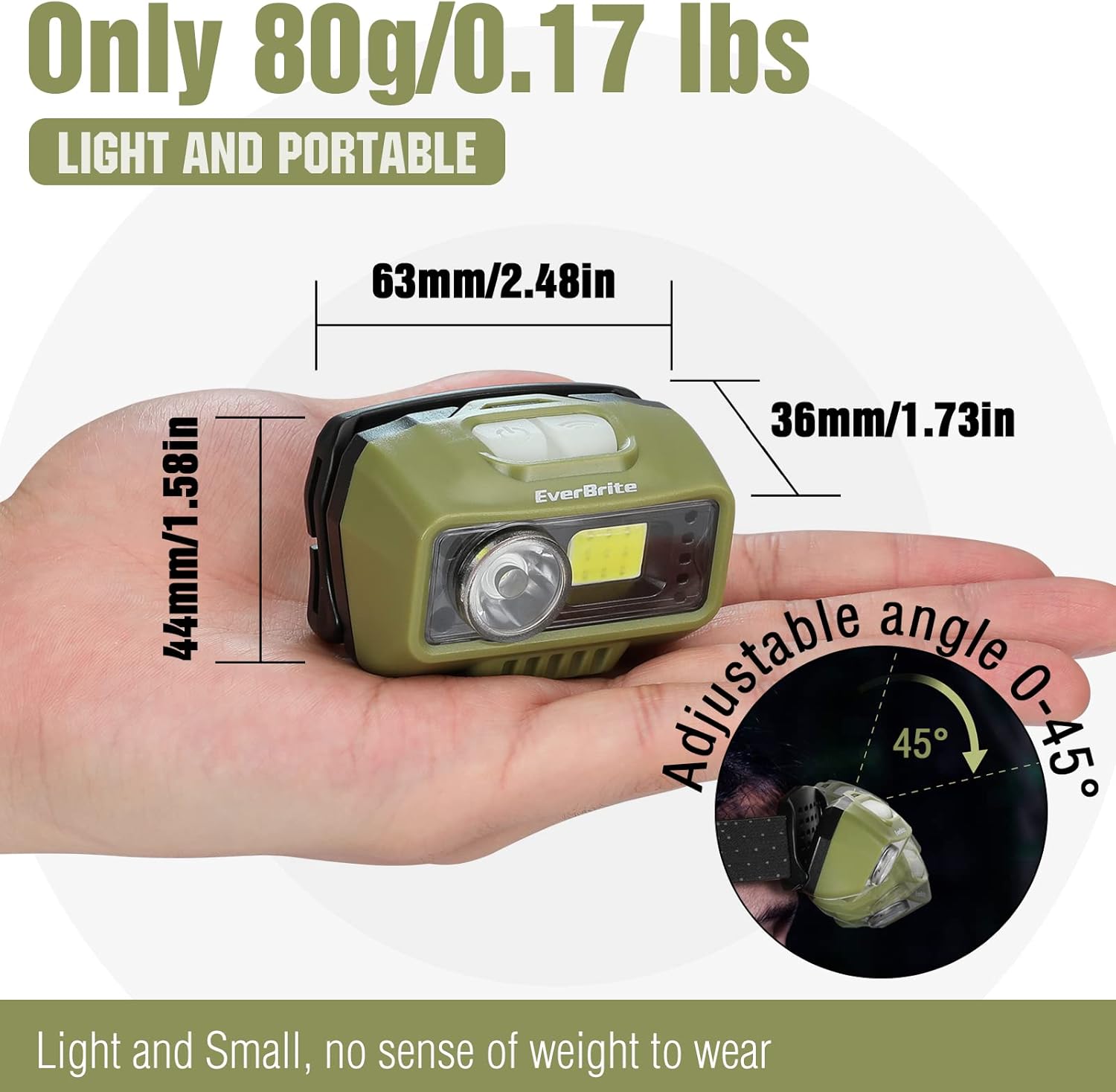
Image 5.3: The headlamp's adjustable angle mechanism, allowing users to direct the light beam.
6. Maintenance
6.1 Cleaning
- Wipe the headlamp body with a soft, damp cloth. Do not use abrasive cleaners or solvents.
- The headband is removable for easy washing. Hand wash with mild soap and water, then air dry completely before reattaching.
6.2 Storage
- Store the headlamp in a cool, dry place away from direct sunlight.
- For long-term storage, ensure the battery is partially charged (around 50%) and recharge it every 3-6 months to maintain battery health.
7. Troubleshooting
- Headlamp does not turn on:
- Ensure the battery is charged. Connect to a power source and check the charging indicator lights.
- Verify the power button is pressed correctly. - Short battery life:
- Ensure the headlamp is fully charged before use. Charging time is typically 2-3 hours.
- Battery performance can decrease over time with repeated charge cycles. - Light flickers:
- This could indicate a low battery. Recharge the headlamp.
- If flickering persists after charging, contact customer support. - Motion sensor not responding:
- Ensure motion sensor mode is activated (red indicator light is on).
- Wave your hand within the optimal sensing distance (approx. 15 cm).
- Clean the sensor area to remove any obstructions.
8. Specifications
| Feature | Detail |
|---|---|
| Model Number | E021047AU |
| Light Source Type | LED (XPE, COB) |
| Maximum Brightness | 500 Lumens (XPE+COB Mode) |
| White Brightness (XPE/COB) | 300 Lumens |
| Power Source | Battery Powered |
| Battery Type | 1200mAh Lithium Ion (included) |
| Charging Port | Micro-USB (5V1A input) |
| Charging Time | 2-3 Hours |
| Material | ABS |
| Item Weight | 0.17 lbs (2.72 ounces / 80g) |
| Product Dimensions | 1.42 x 2.48 x 1.73 inches (3.6 x 6.3 x 4.39 cm) |
| Water Resistance Level | Water Resistant (IP44) |
| Operating Temperature | -4℉ (-20℃) to 140℉ (60℃) |
| UPC | 820909775829 |
9. Warranty and Support
9.1 Warranty Information
This EverBrite headlamp comes with a 2-year warranty from the date of purchase. This warranty covers manufacturing defects and workmanship under normal use. It does not cover damage caused by misuse, accidents, unauthorized modifications, or normal wear and tear.
9.2 Customer Support
For technical assistance, warranty claims, or any questions regarding your EverBrite headlamp, please contact our customer support team:
- Email: support@everbrite.com (Example)
- Phone: 1-800-XXX-XXXX (Example)
- Website: Visit the EverBrite Store on Amazon
Please have your model number (E021047AU) and proof of purchase ready when contacting support.
Related documentsE021047AU


Ask a question about this manual
Ask about setup, troubleshooting, compatibility, parts, safety, or missing instructions. Manuals+ will review the question and use this page’s manual context to help answer it.