
Introduction
This manual provides detailed instructions for the installation, operation, and maintenance of your Kunray 80A 72V 3000W Brushless Motor Controller. This intelligent dual-mode controller is designed for electric bicycles, scooters, mini motorcycles, and karts, offering high power output and versatile functionality. Please read this manual thoroughly before use to ensure proper function and safety.
Safety Information
To prevent injury or damage to the device, observe the following safety precautions:
- Read Instructions: Always read the installation instructions carefully before use.
- Avoid Contact with Motor: Do not touch the motor with your body during operation to prevent burns.
- Intended Use: Kunray motors and controllers are designed for off-road use only. Verify and comply with local laws and regulations before riding.
- Pedestrian Safety: Always yield to pedestrians and obey all traffic regulations. Riding on sidewalks may be prohibited in certain areas.
- Not a Toy: This device is not a toy. Keep it away from children.
- Ventilation: Ensure careful ventilation and heat dissipation for optimal performance and longevity of the controller.
Product Overview
Controller Features
- High Power Output: 72V 3000W 80A Brushless Controller, designed to deliver full power to your motor.
- Intelligent Dual-Mode: Operates with or without Hall sensors.
- Robust Design: Features a large capacitor and 24 high-quality Mosfets for reliable performance.
- Multi-functionality: Includes hard boot, anti-theft, three-speed, cruise control, reverse, self-study, and display functions.
Physical Description and Dimensions
The controller features a ribbed aluminum casing for efficient heat dissipation. Its compact design allows for versatile installation.

Specifications
| Specification | Value |
|---|---|
| Nominal Voltage | 48-72V |
| Under Voltage Protection | 42V |
| Rated Current | 80A |
| Rated Power | 3000W |
| Display Type | LED |
| Material | Plastic (housing) |
| Item Weight | 1.61 Kilograms |

Wiring and Connections
Proper wiring is crucial for the safe and correct operation of the controller. Refer to the diagram and descriptions below for guidance.
Wiring Diagram Overview
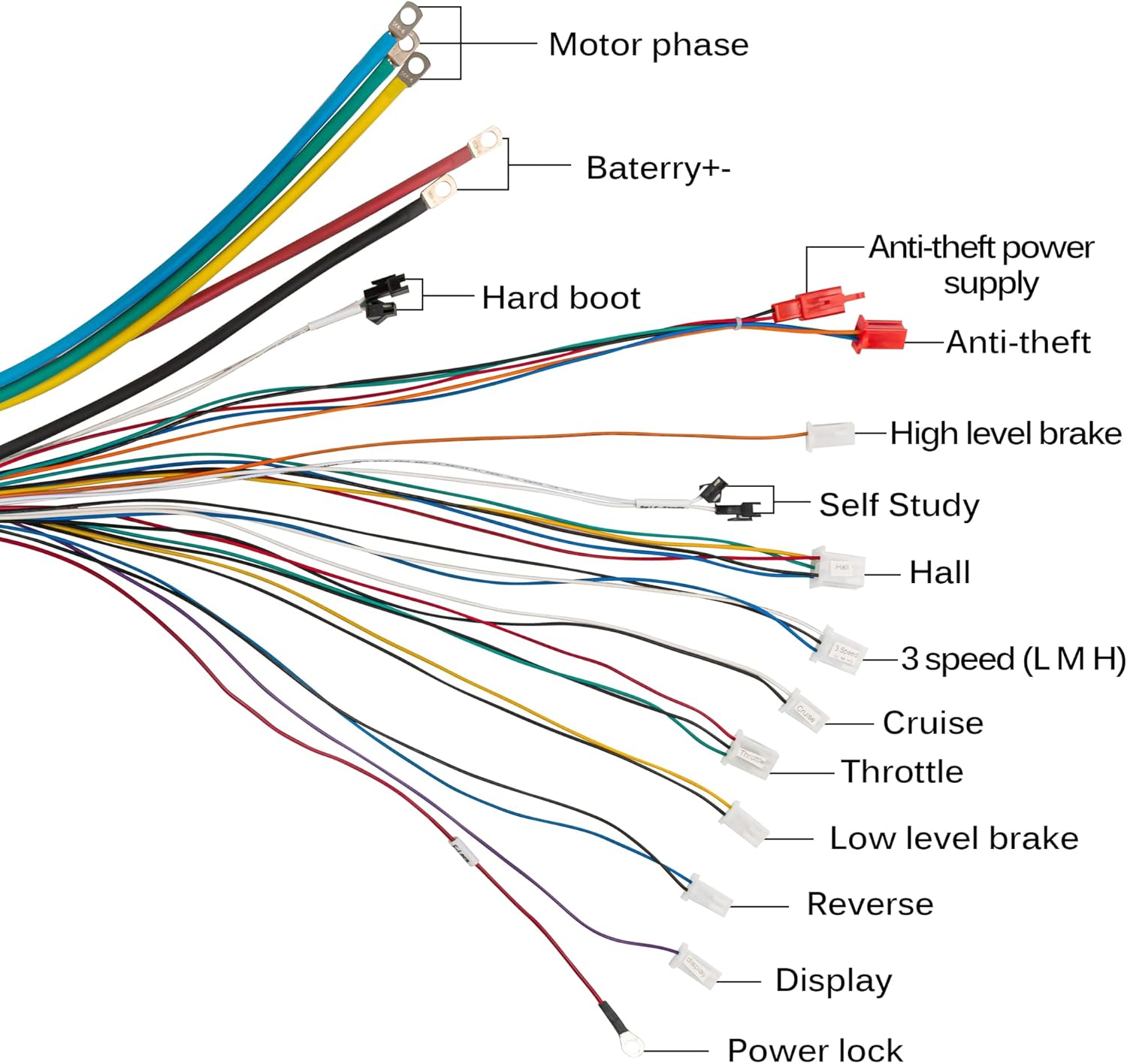
Connection Guide
- Motor Phase: Connect the three thick wires (typically green, yellow, blue) to the corresponding motor phase wires.
- Battery (+/-): Connect the thick red wire to the positive terminal of your battery and the thick black wire to the negative terminal.
- Hall Sensor: Connect the Hall sensor wires from the motor to the controller's Hall connector.
- Throttle: Connect the throttle unit to the designated throttle connector.
- Brake (High/Low Level): Connect your brake levers to the appropriate high or low-level brake connectors.
- 3 Speed (L M H): Connect the 3-speed switch to control motor speed modes (Low, Medium, High).
- Cruise: Connect the cruise control switch if desired.
- Reverse: Connect the reverse switch for backward movement.
- Anti-theft Power Supply/Signal: Connect anti-theft system components as per your system's requirements.
- Display: Connect your display unit to the display connector.
- Power Lock: Connect the power lock for ignition control.
Visual Connection Guide
Watch this video for a visual demonstration of how to connect the controller to various components.
Setup and Initial Configuration
After connecting all components, perform the following steps for initial setup:
Hard Boot Function
The hard boot function allows for a direct power-on. If your controller has a dedicated hard boot wire (often blue or white/black), connect it to enable this feature. Disconnecting it will enable a soft boot.

Self-Study Function
The self-study function is essential for the controller to learn the motor's phase sequence and direction. This should be performed during the first use or after changing motor components.
- Connect Self-Study Wires: Locate the self-study wires (often two white wires) and connect them together.
- Power On: Turn on the controller. The motor should start rotating.
- Observe Rotation: If the motor rotates in the desired direction, disconnect the self-study wires. If it rotates in the opposite direction, disconnect the self-study wires, reconnect them, and the motor should reverse direction. Once the correct direction is achieved, disconnect the self-study wires.
- Final Disconnection: Ensure the self-study wires are disconnected after the learning process is complete.

Operating Instructions
Once the controller is properly installed and configured, you can utilize its various functions:
- Throttle Control: Use the throttle to control the motor's speed.
- Three-Speed Function: Switch between low, medium, and high-speed modes using the connected 3-speed switch.
- Cruise Control: Activate the cruise function to maintain a constant speed without continuous throttle input.
- Reverse Function: Engage the reverse switch for backward movement when needed.
- Anti-theft System: If connected, the anti-theft features will provide security for your vehicle.
Maintenance
Regular maintenance ensures the longevity and optimal performance of your controller:
- Keep Clean: Periodically clean the controller's exterior to prevent dust and debris buildup, which can hinder heat dissipation.
- Check Connections: Regularly inspect all wiring connections to ensure they are secure and free from corrosion or damage.
- Avoid Water Exposure: While the controller may have some water resistance, avoid direct exposure to heavy rain or submersion.
- Temperature Management: Ensure the controller is installed in a location with adequate airflow to prevent overheating.
Troubleshooting
If you encounter issues with your Kunray 80A Brushless Motor Controller, refer to the following troubleshooting guide:
| Problem | Possible Cause | Solution |
|---|---|---|
| Motor does not turn on/respond | Incorrect wiring; Self-study not performed; Power lock not engaged; Faulty throttle. | Verify all connections according to the wiring diagram. Perform the self-study function. Ensure the power lock is engaged. Test the throttle for functionality. |
| Motor rotates in the wrong direction | Self-study function incorrectly completed. | Repeat the self-study function. If the motor rotates in the wrong direction, disconnect and reconnect the self-study wires to reverse the direction. |
| Throttle not working | Throttle not connected; Controller not powered; Self-study not completed; Faulty throttle unit. | Check throttle connection. Ensure the controller is receiving power. Complete the self-study process. Test with a known-good throttle if available. |
| Controller overheating | Insufficient ventilation; Overload; Internal fault. | Ensure adequate airflow around the controller. Reduce load if possible. If problem persists, contact support. |
Additional Resources
For a visual guide on the product's packaging and initial appearance, refer to the video below:
Warranty and Support
For warranty information, technical support, or any questions not covered in this manual, please contact Kunray customer service through your purchase platform. Provide your model number and a detailed description of the issue for efficient assistance.


