
Introduction
This manual provides detailed instructions for the setup, operation, maintenance, and troubleshooting of your ILamourCar HD-6800 DVB-T/T2 & DVB-C Digital Terrestrial Receiver. Please read this manual thoroughly before using the device to ensure proper functionality and safety.

Figure 1: ILamourCar HD-6800 Digital Terrestrial Receiver, showing the main unit, remote control, and an HDMI cable.
Package Contents
Upon opening the package, verify that all components are present and undamaged:
- 1x ILamourCar HD-6800 Digital Terrestrial Receiver
- 1x Remote Control
- 1x HDMI Cable
- 1x User Manual (this document)
Product Overview
Front Panel
The front panel features essential controls and indicators:
- Power Button: To turn the device on or off.
- VOL+/VOL-: Adjust volume levels.
- CH+/CH-: Change channels.
- MENU Button: Access the main menu.
- OK Button: Confirm selections.
- USB 2.0 Host Port: For connecting USB storage devices.
- LED Display: Shows channel number or time.
Rear Panel (Input/Output Interface)
The rear panel provides various connection ports for external devices:

Figure 2: Rear panel connections, including ANT IN, LOOP OUT, S/P DIF, HDTV, LAN, TV SCART, and AC IN.
- ANT IN: Signal input for connecting your antenna.
- LOOP OUT: For looping the antenna signal to another device.
- S/P DIF: Digital Audio Output.
- HDTV (HDMI): High-Definition Multimedia Interface output for connecting to a TV or display.
- LAN: Ethernet RJ45 port for network connection.
- TV SCART: SCART output for connecting to older TVs.
- AC IN: Power input (220V AC).
Setup
1. Connecting the Receiver
Follow these steps to connect your HD-6800 receiver to your television and antenna:
- Connect your terrestrial antenna cable to the ANT IN port on the rear of the receiver.
- Choose your preferred video output connection to your TV:
- For High Definition (HD) quality, connect one end of the provided HDMI cable to the HDTV port on the receiver and the other end to an HDMI input on your TV.
- For Standard Definition (SD) quality or older TVs, connect a SCART cable (not included) from the TV SCART port on the receiver to the SCART input on your TV.
- Connect the power cable to the AC IN port on the receiver and then plug it into a wall outlet.

Figure 3: Connection diagram for the HD-6800 receiver, illustrating antenna, HDMI, SCART, and power connections.
2. Initial Power On and Channel Scan
After connecting all cables:
- Press the Power button on the front panel or the remote control to turn on the receiver.
- Set your TV's input source to the corresponding HDMI or SCART input you used.
- The first-time setup wizard will appear. You may need to select your OSD (On-Screen Display) language.
- Proceed with the automatic channel scan. This process will search for available digital terrestrial and cable channels in your region.
- Once the scan is complete, the receiver will save the found channels, and you can begin watching TV.

Figure 4: The OSD Language selection screen, showing options for English, Italian, Spanish, French, German, Czech, Dutch, and Russian.
Operating Instructions
Basic Operation
- Channel Surfing: Use the CH+/CH- buttons on the remote or front panel.
- Volume Control: Use the VOL+/VOL- buttons on the remote or front panel.
- Accessing Menu: Press the MENU button to open the main menu. Use arrow keys to navigate and OK to confirm.
- Exiting Menu: Press the EXIT button to return to the previous screen or live TV.
Channel Management
The receiver offers various channel editing functions:
- Favorites: Create custom lists of your preferred channels.
- Move: Rearrange the order of channels.
- Lock: Password-protect specific channels.
- Skip: Hide channels from regular channel surfing.
- Delete: Remove unwanted channels.
- Rename: Change channel names.
- Search: Manually search for channels.
- Sort: Organize channels by various criteria.
Multimedia Playback and Recording
Connect a USB storage device to the USB 2.0 Host port to utilize multimedia features:
- USB Recorder (PVR Ready): Record live TV programs directly to your USB device.
- Time Shift: Pause live TV and resume watching later.
- HD Media Player: Play various multimedia files (video, audio, images) stored on your USB device.
Electronic Program Guide (EPG)
Access the Electronic Program Guide to view program schedules for up to 15 days in advance. This feature helps you plan your viewing and recording.
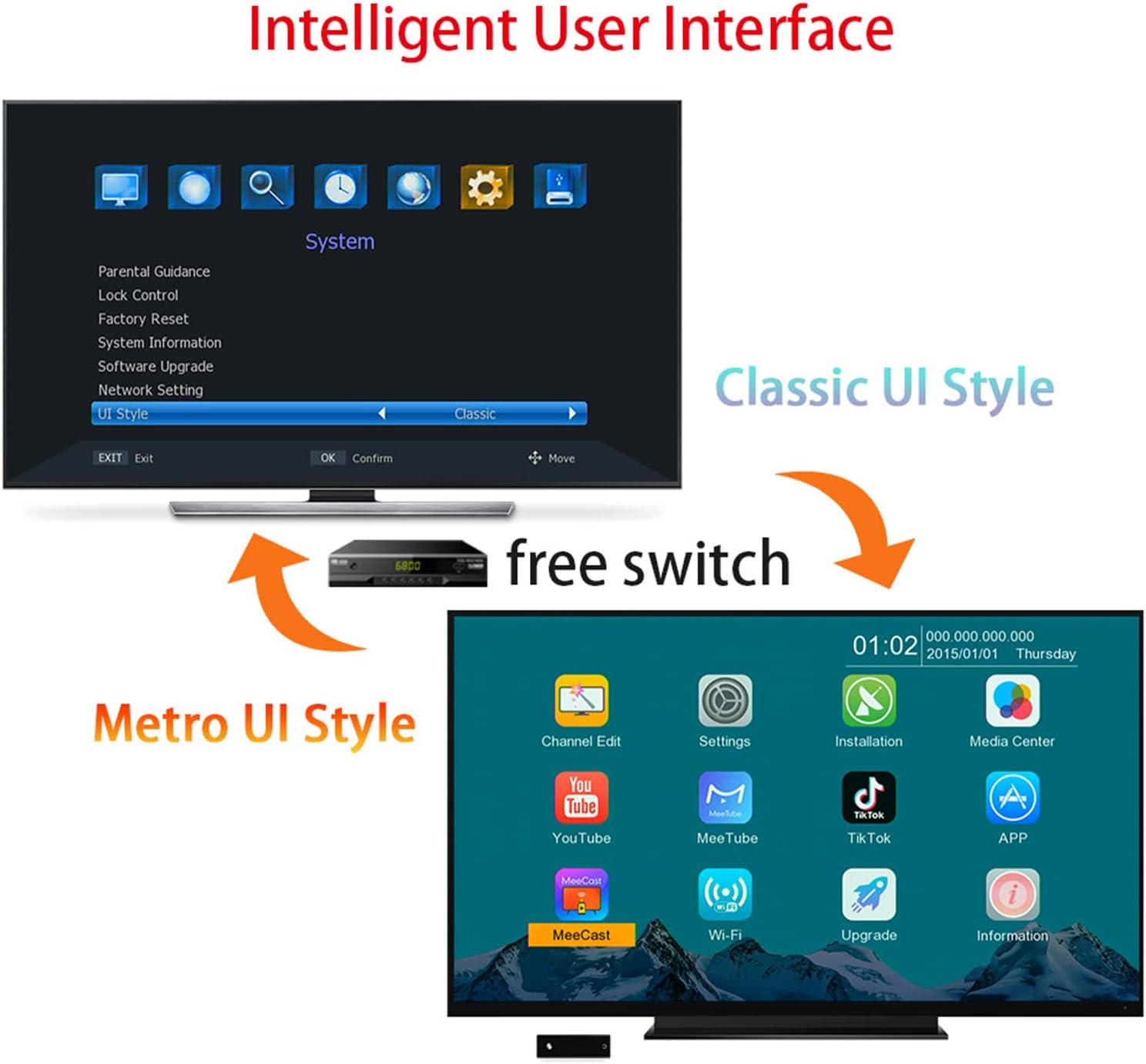
Figure 5: The Intelligent User Interface, demonstrating the option to switch between Classic UI Style and Metro UI Style for menu navigation.
Maintenance
To ensure the longevity and optimal performance of your ILamourCar HD-6800 receiver, follow these maintenance guidelines:
- Cleaning: Use a soft, dry cloth to clean the exterior of the receiver. Do not use liquid cleaners or abrasive materials.
- Ventilation: Ensure the receiver is placed in a well-ventilated area. Do not block any ventilation openings.
- Power Off: Disconnect the power cable from the wall outlet if the device will not be used for an extended period.
- Software Updates: Check for available software updates periodically through the system menu to ensure compatibility and performance improvements.
Troubleshooting
If you encounter issues with your receiver, refer to the following common problems and solutions:
| Problem | Possible Cause | Solution |
|---|---|---|
| No picture or sound | Incorrect TV input selected; Loose cable connections; Receiver not powered on. | Verify TV input source; Check all cable connections (HDMI/SCART, antenna, power); Ensure receiver is powered on. |
| "No Signal" message | Antenna not connected or faulty; Weak signal; No channels scanned. | Check antenna connection; Adjust antenna position; Perform a channel scan. |
| Remote control not working | Dead batteries; Obstruction between remote and receiver; Incorrect remote mode. | Replace batteries; Remove obstructions; Ensure remote is pointed at the receiver's IR sensor. |
| Cannot detect USB drive | USB drive not formatted correctly; Drive too large or incompatible; Faulty USB port. | Ensure USB drive is formatted to FAT32; Try a different USB drive; Test with a smaller capacity drive. |
If the problem persists after trying these solutions, please contact customer support.
Specifications
Detailed technical specifications for the ILamourCar HD-6800 Digital Terrestrial Receiver:
- Model Number: ILamourCar-FullHD-6800
- Supported Standards: DVB-T/T2 & DVB-C
- Video Encoding: H.265, HEVC, H.264, MPEG-4, MPEG-2
- Connections:
- HDMI (1 port)
- USB (2 ports, USB 2.0 Host)
- SCART
- ANT IN (Antenna Input)
- LOOP OUT (Antenna Loop Output)
- S/P DIF (Digital Audio Output)
- LAN (Ethernet RJ45)
- Compatible Devices: Televisions, game consoles, computers, smartphones, tablets, amplifiers, speakers, new channels.
- Controller Type: Remote Control
- Surround Sound: 5.1 Channel Configuration
- Output Power: 10 Watts
- Dimensions (approx.): 168mm x 95mm x 38mm

Figure 6: Overview of advanced features such as H.265 HEVC support, Wi-Fi (via adapter, not included), IPTV, PVR, and Timeshift.

Figure 7: Explanation of H.265/HEVC video codec advantages, such as 50% bandwidth reduction, 100% image quality improvement, and 50% storage space saving compared to H.264.
Warranty and Support
For warranty information and customer support, please refer to the contact details provided on the product packaging or the official ILamourCar website. Keep your purchase receipt as proof of purchase for warranty claims.
For technical assistance or further inquiries, please contact ILamourCar customer service.