
1. Introduction
This manual provides detailed instructions for the setup, operation, maintenance, and troubleshooting of your MEIKEE 42W RGBCW Smart LED Wall Washer Light. This versatile lighting solution offers 16 million colors, 20 dynamic modes, and smart control via a dedicated mobile application, making it suitable for various indoor and outdoor applications.

The MEIKEE 42W RGBCW Smart LED Wall Washer Light, shown with a smartphone demonstrating its app control capabilities.
2. What's in the Box
- 1 x MEIKEE 42W RGBCW Smart LED Wall Washer Light
- 1 x Mounting Components (brackets, screws, hex key)
- 1 x User Manual
3. Setup Instructions
- Download the App: Search for the "Hao Deng" application on Google Play Store or Apple App Store and install it on your smartphone.
- Power On: Connect the LED Wall Washer Light to a power source using the provided cord. The light will typically illuminate in a default color.
- Enable Bluetooth: Ensure Bluetooth is enabled on your smartphone.
- Pairing: Open the "Hao Deng" app. The app should automatically detect the MEIKEE light. Follow the on-screen prompts to add the device. The light will turn green to confirm successful pairing.
The power cord is approximately 5 feet long, offering flexibility in placement. Once paired, you can control the light directly from the app.
This video demonstrates the unboxing and initial app connection process for the MEIKEE Wall Washer Light, highlighting its ease of setup.
4. Operating Instructions and Features
4.1 Color and Mode Selection
The MEIKEE Wall Washer Light supports 16 million colors and 20 dynamic modes. This includes RGB (Red, Green, Blue) as well as Cool White (6500K) and Warm White (2700K) options. You can select colors from a palette within the app or use the camera feature to capture a color from your surroundings.

The mobile application interface for selecting from 16 million colors and adjusting white light temperatures (2700K Warm White to 6500K Cool White).
4.2 Brightness Adjustment
Adjust the brightness of any selected color or white light directly through the app to suit your preference and environment.
4.3 Timing Function
Set specific times for the light to turn on or off, or to activate a particular mode automatically. This feature allows for automated lighting schedules.

Illustration of the timing function, allowing users to schedule automatic on/off times for the lights.
4.4 Group Control
Utilize Bluetooth Mesh technology to control multiple MEIKEE lights simultaneously as a group, or manage them individually. This simplifies managing complex lighting setups.

The app interface showing options for both separate and whole group control of multiple MEIKEE lights.
4.5 Music & Microphone Rhythm Pattern
The light can change colors in sync with music. This feature offers two modes: playing music directly through the app (which identifies system music files) or using the smartphone's microphone to detect ambient music.

The app interface displaying the music and microphone modes, allowing the light to react to audio.
This video showcases the various smart features of the MEIKEE Wall Washer Light, including color changes, dynamic modes, and app control.
5. Installation
The MEIKEE Wall Washer Light is designed for flexible installation, supporting both wall-mounted and ground-inserted configurations. The included mounting components facilitate easy setup.
5.1 Mounting Components
The package includes brackets, screws, and an M5 Hex Screw Key for installation. The brackets offer 180-degree adjustability, allowing you to direct the light as needed.
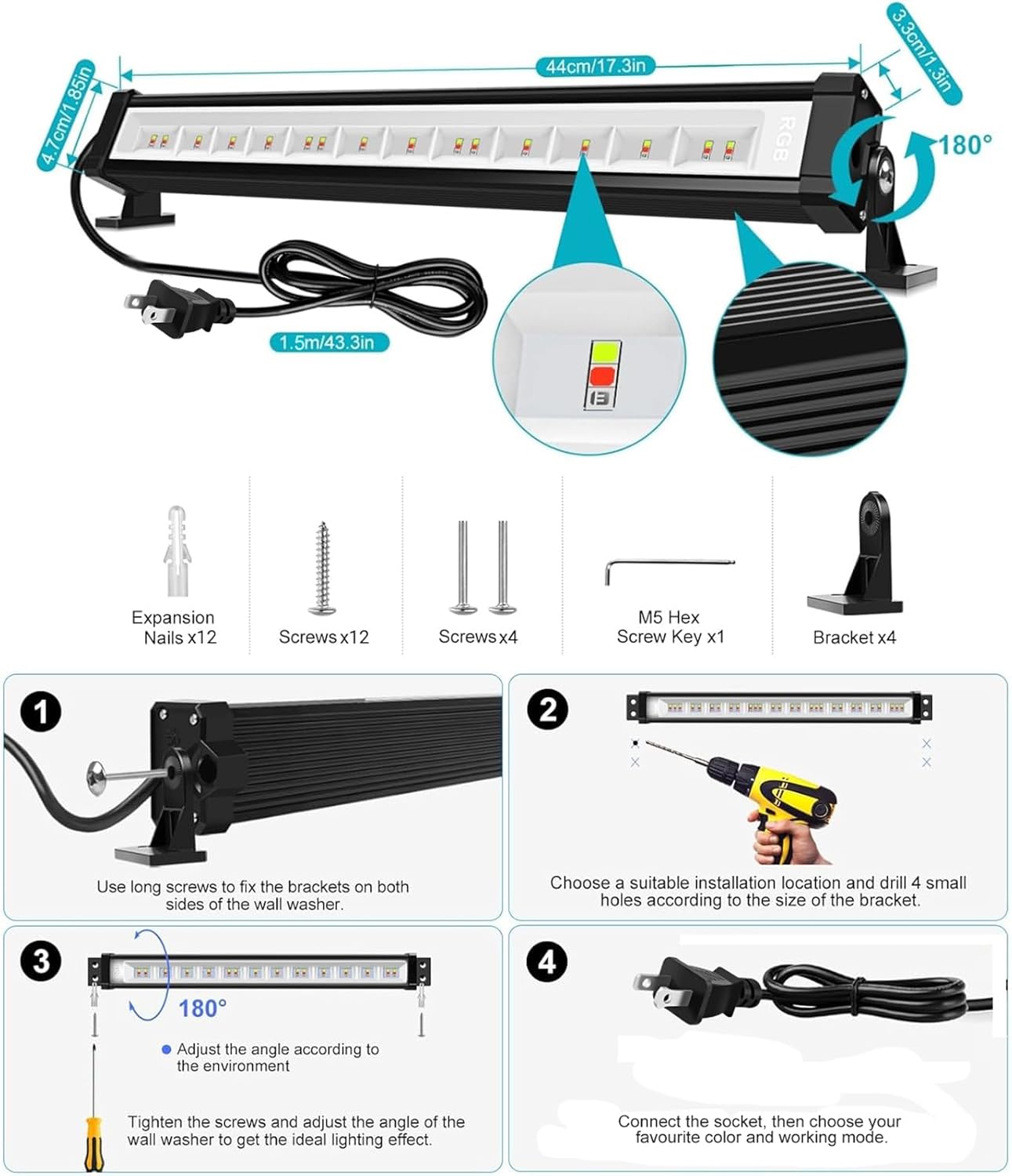
A detailed diagram illustrating the product dimensions, included mounting hardware, and a step-by-step guide for installation.
5.2 Installation Steps
- Use the long screws to attach the brackets securely to both sides of the wall washer light.
- Choose a suitable installation location. For wall mounting, drill four small holes according to the size of the bracket.
- Adjust the angle of the light using the 180-degree swivel brackets to achieve the desired lighting effect. Tighten the screws to secure the angle.
- Connect the light to a power socket.
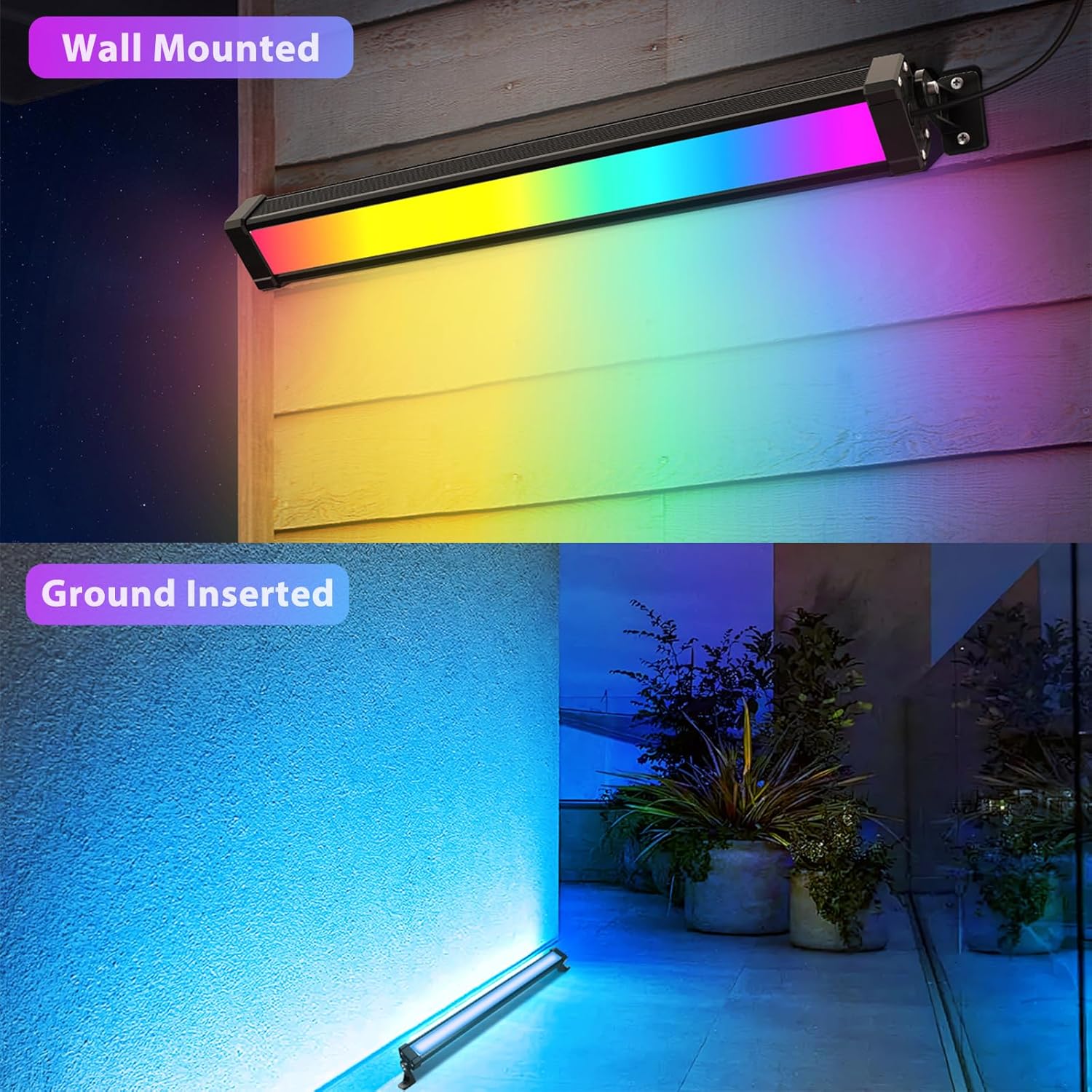
Examples of the MEIKEE Wall Washer Light installed both wall-mounted and ground-inserted, demonstrating its adaptability.
6. Maintenance
To ensure the longevity and optimal performance of your MEIKEE Wall Washer Light, follow these maintenance guidelines:
- Cleaning: Regularly wipe the light fixture with a soft, damp cloth to remove dust and debris. Avoid using harsh chemicals or abrasive cleaners.
- Inspection: Periodically check the power cord and connections for any signs of damage. Ensure all mounting screws remain tight.
- Environmental Considerations: While the light is IP66 waterproof, prolonged submersion is not recommended. Ensure proper drainage around ground-inserted units.
7. Troubleshooting
If you encounter issues with your MEIKEE Wall Washer Light, refer to the following common troubleshooting steps:
- Light Not Turning On:
- Check if the power cord is securely plugged into both the light and the power outlet.
- Verify that the power outlet is functional.
- Ensure the light is turned on via the mobile app.
- App Connectivity Issues:
- Make sure Bluetooth is enabled on your smartphone and the app has Bluetooth permissions.
- Ensure the light is within the 50m/164ft Bluetooth range (without wall obstacles).
- Try restarting the app and the light fixture.
- Incorrect Colors or Brightness:
- Confirm that the correct color and brightness settings are selected in the app.
- If colors appear inaccurate (e.g., green looks pale), ensure the light is not in a specific white light mode (Cool White/Warm White) that might affect RGB color purity.
- Light Gets Warm:
- It is normal for the light to get warm during operation, especially at full brightness, due to its high output.
- Ensure the light is placed in an area with adequate ventilation and not in direct contact with flammable materials.
8. Specifications
| Feature | Specification |
|---|---|
| Brand | MEIKEE |
| Model Number | RFLB042 |
| Wattage | 42 Watts |
| Light Source Type | Light Emitting Diode (LED) |
| Color | RGB (Red, Green, Blue) + Cool White + Warm White |
| Voltage | 120 Volts |
| Material | Acrylonitrile Butadiene Styrene (ABS) |
| Product Dimensions | 16.73"L x 2.63"W x 2.13"H |
| Item Weight | 1.14 Pounds |
| Mounting Type | Wall Mount |
| Special Features | Color Changing, Dimmable, Bluetooth App Control, Music Sync, Timing Function, Group Control |
| Waterproof Rating | IP66 |
9. Warranty and Support
MEIKEE offers a 2-year warranty on this product from the date of purchase. For any inquiries or support needs, please contact us via Amazon or the email address provided in the instruction manual. We aim to provide a timely response within 24 hours.
