
Introduction
This manual provides detailed instructions for the safe and effective operation, maintenance, and troubleshooting of your Caterpillar CBC100E Professional Battery Charger and Maintainer. Please read this manual thoroughly before using the product and retain it for future reference.
Safety Information
WARNING: Cancer and reproductive harm. For more information go to www.P65Warnings.ca.gov.
Always follow all safety precautions when operating electrical equipment. Ensure proper ventilation and avoid contact with battery acid. Wear appropriate personal protective equipment, including eye protection and gloves.
Product Overview & Features
The Caterpillar CBC100E is a versatile battery charger, maintainer, and engine starter designed for various automotive and recreational vehicle applications. It features advanced technology for efficient and safe battery management.

Figure 1: Front view of the Caterpillar CBC100E unit.
- VERSATILE BATTERY CHARGER AND MAINTAINER: Features 100 Amp engine start, 25 amps of charging and 3 amp maintainer.
- ALTERNATOR CHECK: Tests the vehicle's alternator to indicate if it is operating properly.
- EXTEND BATTERY LIFE: Electric pulse technology can help reverse sulfate build up on battery plates to improve charge capacity.
- SIMPLE TO USE: Easy to read LCD screen gives you a clear view of operation information.
- DURABLE: Ruggedly constructed with an impact-resistant polymer housing.
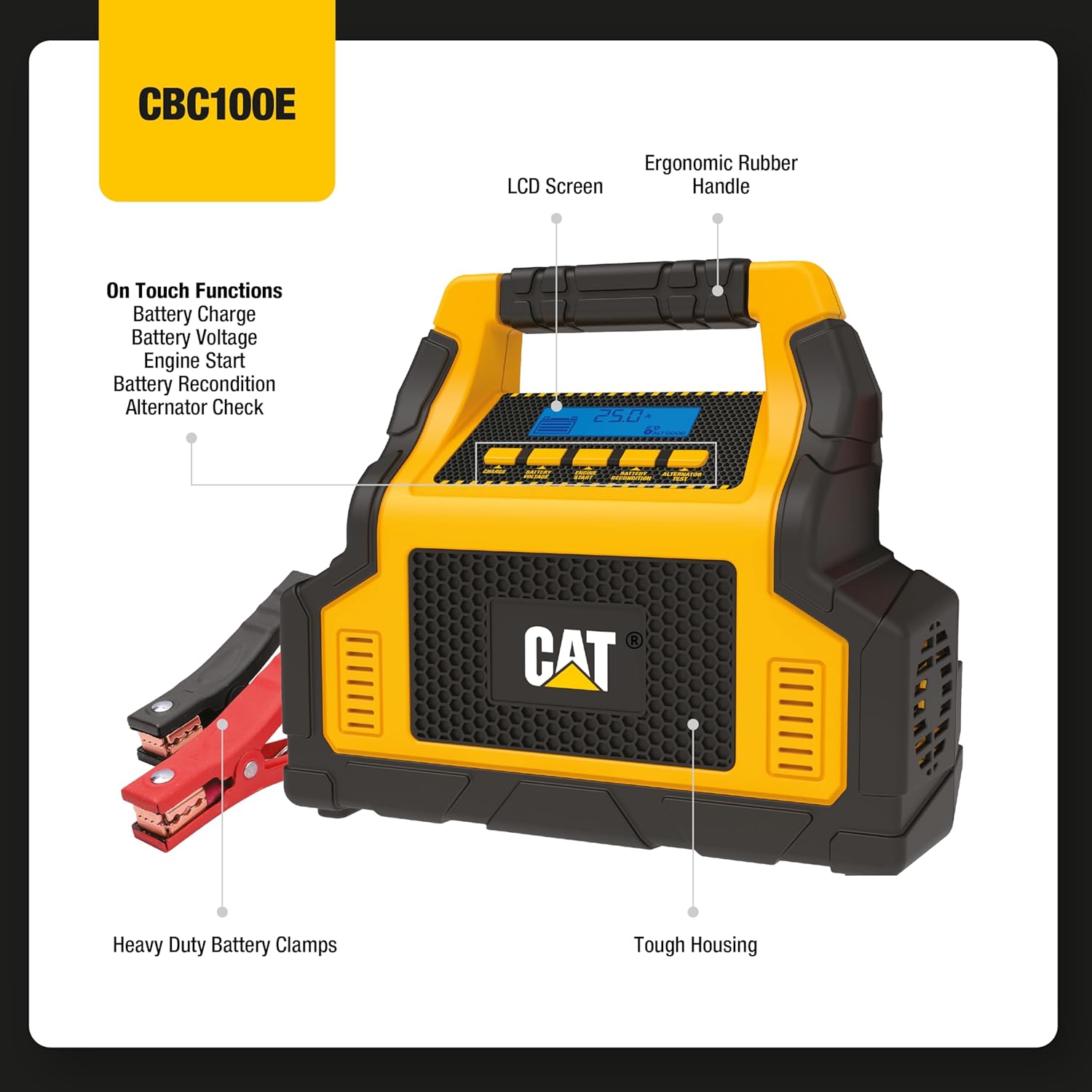
Figure 2: Key components and functions of the CBC100E, including the LCD screen, ergonomic handle, heavy-duty battery clamps, and tough housing.

Figure 3: Visual representation of the unit's core functionalities.

Figure 4: Physical dimensions and weight of the CBC100E for easy storage and portability.
Setup
- Initial Charge: Before first use, fully charge the internal battery of the CBC100E by plugging it into a standard AC outlet. The LCD screen will indicate charging progress.
- Connect to Battery: Ensure the vehicle's ignition is off. Connect the red positive (+) clamp to the positive battery terminal and the black negative (-) clamp to the negative battery terminal or a grounded metal part of the vehicle chassis away from the battery.
- Secure Connections: Verify that the clamps are securely attached to prevent accidental disconnection during operation.

Figure 5: The CBC100E connected to a vehicle battery for charging or jump-starting.
Operating Instructions
The CBC100E offers multiple functions accessible via its intuitive control panel and LCD screen.
Video 1: Product Overview of the CBC100E, demonstrating its features and functions.
1. Battery Charging & Maintaining
The unit automatically selects the optimal charging current (0.15 to 25 Amps) to maintain battery life. Once connected, press the 'Charge' button. The unit will automatically switch to a trickle charge for maintenance when the battery is full.
2. Engine Start (100 Amp)
For jump-starting a vehicle with a dead battery:
- Ensure clamps are correctly connected to the vehicle battery.
- Press the 'Engine Start' button.
- Attempt to start the vehicle. If it doesn't start immediately, wait a few minutes before trying again.
3. Alternator Check
To test if your vehicle's alternator is functioning correctly, connect the unit to the battery and press the 'Alternator Test' button. The LCD screen will display the test results, indicating if the alternator is operating properly.
4. Battery Recondition
This feature uses electric pulse technology to help reverse sulfate buildup on battery plates, which can improve the battery's charge capacity and extend its lifespan. Press the 'Battery Recondition' button to activate this mode.
5. USB Outlets & AC Power
The unit includes multiple USB outlets for charging portable electronic devices. To activate the USB ports or the AC power outlet, ensure the unit is powered on and press the corresponding activation button. The AC power outlet provides 200 Watts for small appliances.
6. Air Compressor
The built-in air compressor is ideal for inflating tires, sports equipment, and other inflatables. Connect the air hose to the item and activate the compressor. Monitor the pressure using the integrated gauge.
7. LED Light
The integrated LED light provides illumination for working in low-light conditions. Press the light button to turn it on or off.
Maintenance
- Cleaning: Regularly wipe down the unit with a dry cloth. Do not use harsh chemicals or abrasive cleaners.
- Storage: Store the CBC100E in a cool, dry place when not in use. Ensure all cables and clamps are properly stored in their designated compartments.
- Battery Care: For optimal performance and longevity, fully charge the internal battery every 3 months, even if not in use.
Troubleshooting
| Problem | Possible Cause | Solution |
|---|---|---|
| Unit does not power on. | Internal battery is depleted. | Charge the unit for several hours using the AC adapter. |
| Vehicle does not jump start. | Incorrect clamp connection; severely discharged battery; vehicle issue. | Verify correct polarity and secure connections. Allow more time for charging before attempting to start. Consult a mechanic if the issue persists. |
| LCD screen displays error or unexpected readings. | Loose connections; internal fault; user error. | Ensure all connections are tight. Refer to the specific icon meanings in the full user guide. If the problem persists, contact customer support. |
| Air compressor not inflating. | Hose not securely attached; item over-inflated; internal issue. | Check hose connection to the item and the unit. Ensure the item's pressure limit is not exceeded. |
Specifications
| Feature | Specification |
|---|---|
| Brand | CAT |
| Model Number | CBC100E |
| Engine Start Amperage | 100 Amps |
| Battery Charger Amperage | 25 Amps |
| Battery Maintainer Amperage | 3 Amps |
| Voltage | 12 Volts |
| Item Weight | 4.8 pounds |
| Product Dimensions | 6.5 x 6.25 x 14.5 inches |
| Country of Origin | China |
| Manufacturer | Baccus Global LLC |
What's in the Box
- Caterpillar CBC100E Battery Charger/Maintainer Unit
Warranty Information
Baccus Global LLC, the manufacturer, warrants this product against defects in material and workmanship for a period of ONE (1) YEAR commencing from the date of retail purchase by the original end-user purchaser or from the date of delivery of the good, whichever occurs later ("Warranty Period").
If there is a defect and a valid claim is received by the manufacturer within the Warranty Period, the defective product can be replaced. Proof of purchase may be required. This manufacturer's warranty does not apply to accessories, bulbs, fuses and batteries; defects resulting from normal wear and tear, accidents; damages sustained during shipping; alterations; unauthorized use; neglect, misuse, abuse, and failure to follow instructions for care and maintenance for the product.
This manufacturer's warranty gives you, the original retail purchaser, specific legal rights. You may also have other rights which vary from state to state or province to province. This product is not intended for commercial use. To register your product with the manufacturer, please visit www.Baccusglobal.com.
Support
For further assistance, technical support, or to inquire about replacement parts, please refer to the official user guide PDF available on the product page or visit the manufacturer's website. You can also contact Baccus Global LLC directly for support.
Official User Guide (PDF): Download Here

