
1. Introduction
Thank you for purchasing the UBeesize TR50 Ring Light and Tripod Stand Bundle. This product is designed to enhance your photography, videography, live streaming, and makeup application by providing adjustable lighting and stable support for your smartphone. This manual provides detailed instructions for assembly, operation, maintenance, and troubleshooting to ensure optimal performance and longevity of your device.
2. Package Contents
Please verify that all items listed below are included in your package:
- 1 x 10-inch Dimmable Ring Light
- 1 x Extendable Tripod Stand (15.7 to 50 inches)
- 1 x Flexible Phone Tripod
- 1 x Spring-Loaded Phone Holder
- 1 x Wireless Bluetooth Remote Shutter
- 1 x AC/DC Power Adapter
- 1 x GoPro Adapter Mount (for flexible tripod)
- 1 x Camera Screw (for flexible tripod)

Image 2.1: Overview of the UBeesize TR50 Ring Light and Tripod Stand Bundle, showing the ring light on its extendable tripod, a flexible phone tripod, and the wireless remote shutter.
3. Setup Guide
3.1 Assembling the Ring Light Tripod
- Unfold the tripod legs by gently pulling them outwards until they are fully extended and stable.
- Extend the tripod stand to your desired height by loosening the locking clips on each section, pulling the sections up, and then securing the clips. The stand can extend from 15.7 inches to 50 inches.
- Mount the 10-inch ring light onto the top screw of the tripod stand and rotate it clockwise until it is securely fastened.

Image 3.1: Illustration of the tripod stand's adjustable heights, ranging from 15.7 inches to 50 inches, suitable for both tabletop and floor use.
3.2 Attaching the Phone Holder
- Locate the phone holder. It is spring-loaded and can extend up to 3.6 inches wide.
- Screw the phone holder onto the central mount within the ring light. Ensure it is tightened securely.
- Gently pull apart the spring-loaded clamps of the phone holder and insert your smartphone. Ensure the phone is centered and stable.
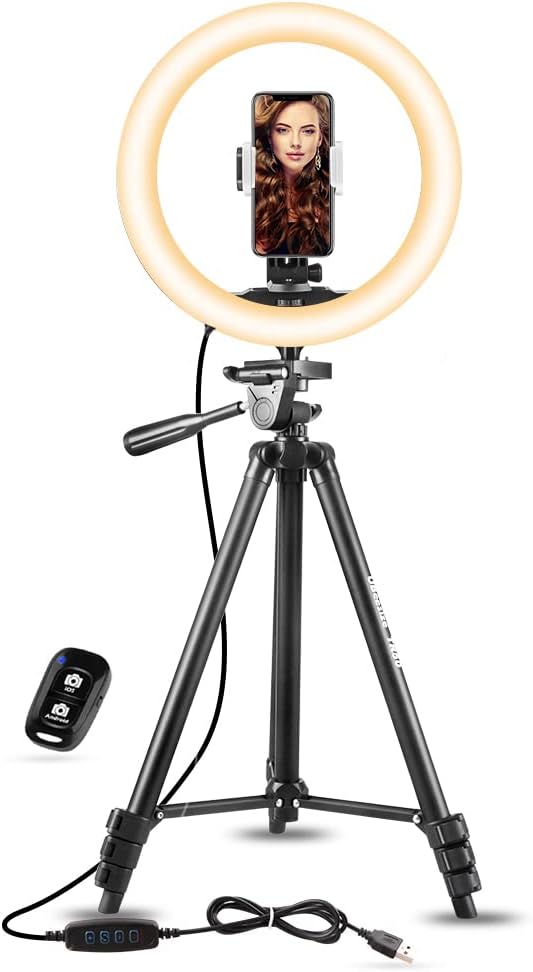
Image 3.2: The UBeesize TR50 Ring Light with a smartphone mounted in the center phone holder, alongside the wireless remote.
3.3 Connecting Power
- Connect the USB cable from the ring light to the provided AC/DC power adapter.
- Plug the AC/DC power adapter into a standard wall outlet.
3.4 Pairing the Bluetooth Remote Shutter
- Ensure your smartphone's Bluetooth is enabled.
- Turn on the wireless remote shutter by sliding the power switch. The indicator light will flash.
- On your smartphone, search for available Bluetooth devices and select 'AB Shutter3' or a similar name.
- Once paired, the indicator light on the remote will stop flashing. No app download is necessary.
4. Operation Guide
4.1 Using the Ring Light
- Power On/Off: Use the power button on the inline controller to turn the ring light on or off.
- Adjusting Color Modes: The ring light offers 3 color modes: Cool White, Warm Yellow, and Daylight. Press the mode button on the controller to cycle through these options.
- Adjusting Brightness: Each color mode has 10 brightness levels. Use the '+' and '-' buttons on the controller to increase or decrease the brightness.

Image 4.1: Visual representation of the three color modes (White, Natural, Warm) and their respective 10 brightness levels, from 1% to 100% intensity.
4.2 Adjusting the Tripod Stand
- The main tripod stand can be adjusted to various heights between 15.7 inches and 50 inches. Loosen the quick-release clips on each section, extend or retract the legs, and then secure the clips firmly.
- Ensure the tripod legs are spread wide enough to provide a stable base, especially when extended to maximum height.
4.3 Using the Flexible Phone Tripod
- The flexible tripod features bendable legs that can be wrapped around objects or adjusted for uneven surfaces.
- Attach the phone holder, camera, or GoPro using the appropriate screw or adapter.
- The ball head allows for 360° rotation, enabling you to adjust the angle of your device freely.

Image 4.2: The flexible phone tripod with a smartphone mounted, accompanied by the wireless remote shutter.

Image 4.3: The flexible tripod demonstrating compatibility with smartphones (up to 9 cm wide), cameras, and GoPro devices, with included adapters.

Image 4.4: The flexible tripod showcasing its 360° rotatable head for versatile positioning of devices.
4.4 Operating the Wireless Remote Shutter
- Once paired, open your smartphone's camera application.
- Press the appropriate button on the remote (iOS or Android icon) to trigger the camera shutter for photos or to start/stop video recording.
- The remote works from a distance of up to 30 feet, allowing for convenient group photos and selfies.
5. Care and Maintenance
- Cleaning: Use a soft, dry cloth to wipe down the ring light and tripod. Avoid using abrasive cleaners or solvents that could damage the surfaces.
- Storage: When not in use, retract the tripod stand to its minimum height and store the entire bundle in a cool, dry place away from direct sunlight and excessive moisture.
- Handling: Handle the ring light and tripod with care. Avoid dropping or subjecting them to strong impacts, which could damage internal components or the LED lights.
6. Troubleshooting
| Problem | Possible Cause | Solution |
|---|---|---|
| Ring light does not turn on. | No power, loose connection, faulty adapter. | Ensure the AC/DC adapter is securely plugged into both the wall outlet and the USB cable. Try a different power outlet. |
| Bluetooth remote does not pair. | Remote not on, Bluetooth off on phone, out of range, low battery. | Ensure the remote is switched on and its indicator light is flashing. Check that Bluetooth is enabled on your phone. Move closer to the remote. Replace the remote's battery if necessary. |
| Phone does not fit in holder. | Phone too wide. | The phone holder supports devices up to 3.6 inches (approx. 9 cm) wide. Ensure your phone, with or without a case, fits within this dimension. |
| Tripod is unstable. | Legs not fully extended/locked, uneven surface, overloaded. | Ensure all tripod leg sections are fully extended and their locking clips are securely fastened. Place the tripod on a flat, stable surface. Do not exceed the recommended weight capacity. |
7. Specifications
| Feature | Detail |
|---|---|
| Ring Light Diameter | 10 inches |
| Color Modes | 3 (Cool White, Warm Yellow, Daylight) |
| Brightness Levels | 10 levels per color mode |
| Tripod Stand Height | Adjustable from 15.7 inches to 50 inches |
| Phone Holder Compatibility | Supports smartphones up to 3.6 inches (approx. 9 cm) wide |
| Wireless Remote Connectivity | Bluetooth |
| Wireless Remote Range | Up to 30 feet |
| Power Source | USB powered via AC/DC adapter |
| Product Color | White |
8. Warranty and Support
UBeesize provides a 12-month after-sale service for this product. If you encounter any issues or have questions regarding the UBeesize TR50 Ring Light and Tripod Stand Bundle, please contact UBeesize customer support through the retailer's platform or the official UBeesize website for assistance. Please retain your proof of purchase for warranty claims.


