
ODK home desk
ODK Computer Desk 47" Table Instruction Manual
Model: home desk
Introduction
The ODK Computer Desk 47" Table is a versatile and modern workstation designed to enhance your home or office environment. Its multi-functional design allows it to serve as a computer desk, office desk, or writing table, seamlessly blending with various decor styles. This manual provides detailed instructions for assembly, usage, maintenance, and troubleshooting to ensure optimal performance and longevity of your desk.

Figure 1: Overview of the ODK Computer Desk 47" Table, showcasing its spacious surface, monitor stand, and integrated storage.
Setup and Assembly
Assembly of the ODK Computer Desk is designed to be straightforward. All necessary parts are numbered, and clear, detailed instructions are provided to guide you through each step. It is recommended to assemble the desk in the room where it will be used to avoid unnecessary moving.
Components Checklist:
- Desktop surface with integrated monitor stand supports
- Metal frame components
- 2 Cloth Drawers with wood-look fronts
- Adjustable storage shelves (2)
- All necessary screws, bolts, and tools (if included)
Assembly Steps:
- Unpack all components and verify against the parts list in your included manual.
- Assemble the metal frame structure according to the numbered instructions. Ensure all connections are secure.
- Attach the desktop surface to the assembled frame.
- Install the monitor stand. This component can be removed if a flat surface is preferred for your workspace.
- Assemble the cloth drawers by inserting the stable base piece into each drawer.
- Slide the assembled drawers into their designated slots under the desktop.
- Install the side storage shelves. Note that the height of the middle shelf is adjustable to accommodate different sized items, such as a computer tower.
- Adjust the table foot pads to ensure stability and protect your floor from scratches.

Figure 2: Detailed dimensions of the ODK Computer Desk, including the main surface, monitor stand, and side shelves.
Features and Components
- Spacious Desktop (47"L x 19.7"W): Provides ample room for your computer, peripherals, and other work essentials.
- Two-Tier Monitor Stand: Elevates your monitor(s) to an ergonomic height (6.7" high), reducing neck and back strain. This stand is removable for a flat workspace if desired.
- Integrated Cloth Drawers (2): Offer convenient under-desk storage for books, documents, and office supplies. The drawers are designed for easy assembly and sturdy use.
- Adjustable Storage Shelves: Located on the side, these open shelves provide additional storage. The middle shelf can be adjusted to two different height levels to accommodate items like a computer tower or larger books.
- Sturdy Construction: Made with a thicker metal frame and durable wood board, ensuring stability and longevity.
- Adjustable Foot Pads: Enhance stability on uneven surfaces and prevent floor damage.

Figure 3: The spacious cloth drawers provide ample storage for various office items, keeping your workspace tidy.
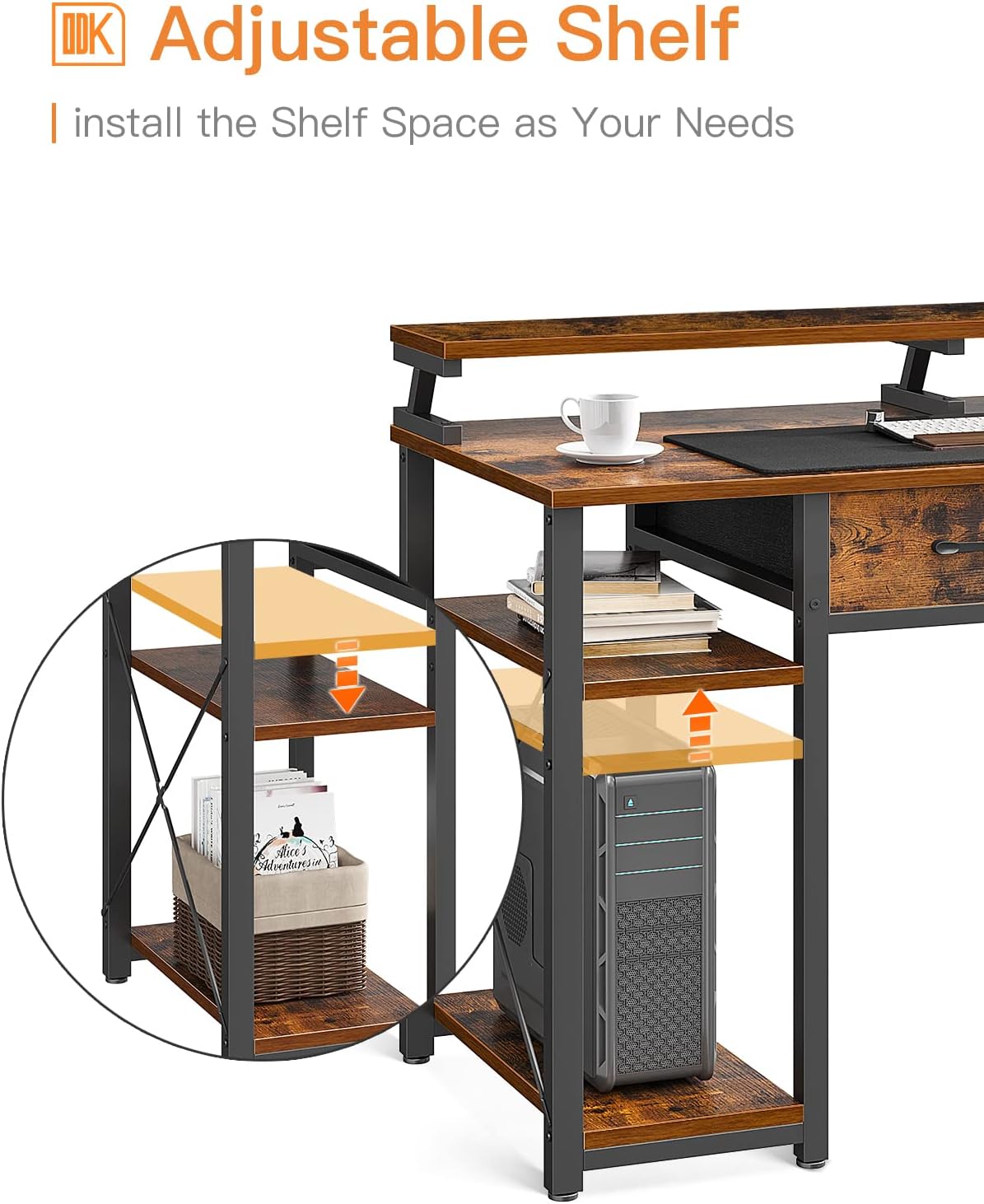
Figure 4: The adjustable shelf allows for flexible storage solutions, accommodating items of varying heights.
Operating Instructions
The ODK Computer Desk is designed for intuitive use. Once assembled, arrange your equipment and supplies to maximize your productivity and comfort.
- Monitor Placement: Utilize the monitor stand to position your screen(s) at eye level for optimal ergonomic posture. This is particularly beneficial for extended work or gaming sessions.
- Storage Utilization: Use the cloth drawers for discreet storage of items you want to keep out of sight but easily accessible. The side shelves are ideal for displaying decorative items, storing books, or housing your computer tower.
- Cable Management: While not explicitly designed with cable management features, the open back design allows for easy routing of cables behind the desk to maintain a neat appearance.

Figure 5: Proper ergonomic setup with the monitor stand helps maintain a comfortable and healthy posture.
Maintenance
Proper care will ensure the longevity and appearance of your ODK Computer Desk.
- Cleaning: For general cleaning, wipe the desk surfaces with a damp cloth. For a thorough clean, follow with a dry cloth to prevent moisture damage.
- Avoid Harsh Chemicals: Do not use abrasive cleaners or strong chemical solutions, as these can damage the finish of the wood board and metal frame.
- Spill Management: Immediately wipe up any spills to prevent staining or warping of the wood surface.
- Weight Distribution: Distribute weight evenly across the desktop and shelves to prevent undue stress on the structure.
Troubleshooting
If you encounter any issues with your ODK Computer Desk, consider the following common solutions:
- Wobbly Desk:
- Check that all screws and bolts are securely tightened.
- Adjust the foot pads on the bottom of the legs to level the desk on uneven floors.
- Drawers Not Sliding Smoothly:
- Ensure the internal stable base piece is correctly inserted and flat within the cloth drawer.
- Verify that the drawer is not overloaded.
- Missing Parts:
- Refer to the components checklist in your assembly manual. If parts are genuinely missing, contact ODK customer service.
For further assistance, please refer to the support section or contact ODK customer service.
Specifications
| Feature | Detail |
|---|---|
| Brand | ODK |
| Model Name | home desk |
| Product Dimensions | 19.7"D x 47"W x 34"H |
| Color | Rustic Brown |
| Style | Modern |
| Base Material | Metal Steel |
| Top Material Type | Engineered Wood |
| Number of Drawers | 2 |
| Number of Shelves | 2 |
| Required Assembly | Yes |
| Product Care Instructions | Wipe with Damp Cloth, Wipe with Dry Cloth |
Warranty and Support
ODK is committed to providing high-quality products and customer satisfaction. This product is covered by a standard manufacturer's warranty against defects in materials and workmanship. For specific warranty terms, please refer to the documentation included with your purchase or visit the official ODK website.
If you require assistance with assembly, have questions about product features, or need to report a defect, please contact ODK customer service. Our team is available to provide support and ensure your satisfaction.
- Customer Service: Refer to your purchase documentation for contact details or visit the ODK brand store.
- Online Resources: Additional support and FAQs may be available on the ODK official website.
Related documentshome desk


Ask a question about this manual
Ask about setup, troubleshooting, compatibility, parts, safety, or missing instructions. Manuals+ will review the question and use this page’s manual context to help answer it.