
1. Introduction
Thank you for choosing the Kewig M22-A1 Motorcycle Phone Mount. This device is designed to securely hold and charge your smartphone while riding, offering both Qi wireless charging and USB-C fast charging capabilities. Please read this manual carefully before installation and use to ensure proper function and safety.

Image 1: Kewig M22-A1 Motorcycle Phone Mount with a smartphone charging wirelessly.
2. Setup and Installation
The Kewig M22-A1 offers versatile mounting and power connection options to suit various motorcycles and user preferences.
2.1 Mounting Options
The package includes both a handlebar base and a rear-view mirror mounting base. Choose the option that best fits your motorcycle and desired phone placement.
- Handlebar Mounting: The handlebar mounting base is compatible with handlebars of 0.5'' (12 mm), 0.87'' (22 mm), 1.0'' (25.4 mm), and 1.26'' (32 mm) in diameter. Use the provided rubber rings to ensure a snug fit.
- Rear-View Mirror Mounting: For motorcycles where handlebar mounting is not suitable, use the rear-view mirror base.

Image 2: Step-by-step diagram illustrating the installation of the phone mount onto a motorcycle handlebar.
2.2 Power Connection
The phone mount can be powered in two ways:
- Direct to Motorcycle Battery: Use the SAE harness to connect the phone holder directly to the motorcycle's electric door lock or battery. The red terminal connects to the positive power supply, and the black terminal connects to the negative or any metal part of the motorcycle frame.
- Via USB-C Port: The USB-C port can also serve as a power input port. Connect it to a power bank or a USB socket with fast charging protocol using a USB harness. When using USB-C as input, the power switch on the mount does not function, and only wireless charging is available.
Warning: Do not connect to batteries higher than 24V.

Image 3: Illustration of power connection methods: SAE harness to battery and USB-C input from external sources.
2.3 Video Installation Guide
Video 1: This video demonstrates the installation process and power connection for the motorcycle phone mount, including wiring to the battery and mounting the device.
3. Operating Instructions
3.1 Phone Placement and Release
The motorcycle handlebar holder features a one-push automatic lock and quick release mechanism for convenient phone handling.
- To Place Phone: Press the two telescopic rods to extend the arms. Place your phone into the mount and gently press down. The arms will automatically lock, securing your phone.
- To Release Phone: Simply press the quick release button, and the arms will open, allowing you to easily remove your phone with one hand.

Image 4: Visual guide for the one-handed operation of the phone mount's locking and release mechanism.
3.2 Charging Functions
The mount supports both wireless and wired charging for your devices.
- Qi Wireless Charging: The wireless charger provides up to 15W max output, compatible with Qi 15W, 10W, 7.5W, and 5W wireless charging modes.
- USB-C Fast Charging: The integrated USB-C port offers up to 20W max output. This port can also be used to charge a second device simultaneously with wireless charging.
- Independent Power Switch: An independent power switch is located on the back of the mount to control the charging functions. This allows you to turn off charging when not in use to prevent battery drain.
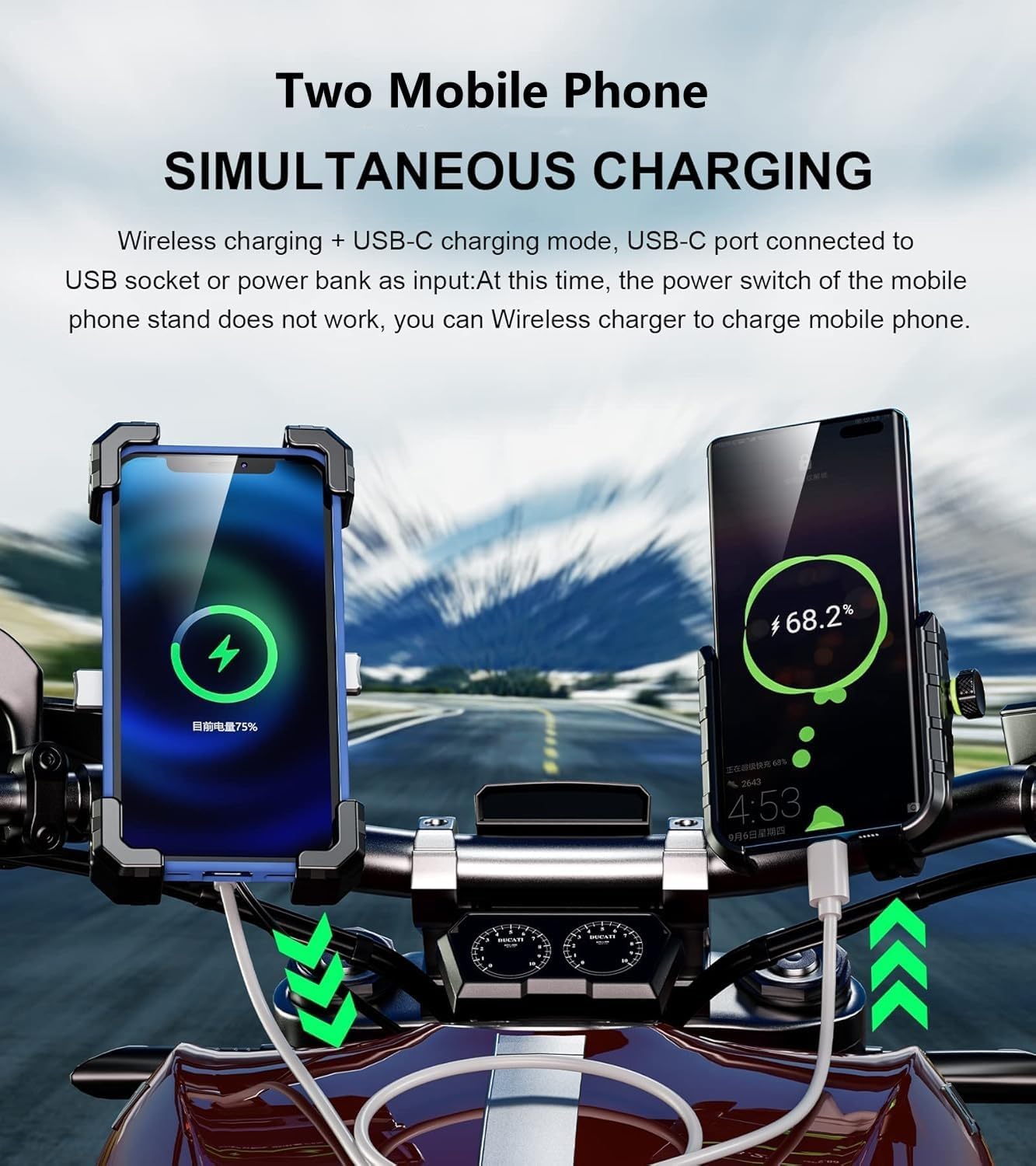
Image 5: Demonstrates simultaneous wireless and USB-C charging of two mobile phones.
3.3 Phone Compatibility
The mount is designed to accommodate smartphones ranging from 4.0 to 6.9 inches in size.
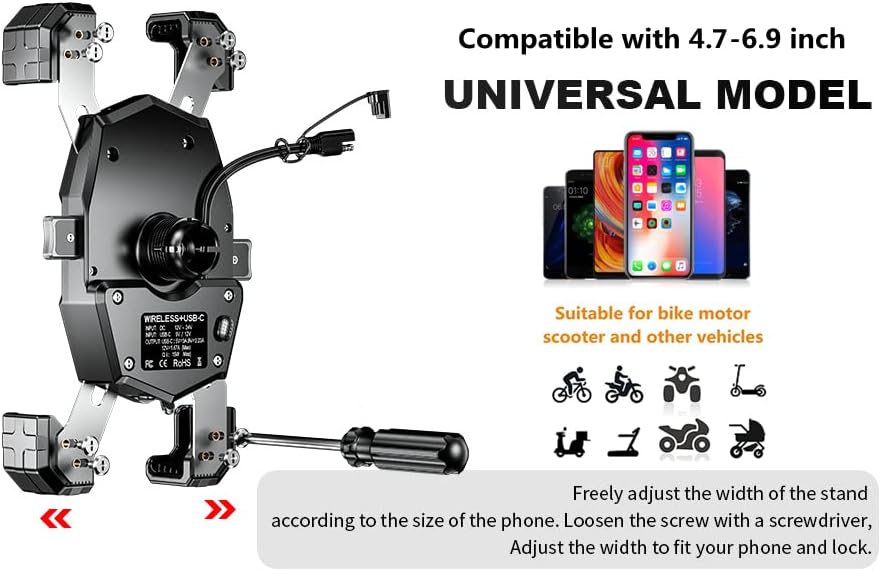
Image 6: Illustrates the universal compatibility of the mount with various phone sizes.
3.4 Product Features Overview
Video 2: This video provides a quick overview of the Kewig Motorcycle Phone Mount's key features, including its charging capabilities and secure design.
4. Safety and Maintenance
4.1 Robust Design
The mount is constructed with a focus on durability and phone protection:
- Built-in soft silicone and shockproof protection.
- Aluminum alloy release bar and mounting base for enhanced sturdiness.
- Special shape design tightly wraps four corners of your smartphone, ensuring safety and stable charging even on bumpy roads.

Image 7: Detailed view of the mount's robust ball head construction for enhanced stability.
4.2 Waterproof Protection
The device features an IP66 waterproof rating, ensuring safer operation during heavy rain. The USB-C and USB ports are covered to prevent water ingress.

Image 8: Highlights the IP66 waterproof design and protective features of the mount.
4.3 Integrated Protection Features
The mount incorporates multiple protections for safe charging:
- Overcharge protection
- Overcurrent protection
- Over temperature protection
- Short circuit protection

Image 9: Illustrates the various safety protections built into the charging system.
5. Troubleshooting
If you encounter any issues with your Kewig M22-A1 Motorcycle Phone Mount, please refer to the following common troubleshooting steps:
- No Power/Charging: Ensure all power connections (SAE harness or USB-C input) are secure and correctly wired. Check the independent power switch on the mount to ensure it is turned on. Verify your motorcycle battery is providing sufficient power.
- Wireless Charging Not Working: Confirm your phone supports Qi wireless charging. Ensure your phone is correctly centered on the wireless charging pad. Remove any thick phone cases that might interfere with wireless charging.
- Phone Not Secure: Ensure the phone is properly seated and the one-push automatic lock mechanism has engaged. Check that the mounting base is tightly secured to the handlebar or rear-view mirror.
- USB-C Charging Issues: Verify the USB-C cable is fully inserted into both the phone and the mount's port. Try a different USB-C cable to rule out cable malfunction.
If problems persist, please contact Kewig customer support for further assistance.
6. Specifications
| Feature | Detail |
|---|---|
| Model Number | M22-A1 |
| Wireless Charger Output | 15W Max (Qi compatible: 15W, 10W, 7.5W, 5W) |
| USB C Port Output | 20W Max |
| Compatible Phone Size | 4.0 to 6.9 inches |
| Handlebar Diameter Compatibility | 0.5'' (12 mm), 0.87'' (22 mm), 1.0'' (25.4 mm), 1.26'' (32 mm) |
| Waterproof Rating | IP66 |
| Special Features | Wireless & USB C charger, one-touch lock & quick release switch, IP66 waterproof, USB C port can be as input or output, aluminum alloy handlebar mounting base |
| Item Weight | 10 ounces |
| Package Dimensions | 7.32 x 4.57 x 2.72 inches |
7. Warranty and Support
The Kewig M22-A1 Motorcycle Phone Mount typically comes with a 1-year warranty from the manufacturer, covering defects in materials and workmanship. For warranty claims, technical support, or any product-related inquiries, please contact Kewig customer service directly through their official channels or the retailer where the product was purchased.


