1. Introduction and Overview
The MSI MAG Z790 Tomahawk WiFi ATX Motherboard is engineered for high-performance computing, supporting 12th and 13th Generation Intel Core processors. Designed with robust power delivery and advanced cooling solutions, this motherboard ensures stability and peak performance for demanding tasks such as gaming, content creation, and intensive multitasking. Its military-inspired elements symbolize sturdiness and durability, making it a reliable foundation for your PC build.

Figure 1: Top-down view of the MSI MAG Z790 Tomahawk WiFi ATX Motherboard, highlighting the CPU socket, RAM slots, and M.2 heatsinks.
2. Key Features
- Processor Support: Supports 13th /12th Gen Intel® Core™ / Pentium® / Celeron® processors for LGA 1700 socket.
- Memory Support: Supports DDR5 Memory, up to 7200+(OC) MHz.
- Lightning Fast Game Experience: Features PCIe 5.0 slot, Lightning Gen 5 x4 M.2, and USB 3.2 Gen 2x3 for rapid data transfer.
- Network Connectivity: Equipped with 2.5G LAN and Intel Wi-Fi 6E Solution for secure, stable, and fast network connections.
3. Setup and Installation
3.1. CPU Installation
Carefully open the CPU socket retention arm. Align the triangular marker on your Intel LGA 1700 processor with the corresponding marker on the socket. Gently place the CPU into the socket without applying force. Close the retention arm to secure the CPU.
3.2. RAM Installation
Locate the four DDR5 DIMM slots. Open the clips on both ends of the slot. Align the notch on your DDR5 memory module with the key in the DIMM slot. Insert the memory module firmly until the clips snap into place, securing the module.
3.3. M.2 SSD Installation
The motherboard features multiple M.2 slots, including Lightning Gen 5 x4. Remove the M.2 Shield Frozr heatsink from the desired slot. Insert your M.2 SSD into the slot at an angle, then gently push it down. Secure it with the provided EZ M.2 Clip or screw. Reattach the M.2 Shield Frozr heatsink for optimal thermal performance.

Figure 2: Close-up view of the motherboard highlighting the DDR5 memory slots and M.2 slots with heatsinks, labeled for Memory Boost and Lightning Gen 4.
3.4. Graphics Card Installation
Insert your PCIe 5.0 graphics card into the primary PCIe x16 slot. Ensure it is seated firmly until the retention clip locks. Connect the necessary PCIe power cables from your power supply to the graphics card.
3.5. Power Connections
Connect the 24-pin ATX power connector and the 8-pin + 8-pin CPU power connectors from your power supply to the motherboard. Ensure all connections are secure.
3.6. Front Panel Connections
Connect the front panel headers (power button, reset button, HDD LED, USB ports, audio jacks) to their respective pins on the motherboard. Refer to the motherboard manual for exact pin layouts.
4. Cooling System
The MSI MAG Z790 Tomahawk WiFi features an advanced cooling system designed to maintain optimal temperatures even under heavy loads and during overclocking. This includes:
- Extended Heatsinks: Large heatsinks cover the VRM (Voltage Regulator Module) components, chipset, and M.2 SSDs to maximize heat dissipation.
- High-Quality Thermal Pads: High-conductivity thermal pads ensure efficient heat transfer from critical components to the heatsinks.
- VRM Cooling: The VRM cooling solution is robust, featuring premium-grade components and a high-phase VRM design to deliver stable voltage and reduce heat generation.
- Fan Support: Multiple fan headers and support for water cooling systems allow for customized and efficient thermal management.
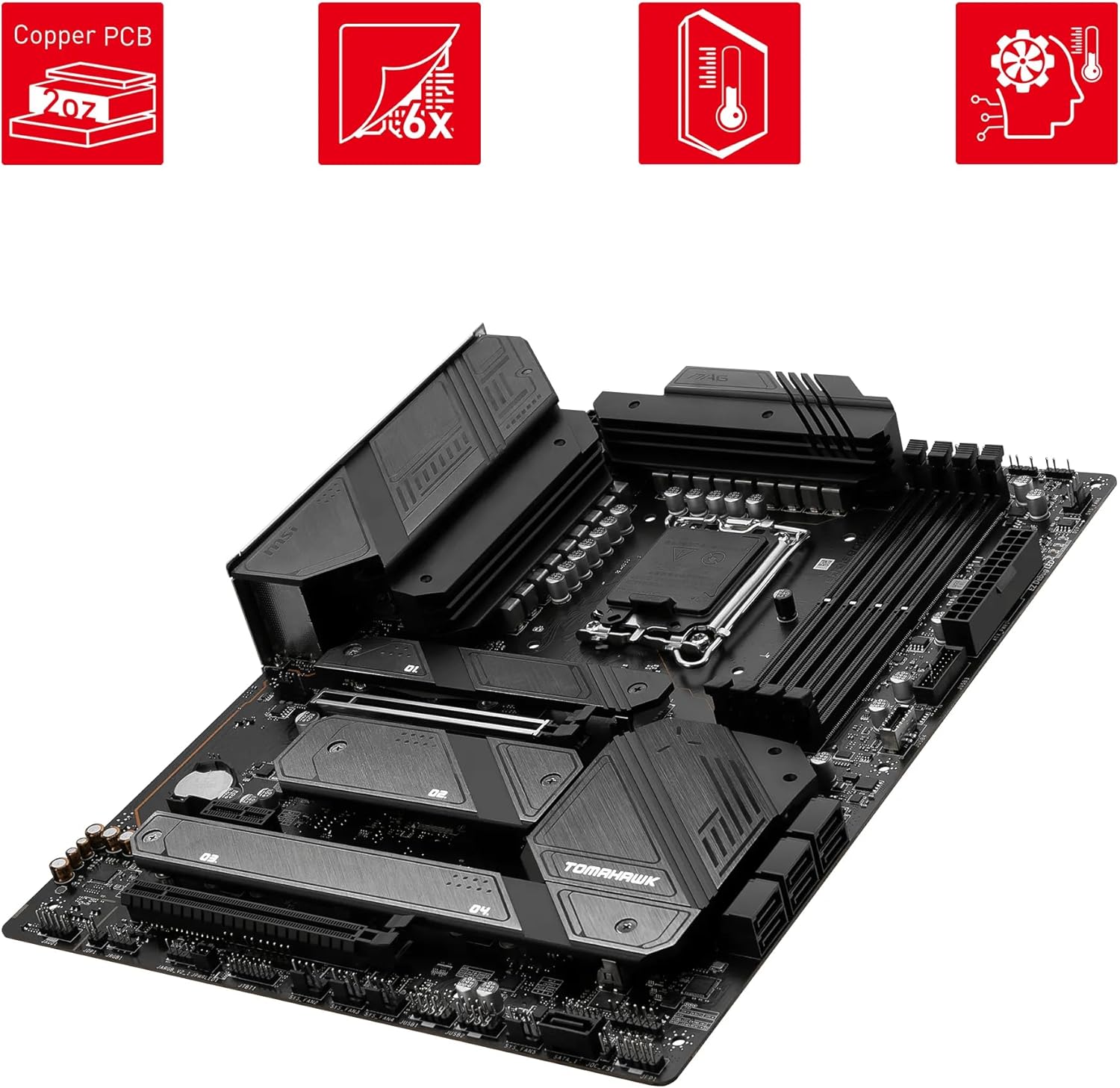
Figure 3: Angled view of the motherboard, emphasizing the robust heatsinks and the Copper PCB for enhanced thermal performance.
5. Memory Support
This motherboard supports DDR5 memory modules, offering significantly higher bandwidth and lower latency compared to previous generations. With support for speeds up to 7200+(OC) MHz and a maximum capacity of 128GB across four DIMM slots, users can achieve exceptional performance in memory-intensive applications. The memory slots are designed with protective mechanisms and improved thermal regulation to ensure stability with high-speed memory.
6. Connectivity and Expansion
The MAG Z790 Tomahawk WiFi provides extensive connectivity and expansion options:
- PCIe Slots: Includes a PCIe 5.0 x16 slot for the latest graphics cards, along with additional PCIe 4.0 x16 and PCIe 3.0 x1 slots for other expansion cards.
- M.2 Slots: Multiple M.2 slots (Lightning Gen 5 x4 and Gen 4 x4) for high-speed NVMe SSDs, ensuring rapid boot times and application loading.
- USB Ports: A comprehensive array of USB ports, including USB 3.2 Gen 2x2 Type-C, USB 3.2 Gen 2 Type-A, USB 3.2 Gen 1 Type-A, and USB 2.0 ports for various peripherals.
- LAN: Integrated Intel 2.5G LAN for high-speed wired network connections.
- Wireless Connectivity: Built-in Intel Wi-Fi 6E and Bluetooth 5.3 for fast and reliable wireless networking and peripheral connections.
- Audio: 8-Channel (7.1) HD Audio with Audio Boost 5 for immersive sound experiences.
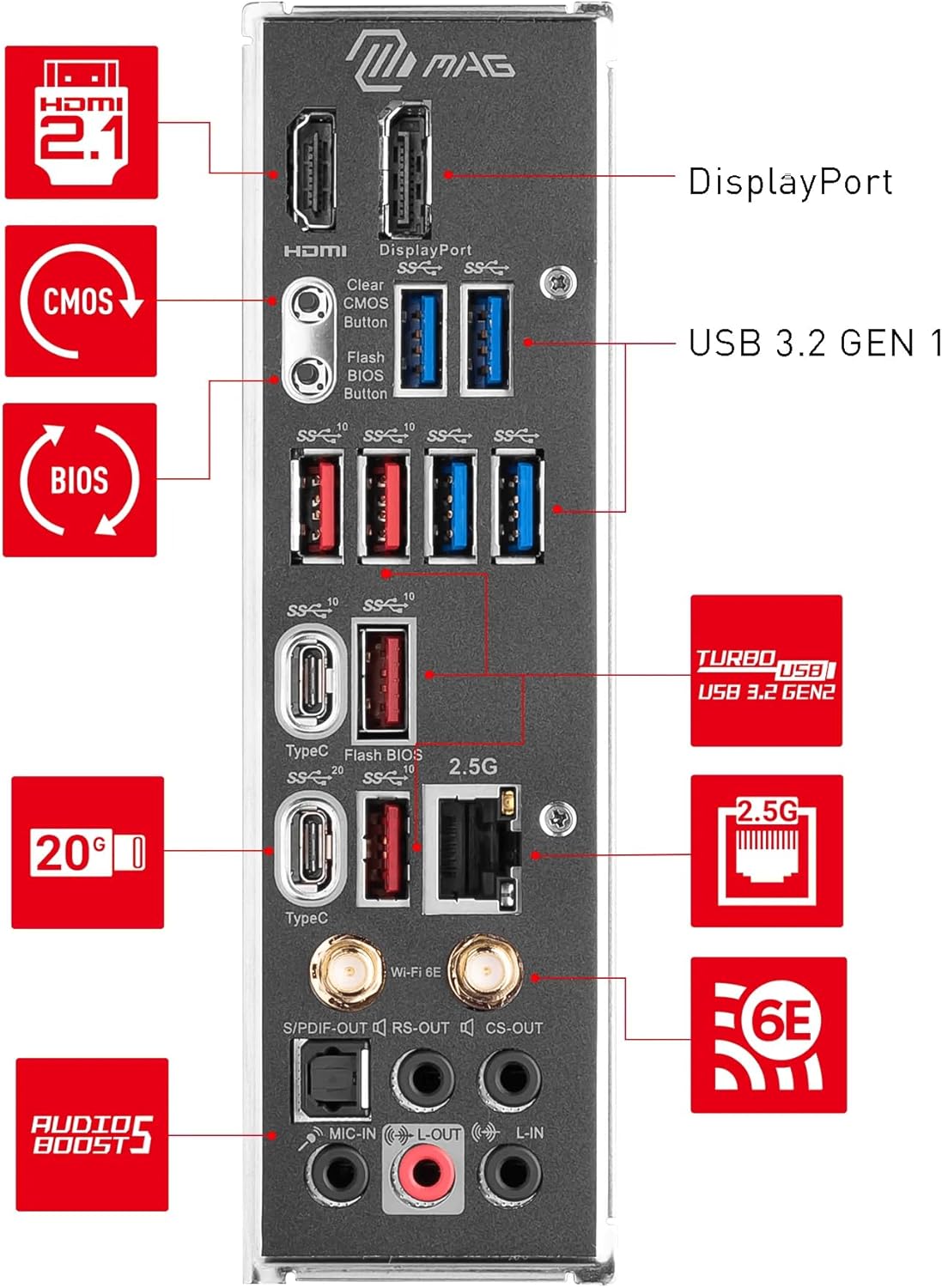
Figure 4: Rear I/O panel of the motherboard, showing various USB ports, LAN, Wi-Fi antenna connectors, and audio jacks.
7. Software Tools
The motherboard comes with MSI Dragon Center software, which provides a centralized platform for system monitoring, tuning, and customization. Users can adjust fan speeds, monitor component temperatures, manage RGB lighting, and optimize system performance profiles for different workloads, from everyday tasks to intensive gaming.
8. Specifications
| Feature | Detail |
|---|---|
| CPU Socket | LGA 1700 |
| Chipset | Intel Z790 |
| Memory Technology | DDR5 SDRAM |
| Memory Clock Speed | Up to 7200+(OC) MHz |
| Max Memory Capacity | 128 GB |
| Expansion Slots | 1x PCIe 5.0 x16, 1x PCIe 4.0 x16, 1x PCIe 3.0 x1 |
| M.2 Slots | 4x M.2 Gen4 x4 64Gbps slots |
| SATA Ports | 7x SATA 6Gbps ports |
| USB Ports (Rear) | 1x USB 3.2 Gen 2x2 20Gbps (Type-C), 6x USB 3.2 Gen 2 10Gbps (Type-A + Type-C), 4x USB 2.0 |
| LAN | Intel 2.5G LAN |
| Wireless/Bluetooth | Intel Wi-Fi 6E, Bluetooth 5.3 |
| Audio | 8-Channel (7.1) HD Audio with Audio Boost 5 |
| Form Factor | ATX |
9. Maintenance
To ensure the longevity and optimal performance of your MSI MAG Z790 Tomahawk WiFi motherboard, regular maintenance is recommended:
- Dust Removal: Periodically clean dust from the motherboard and heatsinks using compressed air. Ensure the system is powered off and unplugged before cleaning.
- BIOS Updates: Keep your BIOS updated to the latest version available on the MSI official website. BIOS updates can improve compatibility, stability, and performance.
- Driver Updates: Ensure all drivers for your motherboard components (chipset, LAN, Wi-Fi, audio, etc.) are up-to-date. These can be downloaded from the MSI support page.
- Cable Management: Ensure proper cable management inside your PC case to maintain good airflow and prevent dust accumulation.
10. Troubleshooting
If you encounter issues with your motherboard, consider the following troubleshooting steps:
- No Power/No Boot: Double-check all power connections (24-pin ATX, 8-pin CPU, GPU PCIe power). Ensure your power supply is sufficient for all components.
- Display Issues: Verify that your monitor is connected to the graphics card (or integrated graphics if applicable) and that the cables are secure. Try reseating the graphics card and RAM modules.
- BIOS Reset: If the system is unstable or won't boot after configuration changes, use the Clear CMOS button on the rear I/O panel or remove the CMOS battery for a few minutes to reset BIOS settings to default.
- Component Compatibility: Ensure all installed components (CPU, RAM, GPU, M.2 SSDs) are compatible with the motherboard and are listed on MSI's QVL (Qualified Vendor List) where applicable.
- Driver Problems: If experiencing issues with specific devices (LAN, Wi-Fi, audio), ensure the correct and latest drivers are installed.
11. What's in the Box
The MSI MAG Z790 Tomahawk WiFi motherboard typically includes the following accessories:
- MSI MAG Z790 Tomahawk WiFi Motherboard
- 2 x SATA Cables
- USB Drive (containing drivers and utilities)
- EZ M.2 Clips / M.2 Screws
- Wi-Fi Antenna
- Quick Installation Guide
- European Union Regulatory Notices
- MSI Shout Out Card / Stickers

Figure 5: Contents typically found inside the MSI MAG Z790 Tomahawk WiFi motherboard packaging.
12. Warranty and Support
For warranty information, please refer to the documentation included in your motherboard's packaging or visit the official MSI website. MSI provides comprehensive support resources, including driver downloads, FAQs, and customer service contacts. Register your product on the MSI website to receive the latest updates and support.
For further assistance, please visit the MSI official website or contact their customer support.


