
Introduction
The HEXBUG VEX Robotics AXIS Robotic Arm is an engaging construction kit designed to teach important STEM principles through hands-on learning. This robotic arm features a motor for enhanced functionality and is compatible with educational VEX IQ pieces, allowing for custom robot creations and unlimited possibilities. This manual provides essential information for assembly, operation, maintenance, and troubleshooting to ensure a rewarding experience.
Product Overview
The AXIS Robotic Arm is a 4-axis robotic arm equipped with rubber grippers. It utilizes a single motor to power three axes, enabling various movements. The kit includes a battery box, switch, and motor, along with a STEM guide to facilitate construction and understanding of engineering concepts.

Figure 1: Assembled HEXBUG VEX Robotics AXIS Robotic Arm.
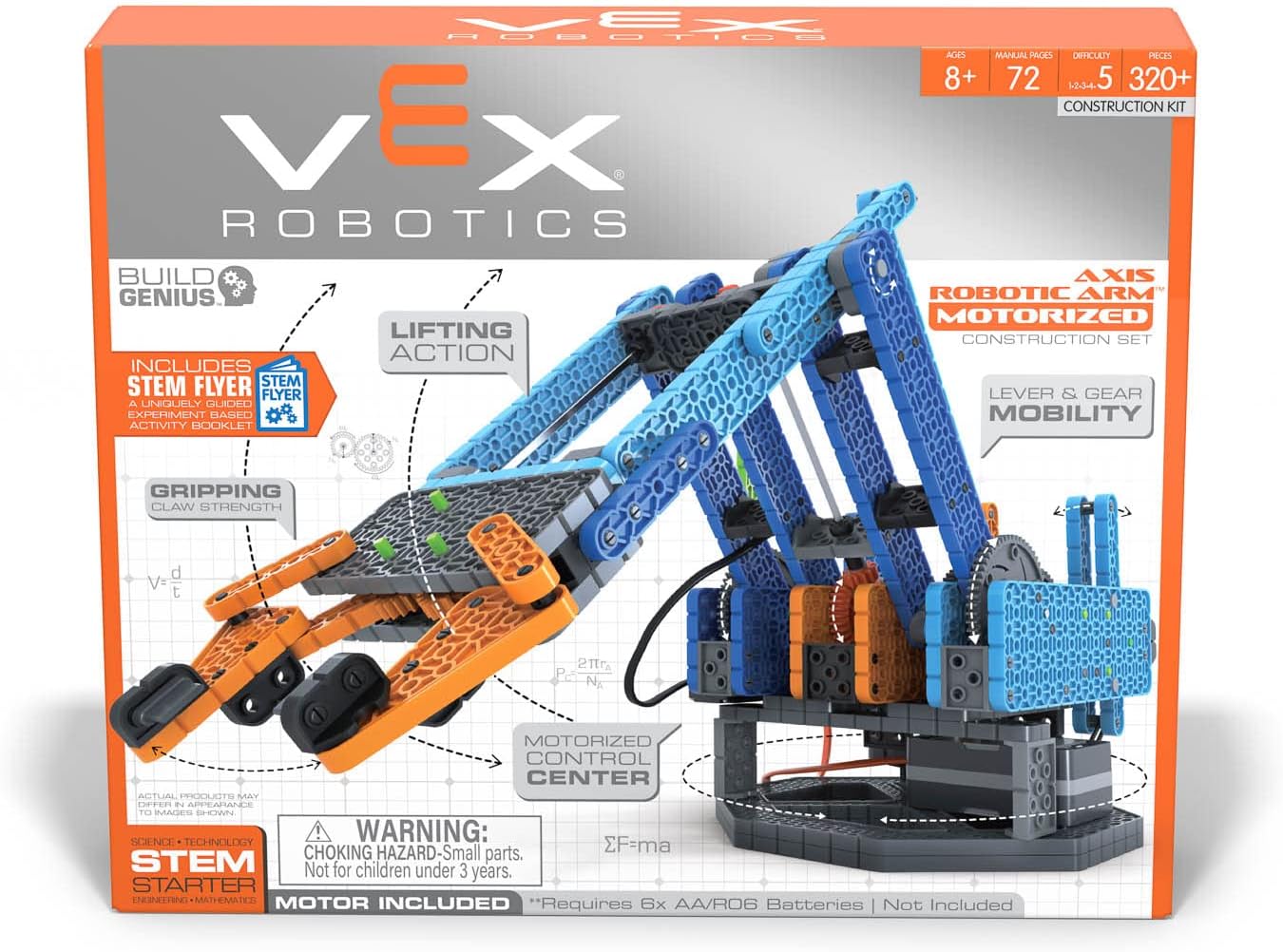
Figure 2: Front view of the HEXBUG VEX Robotics AXIS Robotic Arm product packaging, highlighting key features.

Figure 3: Back view of the product packaging, detailing the arm's movements and components.
Setup and Assembly
The HEXBUG VEX Robotics AXIS Robotic Arm requires assembly. A detailed STEM guide is included in the package to walk you through each step of the construction process. Please follow the instructions carefully to ensure proper functionality.
Battery Installation
- The robotic arm requires 6 x AA batteries for operation (batteries are not included).
- Locate the battery box component within your kit.
- Open the battery compartment and insert the 6 AA batteries, ensuring correct polarity (+/-).
- Close the battery compartment securely.
Assembly Tips
- Organize all pieces before starting assembly.
- Refer to the included STEM guide for step-by-step visual instructions.
- Ensure all connections are secure to prevent parts from detaching during operation.
Video 1: An overview of the HEXBUG VEX Robotic Arm kit contents and initial assembly steps. This video provides a visual guide to help with the unboxing and preparation for construction.
Operating Instructions
Once assembled and batteries are installed, the AXIS Robotic Arm is ready for operation. The arm is designed for various movements and can be controlled using the integrated switches.
Key Movements:
- Move Up/Down: The arm can lift and lower objects, extending up to 14 inches. Use the designated lever or switch to control vertical movement.
- Move In/Out: Extend and retract the arm to reach objects up to 10 inches away. Control this movement with the appropriate lever or switch.
- Rotate 360°: The base of the robotic arm can rotate a full 360 degrees, allowing for versatile object manipulation from various angles.
- Claw Open/Close: The rubber grippers can open up to 5.5 inches to pick up and release objects. Use the control dial or switch to operate the claw.
Refer to the included STEM guide for detailed instructions on operating each function and exploring different robotic arm configurations.

Figure 4: The robotic arm extended, demonstrating its reach capability.

Figure 5: The robotic arm in a retracted position, showcasing its compact form.
Maintenance
To ensure the longevity and optimal performance of your HEXBUG VEX Robotics AXIS Robotic Arm, follow these maintenance guidelines:
- Cleaning: Use a soft, dry cloth to wipe down the robotic arm. Avoid using harsh chemicals or abrasive materials, as these can damage the plastic components.
- Storage: Store the robotic arm in a cool, dry place away from direct sunlight and extreme temperatures. If storing for an extended period, remove the batteries to prevent leakage.
- Inspection: Periodically check all connections and moving parts for any signs of wear or damage. Ensure all pins and connectors are securely in place.
Troubleshooting
If you encounter issues with your robotic arm, consider the following troubleshooting steps:
- Arm Not Moving:
- Check if the batteries are correctly installed and fully charged. Replace if necessary.
- Ensure all motor connections and control switches are properly connected and engaged.
- Parts Breaking/Loose:
- Verify that all pieces were assembled according to the STEM guide. Incorrect assembly can put stress on components.
- For persistent issues or replacement parts, refer to the Warranty & Support section.
- Motor Not Responding:
- Confirm the motor is correctly wired to the battery box and control switches.
- Ensure the switch is in the 'ON' position.
Specifications
| Feature | Detail |
|---|---|
| Model Number | 406-8300 |
| ASIN | B09XZG4K5Z |
| Package Dimensions | 12.01 x 9.96 x 2.8 inches |
| Item Weight | 2.79 pounds |
| Manufacturer Recommended Age | 8 - 12 years |
| Batteries Required | 6 AA batteries (not included) |
| Arm Axes | 4-axis with rubber grippers |
| Rotation | 360 degrees |
| Manufacturer | Innovation First Trading SARL |
Warranty and Support
For specific warranty information or technical support regarding your HEXBUG VEX Robotics AXIS Robotic Arm, please refer to the documentation included in your product packaging or visit the official HEXBUG website. You may also contact Innovation First Trading SARL directly for assistance with product issues or replacement parts.


