
OPPO Oppo A96
OPPO A96 User Manual
Dual-SIM 128GB ROM + 8GB RAM (GSM Only | No CDMA) Factory Unlocked 4G/LTE Smartphone
1. Product Overview
The OPPO A96 is a high-performance smartphone designed for seamless communication and entertainment. It features a powerful Octa-core processor, ample storage, and a vibrant display, making it suitable for daily use and multimedia consumption.
This device supports dual SIM cards and is factory unlocked for international use. Please verify network compatibility with your service provider before use, especially for CDMA networks in the USA.

Figure 1.1: Front view of the OPPO A96 smartphone, showcasing its display and front camera.
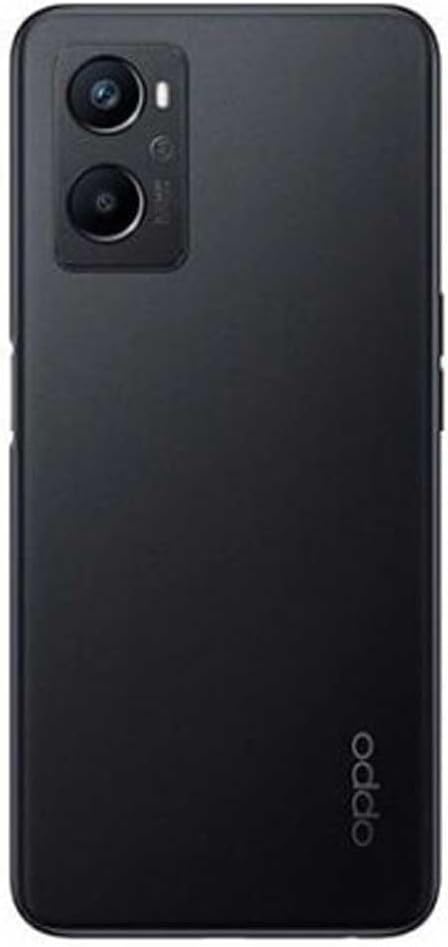
Figure 1.2: Back view of the OPPO A96 smartphone, highlighting the dual camera module and OPPO branding.
2. Setup Guide
2.1. SIM Card and microSDXC Installation
The OPPO A96 supports two Nano-SIM cards and one microSDXC card for expandable storage. Locate the SIM tray on the side of the device.
- Insert the SIM ejector tool into the small hole on the SIM tray to open it.
- Carefully pull out the SIM tray.
- Place your Nano-SIM cards and microSDXC card into the designated slots on the tray, ensuring the gold contacts face downwards.
- Gently push the tray back into the phone until it clicks into place.
Important Network Compatibility Note: This smartphone is not compatible with CDMA networks, including VERIZON, SPRINT, and US CELLULAR in the USA. Please confirm 3G or 4G/LTE compatibility with your network provider before purchase.
2.2. Initial Charging and Power On
Before first use, it is recommended to fully charge the device. Use the provided charger and USB cable.
- Connect the USB cable to the charging port at the bottom of the phone.
- Plug the charger into a power outlet.
- Once charged, press and hold the Power button (located on the right side) until the OPPO logo appears to power on the device.

Figure 2.1: Top and bottom views of the OPPO A96, showing the charging port, speaker, and SIM tray location.
3. Operating Instructions
3.1. Basic Navigation (Android 11)
The OPPO A96 runs on Android 11, offering an intuitive user interface. Use gestures or the navigation bar at the bottom of the screen to navigate:
- Home: Swipe up from the bottom or tap the home button to return to the home screen.
- Back: Swipe from the left or right edge, or tap the back button to go back to the previous screen.
- Recent Apps: Swipe up and hold from the bottom, or tap the recent apps button to view and switch between open applications.
3.2. Camera Usage
The device is equipped with a 48 MP main camera and a 16 MP front camera for high-quality photos and videos.
- Open the Camera application from your home screen or app drawer.
- Select your desired mode (Photo, Video, Portrait, Night, etc.).
- Tap the shutter button to capture a photo or start/stop video recording.
- Use the zoom controls on the screen to adjust magnification.
3.3. Storage and Memory Management
The OPPO A96 comes with 128GB of internal storage and 8GB of RAM. You can expand storage using a microSDXC card.
- Regularly clear cached data and unnecessary files to maintain optimal performance.
- Move large files like photos and videos to your microSDXC card to free up internal storage.
3.4. Connectivity
The device supports Wi-Fi and 4G/LTE cellular connectivity.
- Wi-Fi: Go to Settings > Network & internet > Wi-Fi to connect to available Wi-Fi networks.
- Mobile Data: Ensure your SIM card is active and mobile data is enabled in Settings > Network & internet > Mobile network.
4. Maintenance
4.1. Cleaning Your Device
To keep your OPPO A96 in good condition, clean it regularly:
- Use a soft, lint-free cloth to wipe the screen and back panel.
- Avoid using harsh chemicals, abrasive materials, or excessive moisture.
- For stubborn smudges, slightly dampen the cloth with water or a screen cleaner designed for electronics.
4.2. Software Updates
Regularly check for and install software updates to ensure your device has the latest features, security patches, and performance improvements.
- Go to Settings > About phone > Software update.
- Follow the on-screen instructions to download and install any available updates. Ensure your device is sufficiently charged or connected to a power source during updates.
4.3. Battery Care
The OPPO A96 is equipped with a 4500mAh non-removable battery. To prolong battery life:
- Avoid extreme temperatures (very hot or very cold).
- Do not let the battery drain completely before recharging.
- Unplug the charger once the battery is full.
- Use the original charger and cable for optimal charging.
5. Troubleshooting
5.1. Common Issues and Solutions
- Device not powering on: Ensure the battery is charged. Press and hold the Power button for at least 10 seconds.
- Poor network signal: Check SIM card insertion. Ensure you are within network coverage. Restart the device.
- Apps crashing or freezing: Close background apps. Clear app cache (Settings > Apps > [App Name] > Storage > Clear cache). Restart the device.
- Battery draining quickly: Reduce screen brightness. Disable unused features like Wi-Fi, Bluetooth, GPS. Close background apps.
5.2. Factory Reset
If issues persist, a factory reset may be necessary. This will erase all data on your phone, so back up important information first.
- Go to Settings > System > Reset options > Erase all data (factory reset).
- Confirm your decision and follow the prompts.
6. Specifications
| Feature | Specification |
|---|---|
| Model Name | Oppo A96 |
| Dimensions | 6.47 x 2.98 x 0.33 inches |
| Weight | 6.7 ounces (190.9 Grams) |
| Display | 6.59 Inches OLED, 1080 x 2400 pixels |
| Operating System | Android 11.0 |
| Processor | Qualcomm SM6375 Snapdragon 695 5G (6 nm), Octa-core 2.2 GHz |
| RAM | 8GB |
| Internal Storage | 128GB (expandable via microSDXC) |
| Rear Camera | 48 MP, f/1.7 (wide) + 2 MP, f/2.4 (depth) |
| Front Camera | 16 MP, f/2.4 (wide) |
| Battery Capacity | 5000 Milliamp Hours (4500mAh non-removable) |
| Connectivity | Wi-Fi, LTE |
| SIM Type | Dual-SIM (Nano-SIM) |
7. Warranty and Support
Your OPPO A96 smartphone is covered by a standard manufacturer's warranty. Please refer to the warranty card included in your product packaging for specific terms and conditions, including warranty period and coverage details.
For technical support, service, or warranty claims, please contact OPPO customer service through their official website or the contact information provided in your product documentation. Keep your proof of purchase for warranty validation.
Related documentsOppo A96


Ask a question about this manual
Ask about setup, troubleshooting, compatibility, parts, safety, or missing instructions. Manuals+ will review the question and use this page’s manual context to help answer it.