
Nuvo TH611
Nuvo TH611 Pro Series Commercial LED Track Head
User Manual - Model TH611
Important Safety Instructions
Please read and understand all instructions before installing or operating this product. Failure to do so may lead to electric shock, fire, or other hazards that could cause injury or property damage.
- WARNING: This product can expose you to chemicals including lead, which is known to the State of California to cause cancer and birth defects or other reproductive harm. For more information go to www.P65Warnings.ca.gov.
- Always disconnect power at the circuit breaker or fuse box before installation, servicing, or cleaning.
- Ensure all electrical connections comply with local codes and ordinances, as well as the National Electric Code (NEC).
- If you are not qualified to perform electrical installations, consult a qualified electrician.
- Do not install this fixture in wet locations. This product is designed for indoor use only.
- Do not attempt to modify the fixture. Any modifications may void the warranty and create safety hazards.
- Handle the LED track head with care to avoid damage to the light source.
Product Overview
The Nuvo TH611 Pro Series Commercial LED Track Head is designed for high-demand commercial, retail, and hospitality environments. It provides superior illumination with high lumen output and excellent color rendering.
Key Features:
- Sleek, cylindrical design with a white textured aluminum finish.
- 20 Watt LED with 1200 Lumens output.
- 3000K Warm White color temperature.
- 24-degree beam angle for focused illumination.
- Exceptional color rendering with CRI >93 and high R9 values.
- Adjustable light direction: 350-degree rotation and 90-degree vertical articulation.
- Long lifespan: Rated for up to 50,000 hours.
- Designed for H-type track systems.

Figure 1: Front view of the Nuvo TH611 Pro Series Commercial LED Track Head, showcasing its white cylindrical design and integrated LED light source.

Figure 2: Illustrates the adjustable features of the track head, including its 350-degree horizontal rotation and 90-degree vertical articulation, allowing for precise light direction.
Setup and Installation
This track head is designed for use with Satco "H" type track systems. For detailed installation instructions, please refer to the official Installation Manual provided with your product or available for download from the manufacturer's website.
A digital copy of the installation manual can be found here: Nuvo TH611 Installation Manual (PDF).
General Installation Steps (Refer to PDF for full details):
- Power Disconnection: Before beginning any installation, ensure the power to the track lighting circuit is turned off at the circuit breaker.
- Track Compatibility: Verify that your existing track system is an "H" type track. The TH611 track head is specifically designed for this type.
- Insert Track Head: Align the track head's connector with the track slot. Push the connector firmly into the track until it clicks into place.
- Secure Connection: Ensure the track head is securely seated and the electrical contacts are properly engaged.
- Adjust Direction: Once installed, you can adjust the direction of the light by rotating the head 350 degrees horizontally and articulating it 90 degrees vertically.
- Restore Power: After installation is complete and all connections are secure, restore power at the circuit breaker.
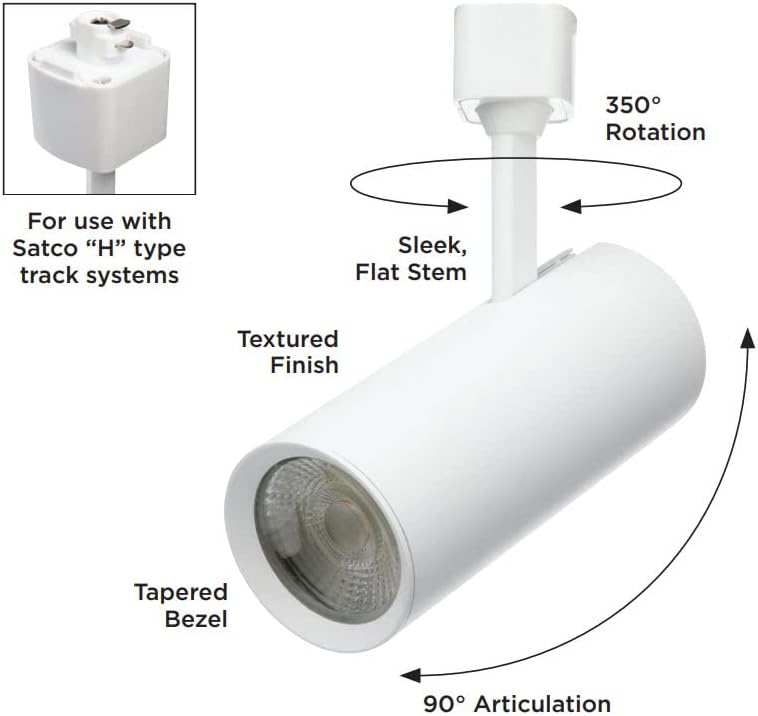
Figure 3: Detail of the track connector, designed for compatibility with Satco "H" type track systems. Proper insertion into the track is crucial for electrical connection.
Operating Instructions
The Nuvo TH611 LED Track Head operates immediately upon receiving power from the track system. It is designed for use with compatible dimmers, allowing for adjustable light output.
Adjusting Light Direction:
- Rotation: The track head can be rotated up to 350 degrees horizontally along the track axis to direct light as needed.
- Articulation: The head can be articulated (tilted) up to 90 degrees vertically to aim the light beam precisely.
Dimming Functionality:
This LED track head is dimmable. For optimal performance and to avoid flickering or damage, use with LED-compatible dimmers. Consult the dimmer manufacturer's instructions for proper installation and operation.
While the product specifications mention "Control Method: App", specific app details are not provided. If an app control feature is desired, please refer to the manufacturer's official website or product packaging for compatible app information and setup instructions.
Maintenance
The Nuvo TH611 LED Track Head requires minimal maintenance due to its long-lasting LED technology.
Cleaning:
- Always ensure power is disconnected before cleaning.
- Wipe the exterior of the fixture with a soft, dry, or slightly damp cloth.
- Do not use harsh chemicals, abrasive cleaners, or solvents, as these can damage the finish or electrical components.
- Avoid spraying liquids directly onto the fixture.
LED Lifespan:
The integrated LED light source is rated for up to 50,000 hours of operation, meaning it does not require bulb replacement under normal use conditions.
Troubleshooting
If you experience issues with your Nuvo TH611 LED Track Head, refer to the following common troubleshooting steps:
| Problem | Possible Cause | Solution |
|---|---|---|
| Light does not turn on. |
|
|
| Light flickers or dims inconsistently. |
|
|
| Light output is lower than expected. |
|
|
If the problem persists after attempting these solutions, please contact customer support.
Specifications
| Model Number | TH611 |
| Brand | Nuvo |
| Manufacturer | Satco Products, Inc. |
| Power Source | Corded Electric |
| Voltage | 120 Volts |
| Wattage | 20 watts |
| Brightness | 1200 Lumens |
| Color Temperature | 3000 Kelvin (Warm White) |
| CRI (Color Rendering Index) | >93 |
| Beam Angle | 24 degrees |
| Material | Aluminum, Polycarbonate |
| Color | White |
| Product Dimensions (L x W x H) | 2.5"L x 6.13"W x 8.25"H |
| Indoor/Outdoor Usage | Indoor only |
| Special Features | 350-degree rotation, Dimmable, Integrated LED light, Rated for 50,000 hours |
| Track Compatibility | H-type track systems |
Warranty Information
This Nuvo TH611 Pro Series Commercial LED Track Head comes with a 5-year limited manufacturer's warranty.
The warranty covers defects in materials and workmanship under normal use. It does not cover damage resulting from improper installation, accident, misuse, abuse, or unauthorized modifications. Please retain your proof of purchase for warranty claims.
For full details regarding warranty terms and conditions, please refer to the documentation included with your product or visit the official Nuvo/Satco website.
Customer Support
If you have any questions, require technical assistance, or need to make a warranty claim, please contact Nuvo/Satco customer support.
Please have your product model number (TH611) and proof of purchase ready when contacting support.
For the most current contact information, please visit the official Nuvo or Satco Products, Inc. website.
You can also visit the Nuvo Store on Amazon for additional product information and resources.
Related documentsTH611


Ask a question about this manual
Ask about setup, troubleshooting, compatibility, parts, safety, or missing instructions. Manuals+ will review the question and use this page’s manual context to help answer it.