
Pro-Ject Phono Box S3 B
Pro-Ject Phono Box S3 B Balanced & Discrete MM/MC Phono Preamplifier
User Manual
1. Introduction
Thank you for choosing the Pro-Ject Phono Box S3 B. This phono preamplifier is designed to provide high-quality amplification for both Moving Magnet (MM) and Moving Coil (MC) cartridges, featuring a fully discrete and symmetrical gain stage for optimal audio performance. Please read this manual carefully before operating the device to ensure proper setup and use.
1.1 Important Safety Instructions
- Always connect the power supply last.
- Ensure the device is placed on a stable, level surface.
- Do not expose the unit to moisture, rain, or excessive heat.
- Disconnect the power supply before cleaning or if the unit will be unused for an extended period.
- Refer all servicing to qualified service personnel.
2. Setup
2.1 Unpacking
Carefully remove the Phono Box S3 B from its packaging. Please ensure all components are present:
- Pro-Ject Phono Box S3 B unit
- External power supply
2.2 Connections
Before making any connections, ensure the Phono Box S3 B and your amplifier are powered off.
- Turntable Connection: Connect your turntable's output to the Phono Box S3 B's input. You have two options:
- RCA Input: Use standard RCA cables for unbalanced connection.
- 5-pin Mini XLR Input: For turntables with balanced output, use a 5-pin mini XLR cable for a true balanced signal path. This connection offers superior noise rejection.
- Ground Connection: Connect the grounding wire from your turntable to the ground terminal on the Phono Box S3 B. This helps reduce hum.
- Output to Amplifier: Connect the Phono Box S3 B's output to a line-level input (e.g., AUX, CD, Tuner) on your amplifier. You can use either:
- RCA Outputs: For unbalanced connection to your amplifier.
- XLR Outputs: For balanced connection to an amplifier with XLR inputs.
- Power Supply: Connect the external power supply to the 'Power 18V' input on the Phono Box S3 B, then plug the power supply into a suitable AC outlet.
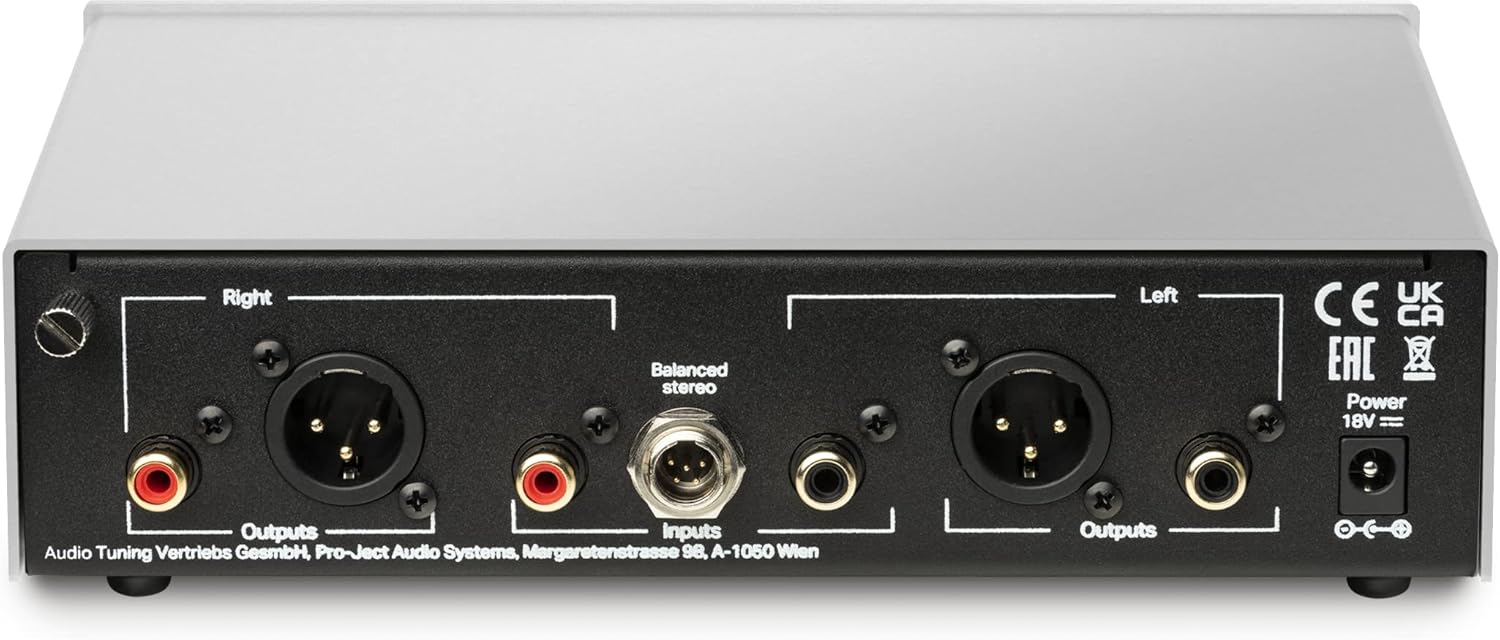
Figure 1: Rear panel connections of the Phono Box S3 B. This image displays the various input and output options, including RCA and XLR for both input and output, a 5-pin mini XLR for balanced input, and the power and ground terminals.

Figure 2: The Phono Box S3 B positioned alongside a turntable, demonstrating a common audio system configuration.
3. Operating the Phono Box S3 B
The Phono Box S3 B features user-friendly controls on its front panel to optimize performance for your specific cartridge.

Figure 3: Front panel controls of the Phono Box S3 B. This image highlights the buttons for adjusting input type, subsonic filter, cartridge loading (Ohms and pF), and gain.
3.1 Front Panel Controls
- Input: Selects between RCA (unbalanced) and XLR (balanced) input. Match this to how your turntable is connected.
- Subsonic: Activates a subsonic filter to remove very low-frequency rumble that can be caused by warped records or turntable motor noise. This can improve bass clarity and prevent amplifier/speaker overload.
- Loading Ohms: Adjusts the input impedance for Moving Coil (MC) cartridges. Common settings include 10, 50, 100, 1k, and 47k Ohms. Consult your MC cartridge's specifications for the recommended loading. For Moving Magnet (MM) cartridges, this should typically be set to 47k Ohms.
- Loading pF: Adjusts the input capacitance for Moving Magnet (MM) cartridges. Common settings include 50, 150, 300, and 400 pF. Consult your MM cartridge's specifications for the recommended capacitance. For MC cartridges, this setting is less critical.
- Gain dB: Adjusts the amplification level. Options include 40, 45, 60, and 65 dB. MM cartridges typically require lower gain (e.g., 40-45 dB), while MC cartridges require higher gain (e.g., 60-65 dB). Select the gain setting that provides adequate volume without distortion.
3.2 Optimizing Settings for Your Cartridge
The correct settings for Loading Ohms, Loading pF, and Gain dB are crucial for optimal sound quality. Always refer to your cartridge manufacturer's recommendations. Experimentation within recommended ranges can also help you find the sound profile you prefer.

Figure 4: Internal components of the Phono Box S3 B. This image showcases the meticulously designed circuit board and discrete components, contributing to its high-fidelity audio processing.
4. Maintenance
4.1 Cleaning
To clean the Phono Box S3 B, use a soft, dry, lint-free cloth. Do not use any cleaning agents containing alcohol, benzene, polish, or other harsh chemicals, as these may damage the surface finish. Ensure the unit is disconnected from the power supply before cleaning.
4.2 Storage
If the unit will not be used for an extended period, disconnect it from the power supply and store it in a cool, dry place, away from direct sunlight and extreme temperatures.
5. Troubleshooting
Most common issues can be resolved by checking the following points:
| Problem | Possible Cause | Solution |
|---|---|---|
| No sound | No power; incorrect connections; incorrect input selection. | Check power supply connection; verify all audio cables are securely connected; ensure correct input (RCA/XLR) is selected on the Phono Box S3 B and your amplifier. |
| Humming or buzzing noise | Grounding issue; cable interference; faulty cable. | Ensure turntable ground wire is connected; try different cable routing to avoid interference; replace cables if suspected faulty. |
| Distorted sound | Incorrect gain setting; incorrect cartridge loading; damaged cartridge. | Adjust Gain dB to a lower setting; verify Loading Ohms and Loading pF match your cartridge specifications; inspect cartridge for damage. |
| Sound too quiet | Low gain setting; incorrect cartridge type selected (e.g., MM gain for MC cartridge). | Increase Gain dB; ensure appropriate gain setting for MM or MC cartridge is selected. |
6. Specifications
| Feature | Detail |
|---|---|
| Model Name | Phono Box S3 B |
| Item Model Number | PJ829283 |
| Product Dimensions | 8.11 x 6.46 x 2.17 inches |
| Item Weight | 2.2 pounds (1 Kilogram) |
| Material | Alloy Steel, Aluminum |
| Included Components | Phonovorstove Power Supply |
| Special Feature | True Balanced Connection, Fully discrete and symmetrical gain stage, High-End Features (steel & aluminum casework, cartridge loading options, balanced inputs & outputs) |
| Compatible Devices | Amplifier |
7. Warranty and Support
7.1 Warranty Information
Pro-Ject products are manufactured to the highest quality standards. For specific warranty terms and conditions, please refer to the warranty card included with your product or visit the official Pro-Ject Audio Systems website. Keep your proof of purchase for warranty claims.
7.2 Customer Support
Should you encounter any issues not covered in this manual, or require further assistance, please contact your authorized Pro-Ject dealer or visit the official Pro-Ject Audio Systems support page for detailed contact information and resources.
Related documentsPhono Box S3 B


Ask a question about this manual
Ask about setup, troubleshooting, compatibility, parts, safety, or missing instructions. Manuals+ will review the question and use this page’s manual context to help answer it.