1. Introduction
Welcome to the user manual for your new XIAOMI F2 43" Smart TV Fire TV. This manual provides essential information for setting up, operating, and maintaining your television. The XIAOMI F2 Fire TV offers a seamless entertainment experience with its integrated Fire TV platform, stunning 4K Ultra HD resolution, HDR10 support, and convenient Alexa voice control.

Figure 1.1: Front view of the XIAOMI F2 43" Smart TV displaying a vibrant landscape.
2. Setup Guide
2.1. Unboxing and Components
Carefully remove all components from the packaging. Ensure all items listed below are present:
- XIAOMI F2 43" Smart TV
- TV Stand (2 pieces)
- Power Cable
- Remote Control with Alexa Voice
- AAA Batteries (2x)
- User Manual (this document)

Figure 2.1: The included remote control with dedicated buttons for streaming services and Alexa voice control.
2.2. Stand Assembly
To attach the TV stand:
- Place the TV screen-down on a soft, flat surface to prevent scratches.
- Align each stand piece with the corresponding slots on the bottom of the TV.
- Secure the stands using the provided screws. Ensure they are firmly attached.
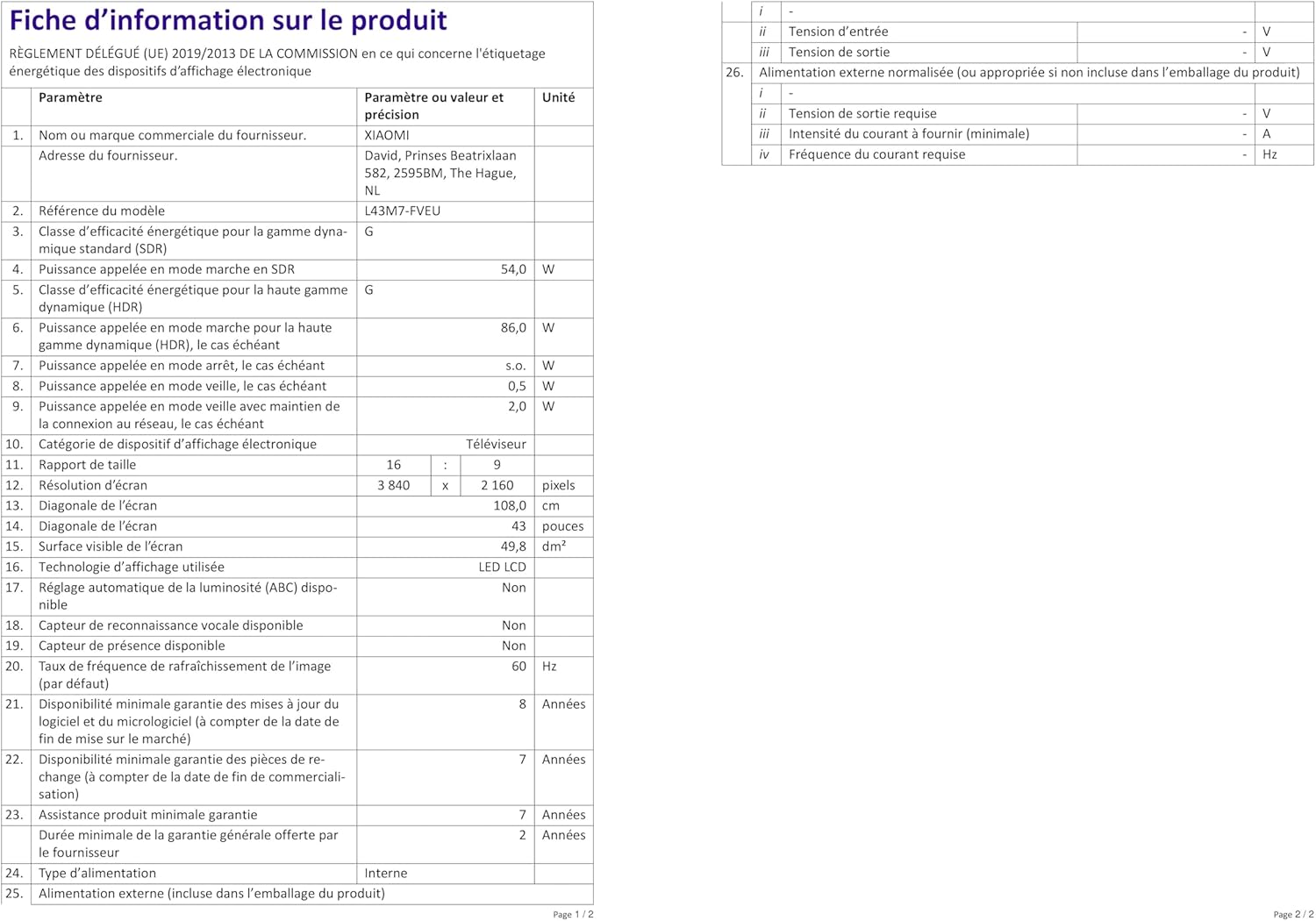
Figure 2.2: Detail of the TV stand attachment point.
2.3. Connecting Your TV
Connect your devices to the TV using the available ports.
- Power: Connect the power cable to the TV's power input and then to a wall outlet.
- HDMI: Use HDMI 2.1 ports for high-quality video and audio from devices like gaming consoles, Blu-ray players, or set-top boxes.
- USB: Connect USB drives for media playback. Note that the USB port is 2.0.
- Antenna/Cable: Connect your antenna or cable TV feed for broadcast channels.
- Ethernet: For a stable internet connection, connect an Ethernet cable from your router to the TV's LAN port.
- Wi-Fi: The TV supports Wi-Fi for wireless internet connectivity.
- Bluetooth: Connect Bluetooth devices such as headphones or speakers.

Figure 2.3: Rear panel of the TV with connection ports.
2.4. Initial Setup and Fire TV Integration
Upon first power-on, the TV will guide you through the initial setup process. This includes:
- Language selection.
- Network connection (Wi-Fi or Ethernet).
- Amazon account login for Fire TV. An Amazon account is required to access all functionalities and streaming services.
- Channel scan for broadcast TV.
- Alexa voice remote pairing.

Figure 2.4: The Fire TV interface on the XIAOMI F2 Smart TV, showing popular streaming applications.
3. Operating Your TV
3.1. Basic Controls and Remote Functions
The included remote control allows full navigation and control of your TV.
- Power Button: Turns the TV on or off.
- Voice Button (Alexa): Press and hold to activate Alexa voice commands.
- Navigation Ring: Use to move through menus and select items.
- Home Button: Returns to the Fire TV home screen.
- Back Button: Goes back to the previous screen.
- Menu Button: Accesses context-sensitive options.
- Volume Buttons: Adjusts the TV volume.
- Channel Buttons: Changes TV channels.
- App Shortcut Buttons: Quick access to popular streaming services like Netflix, Prime Video, and Disney+.
3.2. Smart TV Features and Voice Control
Your XIAOMI F2 TV is powered by Fire TV, offering a wide range of smart features:
- Streaming Apps: Access thousands of apps and channels including Netflix, Prime Video, Disney+, YouTube, DAZN, and more. Subscription charges may apply for certain services.
- Alexa Voice Control: Use the voice remote to easily control your TV. Say commands like "Open Netflix," "Search for action movies," "Change to HDMI 1," or "Turn off the TV." You can also control compatible smart home devices.
- Airplay: Stream content from your Apple devices directly to the TV.
3.3. Picture and Sound Settings
Customize your viewing and listening experience:
- Navigate to Settings on the Fire TV home screen.
- Select Display & Sound to adjust picture modes (Standard, Movie, Sport, etc.), brightness, contrast, color temperature, and sound modes (Standard, Music, Clear Voice, etc.).
- The TV supports HDR10 and Wide Color Gamut (WCG) for enhanced color depth and brightness.
3.4. Gaming Mode
For an optimized gaming experience, the TV features a dedicated gaming mode.
- The 4x HDMI 2.1 connectors support ALLM (Auto Low Latency Mode), which automatically reduces input lag when a compatible gaming console is connected.
- This ensures a short response time, making the TV ideal for gaming.
4. Maintenance
4.1. Cleaning Your TV
To maintain the clarity and appearance of your TV:
- Always unplug the TV before cleaning.
- Use a soft, dry, lint-free cloth to gently wipe the screen and frame.
- For stubborn marks, lightly dampen the cloth with water or a screen-specific cleaning solution. Never spray liquid directly onto the screen.
- Avoid using abrasive cleaners, waxes, or solvents.
4.2. Software Updates
Your TV may receive software updates to improve performance and add new features.
- Ensure your TV is connected to the internet.
- Updates are typically downloaded and installed automatically. You may receive a notification when an update is available or when it has been installed.
- Do not unplug the TV during a software update.
5. Troubleshooting
If you encounter issues with your TV, refer to the following common problems and solutions:
| Problem | Possible Solution |
|---|---|
| No Power | Check if the power cable is securely connected to both the TV and the wall outlet. Ensure the outlet is working. |
| No Picture / Black Screen | Verify the correct input source is selected. Check all cable connections (HDMI, antenna). Try restarting the TV. |
| No Sound | Check the volume level and ensure mute is not activated. Verify audio cable connections. If using external speakers, check their power and connections. |
| Remote Control Not Responding | Replace the batteries (2x AAA). Ensure there are no obstructions between the remote and the TV. Re-pair the remote if necessary (follow on-screen instructions during initial setup or in TV settings). |
| Network Connection Issues | Restart your router and modem. Check Wi-Fi password. If using Ethernet, ensure the cable is connected properly. Try connecting to a different network if available. |
| USB Drive Not Recognized | Ensure the USB drive is formatted to FAT32. The TV may not recognize other formats or USB 3.0/3.2 drives. |
5.1. Factory Reset
If problems persist, a factory reset can resolve many software-related issues. Warning: A factory reset will erase all your settings, installed apps, and personal data.
- Go to Settings on the Fire TV home screen.
- Select My Fire TV.
- Choose About.
- Select Reset to Factory Defaults and confirm.
6. Specifications
| Feature | Detail |
|---|---|
| Model Number | L43M7-FVEU |
| Screen Size | 43 inches (108 cm) |
| Resolution | 4K Ultra HD (3840 x 2160 pixels) |
| Display Technology | LED |
| Refresh Rate | 60 Hz |
| HDR Support | HDR10 |
| Connectivity | 4x HDMI 2.1 (with ALLM), USB 2.0, Bluetooth, Wi-Fi, RF, Ethernet |
| Dimensions (with stand) | 95.72 x 24.14 x 60.71 cm (L x W x H) |
| Weight (with stand) | 6.95 kg |
| Power Consumption (SDR) | 54.0 W |
| Power Consumption (HDR) | 86.0 W |
| Energy Efficiency Class | G |
| Included Components | TV, Stand, Power Cable, Remote Control, Batteries, User Manual |
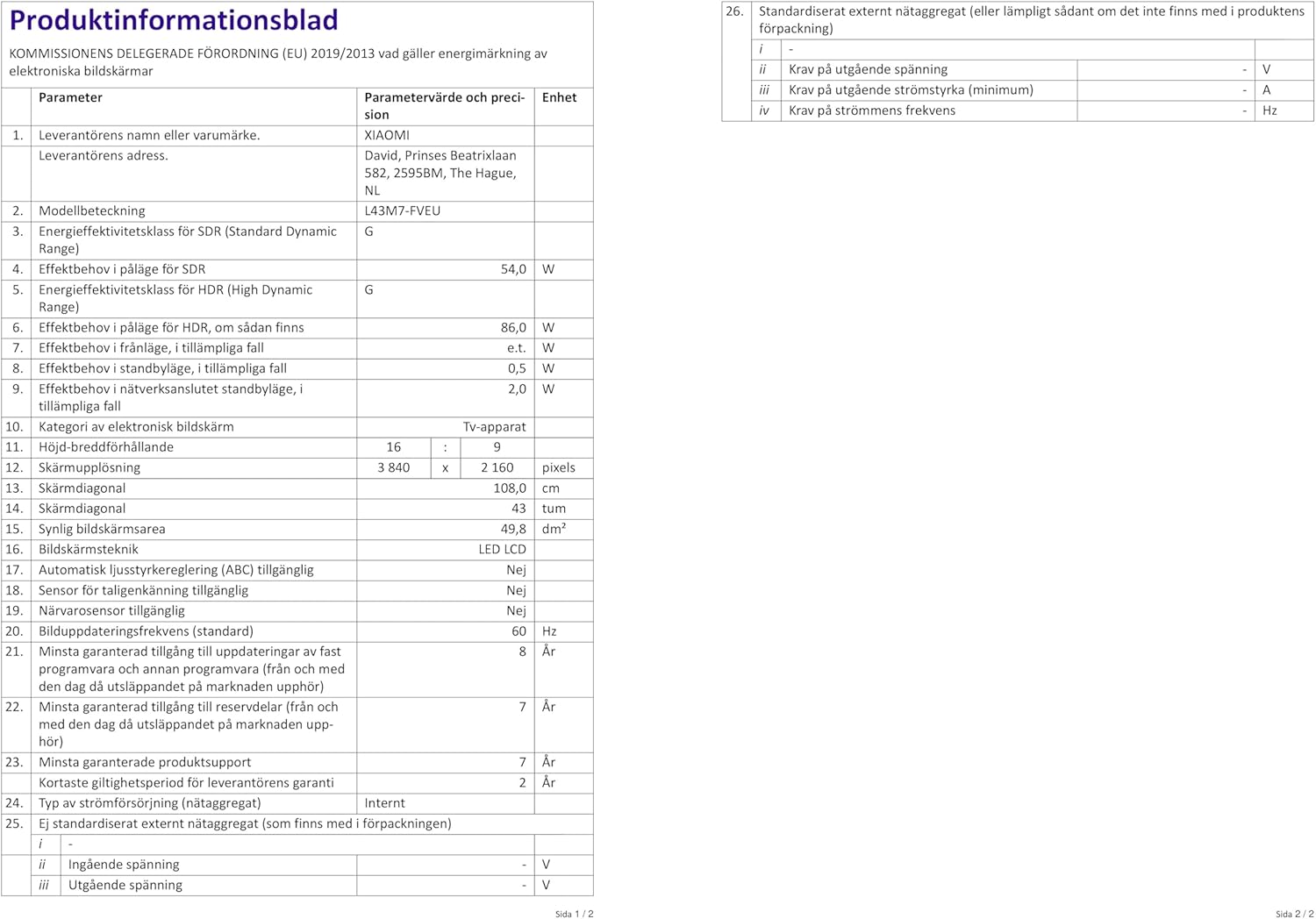
Figure 6.1: Dimensions of the XIAOMI F2 43" Smart TV with stand.
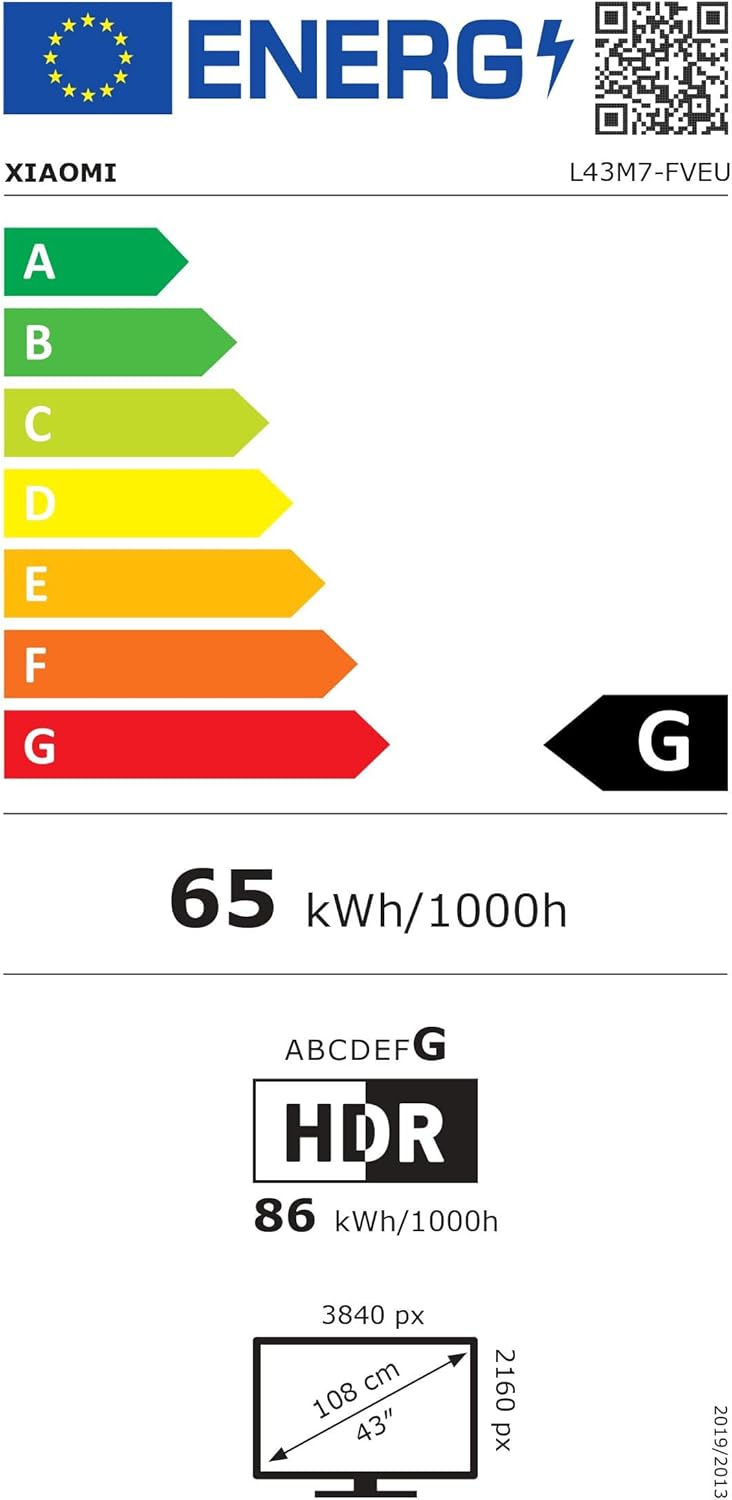
Figure 6.2: EU Energy Label for the XIAOMI F2 43" Smart TV. For more details, visit the EPREL database.
7. Warranty and Support
Your XIAOMI F2 43" Smart TV comes with a manufacturer's warranty.
- Minimum Guaranteed Product Support: 7 Years
- Minimum Guaranteed Availability of Software and Firmware Updates: 8 Years
- Minimum Guaranteed Availability of Spare Parts: 7 Years
- Minimum Duration of the General Guarantee Offered by the Supplier: 2 Years
For technical assistance, warranty claims, or further inquiries, please contact XIAOMI customer support through their official website or authorized service centers. Please have your model number (L43M7-FVEU) and purchase information ready.


