
1. Introduction
This manual provides detailed instructions for the installation, operation, and maintenance of the Aideepen OV2640 Camera Module. This module is designed for integration with microcontrollers, particularly the ESP32, offering a compact and versatile imaging solution.
1.1 Key Features
- 160° Wide-Angle Lens: Captures a broad field of view.
- 2 Megapixel Sensor: Delivers clear and stable color images.
- Compact Design: Small size and low operating voltage for embedded applications.
- Image Quality Enhancement: Utilizes OmniVision sensor technology to reduce optical and electronic defects.
- Standard Interface: Features an SCCB interface, compatible with I2C, for easy integration.
- Output Formats: Supports JPEG, RGB, and YUV image formats.
2. Product Components
The package includes the following components:
- 2 x Aideepen OV2640 Camera Modules (each with lens, FPC board, and connector)

Image: Two Aideepen OV2640 Camera Modules, showing their compact design and flexible flat cable.

Image: Detailed breakdown of the OV2640 Camera Module, highlighting the lens, FPC board, and connector. The lens provides accurate color reproduction and clear images. The FPC board is a printed circuit supported by flexible insulating material. The connector efficiently transmits camera data for stable and reliable image capture.
3. Setup Instructions
The OV2640 Camera Module is commonly used with ESP32 development boards. Follow these general steps for integration:
- Prepare the ESP32 Board: Ensure your ESP32 development board (e.g., ESP32-CAM) is ready for camera module connection.
- Connect the Camera Module: Carefully insert the flexible flat cable (FPC) connector of the OV2640 camera module into the corresponding FPC socket on the ESP32 board. Ensure the connection is secure and correctly oriented.
- Power Supply: Connect the ESP32 board to a stable power supply. Refer to your ESP32 board's documentation for specific power requirements.
- Software Configuration:
- Install the necessary drivers and libraries for the ESP32 and OV2640 camera in your development environment (e.g., Arduino IDE, ESP-IDF).
- Upload example code or your custom firmware to the ESP32 board. This code will initialize the camera and handle image acquisition.
- Testing: After uploading the code, test the camera functionality. This typically involves accessing a web server hosted by the ESP32 to view the camera feed or capture images.
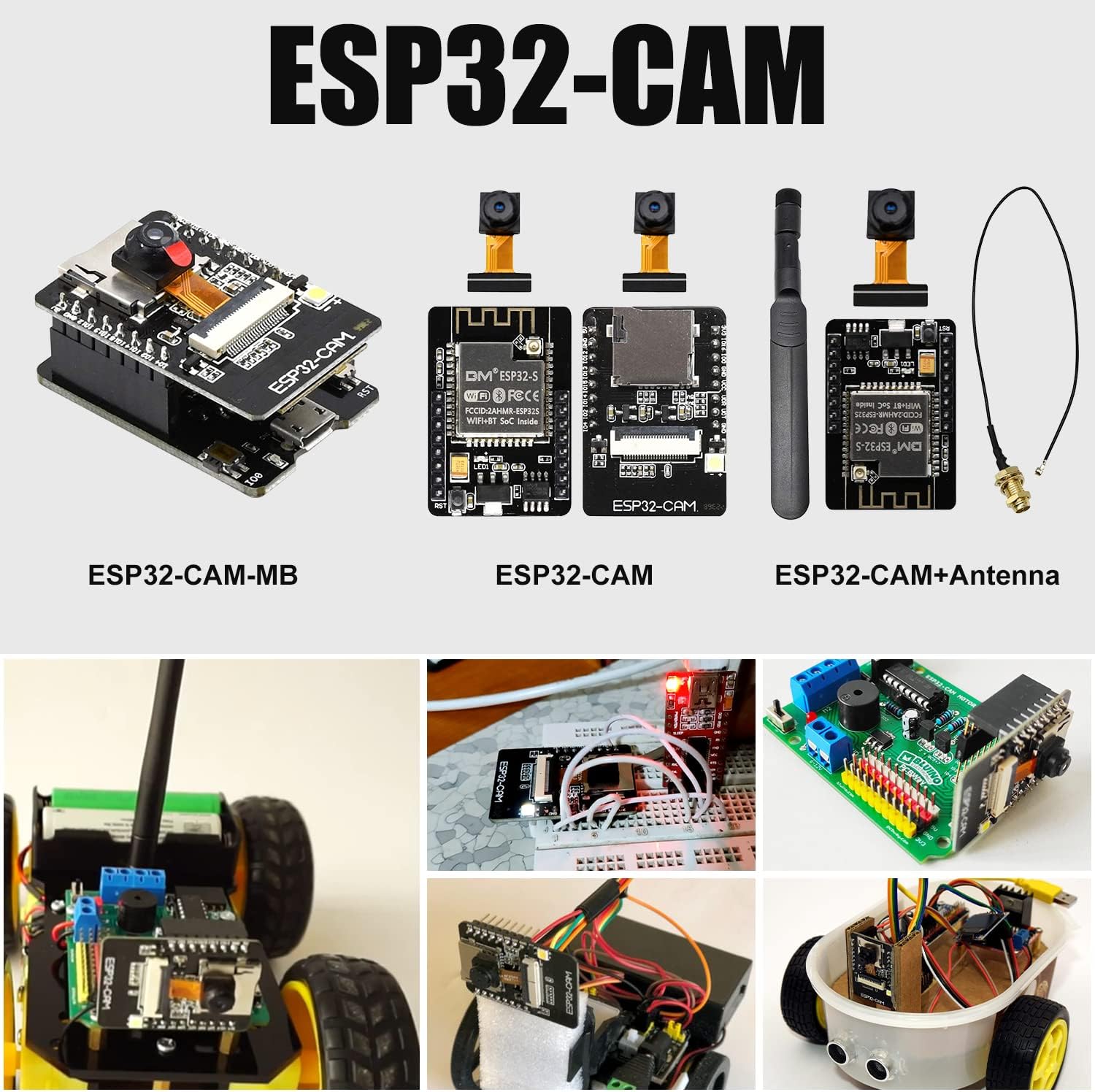
Image: Various ESP32-CAM configurations demonstrating compatibility with the OV2640 camera module, including ESP32-CAM-MB, standard ESP32-CAM, and ESP32-CAM with an external antenna. This illustrates common integration scenarios for the camera.
4. Operating Instructions
Once the camera module is successfully set up with your ESP32 or other compatible MCU, operation is primarily controlled through software. The following outlines general operational aspects:
- Image Capture: Use the programmed functions in your MCU firmware to trigger image capture. The camera supports various resolutions and frame rates, configurable via software.
- Image Processing: Captured images can be processed directly on the MCU or transmitted to another device (e.g., a computer, server) for further analysis or storage.
- Video Streaming: For applications requiring live video, the module can stream video data, often over Wi-Fi when paired with an ESP32.
- Lens Adjustment: The lens may allow for manual focus adjustment by gently rotating the lens barrel. Perform this carefully to avoid damage.

Image: An illustration of the camera module being used in an application, such as video communication on a computer screen. This demonstrates a potential use case for the module in smart devices.
5. Maintenance
To ensure the longevity and optimal performance of your OV2640 Camera Module, observe the following maintenance guidelines:
- Handling: Handle the module by its edges to avoid touching the lens or the FPC contacts. Static electricity can damage electronic components.
- Cleaning: If the lens becomes dusty, gently clean it with a soft, lint-free cloth or a specialized lens cleaning brush. Avoid using abrasive materials or harsh chemicals.
- Storage: Store the module in a dry, cool environment, away from direct sunlight and extreme temperatures. Keep it in anti-static packaging when not in use.
- Environmental Protection: Protect the module from moisture, dust, and corrosive substances.
6. Troubleshooting
If you encounter issues with your OV2640 Camera Module, consider the following troubleshooting steps:
- No Image/Garbled Output:
- Verify that the FPC cable is securely and correctly inserted into the ESP32 board's connector. Incorrect orientation can prevent operation.
- Check the power supply to the ESP32 board. Insufficient power can lead to unstable camera operation.
- Ensure the correct camera model (OV2640) is selected in your software configuration.
- Re-upload the firmware to the ESP32 board to rule out software corruption.
- Poor Image Quality:
- Clean the lens gently with a suitable lens cleaning tool.
- Adjust the lens focus by carefully rotating the lens barrel.
- Check ambient lighting conditions. The camera performs best in adequate light.
- Review your software settings for resolution, exposure, and white balance.
- Module Not Detected:
- Confirm that the camera module is compatible with your specific ESP32 board variant.
- Inspect the FPC cable for any physical damage or bends.
If issues persist after attempting these steps, refer to online community forums for ESP32 and OV2640 users, or contact Aideepen customer support.
7. Specifications
| Feature | Specification |
|---|---|
| Model Name | OV2640 Camera |
| Sensor Resolution | 2 Megapixels (UXGA) |
| Lens Angle | 160° Wide-Angle |
| Interface | SCCB (I2C compatible) |
| Output Formats | JPEG, RGB, YUV |
| Operating Voltage | Low voltage (suitable for embedded applications) |
| Dimensions (Lens) | Approx. 9mm x 9mm x 10mm |
| FPC Length | Approx. 75mm |
| Item Weight | 0.634 ounces |
| Processor Compatibility | ESP32 MCU (ARMv7) |
| Operating System Compatibility | FreeRTOS |
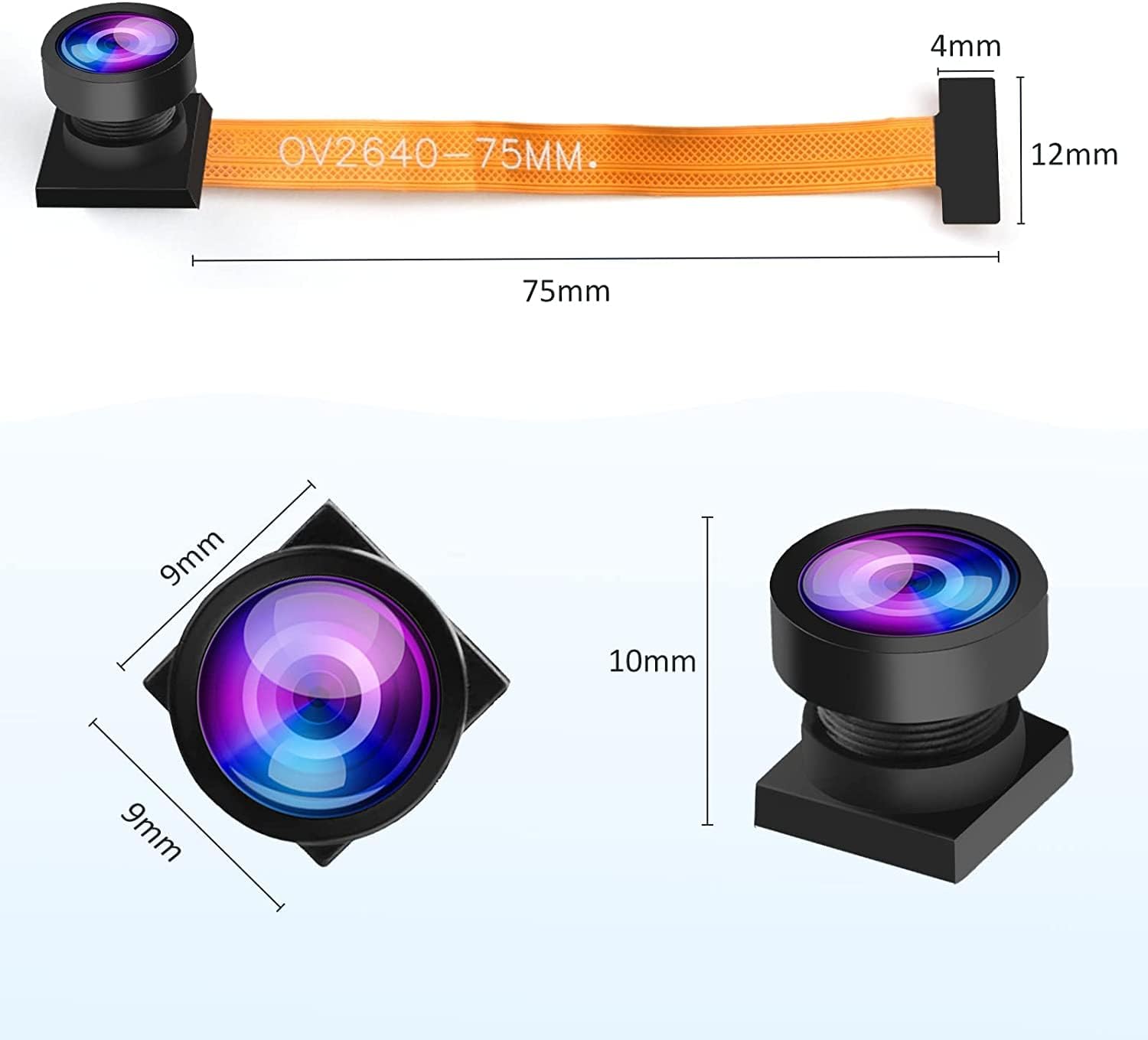
Image: Technical drawing showing the dimensions of the OV2640 Camera Module, including the lens size (9mm x 9mm x 10mm) and the FPC cable length (75mm).

Image: Illustrates diverse applications for the OV2640 Camera Module, such as integration into kiosks, smart lockers, and other embedded systems, highlighting its versatility.
8. Warranty and Support
Aideepen products are designed for reliability and performance. For any questions or support needs, please refer to the following:
- Warranty: Each product purchased from Aideepen includes a 24-month service period.
- Replacements: A new replacement can be obtained if there is any quality issue with your item within the warranty period.
- Contact Support: If you have any questions or require assistance with the product, please contact Aideepen customer service.