
TFCFL WKY8HFD
TFCFL 4-Channel Audio Mixer (Model WKY8HFD) User Manual
Model: WKY8HFD | Brand: TFCFL
1. Introduction
Thank you for choosing the TFCFL 4-Channel Audio Mixer, Model WKY8HFD. This professional-grade mixer combines analog mixing capabilities with a digital sound card, offering a versatile solution for various audio applications including live studio recording, DJ performances, and streaming. It features 4-channel input, 48V phantom power, USB playback, Bluetooth connectivity, and 24 DSP effects. This manual provides essential information for the safe and effective use of your new audio mixer. Please read it thoroughly before operation and retain it for future reference.

Image 1.1: The TFCFL 4-Channel Audio Mixer in a typical studio environment, demonstrating its compact size and professional application.
2. Safety Information
To ensure safe operation and prevent damage, please observe the following precautions:
- Power Source: Use only the provided power adapter. Ensure the voltage matches your local power supply.
- Water and Moisture: Do not expose the mixer to water, rain, or excessive moisture. Do not place objects filled with liquids on the mixer.
- Ventilation: Ensure adequate ventilation around the unit. Do not block ventilation openings.
- Heat: Keep the mixer away from heat sources such as radiators, heat registers, stoves, or other heat-producing appliances.
- Cleaning: Disconnect the power before cleaning. Use a dry, soft cloth. Do not use liquid cleaners or aerosol cleaners.
- Servicing: Do not attempt to service this product yourself. Refer all servicing to qualified service personnel.
- Cables: Protect power cords from being walked on or pinched, particularly at plugs, convenience receptacles, and the point where they exit from the apparatus.
3. Package Contents
Verify that all items listed below are included in your package:
- 1 x TFCFL 4-Channel Audio Mixer
- 1 x Data Cable (USB)
- 1 x Power Plug
- 1 x English User Manual

Image 3.1: Contents of the TFCFL 4-Channel Audio Mixer package, including the mixer unit, power adapter, and USB data cable.
4. Product Overview
The TFCFL 4-Channel Audio Mixer is designed for intuitive control and high-quality audio processing. Below is an overview of its main components and features.
4.1 Front Panel Controls and Connections

Image 4.1: Front panel layout of the TFCFL 4-Channel Audio Mixer, highlighting input channels, equalization controls, DSP effects, and master output.
- MIC/LINE Inputs (Channels 1-2): XLR/TRS combo jacks for microphones or line-level instruments.
- +48V Phantom Power: Button to activate phantom power for condenser microphones on Channels 1-2.
- HPF (High-Pass Filter): Button to engage an 80Hz high-pass filter on Channels 1-2 to reduce low-frequency rumble.
- GAIN Knobs: Adjust input sensitivity for each channel.
- HIGH/LOW EQ Knobs: Two-band equalizer for adjusting treble and bass frequencies for each channel.
- FX/PC/REC Knobs: Controls the send level to the internal DSP effects, PC audio input, or recording output.
- PEAK LEDs: Indicate when the input signal is approaching clipping.
- Channel Volume Knobs: Adjust the individual volume level for each input channel.
- LINE IN/3-4 (Channels 3-4): RCA inputs for stereo line-level devices.
- MAIN OUT (L/R): RCA outputs for connecting to an amplifier or powered speakers.
- REC OUT (L/R): RCA outputs for recording.
- Digital Audio Interface (24bit/48kHz): Integrated sound card for USB audio connection to a computer.
- USB Port: For connecting to a computer or USB drive for MP3 playback.
- Bluetooth Module: For wireless audio streaming from compatible devices.
- 24 DSP Effects: Built-in digital signal processing with various effects (reverb, delay, etc.).
- UP/DOWN/FX/REC/MUTE Knobs: Controls for navigating DSP effects, recording functions, and muting.
- PC/BT/MP3 Controls: Buttons for play/pause, skip tracks, and mode selection for USB/Bluetooth/PC audio.
- MAIN Volume Knob: Controls the overall output volume of the mixer.
- MAIN PH (Headphone) Output: 3.5mm jack for connecting headphones.
4.2 Key Features
- Integrated Digital Sound Card: Seamlessly connect to a computer for recording and playback.
- 48V Phantom Power: Essential for condenser microphones, providing clear and detailed audio capture.
- Bluetooth Connectivity: Wirelessly stream audio from smartphones, tablets, or other Bluetooth-enabled devices.
- USB MP3 Playback: Play audio files directly from a USB flash drive.
- 24 DSP Effects: Enhance your sound with a variety of built-in digital effects.
- Ultra-Low Noise Design: Ensures high-fidelity sound quality with minimal interference.
- High-Speed ARM Chip: Enables advanced processing for features like voice change, pitch change, reverberation, and delay.
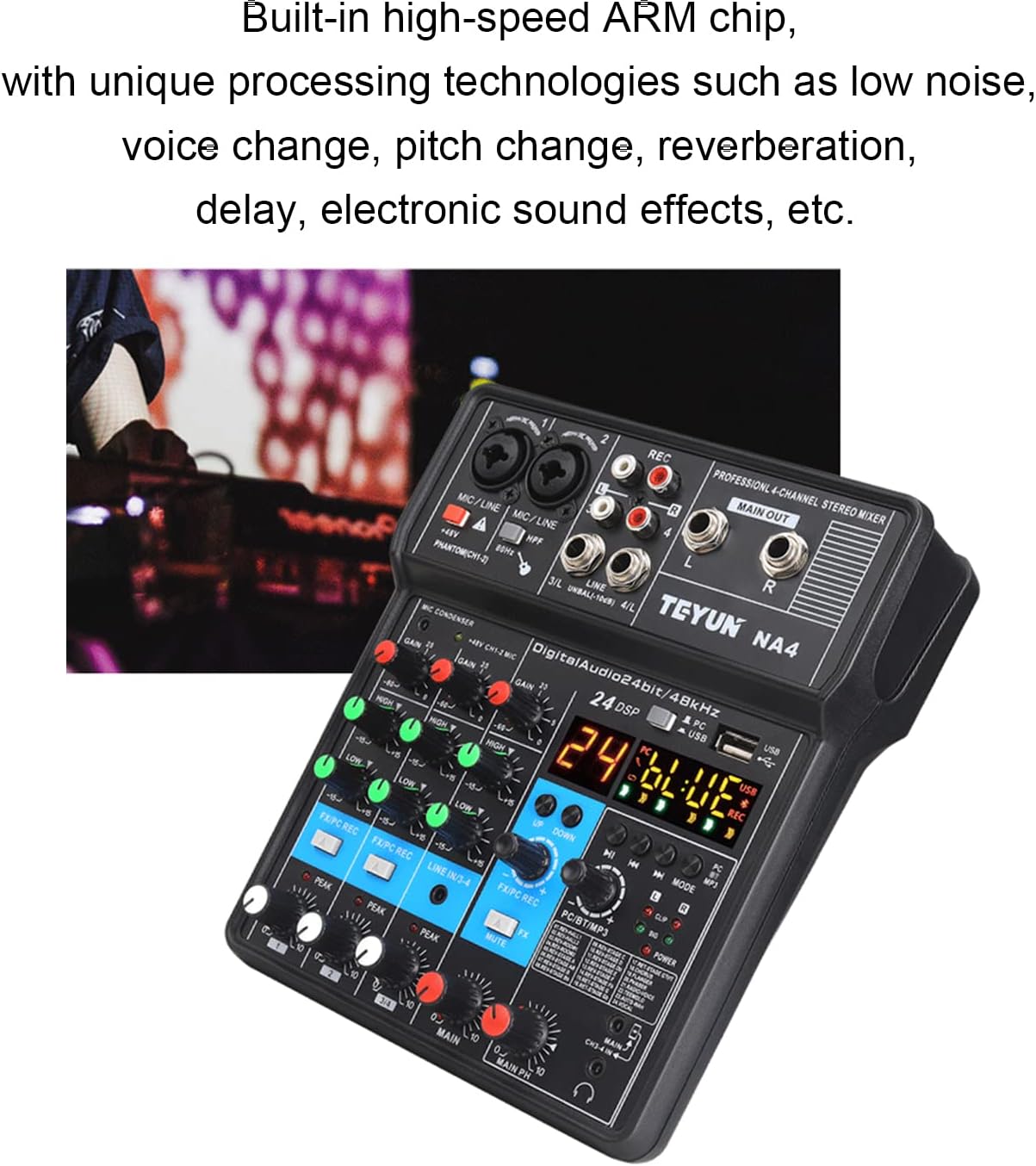
Image 4.2: The mixer's display indicating its digital audio capabilities and emphasizing its low-noise performance.

Image 4.3: Visual representation of the mixer's internal processing power, highlighting its ARM chip for advanced audio effects.
5. Setup
Follow these steps to set up your TFCFL 4-Channel Audio Mixer.
5.1 Power Connection
- Connect the provided power adapter to the DC IN port on the rear of the mixer.
- Plug the power adapter into a suitable electrical outlet.
- Press the POWER button to turn on the mixer. The display will illuminate.

Image 5.1: Rear view of the mixer, illustrating the power input and USB connection points.
5.2 Connecting Audio Devices
Refer to the diagram below for common connection types.

Image 5.2: Comprehensive connection diagram for the mixer, showing inputs for microphones (48V and 3V), electric guitar, electric keyboard, CD player, USB drive, Bluetooth devices, and outputs to HiFi amp, monitor headphones, and live broadcast.
- Microphones:
- For condenser microphones requiring power, connect via XLR to MIC/LINE inputs (Channels 1-2) and press the +48V PHANTOM button.
- For dynamic microphones, connect via XLR or 1/4" TRS to MIC/LINE inputs (Channels 1-2).
- Line-Level Instruments/Devices:
- Connect instruments like electric guitars or keyboards via 1/4" TRS to MIC/LINE inputs (Channels 1-2).
- Connect stereo devices (e.g., CD players, media players) via RCA cables to the LINE IN/3-4 inputs.
- Computer Connection (USB Sound Card):
- Connect the mixer to your computer using the provided USB data cable.
- The mixer will be recognized as an audio input/output device. Select it in your computer's sound settings or DAW software.
- Main Output:
- Connect the MAIN OUT (L/R) RCA jacks to your amplifier, powered speakers, or recording interface.
- Headphones:
- Plug your headphones into the MAIN PH 3.5mm jack for monitoring.
6. Operation
This section details the operational aspects of your TFCFL 4-Channel Audio Mixer.
6.1 Basic Mixing
- Gain Adjustment: For each active input channel, slowly turn the GAIN knob clockwise until the PEAK LED flashes only occasionally during the loudest parts of the signal. Avoid constant illumination of the PEAK LED to prevent distortion.
- Equalization (EQ): Use the HIGH and LOW knobs to adjust the tonal characteristics of each channel. Turn clockwise to boost frequencies, counter-clockwise to cut.
- Channel Volume: Adjust the individual channel volume using the dedicated knob for each channel.
- Main Output Volume: Control the overall output level of the mixer using the MAIN volume knob. Monitor the main level indicators to avoid clipping.
- Headphone Volume: Adjust your monitoring level with the MAIN PH knob.
6.2 Bluetooth Connectivity
- Press the MODE button on the PC/BT/MP3 section until "BT" appears on the display.
- On your Bluetooth-enabled device (smartphone, tablet), search for available devices and select "TFCFL Mixer" (or similar name).
- Once paired, audio from your device will play through the mixer. Use the PC/BT/MP3 controls for playback (play/pause, skip).
6.3 USB Playback and Recording
- USB Playback (MP3):
- Insert a USB flash drive containing MP3 files into the USB port.
- Press the MODE button until "MP3" or similar is displayed.
- Use the PC/BT/MP3 controls to navigate and play tracks.
- USB Recording (PC):
- Connect the mixer to your computer via the USB data cable.
- Ensure the mixer is selected as the input device in your recording software (DAW).
- Adjust channel volumes and the MAIN volume to achieve a good recording level in your software.
- The mixer acts as a 2-in/2-out USB audio interface.
6.4 DSP Effects
- The mixer features 24 built-in DSP effects. The display will show the current effect number.
- Use the UP/DOWN buttons to cycle through the available effects.
- For each channel, use the FX/PC/REC knob to send a portion of that channel's signal to the selected DSP effect.
- The overall level of the effects return can be adjusted via a dedicated control (if available, otherwise it's mixed into the main output).
7. Specifications
Detailed technical specifications for the TFCFL 4-Channel Audio Mixer (Model WKY8HFD):
| Feature | Specification |
|---|---|
| Model Number | WKY8HFD |
| Number of Channels | 4 |
| Frequency Response | 0.5dB/-1.0dB (20Hz~20kHz), Reference Rated Output Level @1kHz, Gain Knob: MID |
| Inputs | MIC*2, 2REC, PC, 2LINE, USB, BT, 3.5MINI |
| Outputs | STEREO OUT:2, 3.5MINI MAIN PH OUT, MINI LOOP BACK OUTPUT; 2.REC |
| Bus | STEREO:1 |
| HPF (Mono) | 80 Hz, 12 dB/Octave (CH3, 4) |
| EQ High Gain | +15dB/-15dB, Frequency Response: 10kHz Ramp Frequency |
| EQ Low Gain | +15dB/-15dB, Frequency Response: 100Hz Ramp Frequency |
| Input and Output Level | MIC(-60dB)LINE OUTPUT(-40dB) |
| Connectivity Technology | Bluetooth, USB |
| Power Source | Corded Electric |
| Product Dimensions | 7.67"D x 6.69"W x 1.96"H (195mm x 170mm x 50mm) |
| Item Weight | 1.32 pounds (0.6 Kilograms) |

Image 7.1: Physical dimensions of the TFCFL 4-Channel Audio Mixer, indicating its compact size.
8. Troubleshooting
If you encounter issues with your mixer, refer to the following common problems and solutions:
| Problem | Possible Cause | Solution |
|---|---|---|
| No sound output |
|
|
| Distorted audio |
|
|
| Microphone not working (condenser mic) |
|
|
| Bluetooth not pairing |
|
|
9. Maintenance
Proper care and maintenance will extend the life of your TFCFL Audio Mixer.
- Cleaning: Disconnect the power before cleaning. Use a soft, dry, lint-free cloth to wipe the exterior. Do not use abrasive cleaners, solvents, or waxes.
- Storage: When not in use for extended periods, store the mixer in a cool, dry place, away from direct sunlight and extreme temperatures. Cover the unit to protect it from dust.
- Handling: Avoid dropping or subjecting the mixer to strong impacts.
10. Warranty and Support
For warranty information or technical support, please refer to the documentation provided at the time of purchase or contact your retailer. Keep your purchase receipt as proof of purchase.
Related documentsWKY8HFD

Ask a question about this manual
Ask about setup, troubleshooting, compatibility, parts, safety, or missing instructions. Manuals+ will review the question and use this page’s manual context to help answer it.