
1. Introduction
Thank you for choosing the Taylor Swoden 3-in-1 Cordless Handheld Vacuum. This lightweight and portable vacuum cleaner is designed for efficient cleaning in various environments, including your home, office, and car. It features strong suction, a long-lasting battery, and versatile attachments to tackle different cleaning tasks. Please read this manual carefully before use to ensure proper operation and maintenance.
2. Safety Instructions
- Always turn off the vacuum cleaner before charging.
- Do not use the cordless vacuum cleaner while it is charging to protect battery life and prevent potential hazards.
- Keep the vacuum cleaner away from water or other liquids to prevent electric shock.
- Do not pick up flammable or combustible materials, hot ashes, or sharp objects with the vacuum.
- Ensure the filter is properly installed before operation.
- When emptying the dust collecting cup, hold it steadily to prevent spills.
- This appliance is not intended for use by persons (including children) with reduced physical, sensory or mental capabilities, or lack of experience and knowledge, unless they have been given supervision or instruction concerning use of the appliance by a person responsible for their safety.
3. Product Components
Familiarize yourself with the parts of your Taylor Swoden handheld vacuum:

Image: Exploded view of the vacuum cleaner showing its internal components and external attachments. Key parts include the main body, dust container, HEPA filter, and various nozzles.
- Main Unit: Contains the motor, battery, and control switch.
- Dust Container: Translucent, bagless container for collecting debris.
- HEPA Filter: Washable filter for trapping dust and fine particles.
- Metal Filter Holder: Supports the HEPA filter.
- Switch: Power on/off and suction level control.
- Indicator Light: Shows charging status and operation.
- Ergonomic Handle: Designed for comfortable grip.
- Attachments:
- Crevice Nozzle: For narrow gaps and hard-to-reach areas (e.g., under sofas, car seat gaps).
- Brush Nozzle: Recommended for cleaning car air outlets and pet hair on carpets.
- Air Blower Hose: Can be used to blow debris from surfaces.
- USB Charging Cable: For recharging the vacuum's battery.
4. Setup and Charging
4.1 Initial Charge
Before first use, fully charge the vacuum cleaner. The 2000mAh lithium-ion battery requires approximately 3-5 hours for a full charge.

Image: Visual representation of the vacuum's battery life and charging time, highlighting 20 minutes of runtime and 2.5-4 hours for a full charge.
- Connect the USB charging cable to the vacuum's charging port.
- Plug the other end of the USB cable into a suitable USB power adapter (not included) or a powered USB port.
- The indicator light will illuminate to show charging status. It will change or turn off once fully charged.
- Ensure the vacuum is turned off during charging.
5. Operating Instructions
5.1 Powering On and Suction Levels
The vacuum features two suction levels for different cleaning needs.

Image: The vacuum demonstrating its two suction modes: a lower setting for general cleaning and a higher setting for stronger debris removal.
- Press the power switch once to turn on the vacuum at the lower suction level (approximately 3500PA).
- Press the power switch a second time to activate the higher suction level (approximately 5000PA) for more powerful cleaning.
- Press the power switch a third time to turn off the vacuum.
5.2 Using Attachments
Select the appropriate attachment for your cleaning task:

Image: Examples of the vacuum in use with different attachments: a long nozzle for narrow spaces, a brush attachment for carpets, and an air blower hose for clearing debris.
- Crevice Nozzle: Ideal for reaching tight spaces like car seat gaps, keyboard crevices, or corners of furniture. Simply push it onto the vacuum's intake.
- Brush Nozzle: Attach this for cleaning upholstery, car air vents, or to effectively pick up pet hair from carpets and fabric surfaces.
- Air Blower Hose: Connect this to the exhaust port of the vacuum to use it as a blower for clearing dust from delicate electronics or hard-to-reach areas where suction is not suitable.
5.3 Low Noise Operation
The vacuum is designed with noise-reducing technology, operating below 75dB, ensuring a quieter cleaning experience.

Image: The vacuum in operation, illustrating its low noise level, suitable for use around pets and in quiet environments.
6. Maintenance
6.1 Emptying the Dust Container
The translucent dust container allows you to monitor the fill level. Empty it regularly to maintain optimal suction.
- Ensure the vacuum is turned off.
- Detach the dust cup from the main unit.
- Carefully remove the filter assembly from the dust cup.
- Empty the collected debris into a waste bin.
6.2 Cleaning the HEPA Filter
The HEPA filter is washable and reusable. Regular cleaning ensures efficient filtration and suction power.
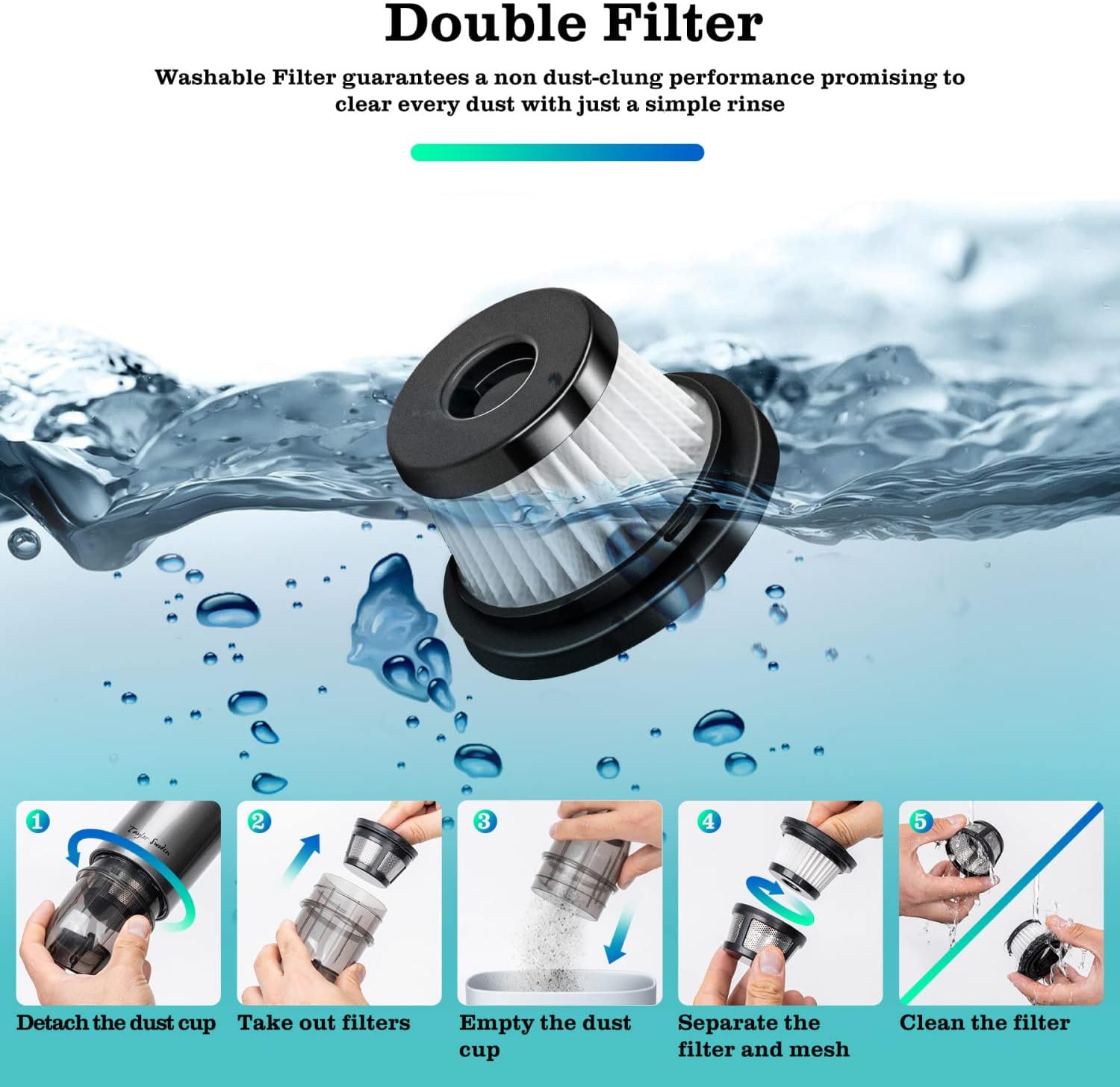
Image: A visual guide demonstrating the five steps to clean the vacuum's filter: detach, take out, empty, separate, and rinse.
- After emptying the dust cup, separate the HEPA filter from its mesh holder.
- Rinse the HEPA filter under running water until clean. Do not use detergents.
- Allow the filter to air dry completely before reassembling. Ensure it is thoroughly dry to prevent damage to the motor.
- Reassemble the filter and dust cup, then attach them back to the main unit.
7. Troubleshooting
If you encounter issues with your vacuum cleaner, refer to the following common problems and solutions:
| Problem | Possible Cause | Solution |
|---|---|---|
| Vacuum does not turn on | Battery is depleted Power switch is off | Charge the battery fully Press the power switch |
| Weak suction power | Dust container is full Filter is clogged Nozzle/hose is blocked | Empty the dust container Clean or replace the HEPA filter Check and clear any blockages |
| Battery not charging | Charging cable not connected properly Faulty charging cable/adapter | Ensure secure connection Try a different USB cable or adapter |
| Unusual noise during operation | Blockage in the nozzle or hose Filter not properly installed | Check for and remove blockages Ensure filter is correctly seated |
8. Specifications
- Brand: Fochai (Taylor Swoden)
- Model: 3-in-1 Cordless Handheld Vacuum
- Form Factor: Handheld
- Suction Power: 3500PA (Level 1), 5000PA (Level 2)
- Motor Power: 75W
- Battery: 2000mAh Lithium-ion
- Runtime: Approximately 20 minutes (lower suction) to 30 minutes (higher suction)
- Charging Time: 3-5 hours
- Filter Type: Washable HEPA Filter
- Noise Level: <75dB
- Weight: Approximately 1.4 lbs
- Included Components: Brush, Crevice Nozzle, Air Blower Hose, USB Charging Cable
- Special Features: Lightweight, Portable, Cordless
9. Warranty and Support
A 1-year warranty is provided by Taylor Swoden for this product. If you encounter any problems with your vacuum cleaner or require assistance, please do not hesitate to contact Taylor Swoden customer service. Please refer to your purchase documentation for specific contact details.