
1. Introduction
The GRAUGEAR G-MP01 is a 3.5-inch front panel USB hub designed to expand the connectivity of your desktop computer. It provides high-speed data transfer capabilities with a USB 3.2 Gen 2x2 USB-C port and two USB 3.0 ports, fitting into a standard 3.5-inch drive bay.
1.1 Package Contents
- GRAUGEAR 3.5'' Front Panel USB Hub (G-MP01)
- USB 3.2 Type-E Key-A 20-Pin Cable
- USB 3.0 19-Pin Cable
- 6x Mounting Screws
- Warranty Card
- User Manual
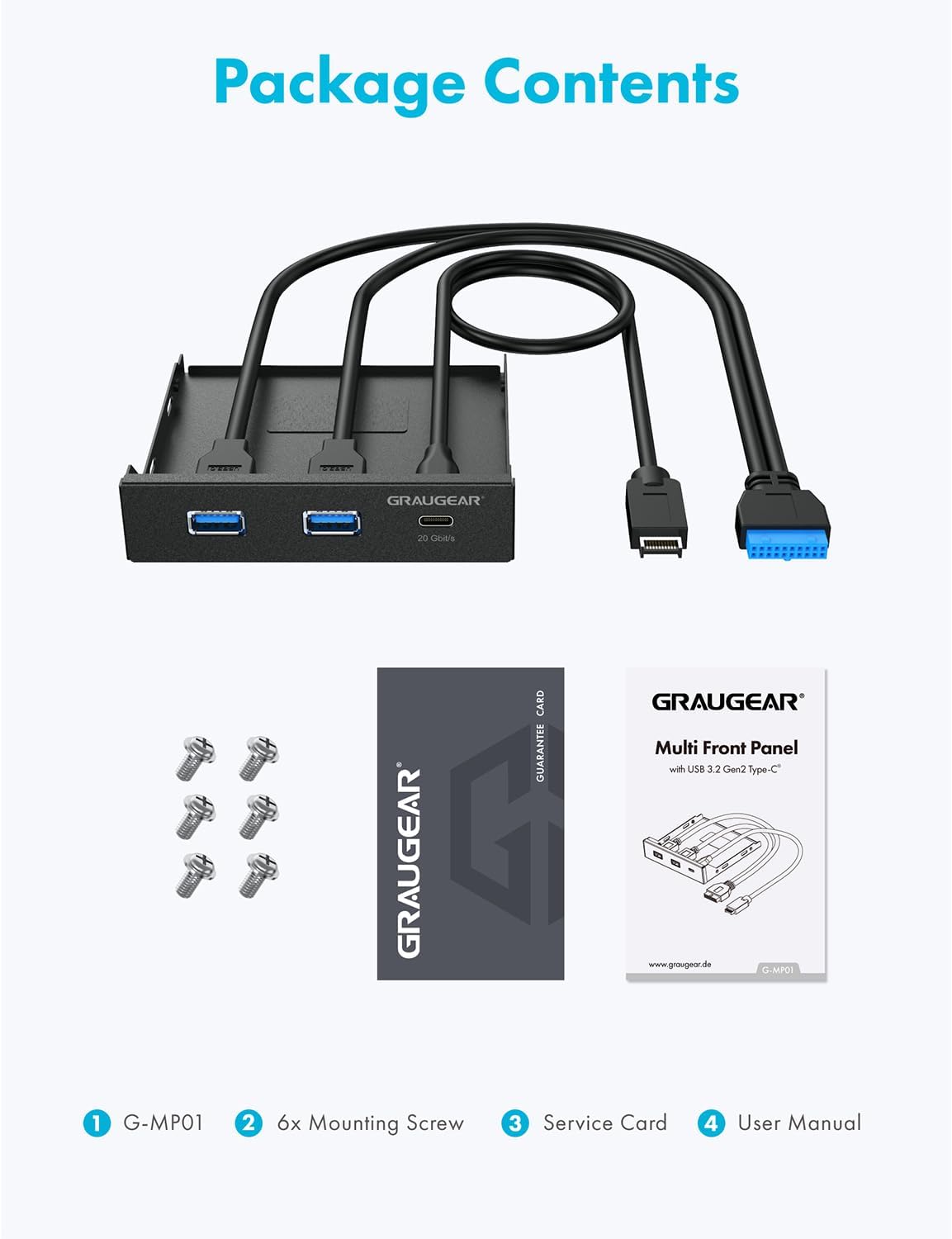
Image: Contents of the GRAUGEAR G-MP01 package, including the hub, cables, screws, warranty card, and user manual.
Video: An overview of the GRAUGEAR 3.5 Inch Front Panel USB Hub, highlighting its USB-C and USB 3.0 ports and general features.
2. Setup
2.1 Installation Requirements
- A free 3.5-inch drive bay in your PC computer case.
- Motherboard with an available USB 3.0 19-pin header.
- Motherboard with an available USB 3.2 Gen 2x2 Type-E Key-A 20-pin header.
- A SATA 15-Pin Power Header from your PC's power supply.
Note: Some older motherboards may not have a 20-pin USB 3.2 Key-A Type-E header. In such cases, an optional USB Front Panel Adapter (to convert USB 3.0 to USB 3.2 Type-E) or a Type-E PCIe Card (to convert a PCIe slot to USB 3.2 Type-E) may be required.
2.2 Installation Steps
- Carefully insert the GRAUGEAR G-MP01 front panel USB hub into an available 3.5-inch drive bay on your PC case.
- Secure the front panel with the six supplied mounting screws.
- Connect the USB 3.2 Gen 2x2 Type-E Key-A 20-pin cable from the hub to the corresponding header on your motherboard.
- Connect the USB 3.0 19-pin cable from the hub to the corresponding header on your motherboard.
- Connect the SATA 15-Pin Power Header from your PC's power supply to the hub's power input.

Image: Diagram illustrating the connection of the USB 3.2 Gen 2 Key A host and USB 3.0 19 Pin host cables to the motherboard.

Image: Close-up view of the USB 3.2 Gen 2 Key A (20-pin) header and USB 3.0 (19-pin) header for connection to the motherboard.
3. Operating
3.1 Data Transfer Speeds
- USB-C Port: Supports USB 3.2 Gen 2x2 standard with data transfer rates up to 20 Gbps.
- USB 3.0 Ports: Compliant with the USB 3.0 standard, supporting data transfer rates up to 5 Gbps.

Image: Visual representation of data transfer speeds for Type-C (20 Gbit/s) and Type-A (5 Gbit/s) ports on the GRAUGEAR G-MP01.
3.2 Compatibility
The GRAUGEAR G-MP01 is compatible with Windows 11, 10, 8, and 7 operating systems. It allows for easy connection of various external USB devices, enhancing the scalability of your desktop computer.

Image: The GRAUGEAR G-MP01 front panel USB hub installed in a 3.5-inch drive bay of a PC computer case.
4. Maintenance
To ensure optimal performance and longevity of your GRAUGEAR G-MP01 front panel USB hub, follow these maintenance guidelines:
- Keep the device clean and free from dust. Use a soft, dry cloth for cleaning.
- Avoid exposing the device to extreme temperatures or humidity.
- Ensure all cable connections are secure to prevent intermittent issues.
5. Troubleshooting
If you encounter issues with your GRAUGEAR G-MP01, consider the following:
- No Power/Device Not Recognized: Verify that the SATA 15-Pin Power Header is securely connected to your PC's power supply and the hub. Check all motherboard header connections (USB 3.0 19-pin and USB 3.2 Gen 2x2 Type-E Key-A 20-pin).
- USB-C Port Not Functioning: Ensure your motherboard has a compatible USB 3.2 Gen 2x2 Type-E Key-A 20-pin header. If not, an adapter or PCIe card may be necessary. Also, confirm that the connected USB-C device is fully compatible with the USB 3.2 Gen 2x2 standard.
- Slow Data Transfer: Ensure you are using compatible USB 3.0 or USB 3.2 Gen 2x2 devices and cables. Older USB devices will operate at their respective lower speeds.
- Physical Fit Issues: Confirm your PC case has a standard 3.5-inch drive bay. If the fit is loose, ensure all mounting screws are properly tightened.
6. Specifications
| Feature | Detail |
|---|---|
| Product Dimensions | 4.02 x 4.02 x 0.98 inches (102 x 102 x 25 mm) |
| Item Weight | 6.3 ounces (180g) |
| Item Model Number | G-MP01 |
| Brand | GRAUGEAR |
| Color | Black |
| Hardware Interface | USB Type C, USB Type A |
| Special Feature | Plug and Play |
| Compatible Devices | Desktops |
| USB-C Port Speed | Up to 20 Gbps (USB 3.2 Gen 2x2) |
| USB 3.0 Port Speed | Up to 5 Gbps |
| Cable Length | 60 cm |

Image: Detailed dimensions and port specifications for the GRAUGEAR G-MP01 front panel USB hub.
7. Warranty and Support
The GRAUGEAR G-MP01 includes a warranty card and user manual in the package. For any product-related inquiries, technical assistance, or warranty claims, please refer to the contact information provided on the warranty card or visit the official GRAUGEAR website for friendly customer service.

