
Hongmed F97t Smart Watch
Hongmed Smart Watch User Manual
Model: F97t Series
1. Introduction
This manual provides comprehensive instructions for the Hongmed Smart Watch, designed for compatibility with both Android and iPhone devices. It features health monitoring capabilities including body temperature, blood pressure, and oxygen levels, alongside fitness tracking, notifications, and various smart functions. Please read this manual thoroughly to ensure proper use and maintenance of your device.

Image: The Hongmed Smart Watch, showcasing its sleek black design and digital display.
2. Package Contents
Verify that all items are present in your package:
- 1 x Hongmed Smart Watch
- 1 x User Manual
- 1 x USB Magnetic Charging Cable
3. Setup Guide
3.1 Initial Charging
Before first use, fully charge the smart watch to activate it. Connect the USB magnetic charging cable to the charging points on the back of the watch and to a standard USB power source.
3.2 App Download and Installation
The companion application for the Hongmed Smart Watch is named "JYouPro". You can download it by:
- Scanning the QR code provided in the physical user manual.
- Searching for "JYouPro" in your phone's app store (Google Play Store for Android, Apple App Store for iOS).
Ensure your mobile phone meets the compatibility requirements: Android 4.4 or above, or iOS 9.0 or above, with Bluetooth 5.0 or above support.
3.3 Device Pairing
To connect your smart watch to the "JYouPro" app and enable full functionality (including call and message notifications), follow these steps:
- Download and install the "JYouPro" app on your phone. Grant necessary permissions: notification, storage, contacts, and GPS location.
- Turn on Bluetooth and GPS location on your phone. Then, power on your smart watch.
- Open the "JYouPro" app. Tap the "Device" button at the bottom of the screen.
- Tap "Scan for device" to search for your watch. It will typically appear as "F97t-XXXX". Select it to connect.
- Once connected, enable "Incoming call notification", "SMS notification", and "Message notification" switches within the app. Grant phone and SMS permissions.
- For Android phones, navigate to your phone's settings, find "JYouPro" under app management. Enable "Allow notifications", turn off battery optimization, and disable "Power saving mode" to allow the app to run in the background.
Note: If the watch was previously paired directly through your phone's Bluetooth settings, delete the paired device from your phone's Bluetooth list and re-pair exclusively through the "JYouPro" app.
4. Operating Instructions
4.1 Basic Navigation
The Hongmed Smart Watch features a 1.69-inch full-touch screen for intuitive navigation. Swipe left, right, up, or down to access different functions and menus. The side button typically serves as a power button or a return-to-home function.
The watch automatically synchronizes date and time with your phone once successfully connected to the "JYouPro" app. No manual time setting is required on the watch itself.
4.2 Health Monitoring
The watch provides comprehensive health tracking features:
- Heart Rate Monitor: Tracks your heart rate throughout the day.
- Blood Pressure Monitor: Measures your blood pressure.
- Blood Oxygen (SpO2) Monitor: Measures your blood oxygen saturation levels.
- Body Temperature Monitor: Monitors your body and skin temperature.
- Sleep Monitoring: Analyzes your sleep patterns and quality.
- Breathing Training: Guides you through breathing exercises for relaxation.
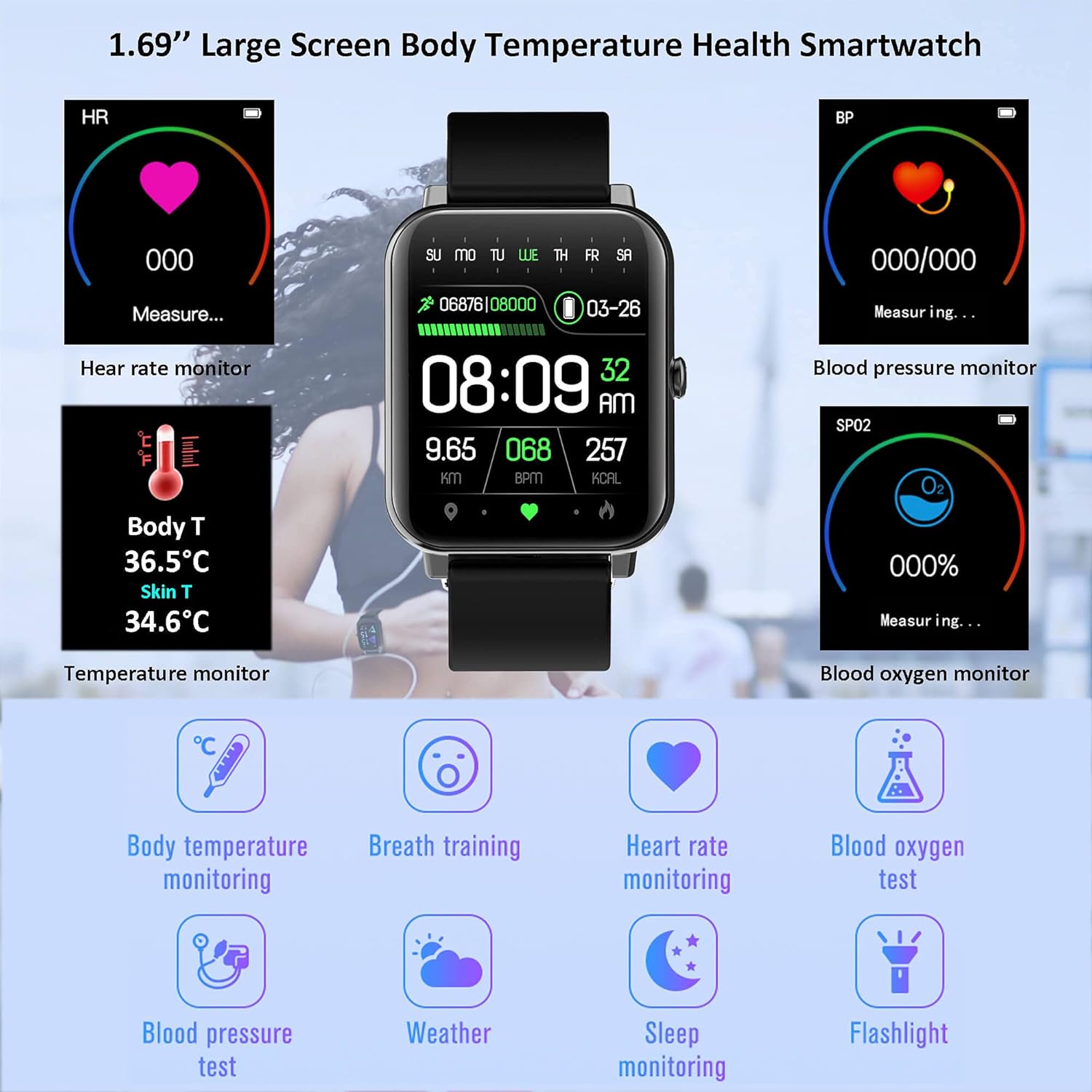
Image: Overview of the watch's health monitoring capabilities, including heart rate, blood pressure, SpO2, and temperature.

Image: Detailed view of the watch's health tracking features, emphasizing temperature, heart rate, blood pressure, and blood oxygen.

Image: The watch's features for promoting a healthy lifestyle, including sedentary reminders, hydration alerts, sleep tracking, and guided breathing exercises.
4.3 Fitness Tracking
The watch tracks your daily activity and supports various sports modes:
- Steps & Calories: Counts your steps and estimates calories burned.
- Distance: Calculates distance covered.
- Sports Modes: Supports running, walking, cycling, basketball, football, badminton, and skipping rope.
- Water Resistance: IP67 waterproof rating allows for swimming, surfing, and showering. Not recommended for deep-sea diving, saunas, or hot baths.

Image: Visual representation of the watch's accurate sport data tracking, including distance, heart rate, steps, calories, and exercise time.

Image: The smartwatch being used during swimming, demonstrating its IP68 waterproof capability and suitability for various sports activities.
4.4 Notifications and Communication
Once paired with your smartphone, the watch can display notifications for incoming calls, SMS messages, and various social media applications. Ensure notification permissions are enabled in the "JYouPro" app and your phone's settings.

Image: The smartwatch's ability to display incoming calls and other smart features like weather, music, and camera control.
4.5 Other Features
- Weather Forecast: Displays current weather conditions and forecasts.
- Music Play Controller: Control music playback on your connected phone.
- Camera Control: Remotely trigger your phone's camera shutter.
- Alarm Clock: Set alarms directly from the watch.
- Stopwatch: A built-in stopwatch for timing activities.
- LED Flashlight: Utilizes the screen as a basic flashlight.
- Reminders: Includes sedentary reminders and drink water reminders.
- Custom Dials & UI Styles: Personalize your watch face and user interface appearance.

Image: Customization options for the smartwatch, including a variety of watch faces, switchable UI styles, and detailed product dimensions.

Image: Breathing Training feature.

Image: Medicine Time Reminder.

Image: Alarm Clock feature.

Image: Stopwatch function.

Image: LED Flashlight feature.

Image: Weather Forecast display.
5. Maintenance
- Cleaning: Regularly clean your watch to remove sweat stains and dust. Keep the watch and your skin dry when wearing it to prevent irritation and maintain sensor accuracy.
- Battery Care: The watch features a 200mAh in-built battery. For optimal battery life, avoid extreme temperatures and fully charge the device when prompted.

Image: Information on the watch's battery life, indicating long standby time and quick charging.
6. Troubleshooting
- Watch Not Receiving Notifications:
- Ensure the watch is successfully connected to the "JYouPro" app.
- Verify that "Incoming call notification", "SMS notification", and "Message notification" are enabled in the "JYouPro" app under the "Device" section.
- Check your phone's settings: ensure Bluetooth is on, GPS is on (for Android 6.0+), and the "JYouPro" app has all necessary permissions (notifications, contacts, phone, SMS, storage, location).
- For Android, confirm "JYouPro" is allowed to run in the background (disable battery optimization/power saving mode for the app).
- Watch Disconnects from Phone:
- Ensure your phone's Bluetooth and GPS are active.
- Confirm the "JYouPro" app is running in the background and not being closed by system optimizations.
- If the watch was previously paired directly through your phone's Bluetooth settings (not via the app), delete it from your phone's Bluetooth list and re-pair exclusively through the "JYouPro" app.
- Update both your watch's firmware (if available through the app) and the "JYouPro" app to the latest versions.
- Incorrect Time Display:
- The watch synchronizes time with your phone. Ensure the watch is properly connected to the "JYouPro" app. Swipe down on the app's homepage to force data synchronization.
7. Specifications
| Feature | Detail |
|---|---|
| Brand | Hongmed |
| Model | F97t Series |
| Screen Size | 1.69 Inches |
| Battery Capacity | 200 Milliamp Hours |
| Connectivity | Bluetooth 5.0, USB (for charging) |
| Compatibility | Android 4.4+ / iOS 9.0+ |
| Water Resistance | IP67 (Splash, rain, and sweat proof. Suitable for swimming. Not for hot water or deep diving.) |
| Health Monitoring | Heart Rate, Blood Pressure, Blood Oxygen, Body Temperature, Sleep Tracking |
| Fitness Tracking | Steps, Calories, Distance, Multi-sport modes |
| Item Weight | 2.39 ounces |
| Package Dimensions | 5.94 x 3.54 x 0.75 inches |
8. Warranty and Support
For warranty information and technical support, please refer to the contact details provided on the product packaging or the official Hongmed website. Keep your purchase receipt as proof of purchase for any warranty claims.
Related Documents - F97t Smart Watch
 |
MexSpFit Smart Watch User Manual: Health and Activity Tracking User manual for the MexSpFit Smart Watch, providing details on body temperature, heart rate, blood pressure, and sleep monitoring, along with activity tracking features for users of all ages. |
 |
koineet T46S Smart Watch User Manual User manual for the koineet T46S Smart Watch, detailing features like call functionality, health monitoring (heart rate, blood pressure, blood oxygen, body temperature), activity tracking, sleep analysis, weather updates, camera control, and music playback. Includes setup instructions and precautions. |
 |
Smart Watch User Manual: Features, App Connection, and Operation Comprehensive user manual for the Smart Watch, covering features like activity tracking, health monitoring (heart rate, sleep, blood pressure, blood oxygen, body temperature), weather, alarm clock, and music control. Includes detailed instructions for downloading and connecting the 'Keep Health' app, device settings, and app functionalities. Supports Android and iOS devices. |
 |
Watchmark Focus Smartwatch User Manual Comprehensive user manual for the Watchmark Focus smartwatch, detailing features, setup, usage, and technical specifications. Learn about health tracking, app integration, and device settings for optimal use. |
 |
LISKA SV-SW12 Smart Bracelet: User Manual and Features Comprehensive guide to the LISKA SV-SW12 Smart Bracelet, covering setup, features like heart rate monitoring, sleep tracking, and app integration with Wearfit2.0. |
 |
V Band Smart Watch User Manual - IP68 Waterproof Fitness Tracker with Health Monitoring User manual for the V Band IP68 waterproof fitness tracker. Covers setup, app connection, health monitoring (heart rate, blood pressure, body temperature, blood oxygen), activity tracking, sleep analysis, and device features for Android and iOS users. |
Ask a question about this manual
Ask about setup, troubleshooting, compatibility, parts, safety, or missing instructions. Manuals+ will review the question and use this page’s manual context to help answer it.