
1. Product Overview
The LYCEBELL LC-1500 is a non-contact infrared thermometer designed for accurate temperature measurement across a wide range. It features dual lasers for precise targeting and an adjustable emissivity for various surfaces. This device is suitable for industrial and daily temperature measurement applications.

Image 1.1: LYCEBELL LC-1500 Infrared Thermometer and included accessories.
Key Features:
- High Temperature Range: Measures from -58°F to 2732°F (-50°C to 1500°C).
- Adjustable Emissivity: Range of 0.1 to 1.0 for improved accuracy on different materials.
- Dual Lasers: Provides precise targeting for accurate measurements.
- Distance Spot Ratio (D:S): 30:1 for safe measurement from a distance.
- Bright Backlit LCD Display: Easy temperature reading in various lighting conditions.
- MAX / HOLD Data Function: Captures maximum readings and holds current data.
- Unit Switch: Easily switch between Celsius (°C) and Fahrenheit (°F).
- Auto Power Off: Extends battery life.
- Low Power Indicator: Alerts when battery is low.
2. Safety Information
Please read and understand all safety warnings before using this product. Failure to do so may result in injury or damage to the device.
- NOT for Human Use: This thermometer is designed for industrial and general-purpose temperature measurement and is not intended for medical use or measuring human body temperature.
- Laser Safety: This device uses a Class II laser with optical power <0.5mW and wavelength 630~670 nm.
- DO NOT look directly into the laser beam or point it at others. Direct eye exposure can cause eye damage.
- DO NOT aim the laser at reflective surfaces, as the beam could reflect into your eyes.
- Keep the device out of reach of children.
- Exercise caution when measuring hot surfaces. The thermometer measures surface temperature, and the object may remain very hot even after the reading is taken.
3. Package Contents
- LYCEBELL LC-1500 Infrared Thermometer
- Instruction Manual
- Carabiner (for portability)
- 9V Battery
- Small Screwdriver
- Carrying Pouch
4. Parts Identification
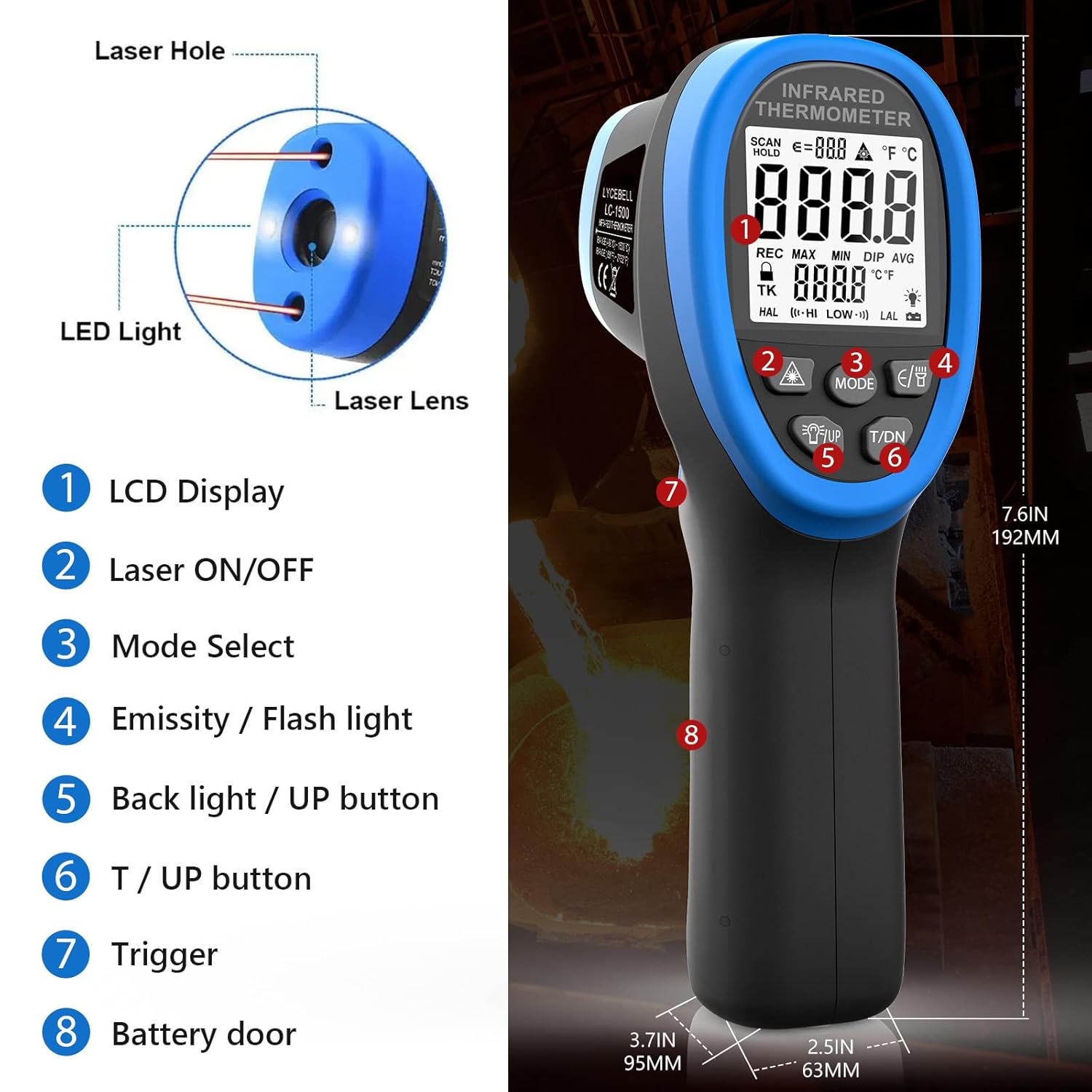
Image 4.1: Key components of the LYCEBELL LC-1500 Infrared Thermometer.
- LCD Display
- Laser ON/OFF Button
- Mode Select Button
- Emissivity / Flashlight Button
- Backlight / UP Button
- T / DN Button (Temperature Unit / Down)
- Trigger
- Battery Door
5. Setup
5.1 Battery Installation
- Locate the battery compartment on the handle (Part 8 in Image 4.1).
- Use the provided screwdriver to open the battery door.
- Insert the 9V battery, ensuring correct polarity.
- Close the battery door and secure it with the screw.
5.2 Attaching the Carabiner
A carabiner is included for convenient carrying. Attach it to the designated loop at the base of the handle.

Image 5.1: The thermometer with an attached carabiner for portability.
6. Operating Instructions
6.1 Basic Measurement
- Point the thermometer at the target surface.
- Press and hold the Trigger (Part 7) to begin measurement. The temperature will be displayed on the LCD.
- Release the Trigger to hold the current reading on the display.
6.2 Unit Switching (°C/°F)
While the product is working (after pressing the trigger), directly press the 'T / DN' button (Part 6) to switch between Celsius (°C) and Fahrenheit (°F).

Image 6.1: Display showing temperature readings in both Celsius and Fahrenheit.
6.3 Laser Pointer Control
Press the Laser ON/OFF button (Part 2) to display the laser symbol on the screen and activate the laser light. Release the trigger to turn off the laser. Press the key again to make the laser symbol and laser disappear from the display.
6.4 Emissivity Adjustment
Emissivity (ε) is the ability of a material to emit thermal energy. Different materials have different emissivities. For accurate measurements, adjust the emissivity setting to match the target material. While the product is working, press the 'E/B' button (Part 4) to enter Emissivity mode. Use the 'UP' (Part 5) and 'DN' (Part 6) buttons to adjust the value from 0.1 to 1.0.

Image 6.2: The adjustable emissivity feature allows for accurate readings on various materials.
Common Emissivity Values:
| Material | Emissivity | Material | Emissivity |
|---|---|---|---|
| Asphaltum | 0.90 to 0.98 | Textile (Black) | 0.98 |
| Beton | 0.94 | Human Skin | 0.98 |
| Cement | 0.96 | Soap bubble | 0.75 to 0.80 |
| Sand | 0.90 | Charcoal (powder) | 0.96 |
| Soil | 0.92 to 0.96 | Lacquer | 0.80-0.95 |
| Water | 0.92 to 0.96 | Lacquer (reluster) | 0.97 |
| Ice | 0.96 to 0.98 | Rubber (Black) | 0.94 |
| Snow | 0.83 | Plastic | 0.85-0.95 |
| Glass | 0.90 to 0.95 | Timber | 0.90 |
| Ceramic | 0.90 to 0.94 | Paper | 0.70-0.94 |
| Marble | 0.94 | Chromic oxide | 0.81 |
| Gypsum | 0.80 to 0.90 | Copper Oxide | 0.78 |
| Compo | 0.89 to 0.98 | Iron Oxide | 0.78 to 0.82 |
| Brick | 0.93 to 0.96 | Stainless steel | 0.2-0.3 |
6.5 Mode Functions (MAX, MIN, DIF, AVG, HAL, LAL)
Press the 'MODE' button (Part 3) to cycle through various measurement options:
- MAX: Measures the maximum temperature detected during a scan.
- MIN: Measures the minimum temperature detected during a scan.
- DIF: Calculates the difference between the maximum and minimum temperatures.
- AVG: Calculates the average temperature of all measurements taken.
- HAL (High Alarm): Sets a high-temperature alarm threshold.
- LAL (Low Alarm): Sets a low-temperature alarm threshold.
6.6 High/Low Temperature Alarm
To set a high or low temperature alarm:
- Press the 'MODE' button (Part 3) until 'HAL' (High Alarm) or 'LAL' (Low Alarm) is displayed.
- Use the 'UP' (Part 5) and 'DN' (Part 6) buttons to adjust the alarm threshold. Long press to accelerate value change.
- When the measured temperature exceeds the 'HAL' setting or falls below the 'LAL' setting, the LCD will display 'HI' or 'LO' respectively, and a buzzer will sound.
6.7 Video Demonstration
Video 6.1: Official LYCEBELL demonstration of the LC-1500 Infrared Thermometer, including unboxing, button functions, and temperature testing.
7. Measurement Principles: Distance-to-Spot Ratio (D:S)
The D:S ratio indicates how large an area the thermometer measures from a given distance. For the LC-1500, the D:S ratio is 30:1. This means that at a distance of 30 units from the target, the measurement spot diameter will be 1 unit. A higher D:S ratio allows for more accurate measurements of smaller areas from a greater distance, which is crucial for safety when measuring high temperatures.

Image 7.1: Illustration of the 30:1 Distance-to-Spot ratio.
8. Applications
The LYCEBELL LC-1500 infrared thermometer is versatile and can be used in various settings, including:
- Testing high temperatures in industrial processes.
- Measuring water temperature.
- HVAC system diagnostics.
- Car repair and engine temperature checks.
- Monitoring temperatures in cooking, such as pizza ovens.
- Metal casting, smelting, and alloy temperature measurement.
9. Specifications
| Feature | Value |
|---|---|
| Temperature Range | -58°F to 2732°F (-50°C to 1500°C) |
| Adjustable Emissivity | 0.1 to 1.0 |
| Distance Spot Ratio (D:S) | 30:1 |
| Laser Safety Level | Class II, <0.5mW, 630~670 nm |
| Display Type | LCD |
| Connectivity Technology | Infrared |
| Power Source | 9V Battery |
| Product Dimensions | 9.25 x 6.5 x 3.23 inches |
| Item Weight | 14.82 ounces |
| Outer Material | Metal |
10. Maintenance and Care
- Cleaning: Wipe the device clean with a soft, dry cloth. Do not use abrasive cleaners or solvents.
- Storage: Store the thermometer in its carrying pouch in a cool, dry place when not in use.
- Battery: Remove the battery if the device will not be used for an extended period to prevent leakage.
11. Troubleshooting
If you encounter issues with your LYCEBELL LC-1500 thermometer, consider the following general troubleshooting steps:
- No Power: Check if the battery is correctly installed and has sufficient charge. Replace the battery if necessary.
- Inaccurate Readings: Ensure the emissivity setting is appropriate for the material being measured. Verify the target is within the optimal distance-to-spot ratio.
- Display Issues: If the display is dim or flickering, replace the battery.
For further assistance, please contact LYCEBELL customer support.
12. Warranty and Support
For information regarding warranty coverage, product support, or service, please refer to the documentation included with your purchase or visit the official LYCEBELL website. Keep your purchase receipt as proof of purchase.