
wogree S66
Wogree 2.1ch Soundbar User Manual
Model: S66
Introduction
Thank you for purchasing the Wogree 2.1ch Soundbar with Built-in Subwoofer. This manual provides essential information for setting up, operating, and maintaining your new soundbar. Please read it thoroughly before use to ensure optimal performance and safety.
Important Safety Information
To reduce the risk of electric shock, fire, or damage to the unit, please observe the following safety precautions:
- Do not expose this appliance to dripping or splashing.
- Do not place objects filled with liquids, such as vases, on the apparatus.
- Ensure proper ventilation. Do not block any ventilation openings.
- Do not install near any heat sources such as radiators, heat registers, stoves, or other apparatus (including amplifiers) that produce heat.
- Protect the power cord from being walked on or pinched, particularly at plugs, convenience receptacles, and the point where they exit from the apparatus.
- Only use attachments/accessories specified by the manufacturer.
- Unplug this apparatus during lightning storms or when unused for long periods of time.
- Refer all servicing to qualified service personnel. Servicing is required when the apparatus has been damaged in any way, such as power-supply cord or plug is damaged, liquid has been spilled or objects have fallen into the apparatus, the apparatus has been exposed to rain or moisture, does not operate normally, or has been dropped.
Package Contents
Please check that all items listed below are included in your package:
- Wogree 2.1ch Soundbar (Model S66)
- Remote Control
- Optical Cable
- Stereo RCA to 3.5mm Audio Cable
- Power Adapter
- Mount Screws (for wall mounting)
- User Manual (this document)

Image: All items included in the Wogree Soundbar package.
Product Overview
The Wogree 2.1ch Soundbar is designed to enhance your home audio experience with clear sound and deep bass. It features a compact design suitable for various TV sizes and multiple connectivity options.
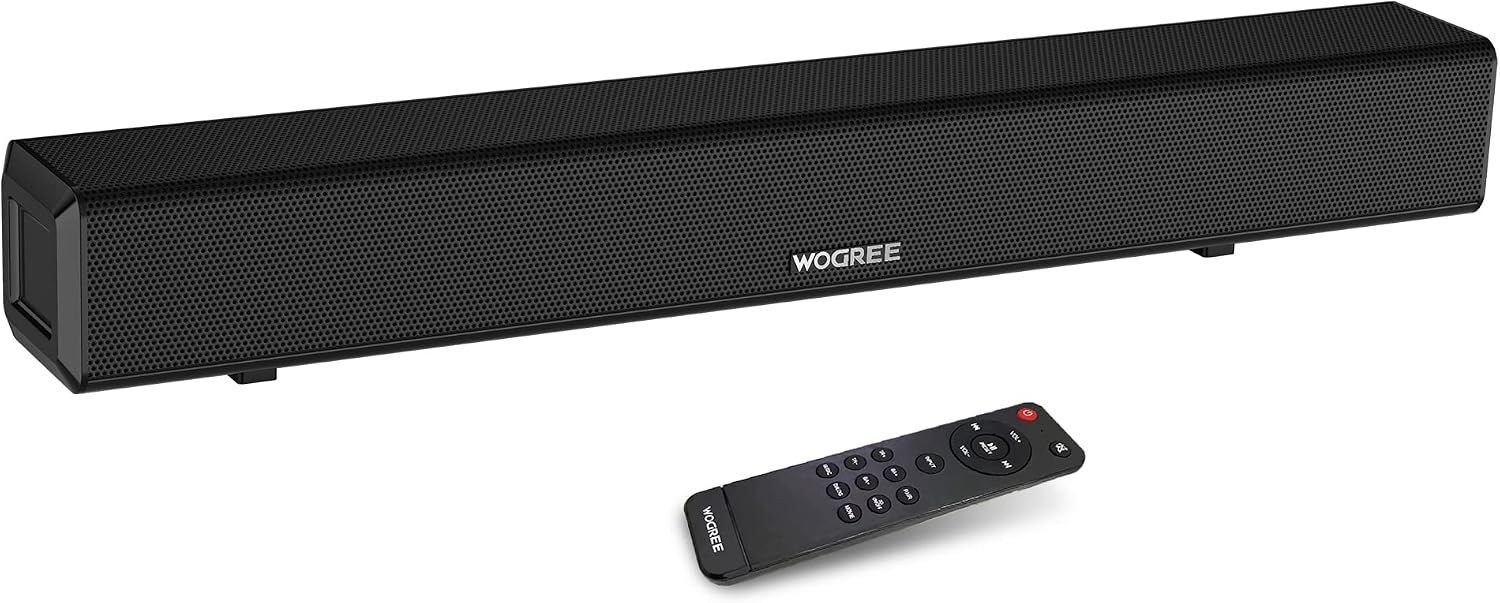
Image: Front view of the Wogree Soundbar with its remote control.
Key Features:
- 2.1 Channel Audio: Delivers clear sound with integrated bass.
- Built-in Subwoofer: Provides enhanced bass performance without a separate unit.
- 80W Output: Powerful audio for an immersive experience.
- Compact 24-inch Design: Fits easily in front of most TVs.
- Multiple Inputs: Supports Bluetooth, TV-ARC (HDMI), Optical, AUX, Line-in, and USB.
- Multiple EQ Modes: Optimized sound profiles for Music, Movie, Dialogue, and 3D audio.


Image: Left: Internal speaker configuration. Right: Visual representation of sound modes.
Setup
Follow these steps to set up your Wogree Soundbar:
1. Placement
Place the soundbar on a stable, flat surface directly in front of your TV, or mount it on the wall below your TV using the provided screws. Ensure there are no obstructions in front of the soundbar to allow for optimal sound projection.

Image: Soundbar positioned below a television.
2. Connecting to Power
- Connect the power adapter to the DC 18V input port on the back of the soundbar.
- Plug the other end of the power adapter into a wall outlet.
3. Audio Connections
Choose one of the following connection methods based on your TV's available ports:

Image: Available input ports on the back of the soundbar.
- HDMI (TV ARC):
- Connect an HDMI cable (not included) from the TV ARC port on the soundbar to the HDMI ARC port on your TV.
- Ensure your TV's audio output is set to HDMI ARC or external speakers. This connection allows your TV remote to control the soundbar volume and power.
- Optical:
- Connect the provided Optical cable from the OPTICAL port on the soundbar to the Optical Out port on your TV.
- Set your TV's audio output to "Optical" and ensure the digital audio format is set to "PCM" (Pulse Code Modulation).
- AUX / Line-in:
- Connect the provided Stereo RCA to 3.5mm Audio Cable from the LINE IN (AUX L/R) ports on the soundbar to the corresponding audio output ports on your TV or other audio device.
- Alternatively, use a 3.5mm to 3.5mm audio cable (not included) to connect to the AUX port.
- Bluetooth:
- Power on the soundbar. Press the "Input" button on the remote or the soundbar to select Bluetooth mode (indicated by a blue LED).
- Enable Bluetooth on your device (smartphone, tablet, etc.) and search for "Wogree S66". Select it to pair.
- Once paired, the blue LED will stop flashing and remain solid.

Image: Bluetooth connection setup.
- USB:
- Insert a USB flash drive (FAT32 format, max 32GB) into the USB port on the soundbar.
- The soundbar will automatically switch to USB mode and begin playing compatible audio files.
Operating Instructions
Your Wogree Soundbar can be controlled using the included remote control or the physical buttons on the unit.
Remote Control Functions:

Image: Remote control and physical buttons.
- Power Button: Turns the soundbar On/Off.
- Input Button: Cycles through input modes (Bluetooth, TV-ARC, Optical, AUX, USB).
- VOL+/-: Adjusts the main volume.
- TR+/-: Adjusts treble levels.
- BA+/-: Adjusts bass levels.
- Mute Button: Mutes or unmutes the sound.
- Play/Pause: Plays or pauses audio (Bluetooth/USB mode).
- Previous/Next: Skips to the previous or next track (Bluetooth/USB mode).
- EQ Modes (Music, Movie, Dialog, 3D): Selects preset equalizer modes for optimized sound.
Physical Buttons:
On the side of the soundbar, you will find basic controls:
- Power Button: Short press to change input, long press to power On/Off.
- Volume +/-: Adjusts the volume.
Maintenance
Proper care will ensure the longevity of your soundbar:
- Cleaning: Use a soft, dry cloth to clean the surface of the soundbar. Do not use liquid cleaners or aerosol sprays.
- Ventilation: Keep the ventilation openings clear of dust and debris.
- Storage: If storing the soundbar for an extended period, unplug it from the power outlet and store it in a cool, dry place.
- Avoid Moisture: Do not expose the soundbar to water or excessive humidity.
Troubleshooting
If you encounter issues with your soundbar, refer to the following common problems and solutions:
| Problem | Possible Cause | Solution |
|---|---|---|
| No sound from soundbar. |
|
|
| Bluetooth pairing issues. |
|
|
| Remote control not working. |
|
|
Specifications
| Feature | Detail |
|---|---|
| Model Number | S66 |
| Speaker Type | Surround Sound (2.1 Channel) |
| Speaker Maximum Output Power | 80 Watts |
| Product Dimensions | 3"D x 24"W x 3"H |
| Item Weight | 5.3 Pounds |
| Connectivity Technology | Wired (TV-ARC, Optical, AUX, USB), Wireless (Bluetooth) |
| Bluetooth Version | 5.0 (implied from A+ content image) |
| Control Method | Remote Control, Physical Buttons |
| Special Features | Bass Boost, Hi Res Audio, LED Light, USB Port, Built-in DSP, 4 EQ Modes |
Warranty and Support
The Wogree 2.1ch Soundbar comes with a Full Warranty. For detailed warranty information, please refer to the warranty card included in your package or contact Wogree customer support.
If you require technical assistance or have questions about your product, please visit the official Wogree store or contact their customer service department. Contact information can typically be found on the product packaging or the brand's official website.
Wogree Brand Store: Visit Wogree Store on Amazon
Ask a question about this manual
Ask about setup, troubleshooting, compatibility, parts, safety, or missing instructions. Manuals+ will review the question and use this page’s manual context to help answer it.