
Onforu BDB100-3
Onforu 100W LED Security Light User Manual
Model: BDB100-3
Brand: Onforu
1. Product Overview
The Onforu 100W LED Security Light is designed to provide powerful and efficient illumination for both outdoor and indoor environments. Featuring 154 ultra-bright LEDs, it delivers 9000 lumens of 6500K daylight white light, offering significant energy savings compared to traditional lighting. Its robust design includes a die-cast aluminum housing for excellent heat dissipation and an IP65 waterproof rating, ensuring reliable performance in various weather conditions. The light is equipped with three adjustable heads, allowing for flexible light direction and broad coverage.

Figure 1: Front view of the Onforu 100W LED Security Light, showcasing its three adjustable light heads.
2. Key Features
- 100W Brightness & Energy Saving: Equipped with 154 ultra-bright LEDs, this 100W flood light produces up to 9000 lumens of high brightness output. It is equivalent to 400W high energy consumption bulbs, saving over 85% on electricity bills.
- Full Metal Design: The housing is constructed from die-cast aluminum, providing efficient heat dissipation and extending the product's lifespan. The professional matte lens design ensures soft, anti-glare illumination.
- IP65 Waterproof: With an IP65 waterproof rating, this LED security light fixture is designed to function reliably in adverse weather conditions such as rain, sleet, and snow. Ideal for lighting doorways, garages, backyards, porches, entryways, stairs, shops, and pathways.
- 3 Flexible Heads: Features three independently adjustable light heads, allowing users to direct light to desired angles. A 120° beam angle provides wide and efficient lighting for exterior environments.
- Easy Installation: Simple wiring steps allow for straightforward wall mounting. This light is switch-controlled and does not include a motion sensor, solar panel, or dusk-to-dawn functionality.
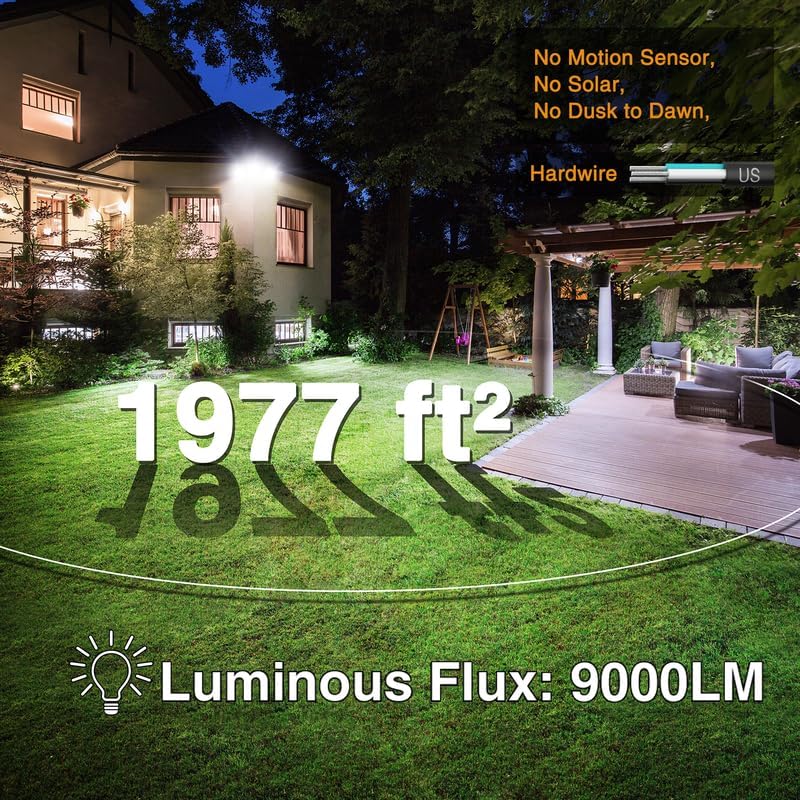
Figure 2: Illustration of the light's coverage (1977 sq ft) and brightness (9000LM) in a typical backyard setting.

Figure 3: Demonstrates the highly flexible and adjustable light heads, allowing for precise illumination of specific areas.
3. What's in the Box
Upon opening the package, please ensure all the following components are present:
- LED Flood Light (1 unit)
- Expansion pipe
- Screw
- Inner hexagon spanner
- Socket head cap screw
4. Setup and Installation
This Onforu LED Security Light is designed for straightforward installation. It can be mounted on a wall or under an eave. Please follow the steps below carefully.
4.1 Safety Precautions
- Always turn off power at the circuit breaker before installation.
- Ensure the mounting surface is sturdy enough to support the fixture.
- Consult a qualified electrician if you are unsure about the wiring process.
4.2 Installation Steps
- Prepare the Mounting Surface: Choose a suitable location for wall or eave mounting.
- Attach the Mounting Plate: Secure the mounting plate to the wall or eave using the provided screws and expansion pipes.
- Wire the Fixture: Connect the electrical wires according to standard wiring practices:
- Live Wire (L)
- Ground Wire
- Neutral Wire (N)
- Mount the Light Fixture: Attach the LED flood light body to the mounting plate, securing it with the socket head cap screw.
- Adjust Light Heads: Once mounted, adjust the three flexible light heads to your desired angles for optimal illumination. The heads offer 135° rotation for the main body and 350° rotation for the side heads, with 90° rotation capability for individual light panels.

Figure 4: Detailed installation diagram, illustrating the wiring and mounting process.

Figure 5: The IP65 waterproof rating ensures durability and performance in outdoor conditions.

Figure 6: Illustration of the light's adjustable heads and their rotation capabilities for customized lighting.
Video 1: This video demonstrates the key features of the Onforu 100W LED Security Light, including its adjustable heads, durable construction, IP65 waterproof rating, and installation options (wall mount, eave mount). It also shows the light being turned on and off via a switch.
5. Operating Instructions
The Onforu 100W LED Security Light is designed for simple operation via a standard wall switch. It does not feature a motion sensor, solar charging, or dusk-to-dawn functionality, providing direct control over its illumination.
5.1 Turning the Light On/Off
To turn the light on or off, simply use the connected wall switch. Ensure the switch is properly installed and wired to the fixture.

Figure 7: The light is controlled by a simple wall switch for direct operation.
5.2 Adjusting Light Direction
The three light heads can be manually adjusted to direct light precisely where needed. Gently pivot each head to achieve the desired illumination angle. Refer to Figure 6 in the Setup and Installation section for detailed rotation capabilities.
6. Maintenance
Regular maintenance helps ensure the longevity and optimal performance of your Onforu LED Security Light.
- Cleaning: Periodically clean the light fixture with a soft, damp cloth. Do not use abrasive cleaners or solvents, as they may damage the finish or lens. Ensure the power is off before cleaning.
- Inspection: Annually inspect the wiring and mounting for any signs of wear, damage, or loosening. Tighten any loose screws.
- LED Longevity: The LEDs are designed for long life (approximately 30,000 hours) and do not require replacement.
7. Troubleshooting
If you encounter issues with your Onforu LED Security Light, please refer to the following common troubleshooting steps:
| Problem | Possible Cause | Solution |
|---|---|---|
| Light does not turn on. | No power to the fixture; loose wiring; faulty switch. | Check circuit breaker. Ensure all wiring connections are secure. Test the wall switch. |
| Light is dim or flickering. | Insufficient power; loose connection; extreme temperature. | Verify power supply. Check all wiring connections. Ensure operating within specified temperature range. |
| Water inside the fixture. | Improper installation; damaged seal. | Ensure proper sealing during installation. If seal is damaged, contact customer support. |
If the problem persists after attempting these solutions, please contact Onforu customer support.
8. Specifications
| Attribute | Value |
|---|---|
| Brand | Onforu |
| Model Name | BDB100-3 |
| Color | Brown |
| Material | Aluminum |
| Light Fixture Form | Floodlight |
| Product Dimensions | 7"L x 4"W x 15"H |
| Item Weight | 2.6 Pounds |
| Indoor/Outdoor Usage | Indoor, Outdoor |
| Power Source | Corded Electric |
| Installation Type | Wall Mount, Eave Mount |
| Special Feature | Energy Efficient, Waterproof |
| Light Source Type | LED |
| Finish Type | Matte |
| Number of Light Sources | 196 |
| Voltage | 110 Volts |
| Light Color | 6500K Daylight White |
| Wattage | 100 watts |
| Brightness | 9000 Lumen |
| Water Resistance Level | Waterproof (IP65) |
| Average Life | 30000 Hours |
9. Warranty and Support
Onforu products are manufactured to high-quality standards and are backed by a standard manufacturer's warranty. For specific warranty details, please refer to the product packaging or contact Onforu customer support.
If you require technical assistance, have questions about installation, or need to report an issue, please contact Onforu customer support through their official website or the contact information provided with your purchase.
For more information and support, visit the official Onforu Store on Amazon.
Related documentsBDB100-3


Ask a question about this manual
Ask about setup, troubleshooting, compatibility, parts, safety, or missing instructions. Manuals+ will review the question and use this page’s manual context to help answer it.