
PartyKindom NF0314P2176H
PartyKindom Quartz Clock Mechanism Replacement Manual
Model: NF0314P2176H
Introduction
This manual provides comprehensive instructions for the installation, operation, and maintenance of your PartyKindom Quartz Clock Mechanism Replacement. This product is designed to replace faulty clock movements in various timepieces, including DIY quartz wall clocks, craft clocks, and frameless painting clocks, offering a silent and reliable solution.
The mechanism is constructed from quality ABS material, ensuring durability and lightweight performance. It is an ideal component for repairing or creating your own timekeeping devices.
Safety Information
- Keep out of reach of small children due to small parts.
- Do not attempt to disassemble the mechanism beyond what is instructed in this manual.
- Ensure correct battery polarity when inserting the battery.
- Dispose of used batteries responsibly according to local regulations.
- Avoid exposing the mechanism to extreme temperatures or moisture.
Package Contents
The package includes the following components:
- 1 x Quartz Clock Mechanism (main unit)
- Mounting hardware (plastic washer, brass washer, hex nut, minute nut)
- (Note: Clock hands and 1 AA battery are not included and must be purchased separately.)

Image: The main quartz clock mechanism unit, black in color, with the shaft visible.
Setup and Installation
Follow these steps to install the clock mechanism into your clock frame:
- Prepare the Clock: Ensure your clock face or frame has a central hole suitable for the mechanism's shaft.
- Insert Plastic Washer: Place the plastic washer over the mechanism's shaft.
- Insert Mechanism: Insert the mechanism's shaft through the hole in the clock surface from the back. If applicable, insert the shaft through the clock face.
- Secure with Brass Washer and Nut: Place the dial plate fixing brass washer over the shaft from the front of the clock face. Then, attach and tighten the dial fixing brass hex nut to secure the mechanism.
- Attach Hour Hand: Gently press your clock's hour hand onto the shaft at the 12:00 position.
- Attach Minute Hand: Place the minute hand over the shaft at the 12:00 position and gently screw the minute nut in place to secure it.
- Attach Second Hand (Optional): If your clock has a second hand, gently press it onto the remaining shaft.
- Insert Battery: Open the battery compartment on the back of the mechanism. Insert one AA battery (not included), ensuring correct polarity (+/-).

Image: A visual guide illustrating the sequence of attaching the plastic washer, brass washer, hex nut, and clock hands to the mechanism shaft.

Image: A hand inserting an AA battery into the battery compartment of the clock mechanism, demonstrating the "Easy to Operate" feature.
Operating Instructions
Once installed and powered, the PartyKindom Quartz Clock Mechanism operates automatically.
- Setting Time: Use the small adjustment knob located on the back of the mechanism to set the correct time. Rotate the knob until the clock hands display the desired time.
- Silent Operation: This mechanism features a silent, non-ticking movement, providing a quiet environment suitable for bedrooms, offices, and other quiet spaces.
- Accuracy: The quartz movement ensures accurate and reliable timekeeping.
Video: A demonstration of the clock mechanism in operation, highlighting its silent movement and accurate timekeeping. This video is provided by the seller.

Image: Examples of the clock mechanism integrated into various clock designs within different home environments, such as living rooms, bedrooms, and studies.
Maintenance
- Battery Replacement: Replace the AA battery approximately once a year, or when the clock begins to lose time or stop.
- Cleaning: Use a soft, dry cloth to gently wipe the exterior of the mechanism if necessary. Do not use liquid cleaners or immerse the unit in water.
- Storage: If storing the clock for an extended period, remove the battery to prevent leakage and potential damage to the mechanism.
Troubleshooting
| Problem | Possible Cause | Solution |
|---|---|---|
| Clock not running or running slowly. | Low or dead battery. Incorrect battery insertion. | Replace with a fresh AA battery, ensuring correct polarity. |
| Clock hands are loose or not moving. | Hands not properly secured to the shaft. | Gently re-press the hands onto the shaft, ensuring they are firmly seated. Tighten the minute nut if applicable. |
| Clock hands are rubbing against each other or the clock face. | Hands are bent or not aligned correctly. | Carefully bend the hands slightly to ensure clearance. Re-align them if necessary. |
| Loud ticking sound. | Not applicable. This mechanism is designed for silent operation. | If ticking is heard, verify the mechanism is indeed the silent type or check for external interference. |
Specifications
- Brand: PartyKindom
- Model: NF0314P2176H
- Material: Acrylonitrile Butadiene Styrene (ABS)
- Color: Black
- Movement Type: Quartz
- Operation Mode: Electrical
- Special Feature: Silent Clock (Non-ticking)
- Power Source: Battery Powered (1 x AA battery, not included)
- Product Dimensions (approx.): 5.6 cm x 5.6 cm x 1.6 cm (2.2 in x 2.2 in x 0.6 in)
- Shaft Lengths (approx.):
- Hour Shaft: 0.299 in / 7.62 mm
- Minute Shaft: 0.216 in / 5.5 mm
- Second Shaft: 0.145 in / 3.7 mm
- Item Weight: 25 Grams (0.882 ounces)
- Country of Origin: China
- Mounting Type: Wall Mount (for compatible clocks)
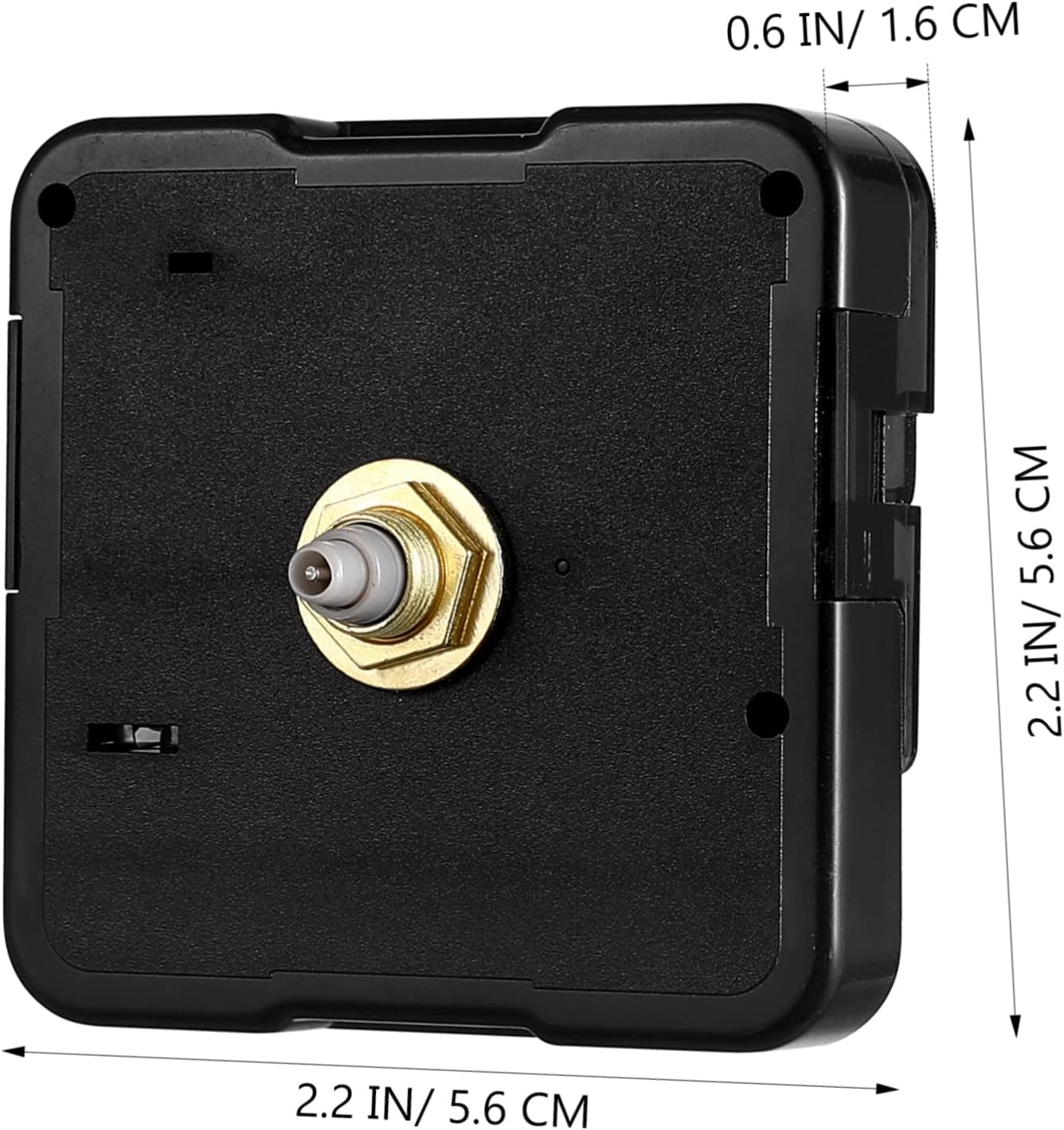
Image: A diagram illustrating the overall dimensions of the clock mechanism: 2.2 inches (5.6 cm) in width and height, and 0.6 inches (1.6 cm) in depth.

Image: A close-up view of the mechanism's shaft, detailing the lengths for the hour (0.299in/7.62mm), minute (0.216in/5.5mm), and second (0.145in/3.7mm) hand attachments.
Warranty and Support
For warranty information or technical support, please refer to the seller's policy on the platform where the product was purchased. Keep your purchase receipt as proof of purchase.
For further assistance, you may contact PartyKindom customer service through their official channels, if available.
Ask a question about this manual
Ask about setup, troubleshooting, compatibility, parts, safety, or missing instructions. Manuals+ will review the question and use this page’s manual context to help answer it.