
BLACK+DECKER 1.1-Cu. Ft. 1000-Watts
BLACK+DECKER 1.1 Cu. Ft. 1000-Watt Countertop Microwave Oven User Manual
Model: 1.1-Cu. Ft. 1000-Watts
Introduction
This user manual provides essential information for the safe and efficient operation of your new BLACK+DECKER 1.1 Cu. Ft. 1000-Watt Countertop Microwave Oven. Please read this manual thoroughly before using the appliance and retain it for future reference.
Important Safety Instructions
When using electrical appliances, basic safety precautions should be followed, including the following:
- Read all instructions before using the appliance.
- Do not operate any appliance with a damaged cord or plug, or after the appliance malfunctions or has been damaged in any manner.
- Do not heat liquids or other foods in sealed containers since they are liable to explode.
- Do not attempt to operate this oven with the door open since this can result in harmful exposure to microwave energy.
- Close supervision is necessary when the appliance is used by or near children.
- Only use utensils that are suitable for use in microwave ovens.
- Do not use corrosive chemicals or vapors in this appliance.
- This appliance is designed for heating food. It is not designed for industrial or laboratory use.
- Always ensure the turntable and turntable support are correctly placed before operation.
Product Overview
Familiarize yourself with the components of your BLACK+DECKER microwave oven.

Figure 1: Front view of the microwave oven, showcasing the control panel, LED display, and door.
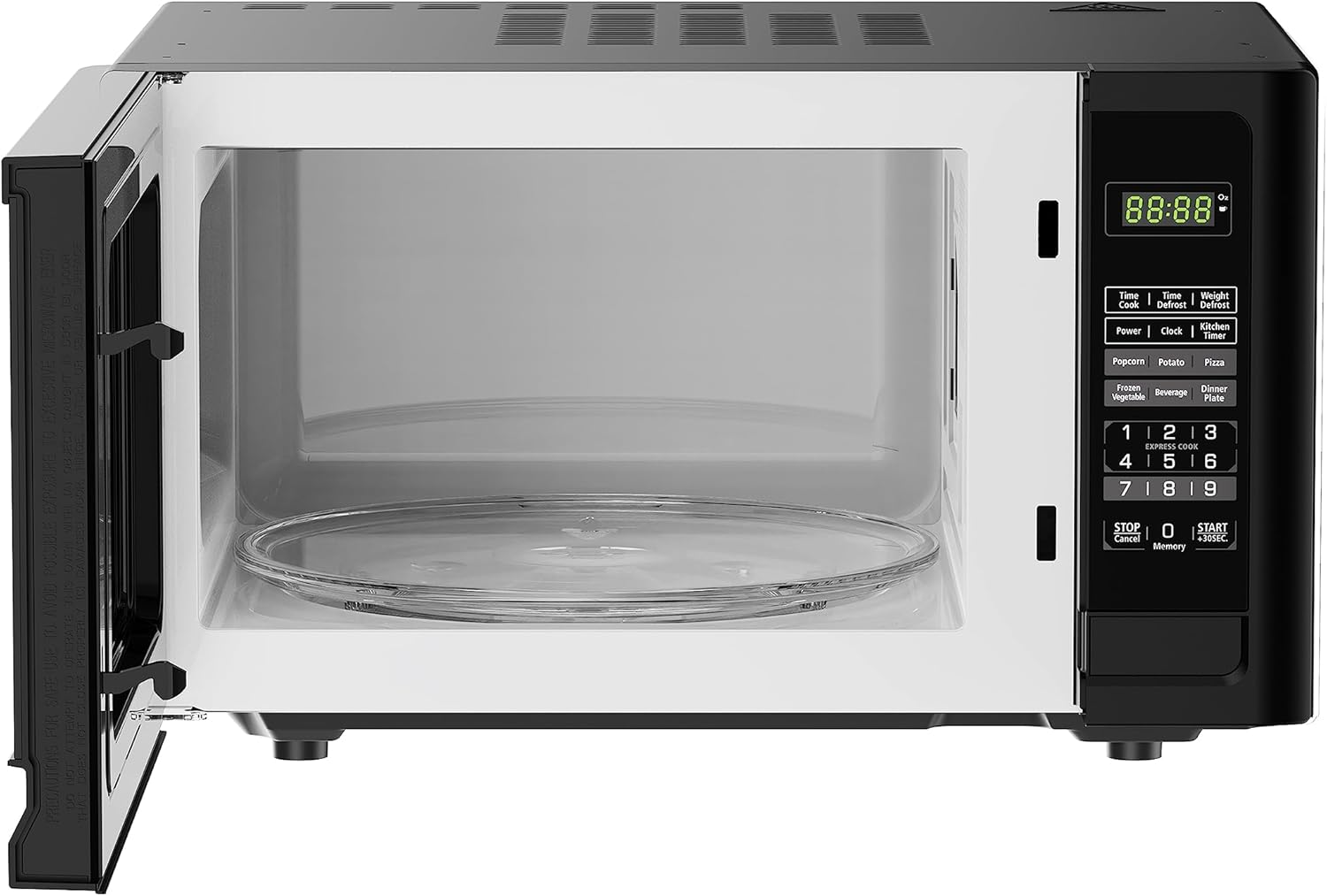
Figure 2: Interior view of the microwave oven with the door open, revealing the glass turntable and interior cavity.

Figure 3: Diagram illustrating the external dimensions of the microwave oven: 20.2 inches (width), 16.1 inches (depth), and 12.1 inches (height).
Control Panel Features:
- LED Display: Shows time, cooking settings, and indicators.
- Number Pad (0-9): Used for entering cooking times, weights, and setting the clock.
- Power Button: Adjusts power levels.
- Time Cook: Sets cooking time manually.
- Time/Weight Defrost: Defrosts food based on time or weight.
- Kitchen Timer: Functions as a standalone timer.
- Clock: Sets the current time.
- Express Cook (1-3): One-touch cooking for 1, 2, or 3 minutes.
- Auto-Menu Functions: Dedicated buttons for Popcorn, Potato, Pizza, Frozen Vegetable, Beverage, Dinner Plate.
- STOP/Cancel Button: Stops cooking, clears settings, or cancels a program.
- START/+30SEC Button: Starts cooking or adds 30 seconds to cooking time.
- Memory Button: Stores and recalls frequently used cooking settings.
Setup
- Unpacking: Carefully remove the microwave oven and all packing materials from the carton. Check for any damage, such as dents or a misaligned door. Do not operate the oven if it is damaged.
- Placement: Place the microwave on a flat, stable surface strong enough to support its weight. Ensure there is adequate ventilation space: at least 4 inches (10 cm) of clearance on the top, sides, and rear for proper airflow. Do not block air vents.
- Power Connection: Plug the power cord into a grounded electrical outlet. Ensure the voltage matches the rating label on the oven. Do not use extension cords unless absolutely necessary, and if so, ensure it is a grounded, heavy-duty cord suitable for the appliance's wattage.
- Turntable Assembly: Place the turntable ring inside the oven cavity, then place the glass turntable plate securely on top of the ring. Ensure it rotates freely.
Operating Instructions
Setting the Clock:
- Press the Clock button once.
- Use the number pad to enter the current time (e.g., 12:30 for 12:30 PM).
- Press the Clock button again to confirm.
Basic Microwave Cooking:
- Place food in a microwave-safe container on the turntable.
- Close the oven door securely.
- Press the Time Cook button.
- Use the number pad to enter the desired cooking time.
- Press the Power button repeatedly to select a power level (1-10). Default is 100% power.
- Press the START/+30SEC button to begin cooking.
Express Cook:
For quick cooking, simply press one of the Express Cook buttons (1, 2, or 3) to cook for 1, 2, or 3 minutes at 100% power.
Time/Weight Defrost:
- Press the Time/Weight Defrost button.
- Select defrost by time or by weight using the number pad.
- Enter the time or weight.
- Press START/+30SEC.
Auto-Menu Functions:
Use the dedicated buttons for common food items. Place the food in the oven, then press the corresponding auto-menu button (e.g., Popcorn, Potato, Pizza, Frozen Vegetable, Beverage, Dinner Plate). The oven will automatically set the optimal cooking time and power level.
Child Safety Lock:
To activate the child lock, press and hold the STOP/Cancel button for 3 seconds. The display will show "LOCK" or a lock icon. To deactivate, press and hold the STOP/Cancel button again for 3 seconds.
Maintenance and Cleaning
Regular cleaning and maintenance will ensure the longevity and optimal performance of your microwave oven.
- Interior: Clean the oven cavity after each use with a damp cloth and mild detergent. For stubborn stains, place a bowl of water with lemon slices inside and microwave for 2-3 minutes, then wipe clean.
- Exterior: Wipe the exterior surfaces with a soft, damp cloth. Avoid abrasive cleaners.
- Door Seal: Keep the door seal and adjacent parts clean. Do not allow grease or food residue to build up.
- Turntable: The glass turntable and turntable ring can be washed in warm, soapy water or in the dishwasher.
- Power Cord: Regularly inspect the power cord for any signs of damage.
Always unplug the microwave oven before cleaning.
Troubleshooting
If you experience issues with your microwave oven, consult the following table for common problems and solutions.
| Problem | Possible Cause | Solution |
|---|---|---|
| Oven does not start. | Power cord not plugged in; Door not closed properly; Fuse blown or circuit breaker tripped. | Ensure plug is securely in outlet; Close door firmly; Check household fuse/circuit breaker. |
| Food not heating. | Incorrect cooking time/power level; Door not closed properly. | Adjust cooking time/power; Ensure door is fully latched. |
| Turntable not rotating. | Turntable not placed correctly; Obstruction under turntable. | Reposition turntable and ring; Remove any obstructions. |
| Unusual noise during operation. | Food container touching oven walls; Turntable not seated correctly. | Adjust food container position; Re-seat turntable. |
| Door is difficult to open. | Mechanism stiffness. | Apply firm, even pressure to the door release button. This may ease with continued use. |
If the problem persists after attempting these solutions, please contact customer support.
Specifications
| Feature | Detail |
|---|---|
| Model Number | 1.1-Cu. Ft. 1000-Watts |
| Capacity | 1.1 Cubic Feet |
| Wattage | 1000 Watts |
| Voltage | 120 Volts |
| Product Dimensions (D x W x H) | 20.2"D x 16.1"W x 12.1"H |
| Item Weight | 34.2 pounds |
| Color | Black |
| Special Feature | Child Safety Lock |
| Installation Type | Countertop |
| Manufacturer | Midea |
Warranty and Customer Support
For warranty information or technical assistance, please contact BLACK+DECKER customer support. Keep your purchase receipt for warranty claims.
For the most up-to-date contact information, please visit the official BLACK+DECKER website or refer to the product packaging.
Online Support: www.blackanddecker.com/support
Related documents1.1-Cu. Ft. 1000-Watts


Ask a question about this manual
Ask about setup, troubleshooting, compatibility, parts, safety, or missing instructions. Manuals+ will review the question and use this page’s manual context to help answer it.