
KLARSTEIN ACO4-4200-sqsy
Klarstein Skyscraper Ice Smart 4-in-1 Air Cooler User Manual
Model: ACO4-4200-sqsy
Introduction
Thank you for choosing the Klarstein Skyscraper Ice Smart 4-in-1 Air Cooler. This versatile appliance combines the functions of an air cooler, fan, humidifier, and ionizer to provide optimal comfort in your home or office. Designed for efficiency and ease of use, it features smart control capabilities and a sleek, space-saving design. Please read this manual carefully before operation to ensure proper use, maintenance, and to maximize the lifespan of your device.

Figure 1: Klarstein Skyscraper Ice Smart 4-in-1 Air Cooler, black and rose gold, with a smartphone displaying the control app.
Safety Instructions
Always observe the following basic safety precautions when using electrical appliances to reduce the risk of fire, electric shock, and personal injury:
- Read all instructions before using the appliance.
- Ensure the power supply voltage matches the rating label on the appliance.
- Do not immerse the appliance, cord, or plug in water or other liquids.
- Unplug from the outlet when not in use, before cleaning, or before moving.
- Do not operate any appliance with a damaged cord or plug, or after the appliance malfunctions or has been damaged in any manner.
- Keep the appliance out of reach of children.
- Do not block air inlets or outlets.
- Use only on a flat, stable surface.
- Do not use outdoors.
- Do not use near water or in damp environments.
- Do not insert fingers or foreign objects into the grille while the fan is operating.
Components Included
The package includes the following items:
- 1 x Klarstein Skyscraper Ice Smart Air Cooler unit
- 2 x Ice packs
- 1 x Remote control
- 1 x User manual (this document)

Figure 2: The 6-liter water tank with two included ice packs for enhanced cooling.
Setup
- Unpacking: Carefully remove the air cooler and all accessories from the packaging. Retain the packaging for future storage or transport.
- Placement: Place the air cooler on a firm, level surface. Ensure there is adequate space around the unit for proper airflow. The integrated castors allow for easy movement between rooms.
- Filling the Water Tank:
- Pull out the water tank from the bottom rear of the unit.
- Fill the tank with clean, cool water. Do not exceed the "MAX" fill line.
- For enhanced cooling, place the provided ice packs (or ice cubes) into the water tank. Ensure the ice packs are frozen before use.
- Carefully push the water tank back into its position until it clicks securely.
- Power Connection: Plug the power cord into a suitable electrical outlet.

Figure 3: Front view of the air cooler, showing its sleek design and water level indicator.
Operating Instructions
The Klarstein Skyscraper Ice Smart can be operated via the control panel on top of the unit, the remote control, or the Klarstein app.
Control Panel and Remote Control
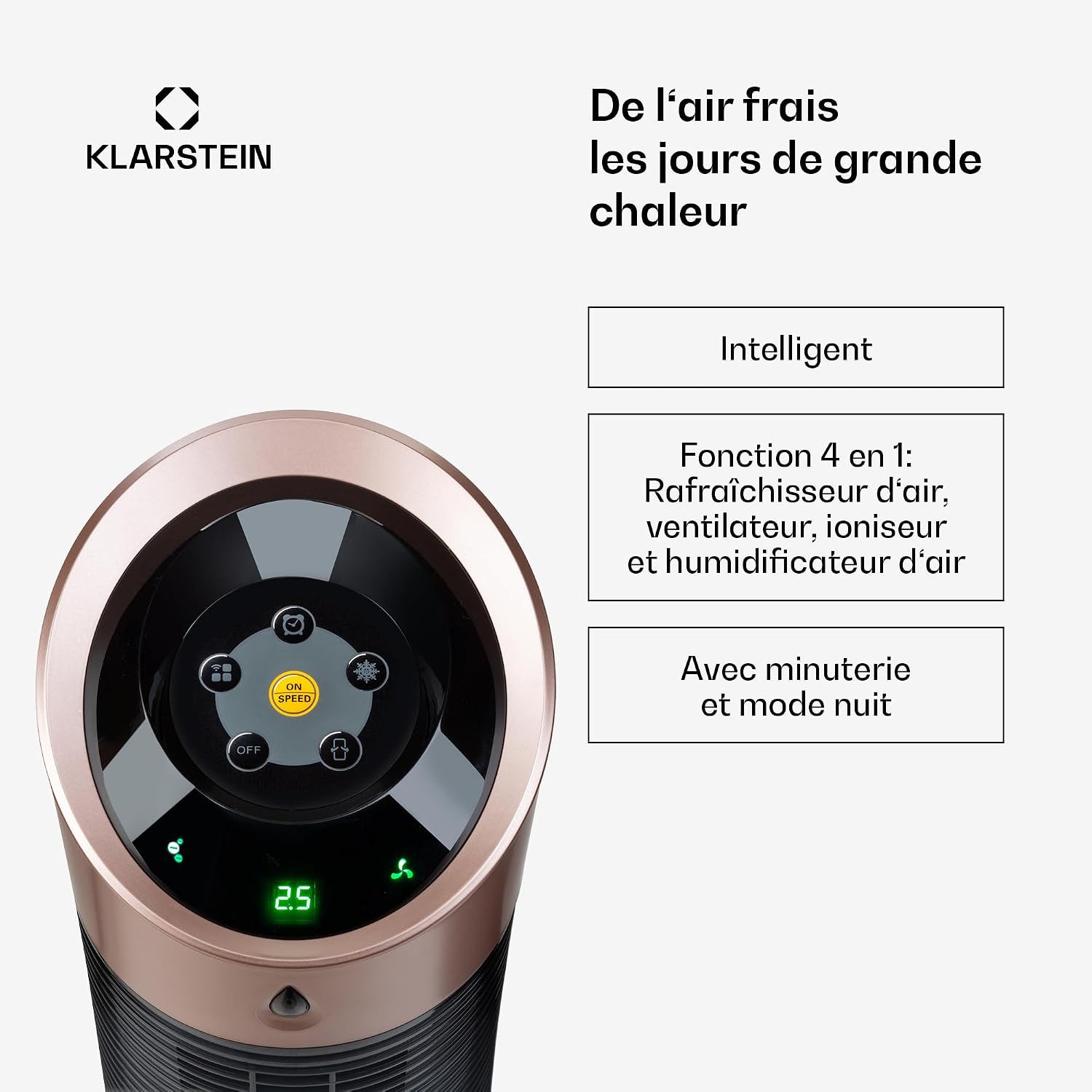
Figure 4: Close-up of the control panel with various function buttons.
- Power Button: Turns the unit ON/OFF.
- Speed Button: Cycles through fan speeds (Low, Medium, High).
- Mode Button: Selects operating modes (Normal, Natural, Sleep).
- Cooling/Humidification Button: Activates/deactivates the evaporative cooling and humidification function.
- Ionizer Button: Activates/deactivates the air ionizer for improved air quality.
- Timer Button: Sets the auto-off timer (up to 12 hours).
- Oscillation Button: Activates/deactivates horizontal oscillation for wider air distribution.

Figure 5: The air cooler unit shown with its remote control, highlighting the oscillation feature for broad air distribution.
Smart Control (Klarstein App)
For advanced control and smart home integration, download the Klarstein app from the App Store or Google Play. Follow the in-app instructions to connect your device to your Wi-Fi network. The app allows you to:
- Turn the unit ON/OFF remotely.
- Adjust fan speed and mode.
- Control cooling, humidification, and ionizer functions.
- Set schedules and timers.
- Integrate with Amazon Alexa and Google Home for voice control.

Figure 6: A smartphone displaying the Klarstein app interface, demonstrating remote control capabilities for the air cooler.
Maintenance
Regular maintenance ensures optimal performance and longevity of your air cooler.
- Cleaning the Exterior: Wipe the exterior surfaces with a soft, damp cloth. Do not use abrasive cleaners or solvents.
- Water Tank Cleaning:
- Empty and clean the water tank regularly (at least once a week) to prevent mold and mildew growth.
- Use a mild detergent and rinse thoroughly with clean water.
- Filter Cleaning: The honeycomb filter should be cleaned periodically.
- Unplug the unit.
- Remove the filter assembly from the back of the unit.
- Rinse the filter under running water. For stubborn dirt, use a soft brush.
- Allow the filter to air dry completely before reinserting it.
- Storage: If storing the unit for an extended period, ensure the water tank is empty and clean, and the filter is dry. Store in a cool, dry place.
Troubleshooting
| Problem | Possible Cause | Solution |
|---|---|---|
| Unit does not turn on. | No power supply; Power button not pressed. | Check power cord connection; Press the power button. |
| No cooling effect. | Water tank empty; Cooling function not activated; Filter dirty. | Fill water tank; Activate cooling mode; Clean the honeycomb filter. |
| Weak airflow. | Air inlets/outlets blocked; Filter dirty; Fan speed too low. | Clear obstructions; Clean filter; Increase fan speed. |
| Unpleasant odor. | Stagnant water in tank; Dirty filter. | Empty and clean water tank thoroughly; Clean the filter. |
| Remote control not working. | Batteries dead; Obstruction between remote and unit. | Replace batteries; Ensure clear line of sight. |
Specifications
- Model: ACO4-4200-sqsy (Skyscraper Ice Smart)
- Functions: Air cooling, ventilation, humidification, ionization
- Airflow Capacity: 210 m³/h
- Water Tank Capacity: 6 Liters
- Noise Level: 45 dB
- Dimensions (L x W x H): 28 x 28 x 95 cm
- Weight: 6 kg
- Power Supply: Mains (for unit), 3V Battery (for remote control)
- Control Type: Remote control, Touch panel, App control (Wi-Fi)
- Special Features: Air Purification Filter, Oscillation, Timer, Sleep Mode

Figure 7: Diagram showing the dimensions of the Klarstein Skyscraper Ice Smart Air Cooler (95 cm height, 28 cm diameter).
Warranty and Support
Klarstein products are covered by a manufacturer's warranty. For detailed warranty information, please refer to the warranty card included with your product or visit the official Klarstein website. If you encounter any issues or require technical assistance, please contact Klarstein customer support. You can find contact details on the Klarstein website or through your purchase platform.
Online Support: www.klarstein.fr/support/
Related documentsACO4-4200-sqsy


Ask a question about this manual
Ask about setup, troubleshooting, compatibility, parts, safety, or missing instructions. Manuals+ will review the question and use this page’s manual context to help answer it.