Introduction
This user manual provides essential information for the safe and efficient operation, maintenance, and troubleshooting of your SnapFresh 20V Cordless Impact Drill. Please read this manual thoroughly before using the tool to ensure proper handling and to maximize its lifespan. Keep this manual for future reference.
Safety Information
Always observe basic safety precautions when using electric tools to reduce the risk of fire, electric shock, and personal injury.
- Wear appropriate personal protective equipment, including safety glasses, hearing protection, and gloves.
- Ensure your work area is well-lit and clear of obstructions.
- Keep children and bystanders away while operating the tool.
- Do not operate power tools in explosive atmospheres, such as in the presence of flammable liquids, gases, or dust.
- Always disconnect the battery pack from the tool before making any adjustments, changing accessories, or storing the tool.
- Use only the specified battery pack and charger for this tool.
- Do not expose battery packs or tools to fire or excessive temperature.
- Avoid accidental starting. Ensure the switch is in the off-position before inserting the battery pack, picking up or carrying the tool.
- Maintain tools with care. Check for misalignment or binding of moving parts, breakage of parts and any other condition that may affect the tool’s operation.
Included Components
Your SnapFresh 20V Cordless Impact Drill kit includes the following items:
- 1 x SnapFresh 20V Cordless Impact Drill
- 1 x 2.0Ah Lithium-ion Battery
- 1 x Rapid Charger
- 34 x Screwdriver Bits
- 9 x Drill Bits

Figure 1: Complete SnapFresh 20V Cordless Impact Drill kit, showing the drill, battery, charger, and various drill and screwdriver bits.
Setup
1. Charging the Battery
The 2.0Ah Lithium-ion battery requires charging before first use. The rapid charger can fully charge the battery in approximately 1 hour.
- Connect the rapid charger to a standard power outlet.
- Slide the battery pack onto the charger until it clicks into place.
- The charger's indicator light will show the charging status. Refer to the charger's specific instructions for light indications (e.g., red for charging, green for fully charged).
- Once fully charged, remove the battery from the charger.

Figure 2: The rapid charger for the 20V Lithium-ion battery. Ensure the battery is properly seated for charging.
2. Installing and Removing the Battery Pack
- To install: Align the battery pack with the base of the drill handle and slide it in until it locks securely into place with a click.
- To remove: Press the battery release button (usually located on the front or sides of the battery pack) and slide the battery pack out of the tool.
3. Installing Drill Bits and Screwdriver Bits
The drill features a 1/2" keyless chuck for easy bit changes.
- Ensure the drill is off and the forward/reverse switch is in the center (locked) position.
- Grip the rear half of the chuck and rotate the front half counter-clockwise until the chuck jaws are open wide enough to insert the bit.
- Insert the desired drill bit or screwdriver bit fully into the chuck.
- Rotate the front half of the chuck clockwise to tighten the jaws firmly around the bit. Ensure the bit is centered and secure.
- To remove a bit, reverse the process: rotate the front half counter-clockwise to loosen the jaws and pull the bit out.
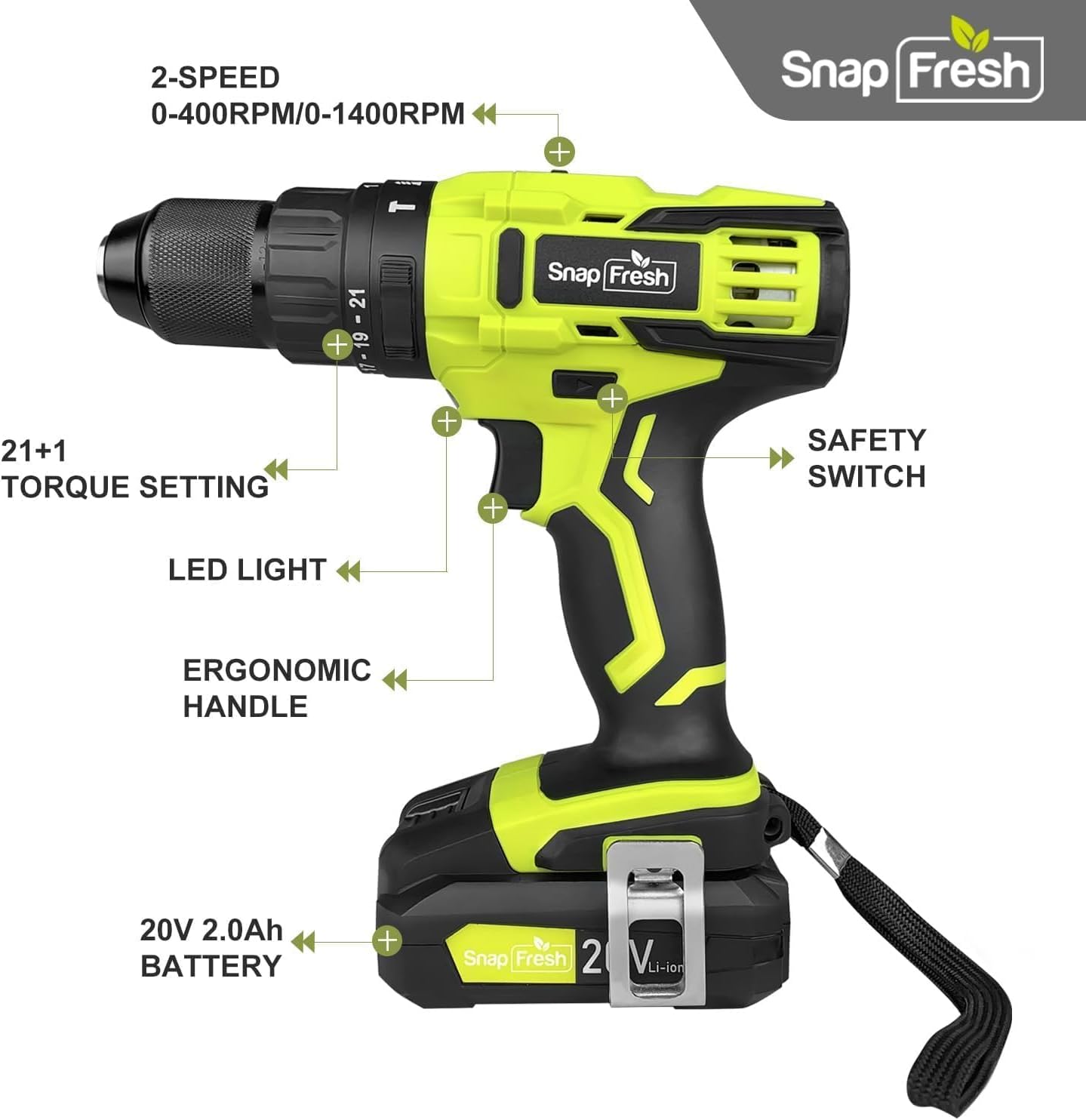
Figure 3: The drill features a durable 1/2" all-metal chuck for maximum durability and compatibility with various bits.
Operating Instructions
1. Power On/Off and Variable Speed Trigger
The drill is activated by pressing the trigger switch. The speed of the drill is variable, controlled by how much you depress the trigger. Pressing lightly results in lower speed, while pressing fully results in maximum speed.
2. Mode Selection
Your drill offers three powerful modes, selected by rotating the collar behind the chuck:
- Drilling Mode (Drill Bit Icon): For drilling holes in wood, metal, and plastic. Provides up to 445 in-lbs of torque.
- Driving Mode (Screw Icon): For driving screws. Provides 0-445 in-lbs of torque, adjustable with the torque control collar.
- Hammer Mode (Hammer Icon): For drilling into masonry and concrete. Provides up to 445 in-lbs of torque with added hammering action.

Figure 4: The mode selection collar allows you to switch between Driving, Drilling, and Hammer modes for various applications.
3. Torque Control
The torque control collar allows you to adjust the amount of torque applied, preventing over-driving screws or damaging materials. Rotate the collar to select the desired torque setting (from 0 to 445 in-lbs). Lower numbers are for softer materials or smaller screws, higher numbers for harder materials or larger screws.
4. Speed Selection
The drill features a 2-speed transmission switch located on top of the tool:
- Low Speed (0-400 RPM): Ideal for high-torque applications like driving large screws or drilling large holes.
- High Speed (0-1500 RPM): Suitable for faster drilling in wood, metal, or for smaller screws.

Figure 5: The 2-speed transmission switch allows you to select between low speed (0-400 RPM) for high torque and high speed (0-1500 RPM) for faster drilling.
5. LED Work Light
A built-in LED light illuminates the work area when the trigger is pressed, improving visibility in dimly lit spaces.
6. Forward/Reverse Switch
The forward/reverse switch is located above the trigger. Push it to the left for forward rotation (drilling/driving) and to the right for reverse rotation (removing screws). When centered, the switch acts as a lock-off to prevent accidental starting.
Maintenance
Regular maintenance ensures optimal performance and extends the life of your tool.
- Cleaning: Keep the tool's air vents clean and free of debris to prevent overheating. Use a soft, damp cloth for cleaning. Do not use harsh chemicals or abrasive cleaners.
- Battery Care: Store battery packs in a cool, dry place away from direct sunlight and extreme temperatures. Do not store battery packs in a discharged state for extended periods.
- Storage: When not in use, store the drill and its accessories in a secure, dry place, out of reach of children.
Troubleshooting
If you encounter issues with your drill, refer to the following common problems and solutions:
| Problem | Possible Cause | Solution |
|---|---|---|
| Drill does not start. | Battery not charged or not properly installed. Forward/reverse switch in locked position. | Ensure battery is fully charged and securely inserted. Move forward/reverse switch out of the center position. |
| Reduced power or speed. | Low battery charge. Incorrect speed setting for the task. | Recharge the battery. Switch to the appropriate speed setting (low speed for higher torque). |
| Bit wobbles or falls out. | Chuck not tightened sufficiently. Bit shank is dirty or damaged. | Ensure the chuck is tightened firmly around the bit. Clean or replace the bit if necessary. |
| Initial sparks from motor. | Normal for new carbon brush drills. | This is typical for new DC motor tools and will diminish over time. If sparks persist or are excessive, contact support. |
If the problem persists after attempting these solutions, please contact SnapFresh customer support.
Specifications
| Feature | Specification |
|---|---|
| Brand | SnapFresh |
| Model Number | JOZ-YFT51 |
| Power Source | Battery Powered |
| Voltage | 20V |
| Battery Capacity | 2.0Ah Lithium-ion |
| Maximum Torque | 445 Inch Pounds |
| No-Load Speed (Low) | 0-400 RPM |
| No-Load Speed (High) | 0-1500 RPM |
| Chuck Size | 1/2 Inch (Keyless) |
| Number of Speeds | 2 |
| Drill Modes | Drilling, Driving, Hammer |
| Item Weight | 2.8 lbs (tool only) / 6.4 lbs (with battery) |
| Product Dimensions | 8.67"L x 3.15"W x 9"H |
Warranty and Support
SnapFresh products are designed for reliability and performance. For warranty information, technical support, or service inquiries, please contact SnapFresh Official customer service. Refer to your purchase documentation for specific warranty terms and contact details.
You can often find support information on the official SnapFresh website or through the retailer where the product was purchased.


